webtop ships a real Linux desktop over port 3001, and the Dockerfile shows exactly what that costs
Ubuntu, Alpine, Arch, and Fedora based Webtop images, Linux in a web browser supporting popular desktop environments.
At a glance
- What is it?
- linuxserver/webtop turns XFCE, KDE, MATE, i3 or LXQt into a browser session on HTTPS port 3001, packaged for Alpine, Debian, Ubuntu, Arch and Fedora. It is a good fit for throwaway desktops and a poor fit for anything that needs host integration.
- Who is it for?
- Adopt webtop when you want an isolated desktop in a browser for a demo, a kiosk, a scratch machine or a container that must not touch the host filesystem. Do not adopt it if you need GPU-class graphics work on NVIDIA hosts without reading the driver requirements, if your reverse proxy validates certificates, or if you need the desktop to see local devices.
- Can I use it commercially?
- Yes, with conditions. GPL-3.0 is a copyleft licence: if you distribute software that includes it, you must release that software's source code under the same licence. Running it internally without distributing it does not trigger that obligation.
- Is it still maintained?
- Yes. The repository last received commits 4 days ago.
- What is it written in?
- Mainly Shell, according to GitHub's language statistics.
Answers come from the project's GitHub data, last synced on November 14, 2026, and from our analysis. They are not legal advice.
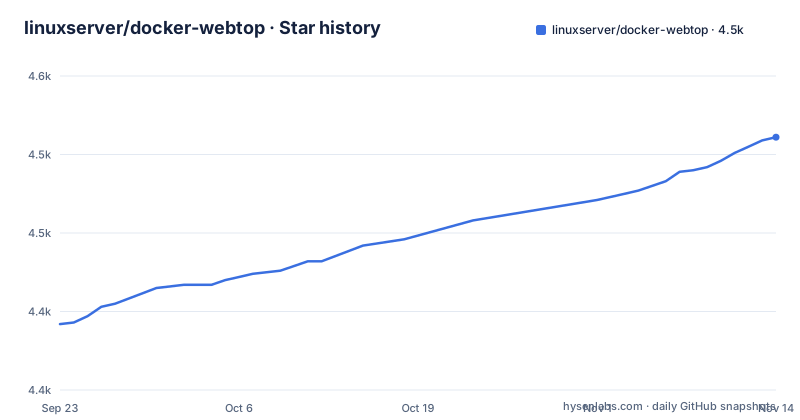
Star history
- linuxserver/docker-webtop4,511 ★ · +119
| Repository | 2026-09-23 | 2026-11-14 |
|---|---|---|
| linuxserver/docker-webtop | 4.4k | 4.5k |
119 Stars in the last 52 days, measured from the daily GitHub snapshot. Compare with other projects
Editorial analysis
webtop answers a specific request: a desktop that outlives no machine you own
The problem webtop solves is not remote desktop in the usual sense. It is the need for a working graphical environment on a host that has no graphical environment: a build server, a small VPS, a NAS, or a locked-down cloud instance where installing a desktop is not an option. You open a browser, you get a shell, a window manager, a file manager and a terminal, and the whole thing arrives as a single container image.
The audience is narrow and it is worth saying so plainly. This is for people who need a disposable Linux desktop, not for people who need to administer the host it runs on. Every other linuxserver image follows the same shape, and webtop is the one where the full desktop rather than a single server binary is the payload.
The images are published on ghcr, quay, docker hub and a GitLab registry, and the architecture table lists only x86-64 and arm64. Both pull from a single manifest list, so the same tag resolves to the right image per architecture, and arch-specific tags exist when you need to pin one. The default branch is master and the root Dockerfile is a short Alpine XFCE build. The licence is GPL-3.0, which matters if you intend to rewrap the image rather than just run it.
The Dockerfile explains the whole product: an Alpine layer, a package list, and a port
Read the root Dockerfile and you have the project in forty lines. The base is ghcr.io/linuxserver/baseimage-selkies:alpine324, which supplies the Selkies streaming layer and the s6 overlay. Everything after that is a package install, a few deletions, and a volume declaration.
The package list is the product. apk add pulls in xfce4, thunar, atril, ristretto, mousepad, pavucontrol, xfce4-terminal, xfce4-taskmanager, xfce4-screenshooter, xfce4-notifyd and chromium, plus a handful of archive and icon packages. Chromium in the image is the clearest tell: the intended workflow includes opening a browser inside the desktop, which is a detail worth knowing before you try to use webtop as a workstation replacement.
Two deletions in the build are worth a second look. /usr/bin/thunar is moved to /usr/bin/thunar-real. Then two xdg autostart entries are removed, xfce4-power-manager and xscreensaver, along with the dunst D-Bus service file, so the desktop does not blank its own screen or pop notifications during a streamed session. A fourth removal drops the power-manager panel plugin, /usr/share/xfce4/panel/plugins/power-manager-plugin.desktop.
At the bottom, EXPOSE 3001 and VOLUME /config. Nothing else. The streaming server, the authentication layer and the session lifecycle are not in this file at all; they live in the base image.
Twenty-one tags, and the tag you pick decides what you get
The version table is the most consequential part of the documentation and the easiest to skim past. There are twenty-two tags. Five are XFCE across different distributions (latest is XFCE on Alpine), five i3, five KDE, five MATE, one LXQt, one dev.
The distribution and desktop are orthogonal, which is useful if you need a specific combination and frustrating if you assume the tag means something else. debian-i3 gives you i3 on Debian; fedora-xfce gives you XFCE on Fedora. LXQt is only offered on Ubuntu, so several cells of the grid are empty.
The Wayland annotations are the catch a skim misses. alpine-kde and arch-kde are marked Wayland Only, meaning the X11 path you might expect is not there. Everything else carrying an asterisk has Wayland Support alongside whatever it does otherwise. If you plan to run an X11-only application inside the container, that asterisk is the line to read twice before you build anything on top of it.
The dev tag points at the current Selkies development head on KDE Ubuntu. Recent release names include ubuntu-mate, ubuntu-kde and ubuntu-xfce builds, which tells you the pipeline publishes per flavour rather than one image.
The minimal run command is deliberately bare, and the trailing bash is the point
The documentation opens the setup section by saying most support issues come from large run configurations assembled from years of forum posts. The advice is to start with nothing and add options one at a time. That command is short enough to be the whole of a first run:
docker run --rm -it \
  --shm-size=1gb \
  -p 3001:3001 \
  lscr.io/linuxserver/webtop:latest bash
It publishes 3001, sizes shared memory at 1gb, and drops you into a shell. Open https://localhost:3001 (note the https) and accept the self-signed certificate warning.
That trailing bash argument is not a decoration. It gives you an interactive shell inside the container so you can confirm the image boots before you add volumes, environment variables or GPU flags. ctrl+d exits and, because of --rm, everything is cleaned up. If you want the same minimal command to fail for you first rather than a fifteen-flag version, this is the one.
Once the minimal command works, the next step people actually need is persistence. The Dockerfile declares VOLUME /config, so that path is where a bind mount goes, and PUID and PGID exist for user mapping. The selkies platform documentation at docs.linuxserver.io/selkies covers the full set of options rather than this README.
GPU acceleration is automatic when a device is mounted, and the exceptions are documented
The claim is that no configuration is needed if the hardware is present: a GPU mounted into the container is detected and configured for zero copy rendering and encoding. Set AUTO_GPU=false to turn that off. For Intel and AMD on open source drivers the whole mechanism is one flag:
docker run --rm -it \
  --shm-size=1gb \
  -p 3001:3001 \
  --device /dev/dri \
  lscr.io/linuxserver/webtop:latest bash
NVIDIA is the exception, and the exception has a floor. The proprietary path requires a host driver of 580 or newer, installed from the .run file downloaded directly from Nvidia. On drivers older than 595.80 you may also need kernel parameters and a dummy plug, and the documentation points you to its GPU guide before opening an issue. The Alpine based images do not have the proprietary drivers at all, which is a direct contradiction inside the tag table: the Alpine flavour is the default latest tag, and it is the one flavour that cannot use the NVIDIA path.
If you must run NVIDIA with webtop, you are therefore already off the default tag.
The NVIDIA invocation adds three flags on top of the minimal one:
docker run --rm -it \
  --shm-size=1gb \
  -p 3001:3001 \
  --runtime nvidia \
  --gpus all \
  --device /dev/nvidia-modeset \
  lscr.io/linuxserver/webtop:latest bash
Compose examples and multi GPU notes follow in the same section.
The self-signed certificate is the failure mode that will cost you an afternoon
Every webtop session begins with a browser warning, because the image ships a self-signed certificate and the scheme is therefore https. Under a reverse proxy that validates certificates, the container's own certificate is what gets rejected, and the documented fix is to disable that validation for the container by following the strict proxy guidance in the linuxserver FAQ.
That is the honest shape of this project's security posture. The default session has no publicly trusted identity attached to it. Behind a strict proxy you must weaken the check somewhere.
Where webtop sits against Kasm Workspaces and Guacamole
The nearest alternative in approach is Kasm Workspaces, which also streams a full desktop or application to a browser and also ships container images. The difference is packaging rather than the streaming itself: webtop is a Dockerfile plus a base image that you run with plain docker run and keep in step yourself.
Guacamole is the other comparison worth naming, and it differs more fundamentally. It is a client gateway to machines you already have, reached over RDP, SSH or VNC. It draws a remote screen; it does not stream application pixels as a compositing desktop the way Selkies does. If the host already has a graphical session you want to reach, Guacamole reaches it. If the host has no session and no permission to install one, webtop creates the desktop inside a container instead.
The practical test: does your requirement end at a screen on an existing machine, or at a desktop that has to exist somewhere it is otherwise absent? The second case is webtop's case.
Editorial conclusion
Adopt webtop when you want an isolated desktop in a browser for a demo, a kiosk, a scratch machine or a container that must not touch the host filesystem. Do not adopt it if you need GPU-class graphics work on NVIDIA hosts without reading the driver requirements, if your reverse proxy validates certificates, or if you need the desktop to see local devices. Before anything else, run the minimal command, confirm the self-signed warning at https://localhost:3001, and check that your chosen tag matches the desktop environment you actually need, since alpine-kde is Wayland only while debian-kde is not.
Frequently asked questions
what is docker webtop
docker webtop is a set of LinuxServer containers based on Alpine, Ubuntu, Fedora, Debian and Arch that contain full desktop environments, reachable from any modern web browser at https://yourhost:3001/. Images exist for XFCE, KDE, MATE, i3 and LXQt, selected by tag.
How does a webtop work?
The images are built on the Docker Baseimage Selkies, which streams a desktop or a single application to your browser. The root Dockerfile adds the desktop packages on top of that base, exposes port 3001 and declares /config as a volume.
Does webtop need a GPU?
No. A GPU is optional and the CPU pipeline is described as fast enough for smooth sessions on modest hardware. When a device is mounted the container detects it and configures zero copy rendering and encoding, and AUTO_GPU=false disables that behaviour.
Which platforms does linuxserver/webtop support?
The architecture table lists x86-64 and arm64 only. Both are served from a single manifest list, so pulling lscr.io/linuxserver/webtop:latest retrieves the correct image for the host architecture.
Why does my webtop session show a certificate warning?
The image uses a self-signed certificate by default, which is why the scheme is https. If you sit it behind a reverse proxy that validates certificates, the documentation directs you to disable that check for the container.
Official sources
Add this badge to your README
If you maintain this project, the badge below links readers to this analysis and shows its maintenance status from the daily GitHub snapshot. Paste the markdown into your README; add ?metric=license or ?metric=stars to the image URL for a different field.

[](https://hysenlabs.com/projects/linuxserver-docker-webtop)Star history chart for your README
[](https://hysenlabs.com/projects/linuxserver-docker-webtop)Was this useful?