mureo: A Local-First Control Plane for AI Ad Ops
Your local-first AI ad ops crew. Works with Claude Code, Cursor, Codex & Gemini.
At a glance
- What is it?
- mureo is a Python-based tool that sits between AI coding agents and ad-platform APIs, adding strategy grounding, safety gates, and an audit log. It works with Claude Code, Cursor, Codex, and Gemini, and supports both read-only BYOD analysis and live OAuth execution.
- Who is it for?
- Ad ops teams and freelancers who already use Claude Code or similar agents and want a safety layer between those agents and their ad accounts should try mureo, starting with the demo or BYOD mode. Teams that need immediate live execution without going through Google's developer-token review should not expect that path to be quick.
- Can I use it commercially?
- Yes. Apache-2.0 is a permissive licence: you can use, modify and sell software built on it, as long as you keep its copyright and licence notices.
- Is it still maintained?
- Yes. The repository received new commits within the last day.
- What is it written in?
- Mainly Python, according to GitHub's language statistics.
Answers come from the project's GitHub data, last synced on October 24, 2026, and from our analysis. They are not legal advice.
Star history
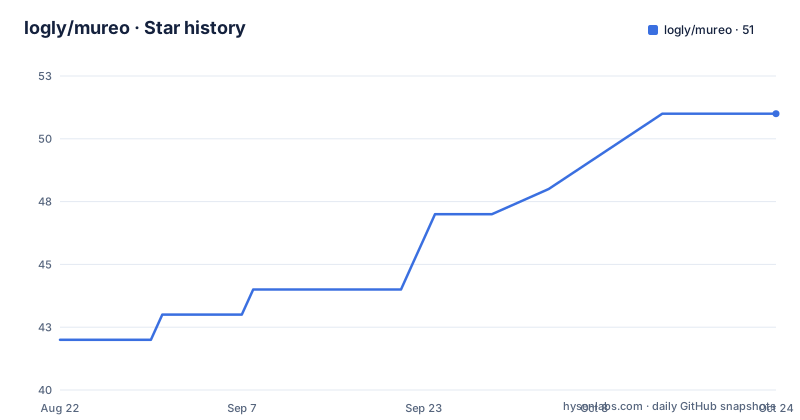
- logly/mureo51 ★ · +9
| Repository | 2026-08-22 | 2026-10-24 |
|---|---|---|
| logly/mureo | 42 | 51 |
9 Stars in the last 63 days, measured from the daily GitHub snapshot. Compare with other projects
Editorial analysis
What mureo Actually Does
mureo is not another ad-management dashboard. It is a local-first control plane that sits between an AI agent and the official ad-platform MCPs. The agent does not talk directly to Google Ads or Meta Ads. It talks to mureo, and mureo decides whether an action is allowed based on a strategy file, a state file, and a set of safety gates. The README is explicit that mureo's value is not the API connection, but what happens around it: strategy grounding, safety gating, cross-platform workflows, and an audit trail. The target user is someone who already runs Claude Code, Cursor, Codex, or Gemini CLI and wants those agents to operate ad accounts without burning money or making unauthorized changes. It is for people who trust the agent's reasoning but not its impulse control.
The Mechanism: STRATEGY.md, STATE.json, and the Audit Log
The core data flow is visible in the README. First, an /onboard run interviews the user and generates two files: STRATEGY.md, which holds persona, USP, brand voice, and goals, and STATE.json, which holds account state. Every later command reads these files. The /daily-check command, for example, pulls campaign data and then evaluates it against the strategy. The audit log is append-only and supports rollback via a rollback_apply tool. The README mentions a rollback allow-list, which suggests that only certain actions can be rolled back. That is a concrete constraint: not every mutation will be reversible. The safety gates include GAQL guards, a credential guard, and per-platform throttle. The credential guard is central to the local-first claim: credentials never leave the machine, and in the Amazon Ads bridge, credentials do not even enter the host's MCP config.
Two Paths to Data: BYOD and Live API
mureo offers two distinct modes, and the difference matters. BYOD (bring your own data) is read-only by construction. You export an XLSX from Google Ads or Meta Ads, import it with mureo byod import, and the agent analyzes it but every mutation tool returns a skipped_in_byod_readonly status. This mode needs no OAuth and no developer-token approval, and setup is 5 to 10 minutes per platform. The Live API path requires OAuth, a Google Ads Developer Token, and Meta App ID and Secret, and the README warns that Google review can take one to three weeks and is sometimes rejected. Live API is required for executing changes like /rescue, /budget-rebalance, /creative-refresh, and for GA4 and Search Console support. The trade-off is clear: BYOD is fast and safe but only diagnoses, while Live API is slow to set up but actually changes things.
Getting Started: Commands and the Local UI
The quick start is straightforward. Install with pip install mureo, then run mureo configure. That opens a local browser UI bound to 127.0.0.1, so no remote access. The UI walks through choosing a Claude app and running one-click basic setup. For a demo, you pick a scenario in the Demo / BYOD section. The terminal equivalent is mureo setup claude-code --skip-auth && mureo demo init --scenario seasonality-trap. That creates a demo directory with a ready-made STRATEGY.md, so you do not need credentials. You open that directory in Claude Code and run /daily-check. For BYOD, the command is mureo byod import followed by the XLSX path, and then /onboard once. For live connections, mureo auth setup handles OAuth. The README also mentions that Cursor, Codex CLI, and Gemini CLI work, but the exact setup commands for those are not shown in the provided material.
The Demo Scenario: A Seasonality Trap
The demo scenario is named seasonality-trap, and the README says it is designed to catch a mistake that numbers-only tools miss. The agent reads the demo STRATEGY.md, pulls campaign data, and walks into a trap. This is a concrete example of what mureo adds: context. A plain script might see a spike in conversions and recommend scaling up, but the strategy file might say that the spike is seasonal and not a signal. The README also shows a real output where brand cannibalization was auto-detected on a 30-day BYOD bundle from an anonymized B2B SaaS account. That is a specific outcome, but the README does not explain how the detection works. It is worth noting that the demo needs no credentials, which makes it easy to evaluate the tool without any setup risk.
Limitations and Failure Modes
The biggest limitation is that the Live API path is gated by platform approval. Google's developer-token review can take weeks and can be rejected, which the README states plainly. That makes mureo a poor choice if you need live execution tomorrow. Another limitation is that BYOD mode is read-only, so you cannot actually fix anything, only recommend. The rollback allow-list is another constraint: not every action can be rolled back, so the audit log is not a universal undo button. The README also says that commands become strategy-grounded only after STRATEGY.md and STATE.json exist, which means running /daily-check before /onboard will give you ungrounded behavior. The README does not specify what happens in that case, but it is a failure mode to watch for. Finally, the tool depends on the official MCPs for each platform, so if a platform does not have an MCP, mureo cannot connect to it directly.
Alternatives and How They Differ
The obvious alternative is to let the AI agent talk directly to the ad-platform APIs without an intermediate layer. That is what most people do with Claude Code today: give it an API key and let it call the platform directly. The difference is that mureo inserts a safety and strategy layer between the agent and the API. Another alternative is a traditional ad-ops tool like Optmyzr or AdEspresso, which have their own dashboards and automation, but those are not local-first and do not integrate with coding agents. The README mentions that mureo bridges the official Amazon Ads MCP so credentials do not enter the host's MCP config, which is a specific difference from just plugging the MCP directly into Claude Code. For a user who already trusts their agent, the alternative is simply to skip mureo and accept the risk. For a user who wants guardrails, mureo is the layer that provides them.
Maintenance, Licensing, and Upgrade Cost
mureo is licensed under Apache-2.0, which is permissive and allows commercial use without requiring you to open-source your own code. The repository is actively maintained, with releases v0.15.0, v0.16.0, and v0.17.0 pushed on consecutive days in late August 2026. That suggests a fast release cadence, which is good for bug fixes but also means you will need to track updates to avoid drift. The README mentions a commercial edition, including a cloud-hosted service and a local Agency edition, so the open-source version may not include every feature. The upgrade cost is not documented in the provided material, but the rapid release cycle implies that you should pin your version or at least read changelogs before updating. The audit log is append-only, which is good for compliance but also means it will grow indefinitely, so you need a plan for storage and rotation.
Editorial conclusion
Ad ops teams and freelancers who already use Claude Code or similar agents and want a safety layer between those agents and their ad accounts should try mureo, starting with the demo or BYOD mode. Teams that need immediate live execution without going through Google's developer-token review should not expect that path to be quick. Before connecting a real account, verify that the rollback allow-list covers the specific mutation tools you plan to expose, and test the GAQL guards against your own query patterns. The append-only audit log is a genuine differentiator, but its value depends on actually reviewing it, not just storing it.
Frequently asked questions
What does muro mean?
The repository does not define the word and is not about Spanish or Italian at all. It is an advertising operations control plane: a Python tool that lets AI coding agents work across Google Ads, Meta Ads, Amazon Ads, TikTok Ads, Search Console and analytics, with a strategy file, safety gates and a replayable audit log, published under the Apache licence by a company called Logly.
How do I try mureo without connecting a real ad account?
Install the package and run the configure command, which opens a local browser interface bound to the loopback address. Choose the demo scenario, skip the platform connection step, then open the generated directory in your coding agent and run the daily check command. The demo runs on synthetic data, so it needs no credentials, no authorisation flow and no sign-up.
Can mureo actually change my Google Ads account?
Not through the spreadsheet path, where every mutation tool returns a skipped status by construction. Writes are available only on the live path, which requires connecting the platform directly through an authorisation flow. That path also needs a cloud project with advertising API access and an application client, and the documentation puts platform review at one to three weeks.
Where do my ad account credentials go when I use mureo?
They stay on your machine, which is the first of the project's stated principles. The video platform is reached through the platform's own protocol server, and the Amazon advertising server is bridged through this tool specifically so that its credentials never enter the host agent's server configuration. The container image reads its credentials file at runtime from a mounted host directory rather than storing them.
Official sources
Add this badge to your README
If you maintain this project, the badge below links readers to this analysis and shows its maintenance status from the daily GitHub snapshot. Paste the markdown into your README; add ?metric=license or ?metric=stars to the image URL for a different field.

[](https://hysenlabs.com/projects/logly-mureo)Star history chart for your README
[](https://hysenlabs.com/projects/logly-mureo)Was this useful?