laravel-docker: a generic Docker image per PHP minor version
🐳 Generic docker image for Laravel Applications
At a glance
- What is it?
- laravel-docker publishes generic Docker images for Laravel applications on Docker Hub, one tag per PHP minor version plus stable and latest aliases. The repository is thin on documentation, which is both its main limitation and the reason adoption is mostly a matter of reading the tag table.
- Who is it for?
- laravel-docker fits teams that want a prebuilt Laravel image with PHP version pinning across amd64 and arm64 hosts, and who are comfortable reading the image contents themselves. It does not fit projects that need a documented entrypoint, a compose file or a documented set of extensions, because none of that is described in the repository.
- Can I use it commercially?
- Yes. MIT is a permissive licence: you can use, modify and sell software built on it, as long as you keep its copyright and licence notices.
- Is it still maintained?
- Yes. The repository last received commits 100 days ago.
- What is it written in?
- Mainly Dockerfile, according to GitHub's language statistics.
Answers come from the project's GitHub data, last synced on November 7, 2026, and from our analysis. They are not legal advice.
Star history
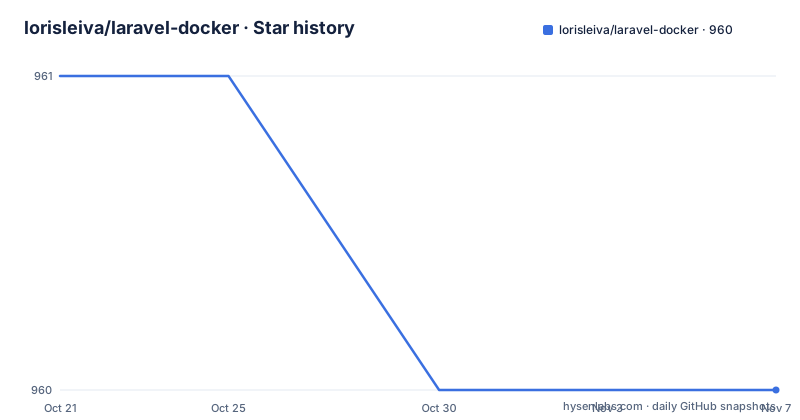
- lorisleiva/laravel-docker960 ★ · -1
| Repository | 2026-10-21 | 2026-11-07 |
|---|---|---|
| lorisleiva/laravel-docker | 961 | 960 |
-1 Stars in the last 17 days, measured from the daily GitHub snapshot. Compare with other projects
Editorial analysis
One image per PHP minor version on Docker Hub
laravel-docker is a generic Docker image for Laravel applications, and its whole design is that you do not build the image yourself. The image is published on Docker Hub under the lorisleiva/laravel-docker name, which the README links to through its Docker badge, and the README's opening line states the purpose in plain terms: a generic docker image for Laravel Applications.
The unit of versioning is the PHP minor version. The tag table lists 8.3, 8.4 and 8.5, each mapped to the matching PHP version, and each of those tags is marked as offering everything the image has to offer. That is a deliberate difference from images that ship a base tag with extra features and older tags without them, so the choice of tag here is purely a PHP version decision.
For who this is for: a Laravel developer or platform team that wants a running PHP environment for an application without maintaining a Dockerfile, and who wants that environment to be pinned to a specific PHP release rather than to whatever the base image happens to ship. The people this does not suit are teams that need a container image tailored to their own extensions, their own web server configuration or their own queue and scheduler layout, because nothing in the repository describes how to extend the image.
The repository itself is small. The top level holds the README, the LICENSE, three version directories named 8.3, 8.4 and 8.5, a gitlab directory, and.github.
stable and latest point at different PHP versions
The two convenience tags are not synonyms, and the table spells out the difference in a way that is easy to skim past.
The stable tag points at PHP 8.4. It aliases the latest stable version of PHP that supports all features of this docker image. The latest tag points at PHP 8.5. It aliases the latest stable version of PHP available, even if that version does not support all features yet.
So the two tags currently resolve to different PHP releases, and the reason is a feature parity rule rather than a version policy. The latest tag is allowed to move ahead to a PHP version whose feature set is not yet complete in the image, while stable only moves when the image supports everything for that PHP line.
That makes tag selection a real decision with a real trade-off. Pinning to stable gives you a PHP version where the image is complete. Pinning to latest gets you a newer PHP, and accepts whatever the image does not yet cover for it. A third option, which the table implicitly supports, is to pin an explicit version tag such as 8.3 or 8.4 and take responsibility for upgrades yourself.
One more practical note on this table: there is no release history to consult. The project has no GitHub releases, so the tags on Docker Hub are the only versioning surface a consumer can observe.
amd64 and arm64 are published for every version tag
Every version in the table, 8.3, 8.4 and 8.5, carries the architecture pair amd64/arm64. There is no separate architecture suffix to remember and no separate tag to track, which removes the most common friction in multi-arch images, where you have to maintain separate amd64 and arm64 tag names and keep them in step.
The practical consequence is that the same pull works on an Intel or AMD server and on an Apple Silicon or ARM based machine, and a CI runner on either architecture can use the identical tag string. For teams running a mix of a build machine, a developer laptop and ARM based cloud instances, that matters more than it sounds, because a mismatched architecture tag is one of the more confusing failures in a container setup, and one that usually shows up as an exec format error rather than as a clear diagnostic.
The trade-off is that the table does not say which base image, which extensions, which PHP configuration or which server configuration each architecture receives. The architecture list tells you that the image exists for your CPU; it does not tell you what is inside it. If your application depends on a particular PHP extension or a specific ini setting, you have to inspect the image yourself rather than reading a manifest in the repository.
The GitLab pipeline route the project documents
The only tutorials the README links are about GitLab pipelines, and they come in two flavours. One is titled Run test suite and check codestyle. The other is Build, test and deploy your Laravel application. Both are hosted on the author's own site, and the repository carries a gitlab directory at the top level to match.
That focus tells you something about the intended use. The image is not presented as a one-off sandbox for poking at a Laravel install. It is presented as the runtime for a CI pipeline that has to check style, run a test suite and then build and deploy an application, which is a repeat-invocation workload where a prebuilt image with a fixed PHP version saves the setup time of every pipeline run.
The choice of GitLab as the documented CI platform is a limitation for anyone else. A GitHub Actions, CircleCI or Jenkins user gets an image and no accompanying pipeline configuration from this project, and would need to write their own job definition, including how the container is started, where the application code is mounted and how the test command is invoked. Nothing in the README describes an entrypoint or a working directory, so those details have to come from the image itself or from the external tutorial.
The two linked articles are the documentation here. The repository is the image source and a tag table, not a guide.
A README with no run command, no entrypoint and no compose file
Be clear about what this repository does not contain. There is no docker run example. There is no Dockerfile snippet showing how to extend the image. There is no docker-compose file, no list of exposed ports, no environment variable table, no health check, no description of the working directory, and no statement about which process is the entrypoint.
That is not a criticism so much as a description of the scope. A generic image is meant to be dropped into whatever arrangement the team already uses, and the author has left the wiring to the reader and to the two tutorial articles. The trade-off is real though: the first five minutes with this image are spent finding out how it wants to be run, and that discovery happens by trial rather than by reading.
For a Laravel application specifically, the questions you will need answered are whether the image expects the application mounted at a particular path, whether it is built for php-fpm or for the built-in artisan server, and whether queue workers and the scheduler are meant to be separate containers. Nothing in the repository addresses them, and the article linked for building, testing and deploying is the place where a Laravel user would look for the answers.
If your team requires that answer to be written down somewhere inside your own repository, plan to write it yourself on day one rather than assuming the upstream documentation will hold that detail.
Version directories, MIT licensing and no tagged releases
The repository layout is the clearest signal of how the image is maintained. There is one top-level directory per PHP version in the tag table, 8.3, 8.4 and 8.5, sitting next to the README and the LICENSE. That mirrors the published tags, so a change for one PHP line lives in its own directory rather than being shared across all of them, and it is the structure you would expect from an image whose variants differ mainly in base image and extension set.
The licence is MIT, stated in the LICENSE file at the root of the repository. That is a permissive grant with no obligations beyond preserving the copyright notice and licence text in redistributions, which matters for a base image because your own image that derives from it inherits the requirement to keep that notice. This is a note about the licence mechanics, not legal advice.
On maintenance, the repository is not archived and the last push was on 2026-07-30. What it does not have is GitHub releases. There is no v-prefixed tag history, no changelog attached to a release, and no release notes to read before an upgrade. The consequence for a consumer is that version history lives in the Docker Hub tag list and in the commit log of the repository, and that upgrading means picking a different PHP tag and testing your application against it, with no published migration notes to guide the step.
Editorial conclusion
laravel-docker fits teams that want a prebuilt Laravel image with PHP version pinning across amd64 and arm64 hosts, and who are comfortable reading the image contents themselves. It does not fit projects that need a documented entrypoint, a compose file or a documented set of extensions, because none of that is described in the repository. Verify first which tag your PHP version maps to, since stable currently points at 8.4 while latest points at 8.5, and note that the project publishes no GitHub releases, so image changes arrive through Docker Hub tags rather than through versioned releases of the repository.
Frequently asked questions
Which PHP versions does lorisleiva/laravel-docker support?
The tag table lists 8.3, 8.4 and 8.5, each built for amd64 and arm64. The stable tag currently points at PHP 8.4 and the latest tag at PHP 8.5.
What is the difference between the stable and latest tags of laravel-docker?
stable aliases the latest stable PHP version that supports all features of the image, and it currently points at PHP 8.4. latest aliases the latest stable PHP version available, even if that version does not support all features yet, and it currently points at PHP 8.5.
Does laravel-docker work on Apple Silicon and ARM servers?
Yes. Every version tag in the table is published for amd64 and arm64, so the same tag works on Intel and ARM based machines.
How do I get the laravel-docker image?
The image is published on Docker Hub under lorisleiva/laravel-docker, and the README links to it through its Docker badge. The README does not include a docker run example or a compose file, so the run configuration has to be taken from the image itself or from the linked tutorial articles.
Does laravel-docker publish GitHub releases?
No. The repository has no GitHub releases, so the Docker Hub tags are the only versioning surface available to consumers.
Official sources
Add this badge to your README
If you maintain this project, the badge below links readers to this analysis and shows its maintenance status from the daily GitHub snapshot. Paste the markdown into your README; add ?metric=license or ?metric=stars to the image URL for a different field.

[](https://hysenlabs.com/projects/lorisleiva-laravel-docker)Star history chart for your README
[](https://hysenlabs.com/projects/lorisleiva-laravel-docker)Was this useful?