Sharp: Node.js Image Processing Built on libvips, Not a Homegrown Pipeline
GitHub describes it as High performance Node.js image processing, the fastest module to resize JPEG, PNG, WebP, AVIF and TIFF images. Uses the libvips library.. The repository metadata lists JavaScript as its primary language. The metadata lists the Apache-2.0 license. This article stays within the project description and details documented in the GitHub repository README.
At a glance
- What is it?
- Sharp wraps libvips to give Node.js, Deno, and Bun a fast, dependency-light image resizing path. This review covers its API, performance claims, and where its abstraction hides real costs.
- Who is it for?
- Adopt sharp if you run Node.js 20.9.0 or newer, need fast resizing with correct colour handling, and can accept the libvips dependency. Do not use it if you need exotic format support beyond the listed ones, or if you cannot tolerate a native module that may break on major runtime upgrades.
- Can I use it commercially?
- Yes. Apache-2.0 is a permissive licence: you can use, modify and sell software built on it, as long as you keep its copyright and licence notices.
- Is it still maintained?
- Yes. The repository received new commits within the last day.
- What is it written in?
- Mainly JavaScript, according to GitHub's language statistics.
Answers come from the project's GitHub data, last synced on November 23, 2026, and from our analysis. They are not legal advice.
Star history
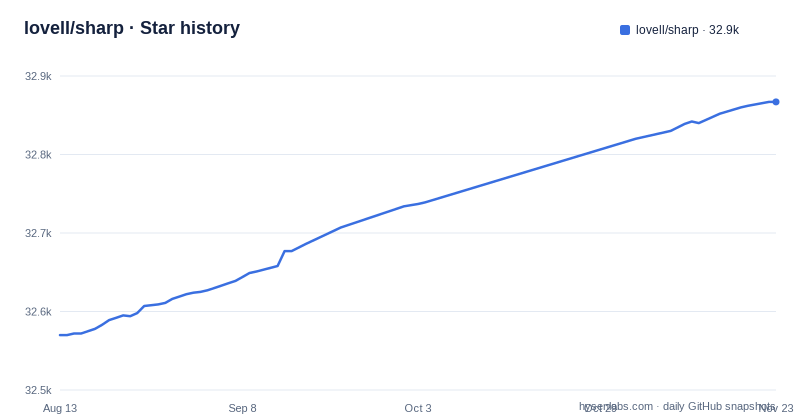
- lovell/sharp32,867 ★ · +297
| Repository | 2026-08-13 | 2026-11-23 |
|---|---|---|
| lovell/sharp | 32.6k | 32.9k |
297 Stars in the last 102 days, measured from the daily GitHub snapshot. Compare with other projects
Editorial analysis
The Problem: Server-Side Image Resizing That Does Not Stall Requests
Web applications often need to convert large uploads into smaller, web-friendly files. Doing this in pure JavaScript is slow, and shelling out to ImageMagick adds process overhead. Sharp targets this gap: it is a Node-API module that wraps libvips, a C library known for lazy, streaming image processing. The README states its typical use case is converting large images to smaller JPEG, PNG, WebP, GIF, and AVIF files. It is aimed at developers who run Node.js, Deno, or Bun and need resizing as part of an API or build pipeline. The core promise is speed: resizing is typically 4x-5x faster than the quickest ImageMagick and GraphicsMagick settings. That claim comes from the project's own documentation, not from independent benchmarks in this review. Still, the architecture supports it: libvips processes images in tiles and only computes the pixels needed for the output, which avoids the full decode-and-encode cycle of many other tools.
How It Works: libvips Under a Node-API Shell
Sharp is not a reimplementation of image algorithms. It is a binding to libvips, and the README is explicit about that. The module exposes a fluent API where you chain operations on an image instance. The pipeline is lazy: calling resize() or jpeg() does not process anything until you call toBuffer(), toFile(), or pipe the stream. The README shows a stream example: sharp() returns a transform stream, so you can pipe a readable stream into it and a writable stream out. This design keeps memory use low because libvips can stream pixels through the pipeline. Colour handling is a stated strength: the README says colour spaces, embedded ICC profiles, and alpha transparency are handled correctly. Lanczos resampling is the default for resizing, which is a high-quality filter but computationally heavier than bilinear. The trade-off is baked in: you get quality at a speed cost, but libvips still outruns ImageMagick in the project's tests.
Getting It Running: One Install, Three Runtimes
Installation is a single command: npm install sharp. The README shows both ESM and CommonJS imports. For ESM: import sharp from 'sharp'. For CJS: const sharp = require('sharp'). The module requires Node-API v9, which maps to Node.js 20.9.0 or newer. Deno and Bun are also supported, though the README does not give specific version numbers for those runtimes. The library ships prebuilt binaries for most macOS, Windows, and Linux systems, so no extra system dependencies are needed in typical setups. The README warns that 'most' modern systems do not require additional install or runtime dependencies, which implies some do. For platforms outside that set, the README points to the installation instructions on the project site. The API examples are straightforward: sharp(inputBuffer).resize({ width: 320, height: 240 }).toFile('output.webp') is the core pattern. You can also create images from scratch, as shown with the create option for a 48x48 PNG with a semi-transparent red background.
The API: Fluent but Deceptively Simple
The README's examples show a clean chain: autoOrient() adjusts EXIF rotation, resize({ width: 200 }) keeps aspect ratio, jpeg({ mozjpeg: true }) enables MozJPEG compression. That one-liner hides a lot: the operations are chained on one instance until a terminal call such as toBuffer() or toFile(). The composite() example is more revealing: you pass a Buffer containing an SVG and use blend: 'dest-in' to apply a rounded-corner mask. The README example composites an SVG buffer; SVG is not among the output formats the README lists (JPEG, PNG, WebP, GIF and AVIF).
Performance Claims: What the 4x-5x Figure Actually Means
The README states sharp is typically 4x-5x faster than the quickest ImageMagick and GraphicsMagick settings. This is a benchmark claim from the project's own site, not an independent measurement. The speed comes from libvips's design: it uses a threaded, demand-driven pipeline that only computes the pixels needed for the output. The 'quickest settings' qualifier is important. The README says Lanczos resampling keeps quality from being sacrificed for speed, and the benchmark details are on the project's performance page.
Limitations and Failure Modes: When Sharp Is the Wrong Tool
Sharp is not a general-purpose image editor. The README lists resizing, rotation, extraction, compositing and gamma correction as examples of its operations; check the API documentation for anything beyond those. Another limitation is the runtime requirement: Node-API v9 means Node.js 20.9.0 or newer. If you are stuck on Node 18 LTS, sharp will not install. The README also says 'most' systems do not need extra dependencies, which means some do. Also, the create example shows you can generate images, but it is limited to simple backgrounds, not text or complex shapes without SVG. For dynamic text overlays, you would need to generate an SVG and composite it, which adds parsing overhead.
Alternatives: ImageMagick and the Shell-Out Trade-Off
The obvious alternative is ImageMagick or GraphicsMagick, either via the command line or a Node wrapper like gm. The difference is architectural: sharp runs in-process as a native module, so there is no process spawn overhead. ImageMagick runs as a separate process, which adds latency per operation but isolates crashes. If an ImageMagick process segfaults, your Node process survives. If a libvips bug crashes, it can take down your server. That is a real reliability trade-off. Another alternative is a pure-JS library like jimp, which is slower but has no native dependencies and works on any platform that runs Node. Jimp decodes the entire image into a bitmap, so memory usage scales with pixel count, not output size. Sharp's streaming approach uses less memory for large images. The choice depends on your workload: for high-throughput resizing of large images, sharp's in-process model wins. For occasional, small images where portability matters more than speed, jimp is simpler. The README's benchmark comparison is specifically against ImageMagick and GraphicsMagick, not against jimp, so the speed claim does not apply to pure-JS alternatives.
Maintenance and Licensing: Apache-2.0 with a Native Dependency
Sharp is licensed under Apache-2.0, which is permissive for commercial use. The README shows the license text and notes it covers 'Copyright 2013 Lovell Fuller and others.' The project is actively maintained, with a release v0.35.5 dated 2026-09-27 and release candidates v0.35.5-rc.1 (the same day) and v0.35.5-rc.0 (2026-09-22). That cadence suggests regular updates. The maintenance cost for you is tied to libvips. Sharp bundles prebuilt libvips binaries, so you do not compile it yourself, but you inherit libvips's version and its bugs. When a new libvips release fixes a security issue, you need to update sharp to get the fix. The README links a changelog on the project site. The Node-API requirement means sharp will only work on runtimes that support v9, so if you run an older Node version, you are locked out. The upgrade path is straightforward: npm install sharp@latest, but each major version may change the API. Read the changelog before upgrading. The Apache-2.0 license has no copyleft obligations, but you must include the license notice if you redistribute sharp.
Editorial conclusion
Adopt sharp if you run Node.js 20.9.0 or newer, need fast resizing with correct colour handling, and can accept the libvips dependency. Do not use it if you need exotic format support beyond the listed ones, or if you cannot tolerate a native module that may break on major runtime upgrades. Before adopting, verify the prebuilt binaries cover your target OS and CPU architecture, and run your own benchmark against your typical image sizes and formats, since the 4x-5x claim is relative to ImageMagick and GraphicsMagick defaults, not a universal guarantee.
Frequently asked questions
How do you install sharp in a Node.js project?
The readme gives one command, npm install sharp, and states that most modern macOS, Windows and Linux systems require no additional install or runtime dependencies. Anything outside that set is pointed at the installation page on the project documentation site.
Which Node.js versions does sharp support?
It works with all JavaScript runtimes that provide support for Node-API v9, and the readme names Node.js 20.9.0 and above, Deno and Bun. The floor is a runtime interface level rather than a language version.
Which image formats does sharp handle?
The stated use case is converting large images into smaller web-friendly JPEG, PNG, WebP, GIF and AVIF images of varying dimensions. The package description also names TIFF among the formats it resizes.
Does sharp replace ImageMagick?
The readme compares resizing against the quickest ImageMagick and GraphicsMagick settings and credits libvips for the difference. sharp is an in-process Node-API module rather than a command-line program, so it replaces the subprocess call in a JavaScript service, not a shell pipeline.
Can sharp generate an image instead of reading one?
Yes. The readme shows sharp taking a create block with a width, height, channel count and a background colour, then encoding the result to PNG, which is how the 48 by 48 half-transparent red example is produced.
Official sources
Add this badge to your README
If you maintain this project, the badge below links readers to this analysis and shows its maintenance status from the daily GitHub snapshot. Paste the markdown into your README; add ?metric=license or ?metric=stars to the image URL for a different field.

[](https://hysenlabs.com/projects/lovell-sharp)Star history chart for your README
[](https://hysenlabs.com/projects/lovell-sharp)Was this useful?