Aikito: A Git-Based Workspace for Governing AI Agent Context and Durable Memory
Your durable workspace across AI agents.
At a glance
- What is it?
- Aikito is a Python tool that centralizes AI agent resources like skills, memory, and instructions in a Git-managed workspace, then synchronizes them to multiple agent runtimes. It is a practical choice for developers who want durable, versioned memory without a vector store or daemon.
- Who is it for?
- Adopt Aikito if you work across multiple AI coding agents (Claude Code, Codex, etc.) and want a single, versioned source of truth for skills, instructions, and memory. It is not for you if you need automatic conversation capture, vector-based retrieval, or native Windows support.
- Can I use it commercially?
- Yes. MIT is a permissive licence: you can use, modify and sell software built on it, as long as you keep its copyright and licence notices.
- Is it still maintained?
- Yes. The repository last received commits 1 day ago.
- What is it written in?
- Mainly Python, according to GitHub's language statistics.
Answers come from the project's GitHub data, last synced on October 22, 2026, and from our analysis. They are not legal advice.
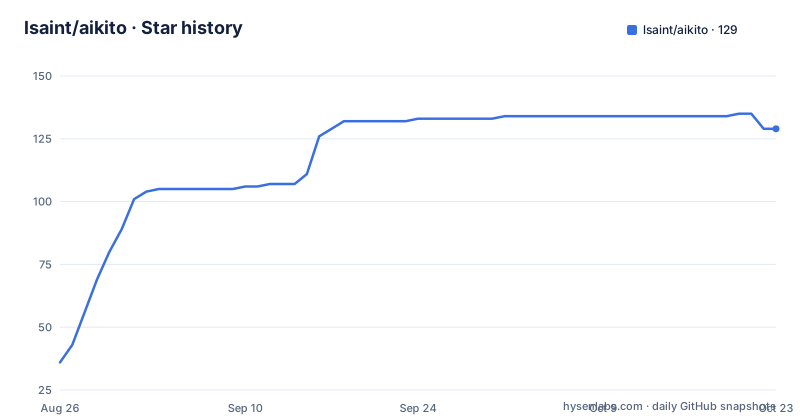
Star history
- lsaint/aikito129 ★ · +93
| Repository | 2026-08-26 | 2026-10-22 |
|---|---|---|
| lsaint/aikito | 36 | 129 |
93 Stars in the last 57 days, measured from the daily GitHub snapshot. Compare with other projects
Editorial analysis
The Problem: Fragmented Agent Resources Across Tools and Time
AI coding agents each have their own configuration formats, and reusable knowledge tends to be copied across projects or lost in old chat sessions. Aikito addresses this by providing a single personal Git workspace that holds skills, memory, instructions, MCP definitions, and subagents. The target user is a developer who uses multiple agents (Codex, Claude Code, OpenCode, etc.) and wants consistent context across them. The README frames it as a response to three kinds of fragmentation: across tools, across projects, and across time. It is not a runtime or a daemon. It is a file-based governance layer.
How It Works: Plain Files, Explicit Scopes, and Git History
The core mechanism is a directory structure under ~/aikito with top-level folders for skills, memory, global instructions, MCPs, subagents, and projects. Each project gets an agent.toml that selects shared resources, an AGENTS.md for project instructions, and a memory folder. Aikito synchronizes these canonical files to each agent's native paths. For example, memory goes to <project>/.agents/memory/, and MCP definitions are converted to TOML, JSON, or JSONC as needed. The README emphasizes that no database, vector store, or hosted service is required. Git provides history, review, and rollback. The synchronization is explicit: nothing is connected until you run aikito sync global.
Share or Isolate: Link and Copy Modes
Aikito gives two modes for handling resources. The link mode keeps a resource shared and immediately up to date, so changes propagate to all projects that reference it. The copy mode creates an isolated snapshot for a project, allowing it to evolve independently. Project memory always uses link mode with its canonical scope, which preserves a single history. This is a deliberate design choice: shared resources stay consistent, while project-specific ones can diverge. The trade-off is that link mode means a change in a shared skill affects every project immediately, which could be surprising if you forget the linkage.
Durable Memory: A Skill That Guides Agents to Curate Notes
Aikito bundles a durable-memory skill that instructs agents to retrieve relevant notes before acting, distill durable conclusions, update stale notes, and choose the correct scope. The README states that new workspaces enable this workflow by default: initialization creates the memory structure, installs the bundled skills, and adds a minimal global instruction requiring agents to evaluate memory relevance. The notes are plain Markdown, so Git handles versioning. The README includes an example of aikito show memory output, listing notes by scope. It also warns that automation is not governance, and points to a document titled 'Memory Needs a Maintainer' to explain why humans must remain responsible for meaning and lifecycle.
Getting Running: Commands and Requirements
The quick start recommends letting your coding agent set up Aikito by pasting a prompt that reads the README and SKILL.md. The manual path is not fully shown in the material, but the README mentions commands like aikito sync global, aikito show memory, aikito maintain memory, and aikito web. The web console is a local, read-only interface that binds to 127.0.0.1. Requirements are macOS or Linux (Windows users must use WSL2), Python 3.12, 3.13, or 3.14, and Git. Native Windows is unsupported because Aikito relies on symbolic links and POSIX permissions. The README does not show a pip install command, but it implies installation from the GitHub repository.
Boundaries: What Aikito Deliberately Does Not Do
The README lists explicit boundaries. Aikito does not capture every agent action or conversation automatically, does not run a vector store or embedding pipeline, does not inject context into every prompt via a background daemon, and does not orchestrate supervisor and worker agents. It also does not replace your coding agent's native runtime. These boundaries are a strength if you want a lightweight, auditable system. But they are also a limitation: if you need automatic context injection or semantic search over past conversations, Aikito is the wrong tool. The README's phrase 'Automation is not the same as governance' sums up the philosophy, but it also means you must manually trigger syncs and maintain memory scopes.
Alternatives: How Aikito Differs from Other Approaches
A common alternative is storing agent instructions and memory in a per-project AGENTS.md file, which is what many agents natively support. That approach has no cross-project sharing or centralized governance. Another alternative is a vector-based memory service that embeds and retrieves conversation snippets. That approach offers automatic retrieval but requires a running service and a database. Aikito sits in between: it uses Git as the backbone, so you get versioning and portability without a server. The key difference is that Aikito is file-centric and scope-aware, while vector stores are query-centric and often stateless. If you already rely on Git for everything else, Aikito fits that workflow.
Maintenance and Upgrade Cost
The repository shows active development with recent releases (v1.20.1, v1.20.0, v1.19.0) within days of each other. The README references documentation files like docs/architecture.md and docs/durable-memory.md, indicating a structured project. The license is MIT, which allows free use and modification. Maintenance cost is low in terms of infrastructure: no daemon or database to update, just Python and Git. However, the governance model requires ongoing human attention to memory scopes and skill updates. The README's 'Memory Needs a Maintainer' document suggests that agents will not handle everything. Upgrades appear to be regular, so you should check release notes for breaking changes, though the material does not specify what changed in these versions.
Editorial conclusion
Adopt Aikito if you work across multiple AI coding agents (Claude Code, Codex, etc.) and want a single, versioned source of truth for skills, instructions, and memory. It is not for you if you need automatic conversation capture, vector-based retrieval, or native Windows support. Before adopting, verify that the bundled durable-memory skill fits your workflow, test the sync behavior on a non-critical project, and confirm Python 3.12+ and Git are available. Aikito deliberately keeps governance in your hands, not the agent's, so you must be willing to review and maintain memory scopes.
Frequently asked questions
What does Aikito do and what is it for?
Aikito gives you one place to govern the context your coding agents share. It manages instructions, skills, MCP servers, subagents and durable memory across agents, projects and machines, keeping the source files in a personal Git workspace and connecting selected resources to each agent.
How do I install Aikito?
With uv using uv tool install aikito, which is the recommended cross-platform route, or with brew install lsaint/tap/aikito on macOS and Linux. The package requires Python 3.12 or newer and declares no dependencies. On Windows, enable Developer Mode and use the install.ps1 script in the repository root.
What is the difference between Aikito's adopt and sync commands?
adopt brings existing agent resources under Aikito's management, and you skip it if there is nothing to adopt. sync then propagates them. Both preflight their complete plan before writing, and adopt accepts --dry-run to preview and --verbose for full paths.
How does Aikito store durable memory?
As plain Markdown files versioned by Git, with a bundled durable-memory skill that guides agents to retrieve relevant notes, record verified conclusions and update stale knowledge. There is no vector store or database, and notes are scoped globally or per project.
What happens if I edit a file Aikito manages?
A locally edited copied project skill blocks its sync until you review the difference, so your change is not silently overwritten. An unmanaged target is also not silently claimed as Aikito's own. Resolve conflicts and sync drift through the troubleshooting documentation.
Does Aikito need a server or hosted account?
No. It runs as a local CLI with no background daemon, vector store, database or hosted service, and the workspace is a local Git repository. There is a local read-only browser console under aikito web, and the documentation states that you govern secrets and should review them before pushing.
Official sources
Add this badge to your README
If you maintain this project, the badge below links readers to this analysis and shows its maintenance status from the daily GitHub snapshot. Paste the markdown into your README; add ?metric=license or ?metric=stars to the image URL for a different field.

[](https://hysenlabs.com/projects/lsaint-aikito)Star history chart for your README
[](https://hysenlabs.com/projects/lsaint-aikito)