WordPressify: a Docker stack and build pipeline for WordPress theme development
🎈 Automate your WordPress development workflow.
At a glance
- What is it?
- WordPressify is a Node CLI that scaffolds a WordPress theme development environment with Docker Compose, a browser-sync asset pipeline and a local nginx, PHP and MariaDB stack, so a theme can be built with ES6, Sass and PostCSS without hand-assembling the tooling. It is a 0.6.x project whose last push was on 2026-05-26, and it assumes Docker on the host.
- Who is it for?
- Wordpressify suits a front-end developer who wants to build a WordPress theme with a modern asset pipeline and a reproducible local stack, because the scaffold sets up nginx, PHP with Xdebug, MariaDB and the gulp pipeline together instead of leaving each developer to assemble them. It is the wrong tool if you cannot run Docker, since the whole environment is containerised, and it is the wrong choice for a plugin-only project, because the scaffold is built around a theme.
- Can I use it commercially?
- Yes. MIT is a permissive licence: you can use, modify and sell software built on it, as long as you keep its copyright and licence notices.
- Is it still maintained?
- Yes. The repository last received commits 166 days ago.
- What is it written in?
- Mainly PHP, according to GitHub's language statistics.
Answers come from the project's GitHub data, last synced on November 6, 2026, and from our analysis. They are not legal advice.
Star history
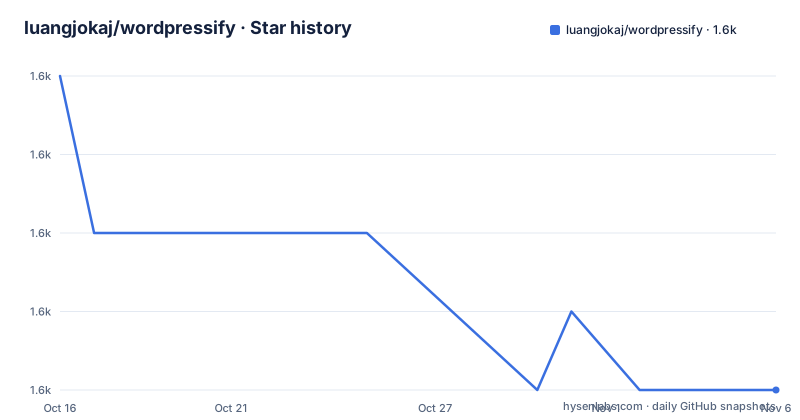
- luangjokaj/wordpressify1,640 ★ · -4
| Repository | 2026-10-16 | 2026-11-06 |
|---|---|---|
| luangjokaj/wordpressify | 1.6k | 1.6k |
-4 Stars in the last 21 days, measured from the daily GitHub snapshot. Compare with other projects
Editorial analysis
A scaffold, not a framework
Wordpressify describes itself with one line: automate your WordPress development workflow. The requirement list is short: Docker is required, and it is compatible with macOS, Windows and Linux.
The architecture is a generator rather than a framework. The package.json shows the shape immediately. The package is named wordpressify, the main export is ./installer/index.js, and there is a single bin entry mapping the word wordpressify to that same file. The runtime dependencies are commander for argument parsing and ora for the spinner, and nothing else. The type is module and the supported node range is 12.20.0 or 14.13.1 or 16 and above.
So the tool is an installer that writes a project directory, and the project directory is where the real content lives. The repository root shows the template it lays down: a src/ directory holding the theme sources, config/ with the nginx and PHP configuration, an installer/ directory with the CLI, a Dockerfile-nodejs and a Dockerfile-wordpress, a docker-compose.yml, a gulpfile.js, a .babelrc, a gitignore_template, and a justfile.
The consequence for a user is that you get a starting point and then you own it. There is no plugin system, no update mechanism and no upstream to pull new capabilities from, which is exactly what you want from a scaffold and exactly what you do not want from a dependency.
The author is Luan Gjokaj, with contributors listed including Bruno Ribarić and Mountain/Ash.
Six services in the compose file
The docker-compose.yml is where the workflow becomes concrete, and it is worth reading service by service.
The db service is a plain mariadb image with MYSQL_ROOT_PASSWORD and MYSQL_DATABASE set to root and wordpress, a persistent_db volume on the data directory, and 3306 published. There is no MYSQL_USER or MYSQL_PASSWORD, so the only account is root with the password root, which is fine for a local stack and is the first thing to change if anyone exposes it.
The wordpress service is built from ./Dockerfile-wordpress and exposes 9000 internally, with the database credentials passed as environment variables. Its WORDPRESS_CONFIG_EXTRA block defines three PHP constants: DISABLE_WP_CRON set to true, which stops WordPress from firing scheduled jobs on page views in the container, WP_DEBUG_LOG pointed at /var/xdebug/wp-errors.log, and FS_DIRECT set to true so the installer can write files directly rather than through FTP. Three volumes mount the built WordPress tree, an xdebug directory, and a PHP ini override. The healthcheck tests for the presence of wp-includes/version.php, with 30 retries, which is how the dependent services know WordPress is actually installed.
The wordpress-chmod service is a one-shot helper using the wordpress:6.9-php8.5-fpm image, depending on the wordpress service being healthy, and its entrypoint chmods wp-content/themes and wp-content/plugins to 777. That is a blunt instrument, and it exists because the bind-mounted theme directory comes from the host with the host user's permissions.
The webserver is nginx:alpine publishing 8080 to 8080, with the nginx config mounted read-only from config/nginx/nginx.conf and the built WordPress tree mounted as the document root. It depends on wordpress-chmod, so the file permissions are fixed before nginx serves anything.
The nodejs service is built from ./Dockerfile-nodejs, publishes 3001 for the browserSync UI and a configurable PROXY_PORT defaulting to 3010, and carries the build toolchain.
The asset pipeline behind browser-sync
The nodejs service is the developer-facing part, and its port mapping explains the workflow.
The comment on the 3001 mapping says it is the default port for the browserSync UI, for debugging. The second mapping is PROXY_PORT, defaulting to 3010 on both sides, with the value passed into the container as an environment variable.
So the shape is the standard one for this kind of setup. The web server serves the site on 8080. The asset server runs on its own port and proxies requests for the compiled CSS and JavaScript, so the theme's source files are served while the rest of the site comes from the container. The gulp pipeline watches src/, compiles Sass to CSS, runs PostCSS, transpiles ES6 with Babel, and reloads the browser on change.
The root files confirm the toolchain. There is a.babelrc for the ES6 transpilation and a.stylelintrc for the CSS, a.prettierrc for formatting, and a.php-cs-fixer.php for the PHP side. The gulpfile.js at the root is the pipeline definition, and the topics list names the individual technologies: babel, es6, sass, postcss, css, gulp, nodejs, node and javascript.
The.env_example file at the root is where the environment values for the compose stack live, and pnpm-lock.yaml tells you the JavaScript dependencies are managed with pnpm rather than npm or yarn.
One thing the root listing reveals is the packaging shape. There is a.npmignore and an.npmrc-adjacent set of publishing files, and a bump.sh script for versioning, next to the justfile which provides docker-clean and docker-start recipes for bringing the compose environment up and tearing it down with its volumes.
The justfile and the two-command lifecycle
The justfile at the root is small, and it is the fastest way to see the intended daily loop.
docker-clean:
  @docker-compose down -v --remove-orphans
  @sudo rm -rf backups build dist xdebug

docker-start:
  @docker compose up
The default target just lists the available recipes, which is the usual just convention and means running just with no arguments shows you what exists.
Two things stand out. The clean recipe removes the volumes with down -v, which destroys the database, and then deletes the backups, build, dist and xdebug directories from the host. The presence of a backups directory in the cleanup list tells you the workflow expects to keep database backups somewhere outside the container, which is the one piece of the local setup that matters for a real project.
The second is that docker-start and docker-clean use different compose invocations. The clean recipe calls docker-compose with a hyphen, and the start recipe calls docker compose with a space. Those are the two different tools, the standalone Python-era docker-compose and the Compose V2 plugin. On a machine with only the modern plugin, the clean recipe fails, and on a machine with only the legacy binary, the start recipe fails.
The src/ directory holds the theme sources and the installer/ directory holds the CLI, and the.github/ directory holds the workflows. check-docker.js at the root is presumably the guard that verifies Docker is present before the installer proceeds, which matches the README's statement that Docker is required.
A 0.6.x project with a single maintainer
The release history is short and recent. v0.6.3 was tagged on 2026-04-08, v0.6.2 earlier the same day, and v0.6.1 a few hours before that, and the last push was on 2026-05-26.
Three patch releases in one afternoon is a pattern worth reading carefully. It usually means something was found and fixed quickly, and in a project with a single named author that means the author was actively working on it. It is also a reminder that the version number is the only handle you have, since there are no GitHub releases described beyond the tags.
The version in package.json is 0.6.3, matching the newest tag, and the project has not reached 1.0. There is a CHANGELOG.md at the root and a bump.sh script for the versioning workflow, which suggests the release process is at least partly scripted.
Two governance details are visible. A CLAUDE.md file sits at the root alongside CONTRIBUTING.md, so the project ships agent instructions as well as human ones. The .github/ directory, a .editorconfig and the .prettierrc and .stylelintrc files form the conventional tooling set.
The licence is MIT, in the LICENSE file at the root, and the package.json declares the same. The README credits the documentation platform Doccupine, which turns MDX files into a documentation site with AI-powered search and automatic navigation, and points to the GitHub Discussions board for searchable technical conversation and a Discord for everything else.
Editorial conclusion
Wordpressify suits a front-end developer who wants to build a WordPress theme with a modern asset pipeline and a reproducible local stack, because the scaffold sets up nginx, PHP with Xdebug, MariaDB and the gulp pipeline together instead of leaving each developer to assemble them. It is the wrong tool if you cannot run Docker, since the whole environment is containerised, and it is the wrong choice for a plugin-only project, because the scaffold is built around a theme. Before you adopt it, read the CHANGELOG.md and the justfile in the repository, and check the compose file's port mapping, since the web server is published on 8080 and the asset proxy defaults to 3010 with a configurable PROXY_PORT.
Frequently asked questions
What does WordPressify require to run?
Docker is required, and the README states it is compatible with macOS, Windows and Linux. The whole environment, including nginx, PHP, MariaDB and the Node build container, is provided through Docker Compose.
What services does the WordPressify docker-compose setup run?
A MariaDB database, a WordPress PHP service built from Dockerfile-wordpress, a one-shot chmod helper, an nginx web server publishing port 8080, and a Node service for the asset pipeline that publishes 3001 for the browserSync UI and a configurable PROXY_PORT defaulting to 3010.
Which front-end technologies does WordPressify support?
The repository topics list Babel, ES6, Sass, PostCSS, CSS, gulp, nodejs and node, and the root has a .babelrc, a .stylelintrc, a .prettierrc and a gulpfile.js. The JavaScript dependencies are locked with pnpm.
How do I start and clean the WordPressify environment?
The justfile provides docker-start, which runs docker compose up, and docker-clean, which runs docker-compose down -v --remove-orphans and removes the backups, build, dist and xdebug directories.
What licence is Wordpressify released under?
MIT, with the licence text in the LICENSE file at the repository root and the same licence declared in package.json.
Official sources
Add this badge to your README
If you maintain this project, the badge below links readers to this analysis and shows its maintenance status from the daily GitHub snapshot. Paste the markdown into your README; add ?metric=license or ?metric=stars to the image URL for a different field.

[](https://hysenlabs.com/projects/luangjokaj-wordpressify)Star history chart for your README
[](https://hysenlabs.com/projects/luangjokaj-wordpressify)Was this useful?