LucidDreamer: Generating 3D Gaussian Splatting Scenes From One Image
Official code for the paper "LucidDreamer: Domain-free Generation of 3D Gaussian Splatting Scenes".
At a glance
- What is it?
- LucidDreamer is a Python research implementation for turning a single image and text prompt into a 3D Gaussian Splatting scene. It suits CUDA-equipped research users, but its pinned Python 3.9 environment, compiled CUDA components, custom model downloads, and research licensing narrow adoption.
- Who is it for?
- LucidDreamer is appropriate for graphics researchers who need the paper's domain-free single-image scene generation workflow and can satisfy its CUDA 11.8-class environment. It is a poor fit for commercial deployment without resolving the noncommercial licensing terms, or for users who need a maintained packaged pipeline.
- Can I use it commercially?
- Check first. The repository uses a licence we do not classify automatically, so read its LICENSE file before any commercial use.
- Is it still maintained?
- Yes. The repository last received commits 108 days ago.
- What is it written in?
- Mainly Python, according to GitHub's language statistics.
Answers come from the project's GitHub data, last synced on November 7, 2026, and from our analysis. They are not legal advice.
Star history
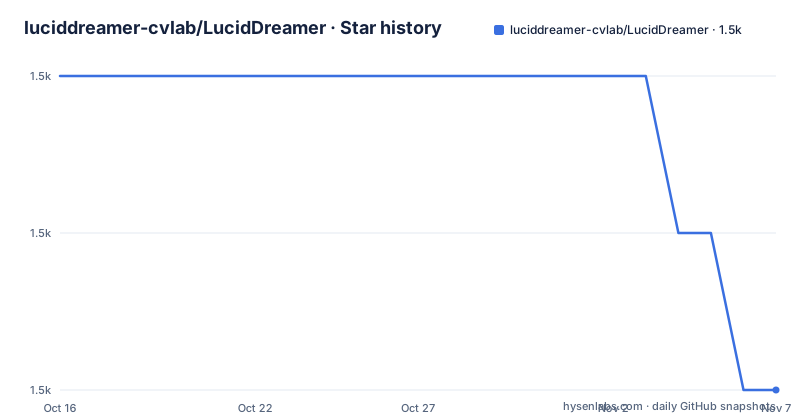
- luciddreamer-cvlab/LucidDreamer1,526 ★ · -2
| Repository | 2026-10-16 | 2026-11-07 |
|---|---|---|
| luciddreamer-cvlab/LucidDreamer | 1.5k | 1.5k |
-2 Stars in the last 22 days, measured from the daily GitHub snapshot. Compare with other projects
Editorial analysis
LucidDreamer's Single-Image 3D Generation Target
LucidDreamer addresses the problem of turning one ordinary image into a scene that can be viewed from more than one camera position. Its output is represented as a 3D Gaussian Splatting scene, rather than a conventional mesh or a stack of rendered video frames. The intended audience is graphics and computer-vision researchers who want to reproduce the workflow described in the paper “LucidDreamer: Domain-free Generation of 3D Gaussian Splatting Scenes.”
The process begins with an image and a text file containing a prompt that guides scene generation. Users can also provide a negative prompt, select a generation camera path, and choose the path used to render the resulting video. Example pairs are included for subjects such as a modern villa, fruit market, waterfall, space station, LEGO scene, and anime streetscape. These files make the expected input shape clearer than the README alone: LucidDreamer takes visual and textual conditioning rather than a complete camera calibration package.
“Domain-free” describes the project's generation goal, not an absence of runtime dependencies. LucidDreamer still depends on CUDA, Stable Diffusion components, ZoeDepth, Open3D, and compiled Gaussian rasterization extensions. The claim concerns the intended input domain of the method, while adoption still requires a specific GPU software stack.
From Input Image to Camera-Controlled Gaussian Scene
The repository layout separates scene generation from Gaussian rendering. `run.py` exposes the command-line entry point, `arguments.py` defines its options, and `luciddreamer.py` holds the main implementation. Camera utilities live under `cameras/`, scene structures under `scene/`, and rendering code under `gaussian_renderer/`. This separation makes the pipeline more accessible to researchers than a single notebook would, although the README does not document its internal call sequence in detail.
The project uses ZoeDepth as a depth-estimation component and includes Gaussian-related submodules named `depth-diff-gaussian-rasterization-min` and `simple-knn`. Those names show that rasterization and nearest-neighbor operations require project-specific compiled code rather than only high-level Python dependencies. The generation side can use a Stable Diffusion model for its inpainting process. The README identifies SD 1.5 as the default and provides options for selecting another inpainting model.
Camera paths are a visible control surface. Generation can use `lookdown`, `lookaround`, or `rotate360`, while video rendering can use `back_and_forth`, `llff`, or `headbanging`. The separation matters because the virtual route used while constructing the scene is not necessarily the route used to produce its final video. The README does not expose optimizer settings, point initialization details, or an API for loading an already reconstructed scene, so those parts should not be treated as stable public interfaces without inspecting the code.
Ubuntu Installation and the Default Image-Prompt Run
The documented Ubuntu environment is deliberately narrow. It requires CUDA 11.4 or newer and Python 3.9. The README explicitly warns against Python 3.10 because of Open3D compatibility. These commands create the Conda environment and install the principal Python packages:
conda create -n lucid python=3.9
conda activate lucid
pip install peft diffusers scipy numpy imageio[ffmpeg] opencv-python Pillow open3d torch==2.0.1  torchvision==0.15.2 gradio omegaconf
The installation script then adds ZoeDepth and Gaussian Splatting dependencies:
pip install timm==0.6.7
# Gaussian splatting
pip install plyfile==0.8.1
Two submodules must also be installed because they contain compiled Python extensions:
cd submodules/depth-diff-gaussian-rasterization-min
# sudo apt-get install libglm-dev # may be required for the compilation.
python setup.py install
cd ../simple-knn
python setup.py install
cd ../..
The README notes that Ubuntu may require `libglm-dev` during compilation. Its first-run command uses placeholders for the image and prompt file:
python run.py --image <path_to_image> --text <path_to_text_file> [Other options]Replace `<path_to_image>` with the path to an input image and `<path_to_text_file>` with the path to its prompt file. The repository contains paired image and text examples, including `examples/Image002_modernvilla.jpg` and `examples/Image002_modernvilla.txt`, but the README does not provide a completed command that substitutes those paths. Exact model acquisition and output-file behavior are also not fully described, so the first run should preserve the default model settings.
Gradio, Colab, and Hugging Face Entry Points
LucidDreamer offers a local Gradio interface in addition to `run.py`. The README links a full Hugging Face Space, a minimal Space, and a community Colab notebook. These hosted routes can reduce local setup effort, but they are separate implementations or hosted environments rather than proof that the repository has no native deployment constraints.
For a local interface, the documented full application is started with:
CUDA_VISIBLE_DEVICES=0 python app.pyThis full application downloads Hugging Face models and is described as requiring approximately 15 GB. A lighter entry point uses only SD 1.5:
CUDA_VISIBLE_DEVICES=0 python app_mini.pyThe distinction is operational. `app.py` represents the complete local demo, including model downloads, while `app_mini.py` is intended as the minimum viable demo. The README does not state whether either interface supports batch processing, persistent scenes, authentication, or concurrent users. It also does not define the expected runtime of a generation request or the exact output naming convention. Those omissions matter when judging the Gradio applications as services rather than research interfaces.
For repeatable research, the command-line route is the clearer starting point because its inputs and options are listed. The Gradio route is more appropriate for interactive inspection. Neither route removes the GPU dependency, and the README does not say that hosted Hugging Face Spaces are governed by the repository's custom LICENSE.
Prompting Constraints and Reproduction Boundaries
LucidDreamer's output depends heavily on prompt design, and the README gives concrete rather than merely aesthetic guidance. For indoor scenes, it recommends putting a simple scene description first, such as a living room or garage. It specifically advises against prompts such as `1girl`, explaining that such wording can produce many human figures across repeated inpainting tasks. For an already engineered Stable Diffusion image or a photograph, it suggests using WD14 tagger to extract Danbooru tags and then remove unwanted comma-separated tags.
The seed controls reproducibility only for the inpainting process according to the CLI documentation. A fixed `--seed` should not be read as a guarantee that every GPU, dependency version, or model download will produce byte-identical output. The README does not publish a deterministic-results claim. It also does not document rollback, checkpoint recovery after interruption, or a supported way to resume a long generation.
The project also lacks GitHub releases. Its last push was on 2026-07-23, so there has been recent repository activity, but versioned releases and migration notes are absent. Consumers should record the commit used for an experiment and preserve the Python, CUDA, PyTorch, Diffusers, PEFT, Timm, and PLYFile versions. Upgrading without those records would make discrepancies harder to classify.
License and Compiled CUDA Maintenance Boundaries
The repository metadata classifies its license as “Other,” while the README carries a CC BY-NC-SA 4.0 badge. This is a material adoption issue for commercial graphics work. The repository directs readers to its LICENSE file, and that file should be inspected for the authoritative terms. This review does not provide legal advice or infer permissions beyond what the visible documentation states.
Maintenance also has two distinct layers. The last push was on 2026-07-23, which supports saying that the repository is recently active. However, it has no GitHub releases, and the installation instructions pin an older software combination, including `torch==2.0.1`, `torchvision==0.15.2`, `timm==0.6.7`, and `plyfile==0.8.1`. The files also include compiled extensions that depend on CUDA and local build tools. Windows is labeled experimental and was tested with Windows 11 and VS2022, with matching CUDA 11.8, cudatoolkit, PyTorch, and C++ 14 or newer.
The Windows instructions include a manual GLM checkout because of a wheel-file issue. This is direct evidence that installation can require repository-specific intervention. Upgrading CUDA, PyTorch, Open3D, or Python may therefore break an installation that currently follows the documented path.
Why a Conventional 3D Pipeline Is Different
A conventional photogrammetry or per-view reconstruction workflow normally expects multiple photographs with enough camera overlap to estimate geometry. LucidDreamer instead starts from one image and a text-guided generation process, then represents the result through its Gaussian scene and rasterization components. That is the central practical difference. The method is aimed at creating a navigable scene from sparse visual input, not recovering a measured object from a calibrated capture sequence.
Another alternative is to use a complete text-to-3D system without image conditioning. LucidDreamer instead accepts an explicit source image and can apply a prompt to guide generated content around it. That makes it more relevant when a user has a particular composition, style, or subject image but lacks a camera array. The README does not document quantitative comparisons with such systems, so it would be inappropriate to claim that LucidDreamer produces more accurate geometry or faster results.
The method is a poor fit when photographic fidelity, measured dimensions, or exact reconstruction are mandatory. The repository describes scene generation, not metrology. It is also unsuitable for CPU-only machines or environments that cannot build and match its CUDA extensions. Its value lies in research access to a specific single-image Gaussian scene-generation approach, with the usual hardware, license, and reproducibility boundaries that accompany research code.
Editorial conclusion
LucidDreamer is appropriate for graphics researchers who need the paper's domain-free single-image scene generation workflow and can satisfy its CUDA 11.8-class environment. It is a poor fit for commercial deployment without resolving the noncommercial licensing terms, or for users who need a maintained packaged pipeline. Before adoption, inspect the LICENSE file, verify CUDA, PyTorch, Python, and C++ compatibility, and run the documented default command with the pinned dependency set because the repository publishes no GitHub releases.
Frequently asked questions
What hardware and Python version does LucidDreamer require?
The documented Ubuntu setup requires CUDA 11.4 or newer and Python 3.9. The README explicitly says Python 3.10 cannot be used because of Open3D compatibility.
Can LucidDreamer generate a 3D scene from one image?
Yes. The documented interface accepts one image path and one text file containing a generation prompt, then produces a 3D Gaussian Splatting scene and video according to the CLI options.
What is the difference between app.py and app_mini.py?
The README describes `app.py` as the full local Gradio demo, including Hugging Face model downloads and approximately 15 GB of requirements. `app_mini.py` is the minimum viable demo and uses only SD 1.5.
Does LucidDreamer support commercial use?
The repository metadata classifies the license as Other, while the README displays a CC BY-NC-SA 4.0 badge. Commercial users must inspect the repository's LICENSE file before use.
Official sources
Add this badge to your README
If you maintain this project, the badge below links readers to this analysis and shows its maintenance status from the daily GitHub snapshot. Paste the markdown into your README; add ?metric=license or ?metric=stars to the image URL for a different field.

[](https://hysenlabs.com/projects/luciddreamer-cvlab-luciddreamer)Star history chart for your README
[](https://hysenlabs.com/projects/luciddreamer-cvlab-luciddreamer)Was this useful?