TuxClocker: a Qt and DBus front end for Linux GPU and CPU overclocking
Qt overclocking tool for GNU/Linux
At a glance
- What is it?
- TuxClocker is a GPL-3.0 hardware controlling and monitoring program for GNU/Linux, split into a DBus daemon and a Qt GUI that talks to it. It reads and writes clock, voltage, power and fan properties on Nvidia and AMD cards and on Intel and AMD CPUs, and it does so through a property tree rather than a set of device-specific dialogs.
- Who is it for?
- TuxClocker suits a Linux user with an Nvidia or AMD card who wants a single window for clocks, voltage, power limits and fan behaviour instead of separate vendor utilities, and the property linking feature is the part that generalises beyond vendor fan curves.
- Can I use it commercially?
- Yes, with conditions. GPL-3.0 is a copyleft licence: if you distribute software that includes it, you must release that software's source code under the same licence. Running it internally without distributing it does not trigger that obligation.
- Is it still maintained?
- Yes. The repository last received commits 81 days ago.
- What is it written in?
- Mainly C, according to GitHub's language statistics.
Answers come from the project's GitHub data, last synced on November 7, 2026, and from our analysis. They are not legal advice.
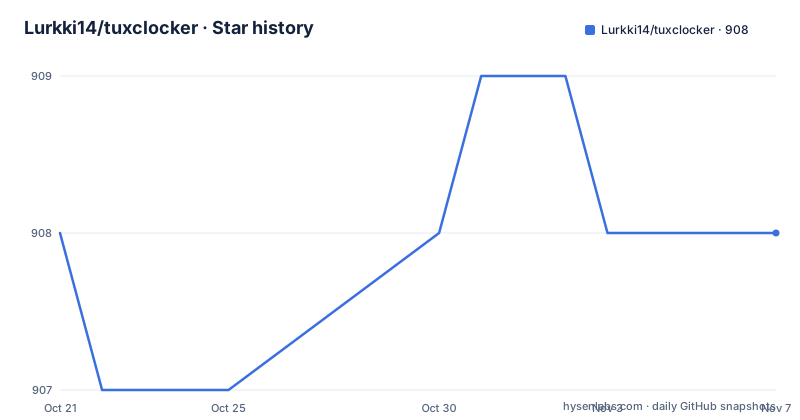
Star history
- Lurkki14/tuxclocker908 ★ · +0
| Repository | 2026-10-21 | 2026-11-07 |
|---|---|---|
| Lurkki14/tuxclocker | 908 | 908 |
0 Stars in the last 17 days, measured from the daily GitHub snapshot. Compare with other projects
Editorial analysis
A daemon and a GUI, split so the privileged part stays small
TuxClocker is described as a hardware controlling and monitoring program consisting of a DBus daemon and a Qt GUI that uses the daemon. That split is the whole architecture and it exists for a reason. Writing clock offsets and power limits needs privilege, and a graphical program that asked for root and then drew a table of sliders would be asking for a lot of trust. Here the privileged component is a service that owns the hardware access and exposes it over DBus, and the interface is a normal unprivileged program talking to it. It also means the monitoring and the control surface can be replaced, and the daemon can keep running while you restart the interface. The Meson build reflects the split too, with a plugins option and a daemon option that builds and installs the daemon binary.
Everything is a property tree, which is why fan curves are only one use of it
The feature list describes an approach rather than a set of device screens. You can read and write device properties by clicking a selected node to edit it, and you can edit multiple similar nodes at once by selecting them and starting an edit. The capability that generalises all of this is property linking: you can connect any writable property to any readable property, which the README says gives more possibilities than just fan curves. A fan curve is therefore not a special mode, it is one instance of a link from a readable temperature property to a writable fan speed property, and if you want a different relationship, such as driving a fan from a utilisation reading, you build that link instead. There is also a reset for writable properties back to their default, and the reset is a right-click action on the node. The consequence is that the same interface handles a card, a CPU and a fan controller without per-device code in the UI.
Nvidia support depends on Coolbits, and clock writing works under Xorg
The Nvidia section of the supported devices is the most detailed part of the documentation, and it splits by generation. For 600-series and above there is support for multiple fans on one GPU, fan mode, fan speed, core and memory clocks, power limit, temperatures, utilisations and VRAM usage monitoring. The clock editing note says Xorg works and there is experimental support elsewhere, which is an honest statement about where the feature was actually exercised. For 600 to 900-series there is voltage setting and reading, Xorg only. The prerequisite is the blocker: Nvidia GPUs require Coolbits set to enable editing of most writable properties, with 31 giving all functionality. That is a driver setting on the user's own machine, which means adopting the tool for overclocking is a two-step operation, one in the driver and one in the program, and the first step is the one people forget.
AMD support is broad, and one property silently overrides another
The AMD section carries an explicit warning that is worth reading before you change anything. When writing to pp_od_clk_voltage, which is a writable property in the Performance subtree, power_dpm_force_performance_level is implicitly set to Manual. Normally that should not matter, but if you set Performance Parameter Control to anything other than Automatic or Manual you may get unexpected results because the value is overridden by other settings. The documented workaround is to remove the setting values from your profile by right clicking on the properties. That is a good example of what a property-tree tool looks like when the hardware underneath has hidden couplings, and it also shows why profiles, which are one of the listed features, need care. Beyond that, the coverage runs from Radeon HD 7000-series upward with the amdgpu driver: temperatures, fan mode and speed, core and memory clock reading, performance parameter control and VRAM usage monitoring. Vega-series and above adds voltage monitoring and utilisations, the Vega-series adds memory and core performance state editing with discrete clock-voltage points, and Navi-series and above adds minimum and maximum core and memory clock editing. Navi-series adds voltage-frequency curve editing for core clocks, and the RX 6000-series and later adds voltage offset setting.
CPU support needs the msr kernel module, and the readouts come from different sources
The CPU section is smaller and has a clear prerequisite: some CPU features require the kernel module msr to be loaded. What is offered across CPUs is frequency monitoring, utilisation monitoring, CPU Governor setting, and CPU Governor minimum and maximum frequency setting. There are also two vendor-specific groups. Under AMD and Intel CPUs, the Energy-Power Preference setting, called Power Usage Mode in the program, plus power usage monitoring via MSR. Under Intel CPUs, temperature monitoring using coretemp, the Energy-Performance Bias setting called Power Saving Tendency in the program, core and memory power usage monitoring via MSR, and voltage monitoring via MSR. The naming differences are worth noting, because the program labels the same concept differently depending on the vendor, and a user switching machines has to learn two vocabularies.
Running from the tarball means a Flatpak for Nvidia libraries and sudo for the daemon
If you do not want to compile, the release page carries a tarball generated by the mkTarball.sh script. The steps are: download the tarball into an empty directory, extract the contents, run the Nvidia install script if you are on Nvidia, then start it:
sudo echo && ./run.shThe sudo is needed for the daemon. The Nvidia step is worth understanding rather than skipping, because the README explains that it exists to get suitable NVIDIA libraries through Flatpak, which sidesteps the situation where the host system has a proprietary driver the Flatpak sandbox cannot see. The tarball is also generated by a script in the repository rather than by hand, and mkTarball.sh sits at the root next to default.nix and release.nix, so the packaging is reproducible from source.
Building with Meson, and the dependency list is where the platform limits appear
The required dependencies are qt with charts, base and dbus, boost-system, boost-filesystem and meson. Optional ones cover the hardware: libnvml, libxnvctrl and xlib for Nvidia support, libdrm for AMD support, and python-hwdata with libpython3 and python3 for prettier AMD GPU names. There is a note that some distributions, NixOS among them, only ship libnvml as part of a fully featured CUDA package, and another that package names differ per distribution. The Meson options are documented in the README:
--prefix=<path> (install location prefix, usually '/usr')
-Dplugins=<true/false>
There is a Nix route, nix-shell release.nix, and a distribution package route through the Repology badge, with the openSUSE Tumbleweed package documented as installed with zypper and opi. One packaging caveat is called out specifically: due to NVIDIA proprietary driver licence problems, the openSUSE package is built without the Nvidia modules, with a link to the tracking issue.
A feature regression from 0.1.1 that the documentation still tracks
There is a small but telling section titled currently missing from earlier releases. The graphs for properties were present in the 0.1.1 release and are absent from 1.3.0, and the README points at the 0.1.1 release readme for anyone who wants them. That is worth pausing on. It means the project shipped a feature, lost it during a refactor, and is documenting the older tag as the way to get it back rather than pretending it was never there. It also means the version history is not a clean upgrade path, and the current release line therefore does not contain everything earlier versions did. The release numbers tell their own story: 1.4.0 in December 2023, 1.5.0 in January 2024 and 1.5.1 in February 2024, with the last push to the repository on 2026-08-19. The tree also carries a po directory and gettext support with a Weblate project, and the README notes that both Matrix and IRC channels exist and are bridged to each other.
Editorial conclusion
TuxClocker suits a Linux user with an Nvidia or AMD card who wants a single window for clocks, voltage, power limits and fan behaviour instead of separate vendor utilities, and the property linking feature is the part that generalises beyond vendor fan curves. It does not suit a Mac or Windows user, since the project states Linux only and lists broader platform support as a possible future improvement, and it does not suit someone who wants a command line tool, which is listed as future work. Before you try it, set the Coolbits option on Nvidia or the amdgpu.ppfeaturemask boot parameter on AMD, because without those the writable properties are not available, and check whether your distribution packages the NVIDIA modules, since the openSUSE build omits them.
Frequently asked questions
What does TuxClocker need to overclock an Nvidia GPU?
Nvidia GPUs require Coolbits set to enable editing of most writable properties, with 31 for all functionality. For AMD cards the amdgpu.ppfeaturemask boot parameter is required, with 0xffffffff for all functionality.
How do I run TuxClocker without compiling it?
Download the tuxclocker.tar from the release page into an empty directory and extract it. Nvidia users run ./nvidiaInstall.sh first to get suitable NVIDIA libraries through Flatpak, then start the program with sudo echo && ./run.sh, since the daemon needs sudo.
Can TuxClocker control more than just the GPU fan?
Yes. You can connect any writable property to any readable property, which the README says gives more possibilities than just fan curves, and the current limitation is that this is only possible with range-based writable properties.
Which CPU settings does TuxClocker support?
Frequency and utilisation monitoring, CPU Governor setting and Governor minimum and maximum frequency setting for all CPUs, plus Energy-Power Preference on AMD and Intel, and on Intel also temperature monitoring via coretemp, Energy-Performance Bias, core and memory power usage via MSR and voltage monitoring via MSR. Some CPU features require the msr kernel module to be loaded.
Official sources
Add this badge to your README
If you maintain this project, the badge below links readers to this analysis and shows its maintenance status from the daily GitHub snapshot. Paste the markdown into your README; add ?metric=license or ?metric=stars to the image URL for a different field.

[](https://hysenlabs.com/projects/lurkki14-tuxclocker)Star history chart for your README
[](https://hysenlabs.com/projects/lurkki14-tuxclocker)Was this useful?