Macro Deck review: web-based macro pads, plugins, and platform limits
The open-source macro pad with customizable widgets, powerful integrations and a secure plugin ecosystem.
At a glance
- What is it?
- Macro Deck turns a browser-connected host into a customizable macro pad for Windows, macOS, and Linux. It suits users who want editable profiles, browser access, and reviewed Store packages, but the current version 3 stable package line remains unavailable and the companion app is paid.
- Who is it for?
- Macro Deck fits users who want a self-hosted macro pad, a browser client, and a defined plugin distribution path. It does not fit someone requiring a documented stable APT package or expecting every companion feature to be included under Apache-2.0.
- Can I use it commercially?
- Yes. Apache-2.0 is a permissive licence: you can use, modify and sell software built on it, as long as you keep its copyright and licence notices.
- Is it still maintained?
- Yes. The repository received new commits within the last day.
- What is it written in?
- Mainly C#, according to GitHub's language statistics.
Answers come from the project's GitHub data, last synced on October 23, 2026, and from our analysis. They are not legal advice.
Star history
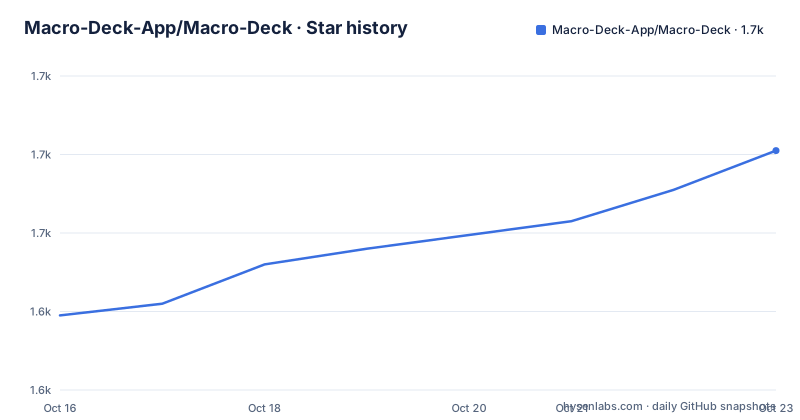
- Macro-Deck-App/Macro-Deck1,681 ★ · +42
| Repository | 2026-10-16 | 2026-10-23 |
|---|---|---|
| Macro-Deck-App/Macro-Deck | 1.6k | 1.7k |
42 Stars in the last 7 days, measured from the daily GitHub snapshot. Compare with other projects
Editorial analysis
Macro Deck's host, browser client, and profile model
Macro Deck addresses a specific gap between physical macro pads and software automation. Instead of binding every control to fixed buttons or requiring a native controller on every device, it places a host at the center of the setup. The README identifies Windows, macOS, and Linux as host platforms. Users organize controls into profiles and folders, then add widgets such as action buttons, sliders, media controls, weather displays, clocks, music players, and CPU usage graphs.
The repository layout reflects that split. Directories named `host/`, `protocol/`, `ui/`, `sdk/`, and `ui-model/` separate the hosted runtime, communication contract, user interfaces, extension surface, and shared interface definitions. The `Makefile` also distinguishes host development, desktop UI, web-client work, packaging, conformance tests, platform tests, and end-to-end tests. This is useful evidence that Macro Deck is not simply a static dashboard repository. It contains separate layers for runtime behavior, client behavior, and plugin-facing contracts.
The intended users are people who want a shared control surface for applications, services, and compatible devices. A phone, tablet, or compatible hardware controller can connect to the same host. The browser client can also operate directly as a macro pad, which matters where no native companion application is available. Macro Deck does not claim to automate every application by itself. Its useful scope depends on built-in integrations, public SDK integrations, and plugins that expose the actions or devices a user needs.
Macro Deck's browser, companion, and hardware access paths
The web-based architecture is the main design choice. The host serves a web client that can be opened from a modern browser on the same network. The README also identifies browser-based game overlays as a possible client context. With HTTPS enabled, the web client can be installed as a PWA. This gives users a path to a dedicated control interface without requiring a native app installation for every controller.
Macro Deck does not treat the browser client and companion app as identical. The companion is described as an optional native alternative with better performance and additional features. Its Android and iOS downloads are available through Google Play and the App Store, and the project says that purchasing it directly supports Macro Deck development. The one-time fee therefore belongs to the companion application, not to the Apache-2.0 host project.
Compatible hardware can connect to the same host, so the architecture also supports a more conventional macro-pad workflow. The available documentation does not publish a complete hardware compatibility list in this section, nor does it explain which companion features are unavailable in the browser. Engineers should not infer feature parity from the fact that all three client paths can reach the host. They need to check the client documentation for device-specific controls and latency-sensitive behavior before building around a particular path.
Installing Macro Deck from the documented APT repository
The README gives direct installation instructions only for 64-bit x86 Debian and Ubuntu systems. It labels this path as the APT repository and says that updates arrive through the normal `apt upgrade` command. The stable suite is intended to carry packages beginning with the first stable Macro Deck 3 release. At present, the repository information says to use `Suites: beta` if prereleases are wanted, while the README also warns that Macro Deck 3 may contain incomplete or unstable functionality.
The following is the documented Debian and Ubuntu installation sequence:
sudo install -d -m 0755 /etc/apt/keyrings
sudo curl -fsSLo /etc/apt/keyrings/macro-deck.asc https://packages.macro-deck.app/gpg.asc
sudo tee /etc/apt/sources.list.d/macro-deck.sources > /dev/null <<'EOF'
Types: deb
URIs: https://packages.macro-deck.app
Suites: stable
Components: main
Architectures: amd64
Signed-By: /etc/apt/keyrings/macro-deck.asc
EOF
sudo apt update
sudo apt install macro-deck
This creates the keyring directory, downloads the repository signing key, writes the `.sources` entry, refreshes package metadata, and installs `macro-deck`. The architecture is explicitly `amd64`, so the instructions should not be treated as installation guidance for ARM, 32-bit x86, or another Linux distribution.
For the first real use, install the package, start the host, and use a modern browser on the network to open its web client. The README does not document the initial browser URL, first-run setup screens, or the exact host startup command for a packaged installation. Those details must come from the installed build, website, or project documentation rather than an invented command. Once in the client, create a profile, organize controls into folders, and add the widgets and integrations required for the workflow.
Macro Deck plugins, Store signatures, and manual package boundaries
Macro Deck provides a public plugin SDK, tooling, and developer documentation, with `MacroDeck.Sdk` identified as a NuGet package. The repository separates `sdk/`, `protocol/`, and conformance-related development work, which suggests that plugin behavior is checked against an explicit contract rather than only through the editor UI.
The official Store provides a controlled distribution path. According to the README, submitted plugins, icon packs, templates, and other content are reviewed for potentially harmful behavior and unexpected data access. Approved packages are hosted by Macro Deck infrastructure and cryptographically signed by the Store. Macro Deck verifies the signature during installation and warns when content does not come from that trusted path. The Store also serves the reviewed package itself, so an approved package is not silently replaced by a developer-controlled download.
That boundary does not make every plugin trusted in the abstract. The README says that manual installation and third-party plugin development remain possible, and that packages outside the trusted Store distribution path are clearly distinguishable from Store-signed packages. Manual installation is therefore available, but it does not receive the same documented distribution assurance. An organization evaluating a plugin should record whether the package is Store-signed and which permissions or data access its integration requires. The README describes the review process, but it does not publish a plugin permission matrix or a rollback procedure.
Macro Deck version 3 limits and development cost
The repository is not archived, and the last push was on 2026-10-16. The three latest listed releases are `v3.0.0-beta.17`, `v3.0.0-beta.16`, and `v3.0.0-beta.15`, dated 2026-10-14, 2026-10-09, and 2026-10-02. The README directly states that Macro Deck 3 is under active development and may contain incomplete or unstable functionality. That makes version selection part of the adoption decision rather than a footnote.
For Debian and Ubuntu administrators, a stable APT suite that has not yet carried the first stable Macro Deck 3 release means that the documented stable path may not match the latest feature set. Switching the suite to `beta` can expose prereleases, but the README does not document compatibility guarantees, migration steps, rollback steps, or the exact upgrade implications of moving between stable and beta.
The Makefile also shows a broad contributor workflow through targets such as `install`, `dev`, `ci`, `test-host`, `test-conformance`, `test-platform`, `test-packages`, `test-ui`, `test-web-client`, `test-desktop-ui`, and `test-e2e`. For maintainers, the repository has dedicated areas for UI work, host tests, SDK conformance, packaging, and end-to-end checks. The README does not state the minimum runtime versions or the complete dependency matrix, so a production operator should inspect the engineering setup documentation and package metadata before designing an upgrade policy.
Apache-2.0 scope, branding, and practical alternatives
Macro Deck is licensed under Apache-2.0. The repository separately lists `NOTICE`, `THIRD-PARTY-NOTICES`, and a `LICENSE`, so distribution should preserve the applicable notices and review third-party component licenses separately. The branding section is explicit: the Macro Deck name, logo, and branding assets are not covered by Apache-2.0. A fork or derived product must use its own name and branding and replace the project assets. This is a licensing boundary to plan for before publishing a derivative build.
A relevant alternative is a local macro-pad application paired with device-specific configuration tools. Such an arrangement can avoid a network host and browser client, but it usually requires configuring the supported hardware and applications directly. Macro Deck instead emphasizes a shared host, browser access, profiles, widgets, and a reviewed package distribution path. The trade-off is additional dependence on host networking, plugin compatibility, and the maturity of the version 3 line.
Another alternative is a general-purpose automation platform with broader integration libraries but less focus on a shared visual control surface. Macro Deck is more specifically aimed at hands-on control from phones, tablets, browsers, or compatible hardware. That makes it a better fit for a dedicated control panel, while a workflow that is primarily unattended automation may need a different tool. The README does not claim unattended scheduling, so it should not be selected on that assumption.
Editorial conclusion
Macro Deck fits users who want a self-hosted macro pad, a browser client, and a defined plugin distribution path. It does not fit someone requiring a documented stable APT package or expecting every companion feature to be included under Apache-2.0. Verify first whether the current beta covers the required integrations, whether your hardware works without a companion app, and whether your operating system is among the documented host platforms.
Frequently asked questions
Which operating systems can run the Macro Deck host?
The README lists Windows, macOS, and Linux as host platforms. The documented APT installation path is limited to 64-bit x86 Debian and Ubuntu systems.
Does Macro Deck require its mobile companion app?
No. The web client can be used directly as a macro pad, and with HTTPS enabled it can be installed as a PWA. The companion app is an optional native alternative with better performance and additional features, and it is sold for a one-time fee.
How does Macro Deck handle plugins from the official Store?
Submitted content is reviewed before publication, approved packages are hosted by Macro Deck infrastructure, and Macro Deck verifies Store signatures during installation. Manual and third-party plugin installation remain possible, but packages outside the Store path are marked as different from trusted Store-signed packages.
Is Macro Deck 3 currently stable?
The README says Macro Deck 3 may contain incomplete or unstable functionality. The listed recent releases are beta releases, and the APT documentation distinguishes the stable suite from prereleases available through the beta suite.
Official sources
Add this badge to your README
If you maintain this project, the badge below links readers to this analysis and shows its maintenance status from the daily GitHub snapshot. Paste the markdown into your README; add ?metric=license or ?metric=stars to the image URL for a different field.

[](https://hysenlabs.com/projects/macro-deck-app-macro-deck)Star history chart for your README
[](https://hysenlabs.com/projects/macro-deck-app-macro-deck)Was this useful?