Magefile/mage: Build Targets in Go Instead of Make
a Make/rake-like dev tool using Go
At a glance
- What is it?
- Mage turns exported Go functions into runnable build targets, so a Go project can drop Make and bash without losing the command-line ergonomics. The trade-off is one more binary to install.
- Who is it for?
- Adopt Mage if your project is already Go and your Makefile has grown conditionals, loops or Windows-specific branches, because the README's argument is that Go beats bash for anything non-trivial. Do not adopt it if your build is a handful of straight-line shell commands.
- Can I use it commercially?
- Yes. Apache-2.0 is a permissive licence: you can use, modify and sell software built on it, as long as you keep its copyright and licence notices.
- Is it still maintained?
- Yes. The repository last received commits 45 days ago.
- What is it written in?
- Mainly Go, according to GitHub's language statistics.
Answers come from the project's GitHub data, last synced on November 15, 2026, and from our analysis. They are not legal advice.
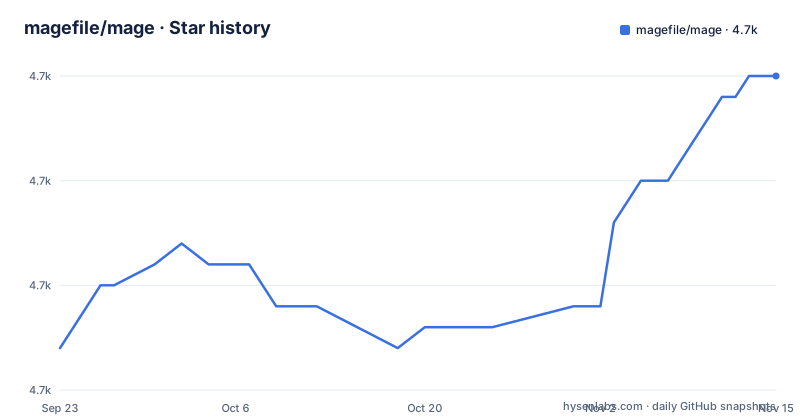
Star history
- magefile/mage4,705 ★ · +13
| Repository | 2026-09-23 | 2026-11-15 |
|---|---|---|
| magefile/mage | 4.7k | 4.7k |
13 Stars in the last 53 days, measured from the daily GitHub snapshot. Compare with other projects
Editorial analysis
The problem Mage targets: Makefiles that are really bash scripts
The README opens with a blunt claim: "Makefiles are hard to read and hard to write. Mostly because makefiles are essentially fancy bash scripts with significant white space and additional make-related syntax." That is the whole motivation. Mage is for teams whose build logic has outgrown straight-line command execution and who are already writing Go, so the branching and looping live in a language the contributors know rather than in make's tab-sensitive dialect.
The second half of the argument is portability. The README states that make generally uses bash, "which is not well supported on Windows", while Mage runs on all major operating systems and has no dependencies outside the Go standard library. For a project that ships to Windows developers, that single point often decides the question.
The intended audience is narrow and specific: Go projects. The README asks why you would introduce "another language as idiosyncratic as bash" when the codebase is already Go. If your repository is Python or Rust, Mage solves a problem you do not have.
How Mage turns exported Go functions into targets
Mage does not interpret a config file at run time. It reads your magefile, which is ordinary Go, and uses its functions as Makefile-like runnable targets. The repository layout reflects this: parse/, target/, mg/ and internal/ sit alongside the mage/ package, and the README points to pkg.go.dev/github.com/magefile/mage/mage for using Mage as a library.
The naming convention is the mechanism. An exported function in the magefile becomes a target; the README's summary is that you "write plain-old go functions, and Mage automatically uses them as Makefile-like runnable targets." Because the magefile is compiled rather than sourced, a typo in a function name is a compile error, not a silent no-op at the shell.
Mage also relaxes a constraint that make imposes. The README notes that Mage lets you "have multiple magefiles, name your magefiles whatever you want", and that they are easy to customize per operating system. That is a real difference from a single Makefile with platform conditionals threaded through it.
Installing Mage and running a first target
The README gives two install paths depending on your Go version. With Go 1.18 or newer, the recommended route is go install. The @latest tag can be replaced with a pinned version, and the README uses v1.15.0 as its example of that form.
go install github.com/magefile/mage@latest
mage -init
The README does not describe what mage -init writes, so check the result rather than assuming a structure.
For older GOPATH-based toolchains, the README gives a different sequence. Note that this form downloads the source with -d and then builds through the bootstrap script.
go get -u -d github.com/magefile/mage
cd $GOPATH/src/github.com/magefile/mage
go run bootstrap.go
There is also a modules-based variant that clones the repository and runs the same bootstrap script:
git clone https://github.com/magefile/mage
cd mage
go run bootstrap.go
The README is explicit about why bootstrap.go exists: a plain go get or go install builds the binary correctly but embeds no version information. Running the bootstrap script, or mage install from inside the repository, produces a binary with the correct version metadata. If version reporting matters to your build logs, use the bootstrap path. The binary lands in $GOPATH/bin, and prebuilt binaries are also available from the project's releases page.
Where Mage is the wrong tool
Mage runs Go targets rather than automatically constructing make's file dependency graph. Its target package provides helpers for comparing file and directory modification times, so magefiles can explicitly skip work when inputs have not changed.
The install story has a sharp edge. The README warns that a plain go install produces a binary without embedded version information, and the fix is to run the bootstrap script from a checkout. That is an extra step for every CI image and every developer machine, and it is easy to get subtly wrong.
The tool is also Go-only by construction. The README's own framing is that Mage suits projects written in Go, and there is no indication of support for driving magefiles in another language. A polyglot repository with a Python service and a Go service would end up with two build systems.
Finally, the documentation surface is split. The README itself is short and defers to magefile.org for full documentation and to pkg.go.dev for library use. Anyone evaluating Mage from the repository alone will find the README thin on target semantics and on how the generated code behaves.
Mage compared with make and Task
The obvious alternative is make itself. The difference is not cosmetic: make is a declarative dependency graph with timestamp comparison, and Mage is a compiled Go program with subcommands. Make gives you incremental rebuilds and decades of tooling; Mage gives you a real type system, real error handling and no tab-versus-space failures. If your build is a dependency graph over files, make is the better fit. If your build is a sequence of operations with branching, Mage is the better fit, and the README's position is that Go beats bash for exactly that case.
Task is the other common comparison point, a YAML-driven task runner. The difference in approach is where the logic lives. Task keeps tasks in a declarative YAML file and shells out for anything complex; Mage keeps tasks in Go source that is compiled. YAML is easier to read for simple command sequences and easier to share with non-Go contributors. Go is easier to debug once the logic includes loops, conditionals or platform checks, because your editor and the compiler are working on the same file you run. Neither is a superset of the other, and the README does not discuss Task.
Maintenance, licensing and the upgrade path
Mage is Apache-2.0 licensed, with the LICENSE file at the repository root. Apache-2.0 includes an express patent grant and requires that you retain notices and state changes when redistributing. If you vendor Mage or ship a modified binary, those obligations travel with it. This is a description of the licence text, not legal advice; read the LICENSE file for your own situation.
The repository is not archived, and the last push was on 2026-10-01. The most recent release is v1.17.2, dated 2026-04-23 and labelled "Tab Completion", following v1.17.1 on 2026-03-31 and v1.17.0 on 2026-03-25. The v1.17.0 label is "Multiline help text output" and v1.17.1 is "Fix for Asset Naming", which suggests the 1.17 line is being iterated on rather than frozen.
Upgrade cost is low by design. go.mod declares go 1.18 and the module has no third-party dependencies listed beyond the standard library, so moving between Mage versions does not drag a dependency tree with it. The practical upgrade risk sits in your own magefile, and the README does not document a rollback procedure.
Editorial conclusion
Adopt Mage if your project is already Go and your Makefile has grown conditionals, loops or Windows-specific branches, because the README's argument is that Go beats bash for anything non-trivial. Do not adopt it if your build is a handful of straight-line shell commands. Before committing, verify that go install github.com/magefile/mage@latest works in your CI image, and whether you need the bootstrap script so the binary embeds version information.
Frequently asked questions
How do I install Mage?
With Go 1.18 or newer, run go install github.com/magefile/mage@latest, then mage -init to create a magefile. For older GOPATH toolchains the README gives go get -u -d github.com/magefile/mage followed by go run bootstrap.go inside the checkout.
Does Mage need anything besides Go?
No. The README states that Mage has no dependencies outside the Go standard library and builds with Go 1.7 and above, possibly even lower versions, though those are not regularly tested.
Why does Mage say no version information is embedded?
The README explains that a normal go get or go install builds the binary correctly but without version info. Running the bootstrap script, or mage install from inside the repository, produces a binary with the correct version information.
Can I have more than one magefile?
Yes. The README states that Mage lets you have multiple magefiles and name them whatever you want, which is one of the differences it draws against make.
Official sources
Add this badge to your README
If you maintain this project, the badge below links readers to this analysis and shows its maintenance status from the daily GitHub snapshot. Paste the markdown into your README; add ?metric=license or ?metric=stars to the image URL for a different field.

[](https://hysenlabs.com/projects/magefile-mage)Star history chart for your README
[](https://hysenlabs.com/projects/magefile-mage)Was this useful?