Manjaro ARM Generic Aarch64: A Minimal Base for Board-Specific Firmware
Generic Aarch64 Images
At a glance
- What is it?
- This repository builds generic Aarch64 Manjaro ARM images that rely on external firmware like Tow-Boot. It is a developer-focused distribution channel, not a plug-and-play installer.
- Who is it for?
- Adopt this project if you are a Manjaro ARM developer or an experienced user with a compatible Aarch64 board (like Pine64-LTS or Pinephone) who can manage SPI flash firmware and build from source. Avoid it if you expect a ready-to-flash ISO with included bootloader or if you need official support for a wide range of devices.
- Can I use it commercially?
- Not without permission. GitHub finds no licence file in the repository, and without a licence all rights are reserved by default: you may read the code but not reuse it. Check the README, or ask the authors, before using it.
- Is it still maintained?
- Yes. The repository received new commits within the last day.
- What is it written in?
- Mainly HTML, according to GitHub's language statistics.
Answers come from the project's GitHub data, last synced on October 22, 2026, and from our analysis. They are not legal advice.
Star history
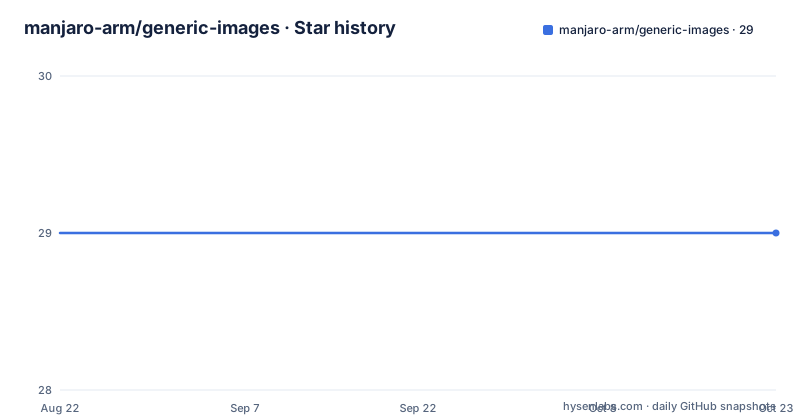
- manjaro-arm/generic-images29 ★ · +0
| Repository | 2026-08-22 | 2026-10-22 |
|---|---|---|
| manjaro-arm/generic-images | 29 | 29 |
0 Stars in the last 61 days, measured from the daily GitHub snapshot. Compare with other projects
Editorial analysis
What This Repository Actually Provides
The manjaro-arm/generic-images repository is a development branch for producing Manjaro ARM images that target generic Aarch64 hardware. It is not a user-facing download page; it is a source of build scripts and release artifacts. The README is sparse, which tells you a lot about the intended audience. This is for people who already know their way around ARM boards, U-Boot, and Manjaro's build tooling. The primary output is a set of images uploaded to GitHub Releases at intervals like 23.02, 22.12, and 22.10. Those releases are the actual deliverables, but the repository itself is a staging area for development.
The Core Mechanism: Relying on External Firmware
The key architectural choice is that these images do not bundle a bootloader. The README explicitly lists a prerequisite: functioning firmware (u-boot or Tow-Boot) on the board's SPI flash. That means the image is a root filesystem and kernel, but the board must already know how to boot it. This is a clean separation of concerns, but it shifts a lot of responsibility to the user. If your board lacks proper SPI flash firmware, the image will not boot. The README points to the Tow-Boot project for SPI flash images, which is a separate download and a separate step. This design is common in the ARM world, but it is a sharp contrast to x86 distributions that ship a full bootloader in the ISO.
Building the Image: A Two-Step Process
The build process is documented in the README with two steps. First, check out the arm-profiles repository from manjaro-pinephone/arm-profiles. Second, run a single command: sudo buildarmimg -d generic -e $EDITION. The $EDITION variable is not expanded in the README, so you need to know what editions are available from the arm-profiles project. This is a minimal instruction set, and it assumes you have the buildarmimg tool installed and configured. The command requires sudo, which makes sense for image creation, but it also means you are running a build as root. That is a security consideration. The build process is not for casual users; it is for developers who want to produce a custom image or test changes.
Tested Devices: A Narrow but Specific List
The README lists two tested devices: Pine64-LTS and Pinephone Community Edition. That is a very short list for a project called 'generic'. The Pine64-LTS is a single-board computer, and the Pinephone is a smartphone. They share an Aarch64 architecture, but they have different peripherals and boot flows. The fact that the same image works on both suggests a high level of abstraction, but it also means the image cannot include board-specific optimizations or drivers. The testing was done by two named individuals, which is transparent but also a reminder that this is a community effort, not a vendor-supported product. If you have a different Aarch64 board, you are on your own, and the README gives you no guarantee.
A Genuine Limitation: No Firmware, No Boot
The most significant limitation is the dependency on external SPI flash firmware. If you have a board that does not have u-boot or Tow-Boot installed, the image is useless until you separately flash that firmware. This is a common failure mode for ARM systems, but it is a real barrier for newcomers. The README does not provide instructions for flashing firmware; it only points to the Tow-Boot GitHub page. That means you need to read another project's documentation to get started. Also, the build process requires the arm-profiles repository, which is a separate dependency. If that repository changes or becomes unavailable, the build breaks. The project has not been pushed to since February 2023, so the build scripts may not work with current Manjaro ARM tooling. That is a maintenance risk.
Alternative Approach: Board-Specific Images
The alternative to generic images is a board-specific image, such as those produced by the manjaro-arm organization for individual devices like the Pinebook Pro or RockPro64. Those images typically include the bootloader or at least a tailored kernel and device tree. The difference is in the trade-off between portability and convenience. A generic image can run on any board that meets the Aarch64 baseline, but it requires external firmware and lacks optimization. A board-specific image is ready to flash and boot, but it only works on that one board. The arm-profiles repository, which is the source for image profiles, likely contains both types, but this repository specifically targets the generic case. If you want a smoother experience, look for a device-specific image.
Maintenance and Upgrade Cost
The last release is 23.02 from February 2023, and the last push to the repository is on the same date. That is over a year old at the time of writing. There is no indication of ongoing maintenance. The README does not mention any upgrade path or update mechanism. Users are expected to download a new release and reflash. Since the image is generic, updates are not tied to a specific kernel or firmware version, which is both a strength and a weakness. It means you can upgrade the root filesystem independently of the bootloader, but it also means you must track changes in the Aarch64 ecosystem yourself. The license is listed as unknown, which is a red flag for enterprise adoption. You cannot legally redistribute or modify the image without knowing the license terms. That is a concrete thing to verify before using it in any commercial context.
Editorial conclusion
Adopt this project if you are a Manjaro ARM developer or an experienced user with a compatible Aarch64 board (like Pine64-LTS or Pinephone) who can manage SPI flash firmware and build from source. Avoid it if you expect a ready-to-flash ISO with included bootloader or if you need official support for a wide range of devices. Before using, verify that your board's SPI flash has working u-boot or Tow-Boot, and check the latest release for your specific hardware. The project is a development branch, so expect changes and minimal hand-holding.
Frequently asked questions
What is a generic image?
In this repository it means a Manjaro ARM system image built for generic Aarch64 hardware rather than for one named board, selected by passing `-d generic` to buildarmimg. The README does not use the phrase in any photographic sense.
what is generic images
The repository is described as a development branch for Manjaro ARM images for generic Aarch64, where images are built and uploaded to the GitHub releases page at a relatively regular interval. The newest tag listed is 23.02, published on 17 February 2023.
How do I build a Manjaro ARM generic Aarch64 image?
Check out the arm-profiles project and run `sudo buildarmimg -d generic -e $EDITION`. The `-d` flag picks the generic device profile and `-e` picks the edition from a shell variable you set yourself.
Which devices is the manjaro-arm generic image known to work on?
Two are named: the Pine64-LTS, tested by Dan Johansen, and the Pinephone Community Edition, tested by Benedikt Wildenhain. Any board also needs a functioning u-boot or Tow-Boot already on its SPI flash before the image is written.
Official sources
Add this badge to your README
If you maintain this project, the badge below links readers to this analysis and shows its maintenance status from the daily GitHub snapshot. Paste the markdown into your README; add ?metric=license or ?metric=stars to the image URL for a different field.

[](https://hysenlabs.com/projects/manjaro-arm-generic-images)Star history chart for your README
[](https://hysenlabs.com/projects/manjaro-arm-generic-images)