PainterEngine: a C application and game engine with a software renderer
PainterEngine is a application/game engine with software renderer,PainterEngine can be transplanted to any platform that supports C
At a glance
- What is it?
- PainterEngine is a component-oriented C engine that ships its own memory pool, math library, signal processing, script VM, and 2D/3D software renderer, with a separate FPGA GPU IP core. It suits C developers targeting odd or embedded platforms, and it is a poor fit for teams that want a large asset pipeline and editor ecosystem.
- Who is it for?
- Adopt PainterEngine when you are writing C, you want one dependency that covers rendering, audio, data structures and a script VM, and you are willing to build the platform folder yourself. Do not adopt it if you need a mature asset pipeline, a large third-party plugin ecosystem, or a team of non-C developers, because the README documents no such tooling and the repository has no published releases.
- Can I use it commercially?
- Yes. MIT is a permissive licence: you can use, modify and sell software built on it, as long as you keep its copyright and licence notices.
- Is it still maintained?
- Yes. The repository last received commits 17 days ago.
- What is it written in?
- Mainly C, according to GitHub's language statistics.
Answers come from the project's GitHub data, last synced on November 15, 2026, and from our analysis. They are not legal advice.
Star history
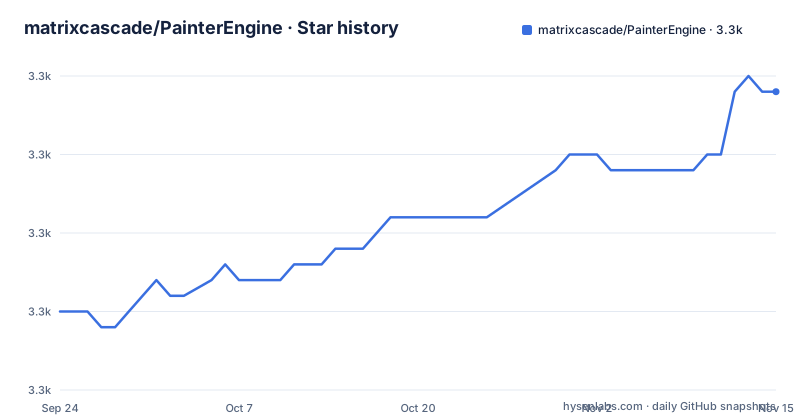
- matrixcascade/PainterEngine3,334 ★ · +14
| Repository | 2026-09-24 | 2026-11-15 |
|---|---|---|
| matrixcascade/PainterEngine | 3.3k | 3.3k |
14 Stars in the last 52 days, measured from the daily GitHub snapshot. Compare with other projects
Editorial analysis
What PainterEngine is for, and who should pick it up
PainterEngine is a C engine for applications and games, built around a software renderer rather than a GPU abstraction layer. The README states it supports Windows, Linux, iOS, Android, WebAssembly, HarmonyOS, and bare embedded platforms with no operating system at all. That last item is the interesting one. Most engines assume a window manager, a GPU driver and a filesystem. PainterEngine assumes C and a way to push pixels.
The stated audience is broad: the README says that even a C beginner can learn to use it in a few minutes, and that it can serve both as a tool for small applications and as a learning project. The feature table backs up the second claim more than the first. It lists a memory pool, a math library covering most of the C standard math functions, DFT/DCT/FFT/DWT and window functions, MFCC feature extraction, string/vector/list/map/stack/fifo/circular-buffer data structures, curve25519/AES/SHAx/MD5, a BP neural network, PNG/JPG/GIF/BMP decoding with PNG encoding, WAV/MP3 decoding with WAV encoding, TTF font loading ported from stb_truetype, geometry rasterization, 2D and 3D renderers, 2D and Live2D-style skeletal animation, an acoustic model with a mixer, phase vocoder, physically modelled piano and Karplus-Strong plucked string synthesis, a script compiler with VM and debugger, a UI framework, MQTT and MODBUS protocols, a game world framework, and VisualOS, a TCP-based display server for devices that have no display of their own.
That list is the pitch. You are not adopting a renderer. You are adopting a self-contained C runtime that happens to draw things. If your target is a board with no OS, no libc conveniences and no graphics stack, the breadth is the point. If you already have a rendering stack and a build system you like, most of this is dead weight.
How the engine is structured and where your code fits
The repository layout is the clearest description of the architecture. At the top level there are core/, kernel/, runtime/, platform/, depend/, cmake/, documents/ and images/, plus PainterEngine.h and CMakeLists.txt. The README's manual integration instructions map directly onto those directories: add all code from PainterEngine/core, PainterEngine/kernel and PainterEngine/runtime to your project, then pick one folder under PainterEngine/platform for your target (the README gives PainterEngine/platform/windows as the Windows example) and add that folder's code, then add the PainterEngine directory itself to your include path.
So the split is roughly: kernel and core hold the platform-independent machinery (memory pool, data structures, math, codecs, the script VM), runtime holds the engine-level pieces (renderer, UI, objects, audio, game world), and platform holds the per-target glue. Everything platform-specific is confined to one folder, which is why the same source tree can target Windows and a bare SoC. The README calls this component-based design and describes the engine as an application framework rather than only a graphics library.
There is a second layer above that. PainterEngine Make is a separate download, offered as a zip from cdn.painterengine.com, and the README says it compiles a PainterEngine project to multiple platforms in one step with no source changes. That tool is not part of this repository. It is a hosted convenience, and the README treats it as optional: the manual four-step integration above is the fallback for people who want to use their own IDE.
One more piece sits outside the normal data flow. VisualOS, under platform/visualos, is described as a TCP-based display server that provides a client-server or browser-server style remote interface, giving devices without display hardware a graphical terminal. That is an unusual design choice: instead of porting a framebuffer, you stream the interface.
Installing PainterEngine and drawing your first object
There is no package manager entry and no release artifact referenced in the README. You get PainterEngine by cloning the repository and adding the source directories to your own build, or by downloading PainterEngine Make from the project site. The repository does contain a CMakeLists.txt at the top level and a cmake/ directory, so a CMake-based build is present in the tree, but the README's own instructions are the manual ones.
If you use your own IDE, the README's four steps are the install procedure. In practice that means your include path must contain the PainterEngine root directory, because the public header is included as "PainterEngine.h". A minimal program looks like this:
#include "PainterEngine.h"
int main()
{
    PainterEngine_Initialize(800, 600);
    return 1;
}
PainterEngine_Initialize takes a width and height and sets up the engine and a window of that size. Note the return value of 1 rather than 0 in the README's example; copy it as written if you are following along.
The README's next example shows the component model. Objects are created by calling a create function with the module handle mp, the root object, and a position:
#include "PainterEngine.h"
int main()
{
    PainterEngine_Initialize(800, 600);
    PX_Object_Firework01Create(mp, root,200,600);
    PX_Object_Firework01Create(mp, root,400,600);
    PX_Object_Firework01Create(mp, root,600,600);
    return 1;
}
What you should see is three firework components placed along the bottom of an 800x600 window. The README presents this as the demonstration that creating a component, or writing your own, is a single call. The mp and root identifiers are used in the example without further explanation, so expect to find their definitions in the core or runtime sources rather than in the README.
The software renderer is a constraint, not a detail
PainterEngine's renderer is a software renderer. The description says so directly, and the feature table lists 2D/3D renderer implementations alongside geometry rasterization routines for lines, triangles, rectangles, circles, rings, sectors and rounded shapes. Everything is computed on the CPU and written into a buffer.
That has consequences the README does not spell out. Fill rate is bounded by CPU throughput and memory bandwidth, so large full-screen effects, heavy overdraw and high-resolution 3D scenes are the wrong workload. The engine compensates with breadth elsewhere: the 2D path has a documented drawing engine, the audio path synthesizes PCM directly, and the FPGA GPU work exists precisely because software rasterization has a ceiling. The README states the FPGA IP core provides no less than 50Mpps of 2D Blender and primitive rasterization acceleration with HDMI output, verified on Zynq7020 and the zynq7000 series. That number comes from the project's own documentation and applies to that specific hardware path, not to the software renderer on a general-purpose CPU.
If you are building a 3D game with modern visual expectations, this is the wrong tool and the README does not claim otherwise. If you are building a 2D interface, a tool, a small game or an instrument panel on hardware where a GPU may not exist or may not be usable, the software path is the reason the engine exists.
PainterEngine Make, VisualOS, and what the documentation leaves open
Two parts of the project sit outside the repository and shape how you would actually work with it. PainterEngine Make is a downloadable tool that the README says compiles your project to Windows, Linux, WebAssembly, Android and other targets in one action, with no source changes. It is a zip file hosted on the project's CDN, not a package in this repository. That means your build reproducibility depends on a binary you fetch from a website, and the README does not describe its versioning, its licence, or what it does when a target is unsupported.
VisualOS is the other one. It is described as a TCP network display server under platform/visualos, offering client-server and browser-server style remote graphical interaction for devices with no display. The README does not document the wire protocol, the port, the authentication model, or the latency characteristics. For a component that puts a display surface on a network, those are the questions that matter most, and they are unanswered here.
The same gap applies to upgrade cost. The repository has no published GitHub releases, so there is no changelog to read, no version tags to pin, and no migration notes. The last push to master was on 2026-09-22, which is recent, but a moving master branch is not the same thing as a released version. If you vendor the source, you are tracking a branch. The README does not document rollback, deprecation policy, or API stability guarantees, and the repository's .gitmodules file indicates submodules, so a clone needs to be recursive to be complete.
Alternatives and the actual difference in approach
The obvious comparison is SDL. SDL gives you a portable window, input, audio and a 2D blit surface, and it delegates rendering to a backend such as OpenGL, Vulkan, Metal or Direct3D. PainterEngine gives you a window and input too, but it does not delegate rendering. It rasterizes in software and ships its own math, data structures, codecs, script VM and UI framework on top. SDL is a thin portability layer you build your own engine on; PainterEngine is closer to the engine itself. If you want to choose your own renderer and your own containers, SDL leaves those decisions to you. If you want them decided and included, PainterEngine does that, at the cost of carrying code you may never call.
A second comparison is a modern GPU-first engine such as Godot. Godot assumes a GPU, provides a full editor, a scene format, an asset pipeline and a scripting language with a large user base. PainterEngine has a designer mode and a component market shown in its screenshots, and it has its own script engine with compiler, VM and debugger, but the README presents these as part of the C codebase rather than as a separate tooling ecosystem. The difference that matters is the target: Godot is not aimed at a board with no operating system, and PainterEngine is.
A third, narrower comparison is raylib, which is also a C library with a simple API and a software fallback. raylib's default path is a GPU backend with a small API surface; PainterEngine's default path is software, and its API surface is much larger because it includes signal processing, cryptography and a neural network. Choosing between them is mostly a question of how much of that surrounding machinery you want in your binary.
Licence and what to check before you ship
The repository is MIT licensed, with a LICENSE file at the top level. MIT is permissive: it allows use, modification and redistribution, including in closed products, provided the copyright notice and permission notice are retained. That is the standard reading, not legal advice, and you should confirm the exact text in the LICENSE file rather than relying on a summary.
Two licence-adjacent details deserve attention. First, the README states that TTF font support was ported from stb_truetype.c. stb_truetype is a well-known single-header library with its own public domain or MIT dual licensing, but the README does not restate the terms, so check the file header in the repository if font loading matters to your product. Second, PainterEngine Make is distributed as a separate zip from the project's CDN and is not covered by this repository's LICENSE file as far as the README shows. If you depend on it for building, its terms are a separate question from the engine's.
The practical upgrade story is thin. With no published releases, there are no version numbers to pin and no changelog to scan before bumping. The .gitmodules file means a full checkout needs submodules initialized. Plan to vendor a specific commit of master rather than tracking the branch, and read the diff yourself before moving that commit forward.
Editorial conclusion
Adopt PainterEngine when you are writing C, you want one dependency that covers rendering, audio, data structures and a script VM, and you are willing to build the platform folder yourself. Do not adopt it if you need a mature asset pipeline, a large third-party plugin ecosystem, or a team of non-C developers, because the README documents no such tooling and the repository has no published releases. Before committing, verify that the platform folder for your target exists, that the FPGA GPU claim is relevant to your hardware (the README states verification on Zynq7020 and the zynq7000 series), and that the MIT licence in the repository root matches your distribution plan.
Frequently asked questions
What does PainterEngine actually do?
It is a cross-platform application and game engine written in C with a software renderer, covering data structures, graphics, acoustics, digital signal processing, a script compiler with VM and debugger, a UI framework, and networking protocols. The README states it can be transplanted to any platform that supports C, including bare embedded targets with no operating system.
Is PainterEngine open source?
Yes. The repository carries an MIT licence with a LICENSE file at the top level, and the full source for core, kernel, runtime and platform is in the tree. PainterEngine Make, the one-click multi-platform build tool, is a separate download from the project's CDN and is not part of this repository.
Can you give me an example of something built with PainterEngine?
The README's own example creates three firework components in an 800x600 window using PX_Object_Firework01Create, and the repository's images and documents folders show further demos including a designer, a component market, a piano and a Live2D-style animation. The README does not list named third-party products built on the engine.
Official sources
Add this badge to your README
If you maintain this project, the badge below links readers to this analysis and shows its maintenance status from the daily GitHub snapshot. Paste the markdown into your README; add ?metric=license or ?metric=stars to the image URL for a different field.

[](https://hysenlabs.com/projects/matrixcascade-painterengine)Star history chart for your README
[](https://hysenlabs.com/projects/matrixcascade-painterengine)Was this useful?