chromiumoxide: driving Chrome from Rust over the DevTools Protocol
Chrome Devtools Protocol rust API
At a glance
- What is it?
- chromiumoxide is a Rust library that launches or attaches to Chrome and Chromium and drives it over the DevTools Protocol, with a typed wrapper layer over the generated protocol types. It suits Rust teams that want browser automation without a Node dependency, and it requires the tokio runtime and a Chrome binary on the machine.
- Who is it for?
- Adopt chromiumoxide when your stack is Rust and you need a browser under test, since the protocol layer is generated from the Chrome PDL files, every command has a typed params and returns pair, and Page::execute gives you an escape hatch for anything the wrapper does not cover.
- Can I use it commercially?
- Yes. Apache-2.0 is a permissive licence: you can use, modify and sell software built on it, as long as you keep its copyright and licence notices.
- Is it still maintained?
- Activity is slowing. The repository last received commits 7 months ago.
- What is it written in?
- Mainly Rust, according to GitHub's language statistics.
Answers come from the project's GitHub data, last synced on November 7, 2026, and from our analysis. They are not legal advice.
Star history
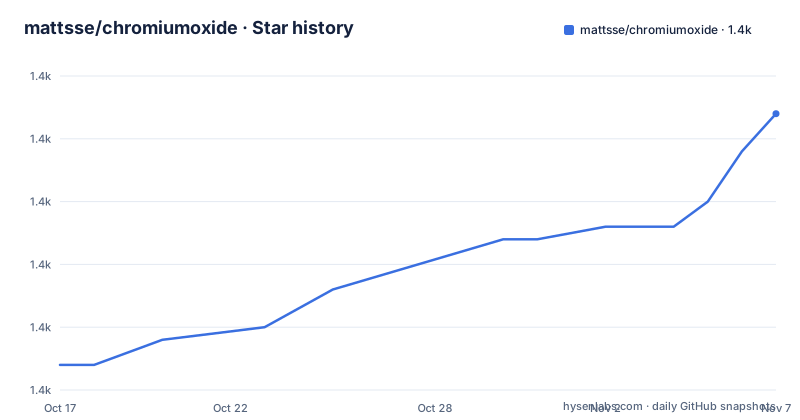
- mattsse/chromiumoxide1,432 ★ · +20
| Repository | 2026-10-17 | 2026-11-07 |
|---|---|---|
| mattsse/chromiumoxide | 1.4k | 1.4k |
20 Stars in the last 21 days, measured from the daily GitHub snapshot. Compare with other projects
Editorial analysis
The wrapper layer sits on top of generated protocol types
chromiumoxide provides a high level, async API to control Chrome or Chromium over the DevTools Protocol, with support for all types of the protocol. It can launch a headless or a full Chrome or Chromium instance, or connect to one that is already running.
The interesting part is how much of the API is hand written. The README says the current API still lacks some functionality, and then explains why that is not a blocker: the Page::execute function allows sending all chromiumoxide_types::Command types. Most Element and Page functions are simplified command constructions and combinations, and the README shows what one of those looks like.
pub async fn pdf(&self, params: PrintToPdfParams) -> Result<Vec<u8>> {
    let res = self.execute(params).await?;
    Ok(base64::decode(&res.data)?)
}
That is a deliberate design: a thin convenience layer over a complete typed surface. When a wrapper is missing, you write your own command wrapper rather than falling back to untyped JSON. The README invites pull requests for commands that deserve a dedicated function, which tells you where the project thinks the convenience layer should grow.
Four crates, and 60K lines of generated Rust
The repository is a workspace of four crates, and the split exists for a concrete reason. chromiumoxide_pdl contains a PDL parser, a Rust rewrite of a Python script from the Chromium source tree, plus a generator that turns the parsed PDL files into Rust code. chromiumoxide_cdp exists to invoke that generator during its build process and include the generated output before compiling itself. chromiumoxide_types holds the command and event types, and chromiumoxide_fetcher is the optional browser download component.
The README is blunt about the cost: the generated output is around 60K lines of Rust code, not counting proc macro expansions, so expect the compiling to take some time. The separation was done purely to keep that mass in its own crate.
The naming convention is consistent and worth learning. Each Chrome PDL domain becomes its own Rust module, with page domain types under chromiumoxide_cdp::cdp::browser_protocol::page and runtime domain types under chromiumoxide_cdp::cdp::js_protocol::runtime. For every command there is a params type with builder support and a corresponding returns type, and all commands implement the chromiumoxide_types::Command trait. All events are bundled into a single enum called CdpEvent.
The README also points at vanilla.aslushnikov.com as a way to browse the protocol types. That site shows command types as Method, and the project deliberately keeps the Command naming instead, which is a small but real difference from the CDP documentation you may have read elsewhere.
A first program: launch, navigate, type, wait, close
The usage example in the README is a complete program and it shows the two-part structure you need to understand. Launching returns a tuple, the browser handle and the handler that drives the websocket, and the handler has to be polled continuously in a spawned task, otherwise nothing progresses.
use futures::StreamExt;

use chromiumoxide::browser::{Browser, BrowserConfig};

#[tokio::main]
async fn main() -> Result<(), Box<dyn std::error::Error>> {
    // create a `Browser` that spawns a `chromium` process running with UI (`with_head()`, headless is default)
    // and the handler that drives the websocket etc.
    let (mut browser, mut handler) =
        Browser::launch(BrowserConfig::builder().with_head().build()?).await?;

    // spawn a new task that continuously polls the handler
    let handle = tokio::spawn(async move {
        while let Some(h) = handler.next().await {
            if h.is_err() {
                break;
            }
        }
    });

    // create a new browser page and navigate to the url
    let page = browser.new_page("https://en.wikipedia.org").await?;

    // find and click the search toggle button to reveal the search bar
    page.find_element(".search-toggle").await?.click().await?;

    // find the search bar type into the search field and hit `Enter`,
    // this triggers a new navigation to the search result page
    page.find_element("input[name='search']")
        .await?
        .click()
        .await?
        .type_str("Rust programming language")
        .await?
        .press_key("Enter")
        .await?;

    let html = page.wait_for_navigation().await?.content().await?;

    browser.close().await?;
    handle.await?;
    Ok(())
}
Note the with_head call, because headless is the default and with_head switches to a visible window. The interaction model is a chain of awaits on Element and Page methods, and the navigation is not implicit: wait_for_navigation is an explicit step after the action that triggers it. The examples directory carries the same idea in smaller pieces, with files for console logs, evaluate, evaluate-on-new-document, PDF, screenshots, incognito, interception, storage and cookies, an iframe workaround and a fetcher example.
The fetcher feature downloads a browser on some platforms
By default chromiumoxide tries to find an installed Chromium on the machine it runs on. That is the simplest deployment and it means the library has no opinion about where Chrome comes from, which is also a constraint: your CI image has to contain a browser.
The alternative is the fetcher feature, which can download and install a browser automatically for some platforms. It needs the rustls or the native-tls feature and the zip0 or zip8 feature to be enabled for the download to work.
use std::path::Path;

use futures::StreamExt;
use chromiumoxide::browser::{BrowserConfig};
use chromiumoxide::fetcher::{BrowserFetcher, BrowserFetcherOptions};

#[tokio::main]
async fn main() -> Result<(), Box<dyn std::error::Error>> {
    let download_path = Path::new("./download");
    tokio::fs::create_dir_all(&download_path).await?;
    let fetcher = BrowserFetcher::new(
        BrowserFetcherOptions::builder()
            .with_path(&download_path)
            .build()?,
    );
    let info = fetcher.fetch().await?;

    let config = BrowserConfig::builder()
        .chrome_executable(info.executable_path)
        .build()?,
}
The fetcher crate is an optional dependency in the manifest, gated behind the fetcher feature, with rustls and native-tls as separate feature flags that map onto the fetcher crate's own TLS backends, and the zip features alongside them. The result of fetch gives you an executable path, which you then hand to BrowserConfig through chrome_executable, so the fetcher and the launcher are separate concerns and you can mix them.
The phrase for some platforms is the one to hold on to. The fetcher is not a universal solution, and the exact set of supported platforms is not spelled out in the README.
A tokio-only runtime, and a language setting that must be English
Two constraints deserve their own attention because both fail in ways that are easy to misdiagnose.
The first is the runtime. The README states that chromiumoxide only supports the tokio runtime, with no option to run on async-std or any other executor. The manifest confirms it, with tokio pulled in with the rt, rt-multi-thread, time, fs, macros and process features, and the entry point in the example carries the #[tokio::main] attribute. Everything is async, and everything is async on tokio's terms.
The second is the browser language, and it is the sort of detail that saves an afternoon. The troubleshooting section says a new Chromium instance is being launched but then times out, and the answer is to check that the Chromium language settings are set to English, because chromiumoxide parses the debugging port from the Chromium process output and that parsing is limited to English. A browser configured in another language produces output the library cannot read, and the symptom is a launch timeout with no useful error.
There is one known issue with the generated code as well. The Rust files generated for the PDL files do not compile when support for experimental types is manually turned off with the CDP_NO_EXPERIMENTAL environment variable, because some experimental PDL types in the pdl files themselves are not marked as experimental. So that environment variable is not a safe way to slim the build.
Dual licensing, a 0.x version line, and what the alternatives are
The licence is the standard dual option, Apache License 2.0 or the MIT licence, with both files, LICENSE-APACHE and LICENSE-MIT, in the repository root and the manifest spelling it as MIT OR Apache-2.0. That is the permissive pairing, and the choice between the two matters only if you are re-licensing a derived work, where Apache-2.0 adds an explicit patent grant. This article does not give legal advice on which to pick.
The version line is worth watching. The crate version is 0.9.1, the releases are v0.9.1 on 2026-02-25, v0.9.0 on 2026-02-20 and v0.8.0 on 2025-11-28, and the last push to the main branch was on 2026-04-03. A crate below 1.0 in the Rust ecosystem is conventionally understood as not having a stable API guarantee, and the README itself says the API still lacks some functionality, so pin the exact version in a lockfile rather than tracking a floating minor.
The manifest also names the ecosystem position. The rust-version is 1.85 and the edition is 2024, so a recent toolchain is a hard requirement, and the keywords list puppeteer and automation alongside chrome, which tells you the category of tool this is competing in. The references section points at chromedp and at a rust-headless project, both of which target the same protocol from other stacks.
Editorial conclusion
Adopt chromiumoxide when your stack is Rust and you need a browser under test, since the protocol layer is generated from the Chrome PDL files, every command has a typed params and returns pair, and Page::execute gives you an escape hatch for anything the wrapper does not cover. Do not adopt it if your team is on Node, where an existing Puppeteer style tool is the smaller move, or if you need a browser on demand without maintaining a Chrome install, since the fetcher only works on some platforms and needs extra features enabled. Before you start, confirm the machine has a Chrome or Chromium binary, set the browser language to English because the library parses the debugging port from process output, and budget for the first build, which compiles tens of thousands of lines of generated code.
Frequently asked questions
What runtime does chromiumoxide require?
The README states that chromiumoxide only supports the tokio runtime. The crate depends on tokio with the rt, rt-multi-thread, time, fs, macros and process features, and the example program is built around the #[tokio::main] attribute.
How do I use a CDP command that chromiumoxide does not wrap?
The Page::execute function accepts all chromiumoxide_types::Command types, so you can send a protocol command directly and write your own wrapper for it. The README notes that most Element and Page functions are simplified command constructions built on that.
Can chromiumoxide download Chrome for me?
There is a fetcher feature that can download and install a browser automatically for some platforms. You need to enable either the rustls or the native-tls feature plus the zip0 or zip8 feature, then use BrowserFetcher and pass the resulting executable path to BrowserConfig.
Why does launching a browser time out in chromiumoxide?
The troubleshooting section says to check that your Chromium language settings are set to English, because chromiumoxide parses the debugging port from the Chromium process output and that parsing is limited to English.
Official sources
Add this badge to your README
If you maintain this project, the badge below links readers to this analysis and shows its maintenance status from the daily GitHub snapshot. Paste the markdown into your README; add ?metric=license or ?metric=stars to the image URL for a different field.

[](https://hysenlabs.com/projects/mattsse-chromiumoxide)Star history chart for your README
[](https://hysenlabs.com/projects/mattsse-chromiumoxide)Was this useful?