ttyper: a terminal typing test you can point at your own word list
Terminal-based typing test.
At a glance
- What is it?
- ttyper is an MIT-licensed Rust terminal typing test built with Ratatui, shipped with 34 language word lists including programming language keywords, configurable down to individual colours, and usable against a plain text file you supply.
- Who is it for?
- ttyper fits a developer who wants a typing test in the terminal rather than in a browser tab, who wants to practise the keywords of the language they actually write, and who wants to feed it their own prose. It does not fit someone who wants a curriculum, a spaced repetition schedule or progress tracking across sessions, since the tool measures a single run and then stops.
- Can I use it commercially?
- Yes. MIT is a permissive licence: you can use, modify and sell software built on it, as long as you keep its copyright and licence notices.
- Is it still maintained?
- Yes. The repository last received commits 10 days ago.
- What is it written in?
- Mainly Rust, according to GitHub's language statistics.
Answers come from the project's GitHub data, last synced on October 23, 2026, and from our analysis. They are not legal advice.
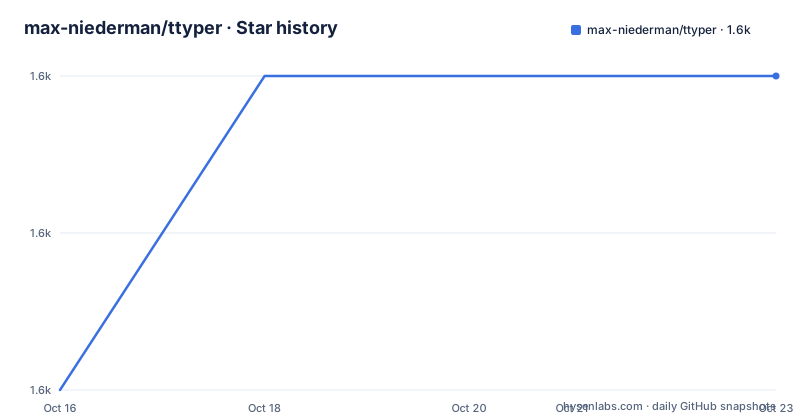
Star history
- max-niederman/ttyper1,607 ★ · +2
| Repository | 2026-10-16 | 2026-10-23 |
|---|---|---|
| max-niederman/ttyper | 1.6k | 1.6k |
2 Stars in the last 7 days, measured from the daily GitHub snapshot. Compare with other projects
Editorial analysis
A typing test that does not need a browser
ttyper is a terminal-based typing test built with Rust and Ratatui, and it is distributed as a single binary with no runtime dependencies beyond a terminal.
That is the whole design idea, and it matters more than it might sound. Most typing practice tools live in a browser tab, which means they compete for attention with the work you are doing, and they want an account, a subscription or at least a page load. A typing test that runs in the terminal next to your editor fits into an existing workflow instead of interrupting it.
The technology choices are plain. The manifest lists clap with the derive feature for argument parsing, crossterm for terminal handling, ratatui for the interface, rand for word selection, toml and serde for configuration, dirs for locating the config directory across platforms, and rust-embed for bundling the language word lists into the binary. The licence is MIT and the package version in the manifest is 1.6.0, matching the v1.6.0 tag from 2024-08-12.
The repository itself is small: `src/`, `resources/` holding a recording of the interface, a `.vscode/` directory, a Cargo.lock and a Cargo.toml. There is a Discord server for contributors and for people who want to ask about an issue.
The last push was on 2026-10-13, so the code is being worked on even though the newest release tag is from 2024.
Installing from cargo, a package manager, or a release binary
There are four documented installation routes, and they cover the usual situations.
From cargo, which works anywhere you have a Rust toolchain:
cargo install ttyperFrom the system package manager on Arch Linux:
pacman -S ttyperFrom Nix, with a note for NixOS users:
nix-env -iA nixpkgs.ttyper # or nixos.ttyper on NixOSAnd from Scoop on Windows:
scoop install ttyperPre-built binaries are also available for most architectures on the GitHub releases page, and the README asks you to open an issue if your system is not supported.
The distribution reach is worth noting, because it is a hint about who uses the tool. A program that is packaged in Arch, Nix and Scoop, and that ships release binaries, is being used by people who already manage their tools as packages rather than downloading a script.
Once installed, the interface is a Rust program using clap for the command line, which is why the help output is a clean, well-organised listing rather than a wall of usage text.
The flags that shape a test
The usage block is the best description of what the tool does, and it is compact.
The positional argument is `contents`, and the word count option defaults to 50 words with `-w`. The language option is `-l`, and `--language-file` points at a plain text file. There is a config file option, `-c`.
The flags that matter for how a test feels are the three that change the rules. `--no-backtrack` disables backtracking to completed words, which means once you have finished a word you cannot go back and fix a mistake in it. `--no-backspace` disables the backspace key entirely, so a typo cannot be corrected at all. `--sudden-death` restarts the test on the first error. Between them they turn a typing test into something closer to a typing exam, which is a different tool from the default forgiving mode.
`--list-languages` prints the installed languages, `--debug` turns on debug output, and `-h` and `-V` cover help and version.
The examples table shows the intended shapes. Running `ttyper` alone gives 50 of the 200 most common English words. `ttyper -w 100` gives 100 of the same list. `ttyper -w 100 -l english1000` switches to the 1000 word list. `ttyper --language-file lang` uses 50 random words from a file you provide, and `ttyper text.txt` uses the contents of a text file split at newlines.
34 word lists, including programming language keywords
The language list is where ttyper differs from a generic typing test, and it is the most interesting thing about the tool.
There are 34 built-in lists, and they fall into two groups. The natural language ones are word frequency lists: 100, 200 and 1000 most common English words, advanced English, 50 pirate speak English words, French at 100, 200 and 1000, German at 207, 1000 and 10000, Norwegian at 200, Portuguese at 100, 200, 1000 plus an advanced list, Spanish at 100, Ukrainian at 100, Russian at 100, 1000 and 10000, and Thai at 4000.
The other group is programming languages, and these are not prose samples but the keywords of each language. There is `c`, `csharp`, `go`, `html`, `java`, `javascript`, `php`, `python`, `qt`, `ruby`, `rust` and `sql`.
That is a genuinely different proposition. A developer who spends their day typing `foreach`, `namespace` and `nullptr` in one language, then `func` and `:=` in another, is training a specific skill that a paragraph of English prose will never touch. And the English lists are frequency-weighted, so the common words come up far more often than in prose samples.
The cost of the built-in lists being fixed is that you cannot practise your own vocabulary without a file, which is what the next point is about.
Your own word list, and where the config lives
Adding a language is a file with a word on each line, placed in the `language` directory of the config folder.
The config directory is platform specific and the README gives all three paths. On Linux it is `$HOME/.config/ttyper`, on Windows it is `C:\Users\user\AppData\Roaming\ttyper`, and on macOS it is `$HOME/Library/Application Support/ttyper`. The `dirs` crate in the manifest is what finds these without hardcoding them.
So a custom list is a text file with one word per line, dropped into that directory, and then referenced with `--language-file`. The example `ttyper text.txt` variant, which splits a file at newlines, uses the same idea, and it means the same file format serves both a word list and a paragraph of prose. Practising a commit message format, a config file syntax or a passage from a book all work through the same path.
The full configuration lives in a `config.toml` in the same directory, and the README ships the default file with the values commented.
What the configuration controls is presentation rather than behaviour. There is a `default_language` setting, which is the language used when one is not specified on the command line, and a `[theme]` table with a default style, the title text style, the input box border and the prompt box border, a border type that is rounded by default, and separate styles for correctly typed words, incorrectly typed words and untyped words, plus three more for the current word's correctly typed, incorrectly typed and untyped letters, and a cursor character style.
The results screen has its own set: overview text and border, worst keys text and border, the chart and its x and y axis labels, and the restart and quit prompt. The custom style format is described further in the README's style format section.
Where the tool stops
ttyper is a measurement instrument and nothing more, and the boundary is worth being clear about.
There is no curriculum and no progression. The tool gives you a result for one run, and the results screen shows an overview, a chart of your typing over the test, and a list of your worst keys, which is the diagnostically useful part. It does not remember what you scored last week, so there is no trend, no streak and no spaced repetition schedule. If you want to see improvement you have to keep the output somewhere else yourself.
There is also no account, no server and no telemetry in the dependency list or the documentation, which is consistent with a self-contained binary but also means there is no leaderboard and no community comparison, beyond the Discord server for contributors.
The language coverage is a second limit, and a mildly ironic one for a tool written in Rust. The built-in lists cover 12 programming languages and a set of natural languages, but there is no way to add a language without writing a word-per-line file, and there is no built-in list for Rust idioms beyond the `rust` keyword list, which is not the same thing as practising real Rust code.
Finally, the interface is terminal-only. The recording in `resources/` is the extent of the visual documentation, and a Ratatui interface cannot be used over a plain serial line or in a terminal without the usual colour and cursor capabilities.
Editorial conclusion
ttyper fits a developer who wants a typing test in the terminal rather than in a browser tab, who wants to practise the keywords of the language they actually write, and who wants to feed it their own prose. It does not fit someone who wants a curriculum, a spaced repetition schedule or progress tracking across sessions, since the tool measures a single run and then stops. Before adopting it, run `ttyper --list-languages` to see what is installed, drop a word-per-line file into the `language` directory of your config folder to add your own, and set `default_language` in `config.toml` so you do not have to pass a flag every time.
Frequently asked questions
What is ttyper?
It is a terminal-based typing test built with Rust and Ratatui, distributed as a single binary on crates.io and packaged for Arch Linux, Nix and Scoop. It is MIT licensed.
How do I install ttyper?
With `cargo install ttyper`, or `pacman -S ttyper` on Arch, `nix-env -iA nixpkgs.ttyper` on Nix, `scoop install ttyper` on Windows, or from the pre-built binaries on the GitHub releases page.
Which languages does ttyper support?
34 built-in lists, covering frequency word lists for English, French, German, Norwegian, Portuguese, Spanish, Ukrainian, Russian and Thai, plus programming language keyword lists for C, C#, Go, HTML, Java, JavaScript, PHP, Python, Qt, Ruby, Rust and SQL.
Can I practise my own words with ttyper?
Yes. Put a file with one word per line into the `language` directory of the config folder, which is `$HOME/.config/ttyper` on Linux, and pass it with `--language-file`. Passing a text file as an argument types its contents split at newlines.
Which flags make ttyper harder?
`--no-backtrack` disables backtracking to completed words, `--no-backspace` disables the backspace key, and `--sudden-death` restarts the test on the first error. The word count is set with `-w` and defaults to 50.
Official sources
Add this badge to your README
If you maintain this project, the badge below links readers to this analysis and shows its maintenance status from the daily GitHub snapshot. Paste the markdown into your README; add ?metric=license or ?metric=stars to the image URL for a different field.

[](https://hysenlabs.com/projects/max-niederman-ttyper)Star history chart for your README
[](https://hysenlabs.com/projects/max-niederman-ttyper)Was this useful?