Bartinter for Dynamic iOS Status Bar Colors
Dynamically changes status bar style depending on content behind it
At a glance
- What is it?
- Bartinter is an MIT-licensed Swift library that changes status bar appearance according to the content behind it. Its default setup uses method swizzling, while a documented opt-out requires apps to handle status bar updates explicitly.
- Who is it for?
- Bartinter is appropriate for UIKit applications that want automatic status bar style changes with limited integration work. It is a poor fit for developers who reject runtime method swizzling or need an update policy that the repository does not document.
- Can I use it commercially?
- Yes. MIT is a permissive licence: you can use, modify and sell software built on it, as long as you keep its copyright and licence notices.
- Is it still maintained?
- Yes. The repository last received commits 130 days ago.
- What is it written in?
- Mainly Swift, according to GitHub's language statistics.
Answers come from the project's GitHub data, last synced on November 6, 2026, and from our analysis. They are not legal advice.
Star history
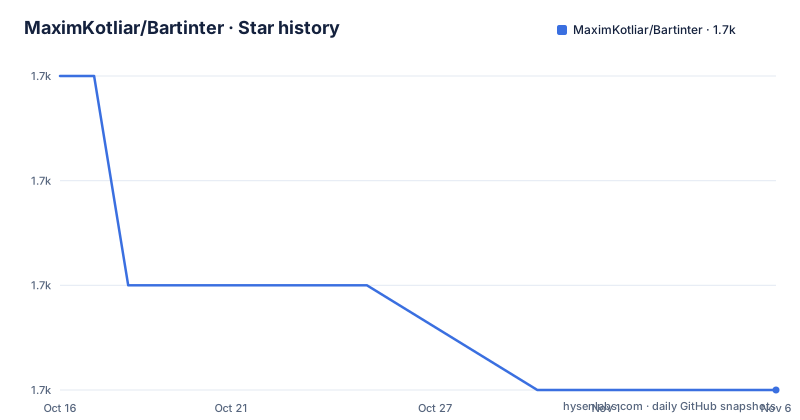
- MaximKotliar/Bartinter1,696 ★ · -3
| Repository | 2026-10-16 | 2026-11-06 |
|---|---|---|
| MaximKotliar/Bartinter | 1.7k | 1.7k |
-3 Stars in the last 21 days, measured from the daily GitHub snapshot. Compare with other projects
Editorial analysis
Bartinter's Content-Dependent Status Bar Problem
Bartinter addresses a specific UIKit presentation problem: the status bar can become difficult to read when scrolling content moves beneath it. The repository describes Bartinter as a status bar appearance manager that selects a readable color based on the content behind the bar. This is most relevant to apps built around scrolling views, but the README also raises the broader question of when a view controller should refresh its status bar style.
The project is aimed at iOS developers working in Swift with UIKit and `UIViewController`. It is not described as a cross-platform status bar library, a macOS application API, or a general interface theming system. Its scope is narrow, which makes the integration requirements easier to assess. The principal design decision is also visible from the start: Bartinter swizzles a couple of methods by default to make status bar updates automatic.
That default matters because method swizzling changes runtime method behavior rather than requiring every view controller to implement a refresh delegate explicitly. Developers who accept that model can use the shortest documented setup. Developers who do not accept it can set `Bartinter.isSwizzlingEnabled = false` and connect the relevant view controllers themselves.
Bartinter's Automatic Update Mechanism
Bartinter's documented default flow depends on UIKit status bar appearance settings. The application must set `UIViewControllerBasedStatusBarAppearance` to `YES` in `Info.plist`, then set `updatesStatusBarAppearanceAutomatically = true` on the view controller. With those controls enabled, the library's swizzling behavior is intended to make refresh handling convenient.
The README points to `UIKitSwizzling.swift` as the implementation reference for the methods Bartinter changes. It does not enumerate each swizzled selector in the text provided, so an adopter should inspect that source file before accepting the runtime behavior. The relevant boundary is clear even without a selector list: the default mode deliberately modifies UIKit method behavior for convenience.
Bartinter also exposes an opt-out for applications that cannot or will not use swizzling. In that mode, a view controller returns a status bar updater through `childViewControllerForStatusBarStyle`, and the owning screen decides when a refresh should occur. A scrolling view can call that updater from its scroll callback. This makes update timing application-owned rather than automatic.
Installing Bartinter Through CocoaPods
The README documents installation through CocoaPods. Add the `Bartinter` pod to the Podfile, then resolve the installed dependencies. The documentation does not provide a Swift Package Manager installation example, even though the repository contains `Package.swift`, so an SPM integration should not be inferred from the README alone.
Add this dependency to the Podfile:
pod 'Bartinter'Then install the pod dependencies:
pod installThe repository includes `Bartinter.xcworkspace`, which is consistent with a CocoaPods-based Xcode workflow, but the README does not describe the remaining workspace-opening steps. The first documented configuration work happens in the app target's `Info.plist` and in the relevant `UIViewController` subclass.
Configuring the First UIKit Screen
Set `UIViewControllerBasedStatusBarAppearance` to `YES` in the application's `Info.plist`. This is an application-level requirement in the Bartinter documentation. Without the controller-based mode described by the project, the library's documented automatic status bar path is not configured.
For the first screen, set `updatesStatusBarAppearanceAutomatically = true` on its `UIViewController`:
updatesStatusBarAppearanceAutomatically = trueThe README then says that this is sufficient for the default setup. There is no documented call that manually supplies a light or dark style in that mode. The status bar update is instead connected to the library's automatic behavior and the content-aware mechanism described in the repository.
This first-use path is small, but it depends on accepting the swizzling default. An application that disables swizzling needs additional code and must identify the events that require a status bar refresh.
Disabling UIKitSwizzling in Bartinter
Bartinter provides a documented escape hatch for applications that reject method swizzling. Disable it with the following setting:
Bartinter.isSwizzlingEnabled = falseWithout swizzling, the view controller must provide `statusBarUpdater` through `childViewControllerForStatusBarStyle`. The README gives this override:
override var childViewControllerForStatusBarStyle: UIViewController? {
    return statusBarUpdater
}
The updater still needs an explicit refresh trigger. For a table view, the README suggests connecting refresh work to table view scrolling:
func scrollViewDidScroll(_ scrollView: UIScrollView) {
    statusBarUpdater?.refreshStatusBarStyle()
}
This mode gives the app direct control over when status bar evaluation occurs. That control is useful when automatic swizzled updates are inappropriate, but it moves integration work into the view controller and its event handlers. The README calls the scroll example illustrative, which indicates that applications may need other refresh events based on their own interfaces.
Bartinter Compared with Manual UIKit Status Bar Control
The clearest alternative documented by the repository is manual UIKit status bar control without Bartinter. A view controller can implement `childViewControllerForStatusBarStyle`, provide a style-owning child, and trigger appearance changes through the app's scroll callbacks. The difference is not the goal, since both approaches seek a readable status bar, but the mechanism and maintenance boundary.
Bartinter's default mode uses method swizzling to reduce the amount of explicit wiring. Its opt-out mode still retains the library's updater abstraction, with the application responsible for the child relationship and refresh timing. A manual UIKit implementation avoids the swizzled behavior and can omit Bartinter's updater layer, but the repository does not provide such a complete standalone example, so the exact implementation burden cannot be quantified here.
This choice is not ideal for every team. Bartinter is convenient when automatic behavior is acceptable. Manual control is the better fit when swizzling is prohibited by project policy, when update points are known and stable, or when the application needs complete control over the view controller relationship.
Bartinter's Maintenance, Licensing, and Release Boundaries
The repository is not archived, and its last push was on 2026-06-30. It also has no GitHub releases. That means there is no release history on which to base a version-by-version upgrade policy, and the README does not document a migration process for replacing one Bartinter release with another. An adopter should verify compatibility through the actual dependency files and Xcode build rather than assume a documented release cadence.
Bartinter is distributed under the MIT license. The repository includes a `LICENSE` file and the README also carries an MIT license badge. The project is primarily written in Swift and its documented integration is through CocoaPods, so the upgrade surface is concentrated in the dependency declaration, the `Info.plist` setting, view controller configuration, and any app code that interacts with `statusBarUpdater`.
The most important maintenance review is `UIKitSwizzling.swift`, especially because the default behavior depends on it. Bartinter does not hide that concern, but it also does not document a rollback procedure in the README. The practical cost of adopting it is therefore tied to accepting its method-level integration and testing status bar behavior across the app's scrolling and navigation flows.
Editorial conclusion
Bartinter is appropriate for UIKit applications that want automatic status bar style changes with limited integration work. It is a poor fit for developers who reject runtime method swizzling or need an update policy that the repository does not document. Before adoption, inspect `UIKitSwizzling.swift`, confirm that automatic status bar appearance is acceptable for the app, and verify how updates behave in every screen that can place contrasting content behind the bar.
Frequently asked questions
How do I install Bartinter in an iOS project?
The README instructs developers to add `pod 'Bartinter'` to the Podfile and run `pod install`. It documents CocoaPods rather than a Swift Package Manager setup.
Does Bartinter require method swizzling?
Bartinter swizzles a couple of methods by default, with the implementation referenced in `UIKitSwizzling.swift`. Developers can set `Bartinter.isSwizzlingEnabled = false`, but they must then provide the documented child view controller relationship and trigger refreshes manually.
What configuration does Bartinter need for automatic status bar updates?
The README says to set `UIViewControllerBasedStatusBarAppearance` to `YES` in `Info.plist` and set `updatesStatusBarAppearanceAutomatically = true` on the view controller. The project does not document any additional automatic-mode call.
How can I refresh Bartinter when a scroll view scrolls?
When swizzling is disabled, Bartinter documents calling `statusBarUpdater?.refreshStatusBarStyle()` from `scrollViewDidScroll(_:)`. The application must first expose the updater through `childViewControllerForStatusBarStyle`.
What license does Bartinter use?
The repository identifies Bartinter as MIT-licensed and includes a `LICENSE` file. The README also carries an MIT license badge.
Official sources
Add this badge to your README
If you maintain this project, the badge below links readers to this analysis and shows its maintenance status from the daily GitHub snapshot. Paste the markdown into your README; add ?metric=license or ?metric=stars to the image URL for a different field.

[](https://hysenlabs.com/projects/maximkotliar-bartinter)Star history chart for your README
[](https://hysenlabs.com/projects/maximkotliar-bartinter)Was this useful?