pi-webrtc and the case for one binary on the edge
Low-latency hardware-accelerated WebRTC video streaming and remote control for Raspberry Pi & NVIDIA Jetson
At a glance
- What is it?
- pi-webrtc is a single C++ binary that streams a Raspberry Pi or Jetson camera to a browser over WebRTC and carries control messages back, with hardware H.264 or AV1 encoding and three interchangeable signaling paths. Its value is the short path from sensor to browser, and its cost is a small community around a young release history and a sponsored feature track.
- Who is it for?
- pi-webrtc fits a robotics or embedded team that needs to see a device in a browser with a gamepad or telemetry on the same connection, and it does not fit a team that needs a managed SFU, a supported protocol implementation or a release history with a long track record. Before adopting it, run the binary on your own board with --use-whep and confirm the frame rate and latency on your network, then read the Sponsors page, since some releases sit behind funding.
- Can I use it commercially?
- Yes. Apache-2.0 is a permissive licence: you can use, modify and sell software built on it, as long as you keep its copyright and licence notices.
- Is it still maintained?
- Yes. The repository last received commits 2 days ago.
- What is it written in?
- Mainly C++, according to GitHub's language statistics.
Answers come from the project's GitHub data, last synced on November 7, 2026, and from our analysis. They are not legal advice.
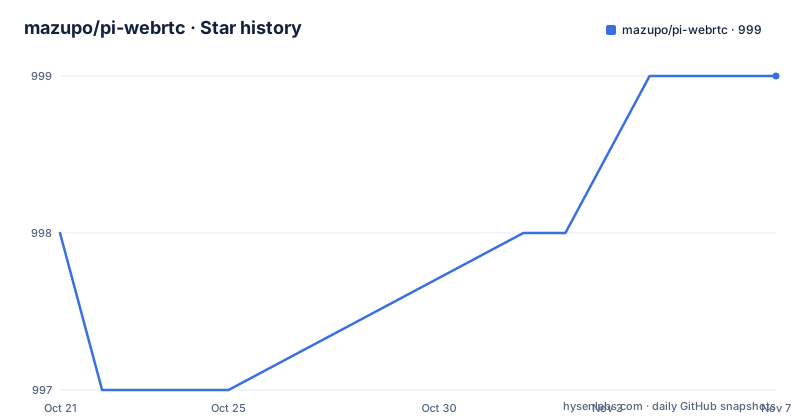
Star history
- mazupo/pi-webrtc999 ★ · +1
| Repository | 2026-10-21 | 2026-11-07 |
|---|---|---|
| mazupo/pi-webrtc | 998 | 999 |
1 Stars in the last 17 days, measured from the daily GitHub snapshot. Compare with other projects
Editorial analysis
A binary that streams out and listens back
pi-webrtc is a single binary that streams a camera from a Raspberry Pi or Jetson to a browser over WebRTC and carries control messages back to the device. That pairing is the point. A camera stream on its own is a solved problem with plenty of solutions, but a stream plus a control channel on the same connection is what turns a camera into a teleoperation device, and doing both without a server component on the device side is a design constraint that shapes the whole project.
The README states the project delivers sub-100ms latency on a LAN and works remotely over WiFi, LTE or 5G with no public IP. That last part is the interesting claim, because it means the connection setup does not require inbound connectivity to the device, which is what makes the scheme workable on a home connection or a mobile network.
The implementation is C++20 built on libwebrtc, with the README badge pointing at branch 7727 of the Chromium WebRTC tree, version m147.7727. Using libwebrtc means the ICE, DTLS and SRTP machinery underneath is the same stack a browser uses, which is why a stock browser can be the viewer with no plugin.
The audience is narrow and clear: embedded and robotics developers who already have a Pi or a Jetson with a camera attached and want a browser tab showing the device plus a way to send it commands. The feature list names four things: low latency video with NAT traversal and congestion control, remote control with commands and telemetry over WebRTC DataChannels, hardware acceleration for H.264 and AV1 on supported devices, and RTSP input so an existing IP camera can gain WebRTC and DataChannels.
Three signaling paths you can run side by side
Signaling is where most WebRTC projects quietly pick one path and lose the others. pi-webrtc documents three, and the README states that several signaling options can run at the same time, which is an unusual degree of flexibility.
WHEP is the simplest. The table describes it as playback with any standard WebRTC player, and the quick start uses it with the --use-whep flag, pointing a browser at a plain HTTP URL on the device. No server component, no room to join. The tradeoff is that WHEP alone gives you video and no way to send commands back.
MQTT is the peer-to-peer option with device control, documented separately under docs/signaling/mqtt.md. That fits deployments where a broker already exists, and it keeps the device reachable from anywhere without a public IP, which matches the README's claim about working over cellular links.
SFU is the many-viewer case. The table points at LiveKit or Cloudflare Realtime as the SFU backends, so a fleet of browsers can watch one device. The cost of that path is that you now run an SFU service, and the project points you at someone else's rather than shipping one.
Mechanically the data flow is the standard WebRTC one with the device as the publisher: the signaling channel carries the offer and answer, WebRTC media flows peer to peer or to the SFU, and the DataChannel carries the control traffic in parallel. Because the DataChannel carries its own messages with their own reliability settings, control traffic can be tuned separately from the video, which is the right split for teleoperation.
Camera backends differ per board, encoders differ per chip
The hardware table is short and it is where most integration friction lives. On Raspberry Pi the camera backend is libcamera and hardware encoding is H.264 on supported models. On NVIDIA Jetson the backend is libargus and hardware encoding covers H.264 and AV1 on supported models. USB cameras over V4L2 work on both platforms, and RTSP streams work on both.
The phrase on supported models does real work in that table. A Pi without a hardware encoder in its SoC falls back to software, and the README does not say what that fallback costs in latency or frame rate, so anyone budgeting a control loop has to measure it on their own board.
The backend split is not cosmetic either. libcamera on a Pi is a camera pipeline stack with its own configuration, while libargus on Jetson is the Argus framework built on the camera stack, and the same binary has to drive both. That is the price of one binary across two very different embedded ecosystems, and it is why the quick start names Raspberry Pi OS Trixie on 64-bit as the reference environment for the Pi path and ships a separate guide for Jetson.
The RTSP input path deserves a mention of its own. It means the project is not limited to a locally attached camera: point it at an existing IP camera and the device gains a WebRTC output and a DataChannel, which turns it into a gateway for hardware you already own.
Getting it running on a Raspberry Pi
The quick start assumes a Raspberry Pi running Raspberry Pi OS Trixie on 64-bit with a CSI camera. The runtime dependencies are ordinary system packages, and the installation copies a prebuilt archive from the releases page:
sudo apt update
sudo apt install libmosquitto1 pulseaudio libavformat61 libyaml-cpp0.8
The libmosquitto1 dependency is there for the MQTT signaling path, and the archive is named for the platform it targets:
wget https://github.com/mazupo/pi-webrtc/releases/latest/download/pi-webrtc_raspios-trixie-arm64.tar.gz
tar -xzf pi-webrtc_raspios-trixie-arm64.tar.gz
Then the binary starts, with the camera backend, a device identifier, no audio and WHEP signaling selected:
./pi-webrtc --camera=libcamera:0 --uid=my-pi --no-audio --use-whepThe result is a stream served over HTTP on the device. You open the web player at app.mazupo.com/whep, enter the device address as the WHEP URL, and connect:
http://<your-pi-ip>:8080Two details in that command line are worth noting. The --uid flag gives the device an identity, which matters for the MQTT path where the broker needs to know which device is which, and the --no-audio flag drops the audio stream, which is the right setting when the camera has no microphone or the bandwidth is scarce. Step by step guides exist for the Raspberry Pi, for the NVIDIA Jetson, and for watching from anywhere with MQTT, and the full documentation is published at mazupo.com/docs as well as in the docs/ directory of the repository.
The examples directory shows the intended integrations
The most revealing part of the repository layout is the examples/ directory, because it shows what the author expects people to build on top of the binary. Six scripts are listed: gamepad_socket.py, ros2_gamepad_teleop.py, ros2_image_to_v4l2.py, unix_socket_client.py, virtual_cam.py and yolo_cam.py.
Read together, they sketch a fairly specific workflow. A gamepad is bridged into the device over a socket, which fits the DataChannel control path since a gamepad is a stream of state changes rather than a file. ros2_gamepad_teleop.py and ros2_image_to_v4l2.py extend that idea to ROS 2, both for teleoperation and for pushing a processed image back out as a V4L2 device, which lets the robot stack treat the remote feed as a local camera. virtual_cam.py and yolo_cam.py sit on the other side, feeding a virtual camera device and a detection loop.
The unix_socket_client.py example suggests a fourth door into the control path, a local Unix socket rather than the network, which would be the way to control a device without exposing the DataChannel.
None of these scripts is described in the README itself, and the README does not document the DataChannel message format, so the examples are the reference rather than a specification. That distinction matters if you build a control protocol on top: the message schema that the Python examples assume is discoverable only by reading those files, and the project does not promise it stays stable.
What the README leaves unsaid, and the sponsor tier
The documentation is thorough on getting a stream running and thin on everything around it. The README does not state how authentication is handled on the WHEP URL, whether the port 8080 endpoint is protected by anything at all, how a TURN server is configured for networks where direct ICE connections fail, or what happens when a client disconnects mid session. Nor does it describe the config/ directory that sits at the repository root, or the scripts/ directory, or the proto/ directory that suggests the control messages are defined as protocol buffer schemas.
Two structural hints are worth noting. The presence of .gitmodules and an external/ directory indicates that libwebrtc and other third-party code are pulled in as submodules rather than vendored, so building from source is a heavier operation than the prebuilt archive suggests. The build system is CMake, and a .clang-format file at the root indicates the project enforces a specific style, which matters if you intend to send patches.
Funding is also part of the adoption picture. The README states that sponsors help fund continued development and receive access to additional releases, features, and documentation, with details under docs/sponsors.md. That is a two-tier distribution model: some artifacts sit behind sponsorship. It is not a defect, and it is a legitimate way to fund edge work, but anyone evaluating the project has to know that the full feature set is not necessarily available from the public releases.
On maintenance, the repository is not archived and the last push was on 2026-10-12. The recent releases are v3.0.1 on 2026-09-16, v3.0.2 on 2026-09-28 and v3.1.0 on 2026-10-06, and the project has already moved to a 3.x version line, so pin a release rather than tracking main.
Editorial conclusion
pi-webrtc fits a robotics or embedded team that needs to see a device in a browser with a gamepad or telemetry on the same connection, and it does not fit a team that needs a managed SFU, a supported protocol implementation or a release history with a long track record. Before adopting it, run the binary on your own board with --use-whep and confirm the frame rate and latency on your network, then read the Sponsors page, since some releases sit behind funding.
Frequently asked questions
What hardware does pi-webrtc need?
A Raspberry Pi with Raspberry Pi OS Trixie on 64-bit and a CSI camera, or an NVIDIA Jetson. The camera backend is libcamera on the Pi and libargus on Jetson, with hardware H.264 encoding on supported Pi models and H.264 or AV1 on supported Jetson models. USB cameras over V4L2 and RTSP streams work on both platforms.
How do I view a pi-webrtc stream in my browser?
Start the binary with the --use-whep flag, then open app.mazupo.com/whep and enter the device address as the WHEP URL, in the form http://<your-pi-ip>:8080. WHEP playback works with any standard WebRTC player, and the device also listens on port 8080 for that HTTP entry point.
Can I send commands to the device while streaming?
Yes, commands and telemetry travel over WebRTC DataChannels alongside the video. The MQTT signaling path is described in the README as the peer-to-peer option with device control, and the examples directory includes gamepad_socket.py, unix_socket_client.py and ROS 2 teleoperation scripts that build on the control channel.
What license is pi-webrtc released under?
The project is released under the Apache License 2.0, with the license text in the LICENSE file and third-party notices in the NOTICE file. The code depends on libwebrtc, and the repository carries .gitmodules and an external/ directory for third-party sources.
Does pi-webrtc need a public IP or a server?
The README states that it works remotely over WiFi, LTE or 5G with no public IP, using WebRTC NAT traversal and congestion control. For many viewers at once you additionally need an SFU, and the project points at LiveKit or Cloudflare Realtime for that.
Official sources
Add this badge to your README
If you maintain this project, the badge below links readers to this analysis and shows its maintenance status from the daily GitHub snapshot. Paste the markdown into your README; add ?metric=license or ?metric=stars to the image URL for a different field.

[](https://hysenlabs.com/projects/mazupo-pi-webrtc)Star history chart for your README
[](https://hysenlabs.com/projects/mazupo-pi-webrtc)Was this useful?