mdn/webextensions-examples: a working reference for the WebExtensions API
Example Firefox add-ons created using the WebExtensions API
At a glance
- What is it?
- Mozilla's example Firefox add-ons repository is a catalogue of small, installable extensions rather than a framework. It is useful when you want to see a specific API wired up end to end, and it is not a starter template you can build a product on.
- Who is it for?
- Adopt this repository as a reading and reference source if you are writing a Firefox extension and need to see a specific API used in a complete, loadable add-on, or if you want a working example to copy a manifest from. Do not adopt it as a project skeleton: there is no scaffolding command, no release process and no upgrade path, and the examples are tested in Firefox only.
- Can I use it commercially?
- Yes, with conditions. MPL-2.0 is a weak copyleft licence: you can use it inside commercial and closed-source software, but if you distribute changes to its own files, you must publish those changes under the same licence.
- Is it still maintained?
- Yes. The repository last received commits 5 days ago.
- What is it written in?
- Mainly JavaScript, according to GitHub's language statistics.
Answers come from the project's GitHub data, last synced on November 13, 2026, and from our analysis. They are not legal advice.
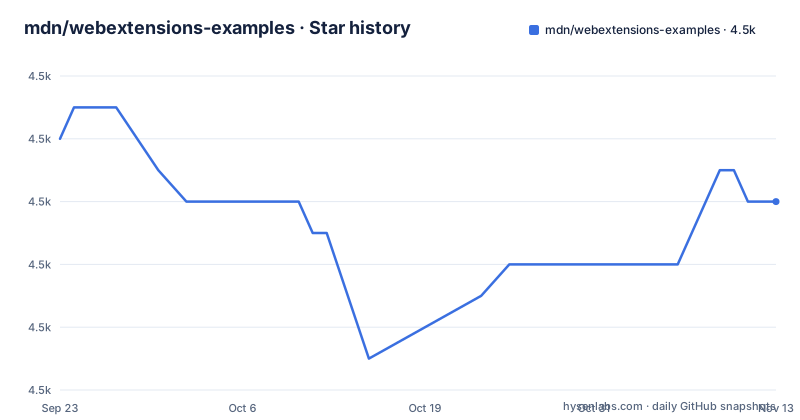
Star history
- mdn/webextensions-examples4,476 ★ · -2
| Repository | 2026-09-23 | 2026-11-13 |
|---|---|---|
| mdn/webextensions-examples | 4.5k | 4.5k |
-2 Stars in the last 51 days, measured from the daily GitHub snapshot. Compare with other projects
Editorial analysis
What mdn/webextensions-examples actually is
This repository is a collection of small, complete, installable Firefox add-ons. Each one lives in its own top-level folder with a manifest.json and a short README describing what it does. The README states the goal plainly: the examples show how to use the WebExtensions APIs and can be used as a starting point. That is a narrower claim than it first appears. There is no shared runtime, no library to import, and no build step that ties the folders together.
The audience is developers learning the WebExtensions API. If you already know how a content script, a background page or a context menu item is declared, most of these folders will tell you little you did not know. If you are trying to work out how the declarativeNetRequest rules are shaped, or how a devtools panel is registered, a folder that does exactly that is faster than reading reference documentation. The folder names are unusually literal: dnr-block-only, dnr-dynamic-with-options, dnr-redirect-url, devtools-panels, native-messaging, notify-link-clicks-i18n. You can guess the contents from the directory listing, which is the point.
How an example is structured and what the browser does with it
Every example follows the same shape. A manifest.json at the folder root declares permissions, the background or content scripts, and any browser action or page action. The JavaScript files next to it implement the behaviour. The README notes that a few examples rely on APIs available only in pre-release Firefox, and in those cases the example declares the minimum version it needs in the strict_min_version attribute of the browser_specific_settings key in manifest.json. That attribute is the mechanism that keeps an example from silently failing on an older build: the browser refuses to install it rather than loading a manifest that references APIs it does not have.
Asynchronous code in the examples uses the browser namespace and promises. The README is explicit that this choice is deliberate and that it has a consequence: the examples will not work in Chrome unless you add the polyfill Mozilla publishes at mozilla/webextension-polyfill. If you copy an example into a Chrome-targeted project without that polyfill, the promise-based calls will not behave as written. The repository also carries examples.json and examples.schema.json at the top level.
Installing an example and loading it in Firefox
The README gives two routes. The first is manual and needs no tooling. Open Firefox, load about:debugging, click Load Temporary Add-on, and select the manifest.json file inside the folder of the example you want. The extension is loaded for that session only.
The second route uses web-ext, which the README says to install and then run from inside the example's folder. This launches Firefox with the extension installed and adds development features such as automatic reloading.
cd beastify
web-ext run
After either route, the extension appears in Firefox and behaves as its README describes. Two restrictions apply to all of them. Some examples work only on specific domains or pages, and each example's README states those restrictions. None of the examples work in private browsing windows by default. If you load an example and nothing happens, the domain restriction or the private window is the first thing to check, not the code.
The repository also has a test script defined in package.json. Running npm test executes eslint over the tree and then node validate.js, which checks the examples metadata against its schema. That is a lint and metadata check, not a test suite for extension behaviour.
The Firefox-only assumption and what it costs you
The README says the examples are tested in Firefox and may work in other browsers if the browser supports the APIs used. That is a real limitation, not a formality. The browser namespace and promise-based APIs are the Firefox idiom; Chrome's extension platform uses a different namespace and largely callback-based APIs. The polyfill bridges the gap for many calls, but the README frames it as a condition for the examples working in Chrome at all, which means you cannot treat a copied example as portable by default.
Edge is Chromium-based, so the same namespace and callback considerations apply. Nothing in the repository's README claims the examples are validated on Edge, Opera or Chrome. If cross-browser is a requirement for your add-on, this repository gives you the Firefox-side code and leaves the porting work to you.
There is a second, quieter limitation. These are teaching examples, sized to demonstrate one API each. They are not hardened. There is no discussion in the README of input validation, permission minimisation beyond what each manifest declares, or update handling. Copying an example wholesale into a published extension means inheriting whatever shortcuts made it a good illustration.
How this compares with a scaffolding tool
The obvious alternative for a new extension is a generator that produces a project skeleton with a build step, a bundler and a packaging command. The difference in approach is stark. A generator hands you an empty but complete project and expects you to fill in the behaviour. This repository hands you complete behaviour and expects you to extract the part you need. Neither is better in the abstract; they answer different questions.
If your problem is "I do not know how to lay out an extension or which files to create", the repository is the wrong tool and a generator is the right one. If your problem is "I know the layout, but I cannot work out how the declarativeNetRequest redirect rule is supposed to be written", the generator gives you nothing and a folder named dnr-redirect-url gives you a working answer. The repository also has a maintenance property a generator does not: because each example is a standalone add-on, you can read one without understanding the rest. There is no abstraction layer between you and the API call.
Licence, maintenance and the cost of keeping up
The examples are made available under the Mozilla Public License 2.0, as the README states. The top-level package.json declares MIT for the repository's own tooling, which is a discrepancy worth noticing before you assume a single licence covers everything you copy. MPL-2.0 is file-level copyleft: the practical consequence is that modifications to MPL-covered files carry obligations, while you can combine them with files under other licences. That is a description of the licence text, not legal advice; if you are shipping a commercial add-on, have someone check how you are reusing the files.
On maintenance, the last push to the repository was on 2026-10-14. The repository is not archived. The repository has no published GitHub releases, which fits a project that ships examples rather than versioned artifacts: you consume it by cloning it, as the README's first instruction says. The upgrade cost is therefore low in the mechanical sense and non-zero in the conceptual sense. Nothing in the README promises API compatibility across Firefox versions, and the strict_min_version mechanism exists precisely because examples sometimes depend on APIs that only exist in pre-release builds. When Firefox changes an API, an example that used it can stop working, and the repository's own README does not document a deprecation policy or a rollback path for examples that break.
Who this repository is for, and the first thing to check
The repository is for someone who already has a reason to build a Firefox extension and needs to see one API used correctly in a complete, loadable add-on. It is also useful for reading a manifest.json that declares a permission you are unsure about, or for seeing how localisable strings are wired up, which notify-link-clicks-i18n demonstrates.
It is not for someone who wants a project template, a build pipeline, or cross-browser code they can ship unchanged. It is also not a source of security guidance. Before copying anything, open the example's own README and check its stated domain and page restrictions, then open its manifest.json and look for strict_min_version. Those two files tell you whether the example will even load in the Firefox version you are targeting. If your target is Chrome, Edge or Opera, plan for the polyfill or plan to rewrite the asynchronous calls.
Editorial conclusion
Adopt this repository as a reading and reference source if you are writing a Firefox extension and need to see a specific API used in a complete, loadable add-on, or if you want a working example to copy a manifest from. Do not adopt it as a project skeleton: there is no scaffolding command, no release process and no upgrade path, and the examples are tested in Firefox only. Before you rely on any single example, check its own README for domain and page restrictions, check the manifest.json for a strict_min_version key, and confirm the API you need is supported in the browser you are targeting.
Frequently asked questions
What is mdn/webextensions-examples?
It is a collection of simple, complete, installable Firefox add-ons built with the WebExtensions API, each in its own top-level folder with a short README. The README describes them as examples that show how to use the WebExtensions APIs and that can serve as a starting point.
How do I install an example from webextensions-examples?
Either load about:debugging in Firefox, click Load Temporary Add-on and select the manifest.json inside the example folder, or install web-ext and run web-ext run from inside that folder, which launches Firefox with the extension installed.
Do the webextensions-examples work in Chrome?
The README states the examples are tested in Firefox and will not work in Chrome unless you use the polyfill provided by Mozilla, because they all use the browser namespace and promises for asynchronous functions.
Why does an example declare strict_min_version in its manifest?
A few examples rely on APIs that are only available in pre-release versions of Firefox, and where that is the case the example declares the minimum version it needs in the strict_min_version attribute of the browser_specific_settings key.
What licence covers the examples in webextensions-examples?
The README says the examples are made available under the Mozilla Public License 2.0, while the repository's package.json declares MIT for its own tooling.
Official sources
Add this badge to your README
If you maintain this project, the badge below links readers to this analysis and shows its maintenance status from the daily GitHub snapshot. Paste the markdown into your README; add ?metric=license or ?metric=stars to the image URL for a different field.

[](https://hysenlabs.com/projects/mdn-webextensions-examples)Star history chart for your README
[](https://hysenlabs.com/projects/mdn-webextensions-examples)Was this useful?