Meshtastic Firmware: LoRa Mesh Networking for Off-Grid Text, Location, and Telemetry
The official firmware for Meshtastic, an open-source, off-grid mesh communication system.
At a glance
- What is it?
- Meshtastic firmware turns ESP32, nRF52, RP2040/RP2350, and Linux devices into nodes in a decentralized LoRa mesh. It delivers text, location, and telemetry without internet or cellular, but the project's rapid release cadence and long feature list demand careful version pinning.
- Who is it for?
- Adopt Meshtastic firmware if you need a decentralized, long-range, low-power mesh for text, location, and telemetry, and you are comfortable with a fast-moving project that often ships alpha and beta releases. Do not adopt it if you require a stable, long-term-support firmware for safety-critical or production deployments, or if you cannot tolerate breaking changes between versions.
- Can I use it commercially?
- Yes, with conditions. GPL-3.0 is a copyleft licence: if you distribute software that includes it, you must release that software's source code under the same licence. Running it internally without distributing it does not trigger that obligation.
- Is it still maintained?
- Yes. The repository received new commits within the last day.
- What is it written in?
- Mainly C++, according to GitHub's language statistics.
Answers come from the project's GitHub data, last synced on November 15, 2026, and from our analysis. They are not legal advice.
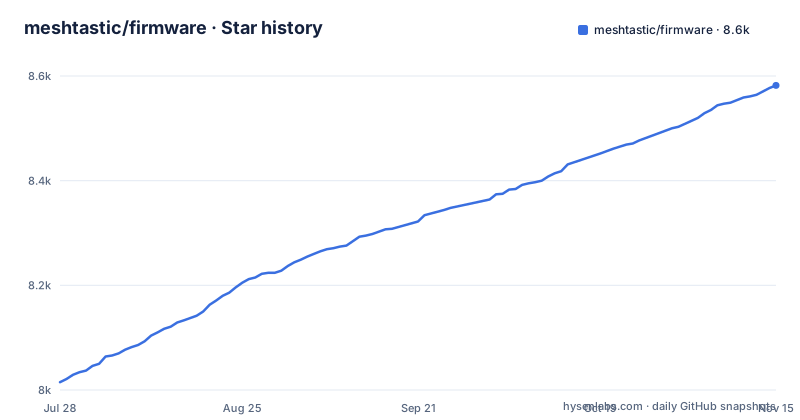
Star history
- meshtastic/firmware8,582 ★ · +567
| Repository | 2026-07-28 | 2026-11-15 |
|---|---|---|
| meshtastic/firmware | 8k | 8.6k |
567 Stars in the last 110 days, measured from the daily GitHub snapshot. Compare with other projects
Editorial analysis
A Firmware for LoRa Mesh Nodes, Not a Full Network
Meshtastic is an open-source project that builds a mesh network over LoRa radios. The firmware in this repository is the software that runs on each node. It is not a server, not a gateway, and not a mobile app. It is the embedded code that lets a device send and receive text messages, share location, and broadcast telemetry across a decentralized mesh. The intended users are people who need communication where cellular and internet are absent: outdoor expeditions, emergency response, and remote operations. The firmware supports ESP32, nRF52, RP2040/RP2350, and Linux-based devices. Meshtastic deliberately spans multiple architectures, which broadens the hardware options but also complicates testing and maintenance.
How the Mesh Works: LoRa, Low Power, and No Central Server
The firmware implements a mesh networking protocol on top of LoRa radios. LoRa provides long-range, low-power wireless links, but each node can only talk directly to nearby nodes. The mesh routes messages through intermediate nodes, so a message from one device can hop to another and then to a third, extending the effective range. The README states that the system is designed for long-range, low-power communication without relying on internet or cellular infrastructure. The protocol is decentralized: there is no central server or coordinator. The practical effect is that you deploy a set of devices, flash them with this firmware, and they form a mesh automatically. The documentation mentions text messaging, location sharing, and telemetry as the core features, which are typical for outdoor and emergency use.
Building from Source: A Developer-First Approach
The README points to a dedicated building instructions page at meshtastic.org/docs/development/firmware/build. It does not include a quick-start command in the README, which is a notable omission for a project that wants community contributions. The flashing instructions are also external, at meshtastic.org/docs/getting-started/flashing-firmware/. This means a developer must leave GitHub and consult the website to get started. The repository does have a CI workflow defined in .github/workflows/ci.yml, as shown by the badge in the README, but the exact commands are not shown in the README. The repository has a platformio.ini, and its Dockerfile installs platformio and runs bash ./bin/build-native.sh, so the build uses PlatformIO. You should expect to read the external build guide before compiling. The lack of inline build instructions is a friction point for new contributors.
Release Cadence: Alpha, Beta, and the Develop Branch
The repository's default branch is develop, not main or master. The recent releases show a rapid cadence: v2.8.0.47db0e3 Alpha (Revoked) on 2026-09-01, v2.8.1.8e6a88d Alpha on 2026-10-01, and v2.8.2.4c89b69 Alpha on 2026-11-02. That is three alpha releases in about two months, one of them revoked. The version string includes a short commit hash (for example, v2.8.2.4c89b69), which suggests that each release is tied to a specific commit. This cadence is aggressive for an embedded firmware project. Users who want stability must be careful to select a release that is marked stable, not alpha or beta. The develop branch is likely the integration branch for new features, which means it could be unstable. If you are deploying devices in the field, you should pin to a specific tagged release and test it on your hardware before rolling out.
Limitations and Failure Modes: Range, Power, and Mesh Density
The firmware depends on LoRa, which has physical limits. Range is affected by terrain, antenna, and power output, and the mesh only works if nodes are within range of each other. If the network is sparse, messages may not reach their destination. The README does not provide specific range numbers, so you cannot rely on a fixed distance. Another limitation is power: LoRa is low-power, but the firmware runs on battery-powered devices, and continuous mesh relaying can drain batteries faster than simple point-to-point links. The firmware also has a large feature set, which increases the attack surface and the chance of bugs. This is a case where the documentation is thin, and you should check the GitHub release notes before upgrading.
Alternative Approaches: LoRaWAN and Store-and-Forward
The main alternative to Meshtastic is LoRaWAN, a different LoRa-based protocol. LoRaWAN uses a star topology with gateways and a network server. It is designed for low-power devices sending small packets to a central infrastructure, not for device-to-device mesh. Meshtastic is mesh-first, with no gateways required. That difference is fundamental. If you need to connect sensors to the internet, LoRaWAN is a better fit. If you need off-grid peer-to-peer communication, Meshtastic is the right model. Another alternative is a store-and-forward approach, where nodes save messages and forward them when a connection becomes available. The README does not mention store-and-forward. LoRaWAN does not offer mesh either, so the choice is between infrastructure-based and infrastructure-free.
Maintenance, Licensing, and Upgrade Costs
The firmware is licensed under GPL-3.0, which means if you distribute a device with this firmware, you must make the source code available. That is a legal obligation, not a suggestion. The project is actively maintained, with the last push on 2026-10-31, so there is ongoing development. However, the rapid release cycle means you will need to track upgrades frequently. Each new version may change the mesh protocol, the radio settings, or the user interface. Upgrading a fleet of devices requires re-flashing each node, which for remote deployments can be logistically difficult. The README does not mention an over-the-air update mechanism, so you should assume that flashing is a manual process. The cost of maintenance is not just time; it is the risk that a new version introduces a regression. The project's use of alpha and beta releases suggests that stable versions are the exception, not the norm. You should budget for regular testing and rollback plans.
Editorial conclusion
Adopt Meshtastic firmware if you need a decentralized, long-range, low-power mesh for text, location, and telemetry, and you are comfortable with a fast-moving project that often ships alpha and beta releases. Do not adopt it if you require a stable, long-term-support firmware for safety-critical or production deployments, or if you cannot tolerate breaking changes between versions. Before deploying, verify which hardware platform you target, check the specific release notes for your chosen version (alpha, beta, or stable), and confirm that the build and flashing instructions match your board. The repository's default branch is develop, so pin your build to a tagged release rather than pulling the latest commit.
Frequently asked questions
How do I build Meshtastic firmware from source?
The README points to the Building Instructions at meshtastic.org/docs/development/firmware/build rather than giving the steps itself. The only build command inside the repository is the Linux one used by the Dockerfile, `bash ./bin/build-native.sh "$PIO_ENV"`, with `PIO_ENV` defaulting to native, and the build scaffolding lives in platformio.ini, boards/, variants/ and bin/.
Which hardware does Meshtastic firmware support?
The README names ESP32, nRF52, RP2040/RP2350 and Linux-based devices. It gives no per-board table, so the board-specific detail has to come from the linked documentation.
How do I run the Meshtastic Linux daemon in a container?
Use docker-compose.yml and copy .env.example to .env, setting CONFIG_PATH to your local config.yaml and USB_DEVICE to the serial device, which the example file says to find with `lsusb -t` by looking for ch341. The compose file mounts the config read-only at /etc/meshtasticd/config.yaml, keeps data in the meshtastic_data volume and forwards port 4403.
Is the current Meshtastic firmware release safe to install on a device?
The repository does not make a stability claim in the README. What the release record shows is an alpha line, with v2.8.2.4c89b69 as the latest alpha and v2.8.0.47db0e3 titled Revoked, and the flashing instructions are on meshtastic.org/docs/getting-started/flashing-firmware/ rather than in the README.
Official sources
Add this badge to your README
If you maintain this project, the badge below links readers to this analysis and shows its maintenance status from the daily GitHub snapshot. Paste the markdown into your README; add ?metric=license or ?metric=stars to the image URL for a different field.

[](https://hysenlabs.com/projects/meshtastic-firmware)Star history chart for your README
[](https://hysenlabs.com/projects/meshtastic-firmware)Was this useful?