Meteor Client: a Fabric utility mod for Minecraft anarchy servers
Based Minecraft utility mod.
At a glance
- What is it?
- Meteor Client is a GPL-3.0 Minecraft Fabric utility mod aimed at anarchy servers, built from source with Gradle and installed through the project's own wiki guide. Here is what the repository actually documents, and where it stays silent.
- Who is it for?
- Adopt Meteor Client if you play Fabric-based Minecraft on anarchy servers and want a GPL-3.0 utility mod you can build yourself with ./gradlew build. Do not adopt it if you need a documented installation path inside the README, or if you want to reuse its code in a closed-source or obfuscated project, because the licence forbids that.
- Can I use it commercially?
- Yes, with conditions. GPL-3.0 is a copyleft licence: if you distribute software that includes it, you must release that software's source code under the same licence. Running it internally without distributing it does not trigger that obligation.
- Is it still maintained?
- Yes. The repository received new commits within the last day.
- What is it written in?
- Mainly Java, according to GitHub's language statistics.
Answers come from the project's GitHub data, last synced on November 15, 2026, and from our analysis. They are not legal advice.
Star history
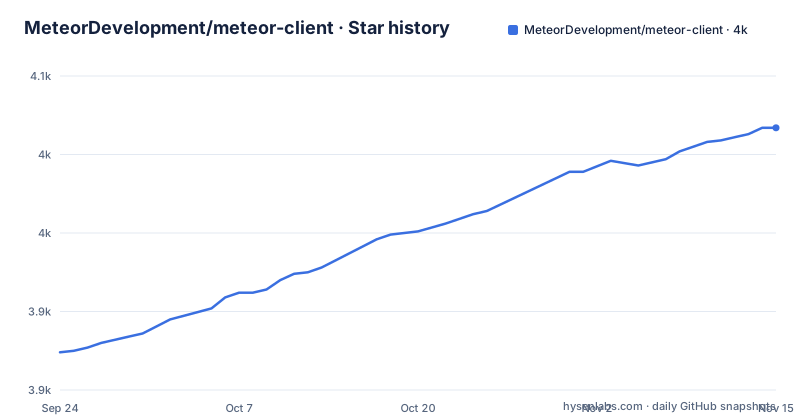
- MeteorDevelopment/meteor-client4,017 ★ · +143
| Repository | 2026-09-24 | 2026-11-15 |
|---|---|---|
| MeteorDevelopment/meteor-client | 3.9k | 4k |
143 Stars in the last 52 days, measured from the daily GitHub snapshot. Compare with other projects
Editorial analysis
What Meteor Client solves, and for whom
Meteor Client is a Minecraft Fabric utility mod, and the README states its target plainly: anarchy servers. That framing matters more than the feature list. On anarchy servers there are no rules enforced by the server operator, so the useful client is not one that adds a single cheat, but one that bundles a wide set of utilities behind a consistent interface and keeps working across Minecraft versions. Meteor Client is that bundle, delivered as a Fabric mod rather than a standalone launcher or an injected client.
The audience follows from that. You need a Fabric installation of Minecraft, you need to be comfortable adding mods to it, and you need to accept that the project ships as source you build or as a release you obtain through its own channels. The README does not describe a graphical installer, a launcher, or a store listing. Installation is delegated to a wiki page, which is the first signal about how the project expects to be used: the repository is the code, the website is the product documentation.
How the Fabric mod is structured in the repository
The repository layout is a standard Gradle Java project. The top level holds build.gradle.kts, gradle.properties, settings.gradle.kts, the Gradle wrapper scripts gradlew and gradlew.bat, and a src/ directory containing the Java sources. There is no separate module split visible at the top level, so the mod is built as one artifact.
The build is Kotlin DSL, which is worth noting if you plan to patch it: build.gradle.kts is not the Groovy build.gradle that older Fabric tutorials assume. The topics list fabricmc, minecraft, minecraft-fabric, minecraft-mod and utility-mod, confirming the Fabric loader and Yarn mappings as the toolchain. The README credits the Fabric team for Fabric and Yarn, and credits Cabaletta and WagYourTail for Baritone, which indicates Baritone is part of the dependency picture rather than an unrelated addon.
What the repository does not show is a version matrix. Neither the README nor the top-level listing states which Minecraft versions the current master targets, nor which Fabric loader version is required. That information lives in build.gradle.kts and gradle.properties, which means anyone building from source has to read the build files rather than the documentation.
Building Meteor Client from source
The README gives exactly two build steps: clone the repository, then run the Gradle wrapper. The wrapper scripts are present at the top level, so the command works from a fresh checkout without installing Gradle separately.
git clone https://github.com/MeteorDevelopment/meteor-client
cd meteor-client
./gradlew build
On Windows the repository ships gradlew.bat, so the equivalent is to run that batch file instead of the shell script. The README does not state where the resulting jar is written, nor which Gradle or JDK version the build expects. If the build fails, the README offers no troubleshooting section; the issue tracker with its templates is the documented route for bug reports and suggestions.
The README's contribution guidelines are the closest thing to build conventions: the licence header must be applied to all Java source files, IDE and system files belong in .gitignore and must never be committed, and code should favour readability over compactness, matching the surrounding code and the Google Java Style Guide. Those rules apply to pull requests, but they also tell you what the maintainers consider a correct patch.
Installing it and a first real use
The README does not contain installation steps. It says to follow the guide on the wiki at meteorclient.com/faq/installation. That is the only installation source given, so treat it as authoritative and do not expect the repository to restate it.
The project's own FAQ page is linked again at the end of the README, alongside a Discord server for questions the FAQ does not cover. For a first real use, the README describes no in-game workflow at all. It documents building and installation, then moves to contributions, bug reports, donations and credits. There is no command list, no keybind table, no module reference in the README.
What the README does establish about running the mod is indirect: the mod is a Fabric mod, it targets anarchy servers, and it credits Baritone, so a Baritone-backed pathing feature is part of the project rather than a third-party bolt-on. Beyond that, the practical first-use instructions are on the wiki, not in the repository. If you need a documented keybind or module list before installing, the README will not give it to you.
Addons, and why the README does not cover them
Meteor Client is designed to be extended, but the README never uses the word addon. The extension surface is implied by the repository structure and the licence, not described. Because the mod is GPL-3.0 and the README spells out the consequences of reusing its code, an addon author has a clear constraint: any code taken from the project forces the modified work and the taken code to be disclosed, the end users to be told clearly that the project's code is in use, and the resulting application to carry the same licence.
That is a stricter regime than a permissive licence would impose, and it shapes what addons can look like. A closed-source or obfuscated addon that copies Meteor Client code is not permitted under the terms the README states. Addons that only interact with the mod at runtime are a different question, and the README does not address it, so the licence text itself is what you would have to read.
The practical gap is documentation. The README points addon-curious readers to the FAQ and Discord rather than to an API reference in the repository. Anyone planning to build on Meteor Client should expect to read the Java sources to find the extension points.
Where Meteor Client is the wrong tool
The clearest limitation is documentation scope. The README is a project front page, not a manual. It covers building, contribution rules, bug reporting, donations and licensing. It does not cover configuration, module behaviour, version support, or rollback. If you need to know whether a specific Minecraft version is supported before you commit to installing, the README will not tell you, and the repository listing does not either.
A second constraint is the licence. GPL-3.0 with the additional expectations the README states is a poor fit if your goal is to embed Meteor Client code in a closed-source or obfuscated product. The README is explicit that this is not allowed, so the licence is a design boundary, not a formality.
A third is the platform. This is a Fabric mod for Java Edition Minecraft. The README describes nothing about Bedrock, and nothing about launchers that do not support Fabric mods. If your setup is not a Fabric Java installation, the project as documented has no path for you. None of these are defects in the mod; they are boundaries a reader should check before spending time on a build.
How it differs from Baritone and from a standalone client
The README credits Baritone to Cabaletta and WagYourTail, which is the useful comparison point. Baritone is a pathfinding and automation system: its job is to move a player and execute tasks autonomously. Meteor Client is a utility mod for anarchy servers that incorporates Baritone rather than competing with it. If your need is purely autonomous pathing, Baritone is the narrower and more direct dependency; if your need is a broader utility surface with pathing as one part of it, Meteor Client is the wider one. The difference is scope, not quality.
The second comparison is against clients distributed outside the Fabric mod ecosystem. Meteor Client is a mod you add to a Fabric installation, built from a Gradle project, with the repository as the source of truth. That model gives you readable Java sources and a build you can reproduce, and it costs you the convenience of a single packaged installer. The README's installation pointer to the wiki is the seam where that trade-off shows.
Maintenance, licence and upgrade cost
The last push to the default branch was on 2026-09-21, two days before the date used for this article, and the repository is not archived. That is the only maintenance evidence available here. The repository has no published GitHub releases, so no version history is described. The README does not document an upgrade procedure, a changelog, or a rollback path.
Upgrade cost therefore concentrates in the build files. Since the README does not pin a Minecraft or Fabric loader version, moving to a new Minecraft release means reading build.gradle.kts and gradle.properties and reconciling them with your Fabric installation. Addon compatibility is a second cost, and the README gives no compatibility policy. The GPL-3.0 licence adds a third: if you distribute a modified build, the README's stated conditions require source disclosure, a clear notice to end users, and the same licence for your application. Donations are described as covering hosting costs only, with donor benefits starting at €5 and requiring a Meteor account linked to Discord and Minecraft accounts. That is a funding model, not a licence term, and it does not change the GPL-3.0 obligations.
Editorial conclusion
Adopt Meteor Client if you play Fabric-based Minecraft on anarchy servers and want a GPL-3.0 utility mod you can build yourself with ./gradlew build. Do not adopt it if you need a documented installation path inside the README, or if you want to reuse its code in a closed-source or obfuscated project, because the licence forbids that. Before installing, read the wiki installation guide at meteorclient.com/faq/installation and check the Gradle build against your Minecraft and Fabric loader versions, since the README does not pin either.
Frequently asked questions
What is Meteor Client?
It is a Minecraft Fabric utility mod for anarchy servers, licensed under GPL-3.0 and written in Java. The repository is the source; the project's website hosts the installation guide and FAQ.
Is Meteor Client a virus?
The repository contains a Gradle Java project with source under src/, a GPL-3.0 LICENSE file and a README pointing to the project's own wiki for installation. The README directs users to build from source or follow the official wiki guide, and it describes no bundled software beyond the mod itself.
Is Meteor Client detectable?
The README does not address detection by servers or anti-cheat systems. It describes the mod as a utility mod for anarchy servers and does not discuss how servers identify it.
Is Meteor Client a safe client?
The README makes no safety claims. It states that the work is free and non-profit, that donations cover hosting costs, and that the source is available under GPL-3.0 for inspection.
How do I install Meteor Client addons?
The README does not document addons or an addon installation procedure. It points readers to the project FAQ and Discord for questions, so that is where addon guidance would be found.
How do I use Meteor Client in game?
The README does not describe in-game usage, keybinds or modules. It covers building with ./gradlew build and defers installation to the wiki guide at meteorclient.com/faq/installation.
Official sources
Add this badge to your README
If you maintain this project, the badge below links readers to this analysis and shows its maintenance status from the daily GitHub snapshot. Paste the markdown into your README; add ?metric=license or ?metric=stars to the image URL for a different field.

[](https://hysenlabs.com/projects/meteordevelopment-meteor-client)Star history chart for your README
[](https://hysenlabs.com/projects/meteordevelopment-meteor-client)Was this useful?