Dash to Dock turns the GNOME overview dash into a permanent bar
A dock for the Gnome Shell. This extension moves the dash out of the overview transforming it in a dock for an easier launching of applications and a faster switching between windows and desktops.
At a glance
- What is it?
- A GNOME Shell extension that relocates the dash from the overview into an always-present dock, shipped as plain JavaScript modules plus a Makefile that compiles the SASS stylesheet. It suits GNOME users who want panel behaviour without leaving the Shell, and a source install costs you a build step.
- Who is it for?
- Adopt Dash to Dock if you run GNOME and want the dash docked, accept compiling a stylesheet, and are willing to reload the Shell after every source update. Stay on the overview if you dislike a permanently reserved strip, or use a distribution package instead of git when you want updates handled outside your own build.
- Can I use it commercially?
- Yes, with conditions. GPL-2.0 is a copyleft licence: if you distribute software that includes it, you must release that software's source code under the same licence. Running it internally without distributing it does not trigger that obligation.
- Is it still maintained?
- Yes. The repository last received commits 36 days ago.
- What is it written in?
- Mainly JavaScript, according to GitHub's language statistics.
Answers come from the project's GitHub data, last synced on November 14, 2026, and from our analysis. They are not legal advice.
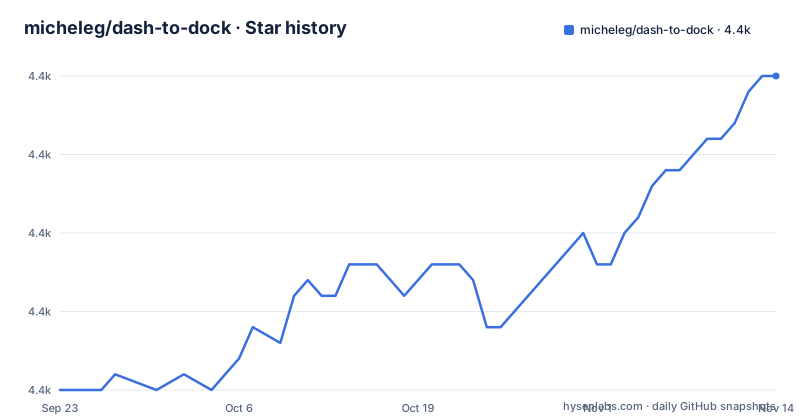
Star history
- micheleg/dash-to-dock4,410 ★ · +20
| Repository | 2026-09-23 | 2026-11-14 |
|---|---|---|
| micheleg/dash-to-dock | 4.4k | 4.4k |
20 Stars in the last 52 days, measured from the daily GitHub snapshot. Compare with other projects
Editorial analysis
The dash is pulled out of the overview instead of copied
GNOME keeps its application dash inside the Activities overview, which means the launcher is one keypress away from nothing at all. Dash to Dock takes that same widget and moves it to the desktop permanently, so launching an application and switching between windows and desktops happens without entering the overview. The extension does not add a second launcher. It relocates the existing one, which is why the description talks about transforming the dash rather than adding a panel.
That relocation is the whole product. Every setting in Settings.ui, every entry in the schemas directory, exists to tune the behaviour of a dock that GNOME itself does not ship. The result is familiar to anyone who came from Unity or a classic bottom panel, and unfamiliar to anyone who configured GNOME to hide its dash entirely.
dockStruts.js claims screen space, intellihide.js gives it back
The repository is flat and readable: roughly two dozen JavaScript modules sit next to metadata.json, with no bundler in between. Two names describe the geometry work. dockStruts.js deals with reserving a strip of screen so maximized windows do not slide underneath the dock. intellihide.js decides when the dock should be present at all, which is the piece that maps onto the always-visible question most users ask.
Beside them sit the modules that make the dock feel like an application switcher rather than a picture. They include windowPreview.js, appSpread.js, locations.js, locationsWorker.js, fileManager1API.js, desktopIconsIntegration.js, notificationsMonitor.js, dbusmenuUtils.js and theming.js.
SASS selection happens before the stylesheet can compile
The stylesheet is authored as _stylesheet.scss, so a source install cannot skip the compile step. Three implementations are supported: dart-sass, sassc, and ruby-sass. The build defaults to sassc, and the choice is made through an environment variable read before make runs.
export SASS=dart
# or...
export SASS=ruby
Ruby is the one to leave alone. It is deprecated, and the project says so while still accepting it as a value, which is the kind of compatibility that keeps an old laptop building but gives you no reason to stay on it. Every distribution ships at least one of the three, so the variable matters when you want a specific compiler rather than when you are stuck.
make installs into your home directory unless DESTDIR is set
Installation is two commands, and the destination depends on a variable most people never set.
git clone https://github.com/micheleg/dash-to-dock.git
make -C dash-to-dock install
The Makefile checks whether DESTDIR is empty. Empty means a local install, and the extension lands in your own gnome-shell extensions directory under your home. Set DESTDIR and the same target switches to a system-wide prefix, which is what a distribution package build wants. Nothing asks you to choose; the default quietly writes to your account.
After the build the Shell needs a reload. Under Xorg that is the Alt, F2, r sequence followed by Enter; under Wayland you may have to log out and log back in. Then enable the extension through GNOME Extensions or through dconf. The Makefile calls the extension dash-to-dock at micxgx.gmail.com, so that identifier, not the repository name, is what GNOME looks for.
A missing msgfmt stops the build before any extension is installed
The Makefile collects translation files from the po directory, which means the build depends on gettext. If msgfmt is not on the system, make fails with a plain missing-command error:
make: msgfmt: No such file or directoryThe fix is to install gettext from your distribution's repository, then run the install target again.
Checking for dart-sass or sassc before cloning saves the debugging round trip.
Source git install and packaged installs take different paths
The source route exists for two reasons: convenience of using git, and testing the latest development version. Both come at a cost the packaged route does not pay. You compile the stylesheet yourself, you reload the Shell yourself, and you re-run make after every pull to see a change. The repository also ships default.nix, so a Nix build can do the same work declaratively, and the README links the extension's extensions.gnome.org listing, with releases tagged extensions.gnome.org-v108, v109 and v110.
That is the real trade. Bundled or distribution-packaged installs arrive compiled, land where the package manager expects, and update with the system. Source installs give you the newest commit and a per-user copy you can edit, at the price of a toolchain in the loop.
Cloning the default branch gives you master, and VERSION decides the label
The build instructions say to clone the desired branch, but the clone command shown clones the default branch, and that default is master. No command in the documentation picks a branch by GNOME version, so the branch that gets installed is whatever master currently holds. Meanwhile the published releases are tagged extensions.gnome.org-v108, v109 and v110. The Makefile adds a third mechanism: the current commit SHA becomes the version string, which makes every local build report a different version. Two versioning schemes coexist in the same repository, and only one of them is reachable from the documented command.
This is also why the version string behaves oddly. Passing VERSION to make sets it in the metadata and in the generated zip. Pass nothing and the Makefile substitutes the current commit SHA as the version, while the zip file gets no string attached at all. If you package this for more than one person, set VERSION yourself.
Editorial conclusion
Adopt Dash to Dock if you run GNOME and want the dash docked, accept compiling a stylesheet, and are willing to reload the Shell after every source update. Stay on the overview if you dislike a permanently reserved strip, or use a distribution package instead of git when you want updates handled outside your own build. Before switching, verify that a SASS implementation and gettext are present; confirm your build actually compiled the stylesheet before you spend time on preferences.
Frequently asked questions
What does Dash to Dock do?
It moves the GNOME dash out of the Activities overview and turns it into a dock, so you can launch applications and switch between windows and desktops without leaving the desktop view.
How do I install Dash to Dock?
Clone the repository and run the install target with make, which places the extension under your home directory when DESTDIR is empty. Then reload the Shell and enable the extension with GNOME Extensions or dconf.
How do I install Dash to Dock in Fedora?
The source route works on any distribution, but it needs a SASS implementation (dart-sass or sassc are recommended over the deprecated ruby-sass) and the gettext package for msgfmt.
How do I always show the dock on GNOME?
Dash to Dock is what makes a permanently visible launcher possible, since GNOME keeps its dash inside the overview by default. Visibility is handled by intellihide.js, and the behaviour is adjusted from the extension preferences.
How do I install Dash to Dock on Ubuntu?
Use the Makefile target, which installs to your home extensions directory when DESTDIR is empty. After installing, reload the Shell with Alt, F2, r and Enter under Xorg, or log out and back in under Wayland, then enable the extension.
Official sources
Add this badge to your README
If you maintain this project, the badge below links readers to this analysis and shows its maintenance status from the daily GitHub snapshot. Paste the markdown into your README; add ?metric=license or ?metric=stars to the image URL for a different field.

[](https://hysenlabs.com/projects/micheleg-dash-to-dock)Star history chart for your README
[](https://hysenlabs.com/projects/micheleg-dash-to-dock)Was this useful?