Microsoft AdaptiveCards for cross-platform card rendering
A new way for developers to exchange card content in a common and consistent way.
At a glance
- What is it?
- Adaptive Cards defines a common card format with renderers for web, .NET, WPF, Windows, Android, and iOS. It fits Microsoft Teams and Outlook integrations, but renderer packages and release schedules are not synchronized.
- Who is it for?
- Adaptive Cards is appropriate for developers that need one card model across Microsoft-supported channels or several native applications. It is a poor fit when direct native UI control is required and no platform-specific mapping is acceptable.
- Can I use it commercially?
- Yes. MIT is a permissive licence: you can use, modify and sell software built on it, as long as you keep its copyright and licence notices.
- Is it still maintained?
- Yes. The repository last received commits 18 days ago.
- What is it written in?
- Mainly C#, according to GitHub's language statistics.
Answers come from the project's GitHub data, last synced on October 23, 2026, and from our analysis. They are not legal advice.
Star history
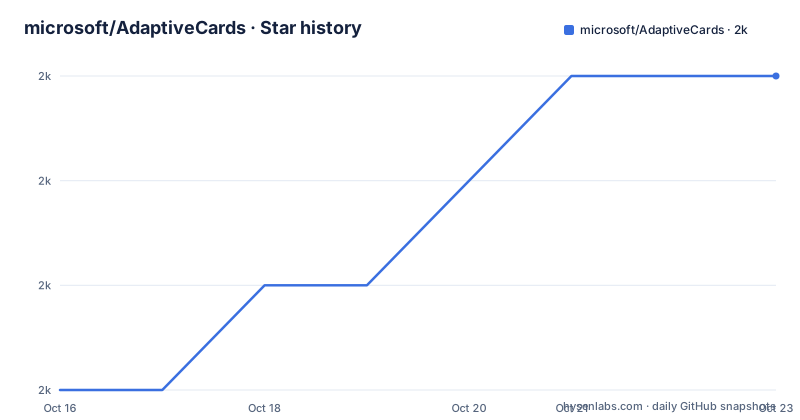
- microsoft/AdaptiveCards1,970 ★ · +3
| Repository | 2026-10-16 | 2026-10-23 |
|---|---|---|
| microsoft/AdaptiveCards | 2k | 2k |
3 Stars in the last 7 days, measured from the daily GitHub snapshot. Compare with other projects
Editorial analysis
Adaptive Cards' common content exchange problem
Adaptive Cards addresses a recurring integration problem: several hosts can need the same structured content, but each application may otherwise define its own payload and presentation layer. The README describes cards as a way for developers to exchange content in a common and consistent form. That makes the format relevant to bot responses, Outlook Actionable Messages, Microsoft Teams, Cortana Skills, Windows Timeline, and cards displayed inside an application built with one of the SDKs.
The intended users are developers working across multiple rendering environments. A service can prepare card content once, while a JavaScript client, .NET application, WPF program, Windows UWP app, Android application, or iOS application uses its corresponding renderer. The repository also covers the templating and authoring side of that workflow through JavaScript, XAML, C#/WinRT, and C++/WinRT components listed in the release schedule.
This is not a general-purpose visual component library. Its unit of exchange is a card, and the repository contains schemas, specifications, templates, host configuration samples, and versioned samples. The project website links to a Schema Explorer, sample cards, documentation, and a Card Designer. That separation between content, host behavior, and rendering matters for adoption decisions. It indicates a portable presentation contract, with some behavior still governed by the capabilities and configuration of each host.
Schema-to-renderer data flow across platforms
Based on the repository layout, the core content model is represented by schema and specification material under `schemas/` and `specs/`. Renderers are then implemented separately under `source/nodejs`, `source/dotnet`, `source/uwp`, `source/android`, and `source/ios`. This arrangement separates the card contract from the platform-specific code that displays it.
The `samples/HostConfig/` directory adds another layer. Host configuration is treated as a distinct project concept, which matters because a host controls how a portable card behaves in its own surface. The release schedule also separates templating from rendering. Consequently, exchanging content does not mean every target receives an identical application environment. A renderer receives card content and applies rules associated with that platform and host context.
Versioned sample directories extend from `samples/v1.0` through `samples/v1.6`. These concrete directories place schema evolution inside the repository rather than treating it as an abstract concern. The README does not explain host-config precedence, unsupported elements, fallback behavior, or action dispatch rules. An engineer cannot infer those details from the repository overview alone. They are first questions for the platform documentation, schemas, and sample configuration.
The Card Designer is distributed separately as `adaptivecards-designer`. That separation reflects a broader division: authoring tools help produce and inspect card payloads, while renderer packages consume those payloads in applications. The README links separate documentation for each renderer, so installing a package should not be interpreted as making every API identical.
JavaScript setup and the first documented command
For a JavaScript project, the README links the `adaptivecards` package on npm. It does not give an explicit installation command with the package name attached, so this article does not manufacture one. It also does not provide renderer initialization code, a card-processing call, or an exact API for the current release.
The first useful card examples are available through the project's sample cards page and the versioned sample directories in the repository. Start with an example whose schema version matches the renderer being used. Confirm that version against the JavaScript documentation before adapting the payload to an application.
For authoring work rather than application rendering, the README separately links `adaptivecards-designer` on npm. Again, the README does not show a complete installation command or a tutorial for using the Designer. It links the package and its documentation, so those are the relevant starting points.
The README provides a concrete Node.js formatting command for contributors. Run `npm install` before invoking it, as the README instructs, then execute the script from the `source/nodejs` directory:
npm run formatThis formats source code and does not install or run the Adaptive Cards renderer. Its output and supported options are not documented in the README, so the command is a repository maintenance task rather than an application tutorial.
Native renderer packages and uneven release schedules
Adaptive Cards offers renderer packages rather than one universal package. JavaScript is distributed through npm. The general `.NET`, `.NET WPF`, `.NET HTML`, and Windows UWP renderers have separate NuGet entries named `AdaptiveCards`, `AdaptiveCards.Rendering.Wpf`, `AdaptiveCards.Rendering.Html`, and `AdaptiveCards.Rendering.Uwp`. Android uses `adaptivecards-android` through Maven Central, while iOS uses `AdaptiveCards` through CocoaPods.
This arrangement suits an application spanning web, desktop, mobile, and Microsoft host boundaries. It also creates a compatibility matrix. A card element existing in the schema does not, by itself, establish that every listed renderer handles it identically. The README does not publish a complete compatibility table, and its release table lists products on separate schedules. For example, the table records a 2023-07-17 target for the `.NET Renderer` and `.NET Templating`, while other products list later dates. The note says release dates are subject to change based on availability and active development of each product.
That warning deserves attention. The repository is not archived, and the last push was on 2026-10-06, but repository activity does not prove that every renderer and templating component receives synchronized releases. Recent release records also use different product versions, including `[email protected]`, a JavaScript release, and a UWP release. Check each package separately when release timing matters.
Templates, host configuration, and native UI trade-offs
Templates and host configurations are distinct parts of the architecture. The release schedule lists JavaScript, C++/WinRT, and C#/WinRT templating as separate products. The repository's `samples/Templates/` directory provides examples, but the README does not define the templating syntax, interpolation rules, or a supported operation for transforming an arbitrary API response into a card.
Host configuration is equally significant. A common payload can travel between hosts, while each host decides which capabilities it exposes. That boundary can prevent a card from assuming support for an action or control the host does not implement. It can also create additional work for developers who need predictable behavior across surfaces, especially when a card includes platform-dependent actions.
A native XAML, Android, or iOS component model takes a different approach. It gives the application direct control over presentation but requires platform-specific UI code and normally a separate adaptation path for each surface. Adaptive Cards places more of the card definition in portable content and delegates display to a renderer. The trade-off is reduced direct control in exchange for a shared card model.
If exact native interaction behavior or layout is the primary requirement, portable cards may be the wrong boundary. The README does not document custom renderer extension points, partial fallback, or server-side conversion. Those capabilities should not be assumed from the existence of multiple renderer directories.
MIT licensing, maintenance, and upgrade cost
The repository identifies Adaptive Cards as MIT licensed. The repository also contains `LICENSE`, `THIRD-PARTY-NOTICES.TXT`, and `SECURITY.md`. Distributors and teams modifying the project should inspect those files for their actual obligations rather than relying only on the top-level license description.
The repository is not archived, and the last push was on 2026-10-06. Its recent release records do not form one uniform version line across all products. The README's release schedule warns that dates can change based on availability and active development. Upgrade planning therefore belongs at the component level. A JavaScript card consumer, WPF renderer, Android package, and templating engine cannot be assumed to move in lockstep from the repository's release history.
Contributors also face a specific C++ formatting requirement. The README requires `clang-format` version 12.0.0 or above. On Windows, it documents this command for use from the repository root:
PowerShell.exe -ExecutionPolicy Bypass scripts\FormatSource.ps1 -ModifiedOnly $FalseThe README says the first use should report the `clang-format` version and that an older installation may require an upgrade. For Node.js formatting, it points contributors to the npmjs `clang-format` package and the command documented above. It also identifies `scripts/hooks/pre-commit` as an optional hook that can check and fix formatting during `git commit`.
These requirements concern contributors, not application installers. They do show that the repository contains native, managed, mobile, web, and templating code with different development workflows. That diversity is the main upgrade cost indicated by the repository and release schedule.
Editorial conclusion
Adaptive Cards is appropriate for developers that need one card model across Microsoft-supported channels or several native applications. It is a poor fit when direct native UI control is required and no platform-specific mapping is acceptable. Verify the current renderer API, host configuration, action handling, schema coverage, and package versions for each target before adoption.
Frequently asked questions
What is Microsoft Adaptive Cards used for?
Adaptive Cards lets developers exchange structured card content through a common format and render it in applications. The README names Microsoft Teams, Outlook Actionable Messages, Cortana Skills, Windows Timeline, and custom applications as relevant contexts.
Which platforms have Adaptive Cards renderers?
The README lists renderers for JavaScript, .NET, .NET WPF, .NET HTML, Windows UWP, Android, and iOS. Each renderer has a separate package or platform documentation entry.
How do I install the Adaptive Cards JavaScript renderer?
The README links the `adaptivecards` package on npm but does not provide a complete installation command. It also links JavaScript renderer documentation rather than showing initialization code.
Official sources
Add this badge to your README
If you maintain this project, the badge below links readers to this analysis and shows its maintenance status from the daily GitHub snapshot. Paste the markdown into your README; add ?metric=license or ?metric=stars to the image URL for a different field.

[](https://hysenlabs.com/projects/microsoft-adaptivecards)Star history chart for your README
[](https://hysenlabs.com/projects/microsoft-adaptivecards)Was this useful?