DirectXTex exposes two public headers out of dozens, and its WIC dependency ties the core library to Windows
DirectXTex texture processing library
At a glance
- What is it?
- microsoft/DirectXTex is a C++ shared-source library for reading and writing DDS, TGA and HDR files and processing textures for Direct3D. This review covers the public header rule, the build matrix, the runtime loaders, the command-line tools and the notes about breaking changes.
- Who is it for?
- DirectXTex fits Windows and Xbox toolchains that need DDS reading and writing, mip-map generation and block compression, and teams that want texconv without the legacy DirectX SDK. It is a poor fit if you need image processing on a platform without WIC, since the library makes use of the Windows Image Component APIs.
- Can I use it commercially?
- Yes. MIT is a permissive licence: you can use, modify and sell software built on it, as long as you keep its copyright and licence notices.
- Is it still maintained?
- Yes. The repository last received commits 5 days ago.
- What is it written in?
- Mainly C++, according to GitHub's language statistics.
Answers come from the project's GitHub data, last synced on November 25, 2026, and from our analysis. They are not legal advice.
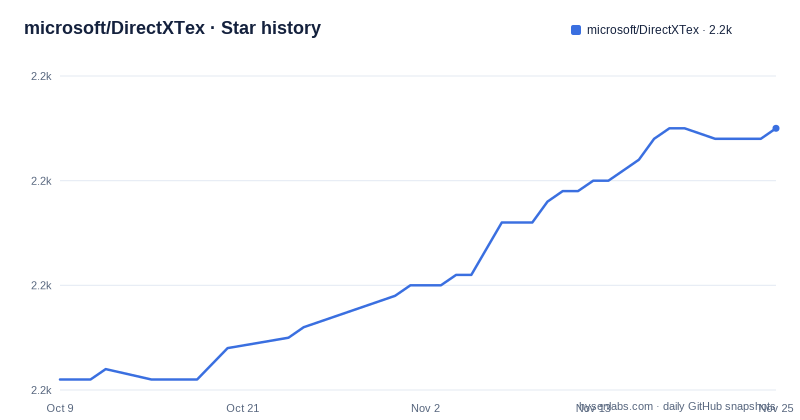
Star history
- microsoft/DirectXTex2,185 ★ · +24
| Repository | 2026-10-09 | 2026-11-25 |
|---|---|---|
| microsoft/DirectXTex | 2.2k | 2.2k |
24 Stars in the last 47 days, measured from the daily GitHub snapshot. Compare with other projects
Editorial analysis
Only DirectXTex.h and DirectXTex.inl are public, and every other header is internal
The DirectXTex folder holds a lot of headers, and almost none of them are meant for you. The README names BC.h, BCDirectCompute.h, DDS.h and DirectXTexP.h as examples of headers used for the internal implementation of the library only. Only DirectXTex.h and DirectXTex.inl are meant as the public header.
That rule shapes how to consume the library. Include the one header and treat the rest as private. Code that reaches into BC.h to call a compression routine directly depends on something the project has declared internal.
The folder itself is described as containing a full-featured DDS reader and writer, including legacy format conversions, plus a TGA reader and writer, an HDR reader and writer and a WIC-based bitmap reader and writer for BMP, JPEG, PNG, TIFF and HD Photo. The stated intent is primarily tool usage. For runtime loading the README points to the separate loader folders described below.
The library uses Windows Imaging Component for common formats and adds its own TGA and HDR code
DirectXTex is a shared source library for reading and writing .DDS files and for texture processing operations including resizing, format conversion, mip-map generation, block compression for Direct3D runtime texture resources and height-map to normal-map conversion. It makes use of the Windows Image Component (WIC) APIs.
The README explains why TGA and HDR have readers and writers of their own: these image file formats are commonly used in texture content processing pipelines, but are not currently supported by a built-in WIC codec. Everything else, such as BMP, JPEG, PNG, TIFF and HD Photo, comes through WIC.
The dependency has a plain consequence. The format list you get is the format list Windows provides, plus the three the library carries itself. OpenEXR is handled differently: the Auxiliary folder contains optional source files, such as adapter loading functions using the OpenEXR library and Xbox texture tiling extensions. The README gives no sample for using them, so read the Auxiliary sources before planning on it.
The build accepts four toolchains, but Visual Studio users need the Windows 11 SDK 22000 or later
The code is designed to build with Visual Studio 2022, Visual Studio 2026, clang for Windows v12 or later, or MinGW. Visual Studio requires the Windows 11 SDK (22000) or later. The library can also be built for Windows Subsystem for Linux using GCC 11 or later. The CMake projects require version 3.21 or later.
The top-level listing shows how many project flavors that adds up to. There are solution files named DirectXTex_Desktop_2022.slnx, DirectXTex_Desktop_2022_Win10.slnx, DirectXTex_Desktop_2026.slnx, DirectXTex_Windows10_2022.slnx and three GDK variants: DirectXTex_GDKX_2022.slnx, DirectXTex_GDK_2022.slnx and DirectXTex_GXDK_PC_2022.slnx. CMakeLists.txt and CMakePresets.json sit beside them.
A developer on an older Visual Studio is therefore out of the supported set. The README also states that the components are designed to work without any content from the legacy DirectX SDK, which matters for teams that still keep that SDK installed only to build old tools. For anyone who clones the repository, the first job is to pick the .slnx file that matches the installed Visual Studio.
The recommended integration path is vcpkg, and two NuGet packages are deprecated
The Release Notes section is blunt about packaging. The directxtex_desktop_win10 and directxtex_uwp NuGet packages are deprecated. The best way to integrate the latest DirectXTex into your C++ project is using vcpkg, and the README links the directxtex port in the vcpkg repository.
No vcpkg command line appears in the README, and no CMake snippet either. A reader who wants to know how to install DirectXTex gets a direction, not a command. The documentation lives on the GitHub wiki, and the homepage is walbourn.github.io/directxtex.
Building from the repository itself means choosing one of the solution files or the CMake projects named above. A team that currently pulls DirectXTex in through the deprecated NuGet packages should plan a move to vcpkg rather than waiting for the packages to be updated.
DDSTextureLoader does no pixel conversion, and WICTextureLoader cannot load cubemaps or volumes
Two runtime loaders ship as separate folders, and their limits are written down. DDSTextureLoader is a streamlined version of the legacy DirectX SDK sample DDSWithoutD3DX11, a light-weight runtime DDS loader with versions for Direct3D 9, Direct3D 11 and Direct3D 12. It performs no runtime pixel data conversions. It supports the full complement of Direct3D texture resources: 1D, 2D, volume maps, cubemaps, mipmap levels, texture arrays and BC formats.
WICTextureLoader covers the other case. It uses WIC to load a bitmap such as BMP, JPEG, PNG or HD Photo, resizes if needed based on the current feature level or an explicit parameter, converts to a DXGI_FORMAT if required and then creates a 2D texture. It does not support 1D textures, volume textures, cubemaps or texture arrays.
The README tells you which to choose: DDSTextureLoader is recommended for fully precooked textures for maximum performance and image quality, while WICTextureLoader is useful for simple 2D textures from standard image files at runtime. ScreenGrab is the third module, with texture writing for Direct3D 9, 11 and 12 aimed at screenshots, written as DDS or as a WIC image file. The 11 and 12 versions of all three are stand-alone copies of modules shipped in the DirectX Tool Kit for DX11 and DX12.
Texconv reproduces texconvex.exe except for two dropped arguments and a new set of filter names
Four sample programs sit in the repository. Texconv is an implementation of the texconv command-line utility from the DirectX SDK, built on DirectXTex rather than D3DX. It supports the same arguments as the legacy Texture Conversion Tool Extended, texconvex.exe, with differences. The -10 and -11 arguments are not applicable, and the filter names are POINT, LINEAR, CUBIC, FANT or BOX, TRIANGLE, and the *_DITHER and *_DITHER_DIFFUSION variants. It also supports the JPEG XR (HD Photo) bitmap format.
Any build script that passes -10 or -11 to the old tool will not carry over unchanged. Check the filter names as well.
Texassemble is a command-line utility for creating cubemaps, volume maps or texture arrays from a set of individual input image files. Texdiag analyzes image contents, primarily for debugging. DDSView is a simple Direct3D 11 viewer for DDS files, where the < and > keys step through the images in an array texture or volume map, and the 1 through 0 keys jump to a specific image index. The usage for each command-line tool is documented on the project wiki, not in the README.
The October 2025 release changed Auxiliary JPEG and PNG signatures, and a Copilot skill is published
Breaking changes are listed in the Release Notes. Starting with the October 2025 release, the Auxiliary functions for loading and saving JPEG and PNG files take a flag parameter after the filename. Code written against earlier signatures will not compile until the call sites add it. The README also carries a note beginning with the March 2025 release about Windows 7 and Windows 8, and that note is cut off in the front page, so the change history in CHANGELOG.md is the reference.
Releases are tagged by month: oct2025 on 28 October 2025, mar2026 on 31 March 2026 and may2026 on 8 May 2026, with the README header dated May 7, 2026. The last push to the repository was on 21 October 2026, and the repository is not archived. Security advisories are on GitHub.
Contributors face one tooling constraint. clang-format must match the version used by GitHub Super-Linter, and VS 2022 and VS 2026 ship different versions, so the README gives:
winget install --id=LLVM.LLVM --version 21.1.2
powershell -File build/Format.ps1 -LLVM
The repository also publishes Copilot skills in a skills folder. The README gives these commands for Copilot CLI assistance:
winget install GitHub.Copilot
winget install GitHub.cli
gh skill install microsoft/directxtex
copilot
/skills list
Editorial conclusion
DirectXTex fits Windows and Xbox toolchains that need DDS reading and writing, mip-map generation and block compression, and teams that want texconv without the legacy DirectX SDK. It is a poor fit if you need image processing on a platform without WIC, since the library makes use of the Windows Image Component APIs. Before adopting, confirm your Visual Studio and Windows SDK versions against the build requirements, and check the CHANGELOG.md for the release where Auxiliary function signatures changed.
Frequently asked questions
how to use directxtex
Include DirectXTex.h, the one public header, and link the library built from one of the solution files or the CMake projects. Documentation is on the GitHub wiki.
how to install directxtex
The README recommends vcpkg for integrating the latest DirectXTex into a C++ project, and says the directxtex_desktop_win10 and directxtex_uwp NuGet packages are deprecated.
What file formats does DirectXTex read and write?
It reads and writes DDS, TGA and HDR files itself and uses WIC for BMP, JPEG, PNG, TIFF and HD Photo. OpenEXR adapter functions are in the optional Auxiliary folder.
Official sources
Add this badge to your README
If you maintain this project, the badge below links readers to this analysis and shows its maintenance status from the daily GitHub snapshot. Paste the markdown into your README; add ?metric=license or ?metric=stars to the image URL for a different field.

[](https://hysenlabs.com/projects/microsoft-directxtex)Star history chart for your README
[](https://hysenlabs.com/projects/microsoft-directxtex)Was this useful?