OpenVMM: a Rust VMM focused on OpenHCL paravirtualization
Home of OpenVMM and OpenHCL
At a glance
- What is it?
- OpenVMM is Microsoft’s modular, cross-platform Virtual Machine Monitor written in Rust. The repository is primarily organized around its use in the OpenHCL paravisor, while also supporting a traditional VMM role.
- Who is it for?
- Adopt OpenVMM if your work involves OpenHCL, paravisor development, or contributions to its Rust virtual machine components. Do not choose it solely as a documented general-purpose hypervisor, because the README gives no build or deployment procedure and says development is focused on OpenHCL.
- Can I use it commercially?
- Yes. MIT is a permissive licence: you can use, modify and sell software built on it, as long as you keep its copyright and licence notices.
- Is it still maintained?
- Yes. The repository received new commits within the last day.
- What is it written in?
- Mainly Rust, according to GitHub's language statistics.
Answers come from the project's GitHub data, last synced on October 23, 2026, and from our analysis. They are not legal advice.
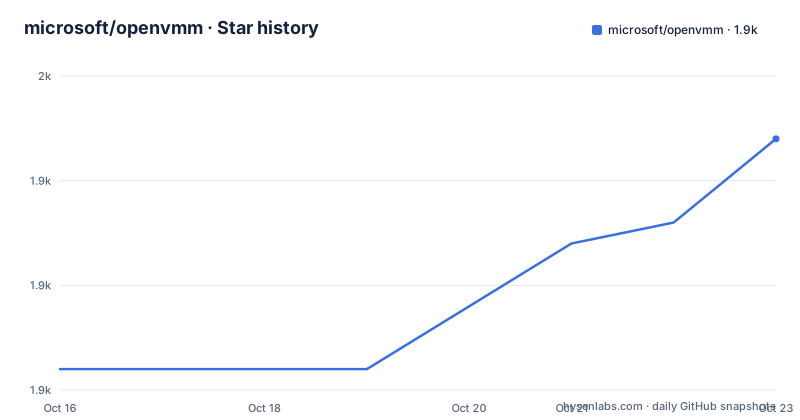
Star history
- microsoft/openvmm1,947 ★ · +11
| Repository | 2026-10-16 | 2026-10-23 |
|---|---|---|
| microsoft/openvmm | 1.9k | 1.9k |
11 Stars in the last 7 days, measured from the daily GitHub snapshot. Compare with other projects
Editorial analysis
OpenVMM’s OpenHCL-centered role
OpenVMM is a Virtual Machine Monitor, or VMM, written in Rust. Its repository description places it in the broader Microsoft open source virtualization ecosystem, but the README gives a narrower statement about current priorities: although OpenVMM can function as a traditional VMM, its development is currently focused on its role in the OpenHCL paravisor.
That distinction matters for evaluation. A team looking for a documented, immediately deployable general-purpose VMM is not given enough installation, configuration, or operation information in the README to make that decision. A team working on OpenHCL or on components around a paravisor is the more natural audience. OpenHCL is not presented here as a separate command-line application with a fixed user workflow. Instead, the repository is the home for both OpenVMM and OpenHCL, and the source tree contains crates for both sides of that relationship.
OpenVMM is therefore best understood as a systems-oriented virtualization codebase rather than a small end-user hypervisor package. The README points contributors and users to the OpenVMM Guide for practical information. It does not promise a conventional installer, a universal management interface, or compatibility with an unspecified set of hosts and guests.
The Cargo workspace behind OpenVMM and OpenHCL
Based on the repository layout and the root `Cargo.toml`, the project is a large Cargo workspace with a default member at `openvmm/openvmm`. The workspace includes OpenVMM, OpenHCL, test code, tooling, support libraries, fuzz targets, firmware-related components, and development utilities. This is a concrete architectural signal. The project is divided into many crates rather than being represented by one executable crate with all functionality in a single package.
The listed workspace members include `openvmm/openvmm`, `openvmm_vhost/openvmm_vhost`, `openhcl/openhcl_boot`, `openhcl/openvmm_hcl`, `openhcl/sidecar`, and `openhcl/vmfirmwareigvm_dll`. It also includes virtual machine test suites under `vmm_tests`, device fuzzing targets, image and loader tools, `vmgstool`, and support crates. The `petri` directory contains testing and incubation-related packages, while `hyperv` contains additional tooling.
The workspace declares `resolver = "2"` and a `rust-version` of `1.95`. Those settings affect how the Rust workspace is organized and which Rust toolchain version the project expects. The repository also contains `Cargo.lock`, `.cargo/`, `.config/`, CI-related directories, and Flowey-related tooling. That arrangement suggests substantial build and testing infrastructure, although the README does not state build times, host support, or release artifact formats.
Why OpenHCL changes the evaluation
OpenHCL is described as a paravisor, and OpenVMM’s development focus is tied to that role. A paravisor-oriented system is not evaluated only by whether it can create a conventional virtual machine. The repository includes OpenHCL boot, OpenHCL-related VMM integration, sidecar, firmware, and diagnostic packages, which indicates that the system is assembled from components with distinct responsibilities.
The repository’s separate directories for `hyperv/`, `vm/`, `vmm_core/`, `openvmm/`, and `openhcl/` reflect a layered systems codebase. Virtual machine devices, firmware, loaders, guest memory, storage, and related support code occupy their own areas. The workspace also names fuzzing packages for multiple device and virtual machine components. Those names show where testing attention is directed, but they do not by themselves establish coverage quality or security properties.
For contributors, this organization offers a more specific target than a generic VMM label. The relevant starting point depends on whether the work concerns the VMM core, OpenHCL boot, sidecar behavior, firmware integration, device models, guest tests, or tooling. For users, however, the README does not document a supported topology, a deployment package, or a compatibility matrix. The correct interpretation is that OpenVMM is closely coupled to an OpenHCL development context.
Finding setup instructions and completing a first use
The README does not include installation commands, build commands, configuration examples, ports, environment variables, or a first-run procedure. It explicitly directs readers to the OpenVMM Guide at `https://aka.ms/openvmmguide` for information about running, building, and using OpenVMM. The guide is published from the repository through the Markdown files under `Guide/src/SUMMARY.md`.
Because the README and root configuration do not present the required commands, this review does not reproduce an invented installation sequence. A reader should consult the OpenVMM Guide for the current host prerequisites, toolchain setup, build steps, and the command used to run a relevant development configuration. The repository’s `Guide/` directory is the documented source for those instructions.
The first useful step is procedural rather than executable: obtain the Guide, identify whether the target scenario is OpenHCL paravisor development or traditional VMM use, and then follow the guide for that path. The README does not state whether a built binary is distributed through a package manager, whether a container image exists, or whether users must build the workspace themselves. It also does not identify a universal command that can create and start a VM.
Documentation and workspace limitations
The clearest limitation is the mismatch between the project’s broad identity and its narrow current guidance. OpenVMM calls itself cross-platform and capable of traditional VMM operation, yet the README does not identify the supported operating systems, processor architectures, virtualization backends, guest operating systems, or deployment environments. It also does not document rollback, upgrade compatibility, production support, or operational monitoring.
That does not mean those capabilities are absent. It means the README does not establish them. The repository layout confirms many Rust crates and test-related components, but it cannot establish a ready-to-run distribution or a guaranteed production configuration. OpenHCL’s paravisor focus may be intentional and appropriate for the project’s development stage. It is still a meaningful constraint for adoption decisions.
A second limitation is the breadth of the workspace. A contributor may need to navigate OpenHCL, VMM internals, firmware, storage, device models, fuzzing, and test infrastructure at once. The README does not provide a getting-started code path or identify a minimal crate for a narrowly scoped task. The Guide is the documented place to look for such a path.
OpenVMM compared with traditional VMM use
The most direct alternative described by the README is a traditional VMM. The difference is not presented as a claim that one implementation supports every feature the other lacks. Instead, the README identifies the current development priority: OpenVMM can operate as a traditional VMM, but development is focused on its role as an OpenHCL paravisor component.
For a team whose requirement is OpenHCL integration, OpenVMM has the more direct architectural context. The repository includes `openhcl_boot`, `openvmm_hcl`, `sidecar`, firmware-related crates, and OpenHCL-specific test and diagnostic packages. A team whose requirement is a conventional VMM with a separately documented setup path may find that the README provides too little operational detail to compare the options fairly.
This is also why an OpenHCL-only evaluation would be incomplete. OpenVMM and OpenHCL share this repository, but the project names refer to different layers. A team should determine whether it needs the VMM, the paravisor, a specific crate, or a complete development environment before selecting a deployment approach.
Licensing, maintenance, and upgrade constraints
The repository identifies the project as licensed under the MIT License. The root `Cargo.toml` also shows an MIT license notice, while the README separately states that contributions generally require agreeing to a Contributor License Agreement. That CLA requirement affects contribution workflow and the rights granted for submitted code. The README does not offer a legal interpretation of either arrangement.
The repository is not archived. Its last push was on 2026-10-16, and the release history includes `openvmm-v0.2.0` from 2026-10-02, `vmgstool-v2.1.1` from 2026-09-29, and `openvmm-v0.1.0` from 2026-08-14. These records show recent release activity, but they do not establish a compatibility policy or upgrade path. The README does not document migration notes, breaking-change handling, dependency upgrade procedures, or rollback.
The practical upgrade question is therefore tied to the Guide and release-specific documentation. Users should check the exact OpenVMM version, the OpenHCL components involved, the Rust requirement of `1.95`, and any configuration examples that may change across releases. The separate release dates for OpenVMM and `vmgstool` also mean that package versions should not be assumed to change together.
Contributing within Microsoft’s CLA workflow
The README says the project welcomes contributions and suggestions. Most contributions require agreeing to Microsoft’s Contributor License Agreement, which declares that the contributor has the right to grant the necessary rights. When a pull request is submitted, a CLA bot determines whether the agreement is needed and decorates the pull request with its status.
The repository also provides CI workflow files, formatting configuration, test directories, and tooling. Those files indicate that contribution checks exist in the project structure, but the README does not describe the exact checks or claim that every check applies to every change. Contributors should follow the repository’s contribution documentation and the bot’s instructions rather than infer a workflow from the crate list.
For users, the distinction between using OpenVMM and contributing to it is important. The README points both external contributors and users to the same Discord community. It does not promise that chat support replaces the Guide, and it does not document a support policy for production deployments.
Editorial conclusion
Adopt OpenVMM if your work involves OpenHCL, paravisor development, or contributions to its Rust virtual machine components. Do not choose it solely as a documented general-purpose hypervisor, because the README gives no build or deployment procedure and says development is focused on OpenHCL. Verify the platform requirements, required firmware and guest configuration, and the expected paravisor workflow in the OpenVMM Guide before committing to it. The repository’s MIT license covers the listed project code, while contributions require accepting Microsoft’s Contributor License Agreement process.
Frequently asked questions
What is OpenVMM used for?
OpenVMM is a modular, cross-platform Virtual Machine Monitor written in Rust. The README says it can act as a traditional VMM, but current development is focused on its role in the OpenHCL paravisor.
How do I install or run OpenVMM?
The README does not provide installation or build commands. It directs users to the OpenVMM Guide at `https://aka.ms/openvmmguide` for instructions on running, building, and using the project.
Is OpenVMM actively maintained?
The repository is not archived, and its last push was on 2026-10-16. Recent releases include `openvmm-v0.2.0` on 2026-10-02 and `vmgstool-v2.1.1` on 2026-09-29.
Official sources
Add this badge to your README
If you maintain this project, the badge below links readers to this analysis and shows its maintenance status from the daily GitHub snapshot. Paste the markdown into your README; add ?metric=license or ?metric=stars to the image URL for a different field.

[](https://hysenlabs.com/projects/microsoft-openvmm)Star history chart for your README
[](https://hysenlabs.com/projects/microsoft-openvmm)Was this useful?