oh-my-rime: a Rime config template with pinyin, double pinyin and wubi schemas
The Simple Config Template Of Rime By Mintimate.
At a glance
- What is it?
- oh-my-rime is a GPL-3.0 template that drops a working set of Rime schemas, dictionaries and themes into your Rime user directory. It suits users who want a maintained starting point rather than building schemas from scratch.
- Who is it for?
- oh-my-rime is for Rime users on Fcitx5, iBus, Weasel or Squirrel who want a maintained schema set with pinyin, double pinyin, wubi and a T9 layout without authoring YAML themselves. Skip it if you already run a tuned configuration and do not want the 2025-07-09 dictionary switch to touch your user dictionary, or if you need Windows XP or Windows 7 support, where Weasel 0.14.3 cannot run the full schema.
- Can I use it commercially?
- Yes, with conditions. GPL-3.0 is a copyleft licence: if you distribute software that includes it, you must release that software's source code under the same licence. Running it internally without distributing it does not trigger that obligation.
- Is it still maintained?
- Yes. The repository received new commits within the last day.
- What is it written in?
- Mainly Lua, according to GitHub's language statistics.
Answers come from the project's GitHub data, last synced on November 14, 2026, and from our analysis. They are not legal advice.
Star history
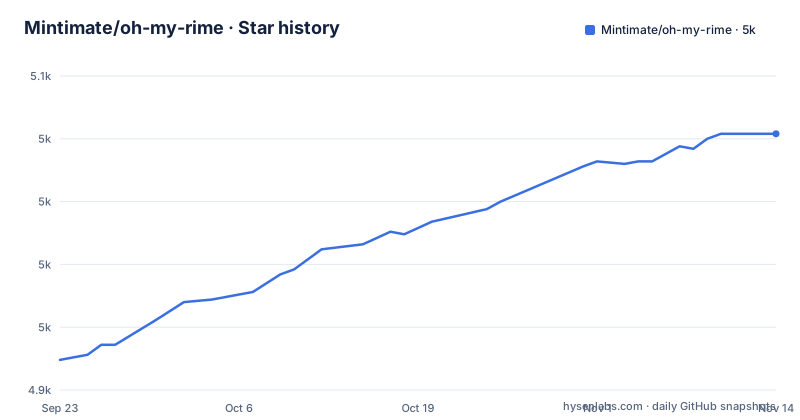
- Mintimate/oh-my-rime5,027 ★ · +90
| Repository | 2026-09-23 | 2026-11-14 |
|---|---|---|
| Mintimate/oh-my-rime | 4.9k | 5k |
90 Stars in the last 52 days, measured from the daily GitHub snapshot. Compare with other projects
Editorial analysis
What oh-my-rime actually ships
Rime is an input method engine, not an input method. Installing it gives you a framework and an empty or minimal set of schemas, and the work of assembling pinyin tables, double pinyin mappings, wubi tables, emoji and a theme is left to you. oh-my-rime is a template that fills that gap. The repository is a complete Rime user directory: schema files such as rime_mint.schema.yaml, double_pinyin_flypy.schema.yaml, wubi86_jidian.schema.yaml and t9.schema.yaml sit next to the dictionaries they load, plus squirrel.yaml and weasel.yaml for the macOS and Windows front ends.
The README describes the project as a fast way to initialise Rime and names it after oh-my-zsh, which is the right mental model: a bundle of defaults you are expected to override rather than edit. The schemas cover full pinyin (the default), a Xiaohe double pinyin variant with optional shape-code auxiliary input, a mixed full pinyin and Xiaohe mode, an Earth Pinyin variant, 98 and 86 wubi, and a nine-key grid layout ported for Hamster on iOS. Two themes, 水鸭 and 青涩, are included for Squirrel and Weasel.
The audience is narrow but real: people who have decided to use Rime and do not want to spend a weekend writing YAML. If you are happy with your current configuration, this adds nothing except a dictionary update you did not ask for.
How the schemas, dictionaries and Lua scripts fit together
Each schema file declares which dictionary it uses, and the dictionary file declares which tables it imports. The README shows rime_mint.dict.yaml as the anchor for the full pinyin schema: it sets name: rime_mint, version: "2025.07.06" and sort: by_weight, then lists an import_tables block that pulls in dicts/custom_simple, the rime_mint.* tables from the Wanxiang dictionary and the kaomoji table. Changing what the input method knows means editing that import list, not the schema.
The dicts/ directory is organised by upstream source, and the README marks most files as updated by GitHub Actions: the rime_ice.* files are labelled as Rime Frost (白霜) tables, and rime_mint.* comes from Wanxiang. Only custom_simple.dict.yaml is meant for your own entries. That split is the useful part of the design, because it means a dictionary refresh is a file replacement rather than a merge.
The lua/ directory and rime.lua are present in the repository listing, and the README mentions Wanxiang pre-edit and correction scripts, including a resolved conflict between them where the correction styling is now indistinguishable from the Wanxiang styling.
Installing oh-my-rime and switching schema for the first time
The README's install steps are short: install Rime, log out or reboot, download the repository's configuration files into your local Rime configuration directory, redeploy, and then customise. The directory differs per platform. On Windows with Weasel it is %APPDATA%\Rime; on macOS with Squirrel it is ~/Library/Rime; on Linux with iBus it is ~/.config/ibus/rime and with Fcitx5 it is ~/.local/share/fcitx5/rime.
If cloning from GitHub is slow, the README points to a mirror and to a packaged archive built by a CNB pipeline. The archive avoids Git entirely, and the README gives its address as https://cnb.cool/Mintimate/rime/oh-my-rime/-/releases/download/latest/oh-my-rime.zip.
Unzip that into the Rime user directory for your platform, then trigger a redeploy from the input method's menu. After deployment, the README says the default active schema is 薄荷拼音-全拼输入 and that Ctrl+~ opens the schema menu, which is where you switch to a double pinyin, wubi or T9 schema.
Once deployed, customisation is done through override files rather than by editing the shipped YAML. The README recommends creating default.custom.yaml for global behaviour, squirrel.custom.yaml on macOS and weasel.custom.yaml on Windows, and links to a configuration override guide. The dictionary import list shown in the README looks like this:
---
name: rime_mint                  # 注意name和文件名一致
version: "2025.07.06"
sort: by_weight
use_preset_vocabulary: false
import_tables:
  - dicts/custom_simple          # 自定义
  - dicts/rime_mint.chars        # 单字(万象拼音词库)
  - dicts/rime_mint.base         # 基础词(万象拼音词库)
  - dicts/rime_mint.correlation  # 错音错字兼容(万象拼音词库)
  - dicts/rime_mint.compatible   # 多音兼容(万象拼音词库)
...
Adding your own table means adding a line to import_tables and placing the file in dicts/. Redeploy again after saving, and the Ctrl+~ menu should reflect the schemas you kept.
The 2025-07-09 dictionary switch and its migration cost
The README labels 2025-07-09 a breaking change. The bundled dictionary moved from the Rime Frost tables to the Wanxiang tables, and the pinyin files inside the dictionary were renamed to start with rime_mint. The stated reasons are better Earth Pinyin behaviour and compatibility with mounting Wanxiang language models.
The consequence is not cosmetic. After the switch, the README says the user dictionary (.userdb) needs a script rewrite, otherwise tone marks do not display. An offline migration tool is provided for this. That is a real upgrade step, and it is the kind of thing that catches people who copy dicts/ over an existing installation and redeploy without reading the release note. If you have years of accumulated personal entries, verify the migration tool against a copy of your user directory before running it in place.
The README also notes an unresolved cosmetic issue: the Wanxiang pre-edit script and the correction script no longer conflict, but the correction styling now matches the Wanxiang styling, so the two are visually indistinguishable. The README says an adjustment is under consideration.
Where oh-my-rime is the wrong choice
The clearest boundary is Windows XP and Windows 7. The README states those systems can only use Weasel 0.14.3 and cannot use the full schema set, requiring a manual librime support library update, with a FAQ entry covering it. If you are maintaining an old Windows install, this template will not give you the same behaviour as on current systems.
The second boundary is anyone who wants a curated personal configuration. oh-my-rime is a bundle, and its update model is replacement: the README says that to update dictionaries you download the files in dicts/ and overwrite everything except custom_simple.dict.yaml. That works if you kept your own entries in custom_simple, and breaks if you edited the shipped tables directly. The project's own guidance is to use override files, and it is worth taking seriously.
Third, the repository has no published GitHub releases. If you need reproducible deployments across machines, plan to pin a commit yourself.
How it differs from starting with Rime Ice or a single upstream table
The obvious alternative is to build on one upstream dictionary directly. Rime Ice (rime-ice) is a maintained Simplified Chinese dictionary and schema set, and oh-my-rime lists it among the sources of its dicts/ directory. Adopting Rime Ice alone gives you one coherent project with its own schema definitions and its own update cadence. oh-my-rime gives you Rime Ice plus Wanxiang plus wubi bases plus emoji and kaomoji plus themes, wired together in one directory.
The difference matters at update time. With Rime Ice alone, you track one repository. With oh-my-rime, the dicts/ directory mixes tables from Rime Ice, Rime Frost, Wanxiang, 98wubi-tables and rime-wubi86-jidian, and the README says the automated updates come from GitHub Actions in this repository. You get a single refresh point, at the cost of depending on this project's pipeline to keep five upstreams current.
The wubi schemas are a second comparison. The README describes wubi98_mint and wubi86_jidian as slimmed-down versions of 98wubi and rime-wubi86-jidian, and explicitly tells users who want mixed wubi and pinyin input to go to those upstream projects instead. That is an honest scope statement: if wubi is your primary method, the upstream schema is the better fit, and oh-my-rime is for people who want wubi available alongside pinyin.
Licence, maintenance and what an upgrade costs you
The repository is GPL-3.0. That matters if you intend to redistribute a modified configuration as part of a product, because the licence carries copyleft obligations; the dictionaries imported from other projects may carry their own terms. Check each upstream table's licence before shipping anything derived from dicts/.
Maintenance looks current rather than dormant: the last push was on 2026-10-29, and the repository is not archived. The README documents GitHub Actions updating dictionary files automatically, which suggests the tables move without schema changes. The repository has no published GitHub releases, so there is no version number to pin against, and the version field inside rime_mint.dict.yaml is a date string rather than a semantic version.
The practical upgrade cost is the overwrite step plus a redeploy, and the migration tool when a breaking change lands. Budget for reading the README's changelog section before each pull, since the 2025-07-09 entry shows the project is willing to make breaking dictionary changes.
Editorial conclusion
oh-my-rime is for Rime users on Fcitx5, iBus, Weasel or Squirrel who want a maintained schema set with pinyin, double pinyin, wubi and a T9 layout without authoring YAML themselves. Skip it if you already run a tuned configuration and do not want the 2025-07-09 dictionary switch to touch your user dictionary, or if you need Windows XP or Windows 7 support, where Weasel 0.14.3 cannot run the full schema. Before adopting, check the migration note for the user dictionary tone-mark rewrite, confirm the configuration override pages exist for the keys you plan to change, and decide whether you will overwrite dicts/ on each update or pin a version.
Frequently asked questions
What is oh-my-rime and which Rime front ends does it support?
It is a template configuration for Rime that bundles pinyin, double pinyin, wubi and nine-key schemas with dictionaries and themes. The README names Weasel on Windows, Squirrel on macOS, iBus and Fcitx5 on Linux, and Fcitx5 for Android as the front ends it covers.
Where do I put the oh-my-rime files on my system?
The README lists the Rime user directory per platform: %APPDATA%\Rime for Weasel, ~/Library/Rime for Squirrel, ~/.config/ibus/rime for iBus and ~/.local/share/fcitx5/rime for Fcitx5. Copy the repository's configuration files there and redeploy Rime.
How do I switch between the pinyin, double pinyin and wubi schemas in oh-my-rime?
The README says to press Ctrl+~ to open the schema menu after installation, and that 薄荷拼音-全拼输入 is the default active schema. You can also restrict the menu by editing the schema list in default.custom.yaml and redeploying.
Why do tone marks stop showing after updating oh-my-rime?
The README ties this to the 2025-07-09 breaking change from the Rime Frost dictionary to the Wanxiang dictionary, which requires the user dictionary (.userdb) to be rewritten by a script. An offline migration tool is provided for that purpose.
How do I update the dictionaries in oh-my-rime without losing my own words?
The README says to download the files in dicts/ and overwrite everything except custom_simple.dict.yaml, which is the file intended for your own entries. Keep personal vocabulary there rather than editing the shipped tables.
Official sources
Add this badge to your README
If you maintain this project, the badge below links readers to this analysis and shows its maintenance status from the daily GitHub snapshot. Paste the markdown into your README; add ?metric=license or ?metric=stars to the image URL for a different field.

[](https://hysenlabs.com/projects/mintimate-oh-my-rime)Star history chart for your README
[](https://hysenlabs.com/projects/mintimate-oh-my-rime)Was this useful?