Agentrove: A Self-Hosted Control Plane for Claude, Codex, and Other Coding Agents
Self-hosted AI coding workspace to run and orchestrate Claude Code, Codex, Copilot, Cursor, Grok and OpenCode agents — multi-agent workflows, personas, and ACP-powered sandboxes
At a glance
- What is it?
- Agentrove is a TypeScript-based workspace that runs multiple AI coding agents through ACP adapters and orchestrates them via a bundled MCP server. The core judgment: it is a serious tool for teams that want to own their agent fleet, but its multi-agent orchestration is still young and depends on your willingness to manage sandboxes and tokens yourself.
- Who is it for?
- Adopt Agentrove if you need a single interface to run and orchestrate multiple coding agents under your own control, especially if you already use Docker and are comfortable managing agent CLI tokens and sandbox resources. Do not adopt it if you expect a managed cloud service or if your team relies on a single vendor's agent with deep IDE integration; you will be trading that for setup overhead and a young project.
- Can I use it commercially?
- Yes. Apache-2.0 is a permissive licence: you can use, modify and sell software built on it, as long as you keep its copyright and licence notices.
- Is it still maintained?
- Yes. The repository last received commits 18 days ago.
- What is it written in?
- Mainly TypeScript, according to GitHub's language statistics.
Answers come from the project's GitHub data, last synced on October 4, 2026, and from our analysis. They are not legal advice.
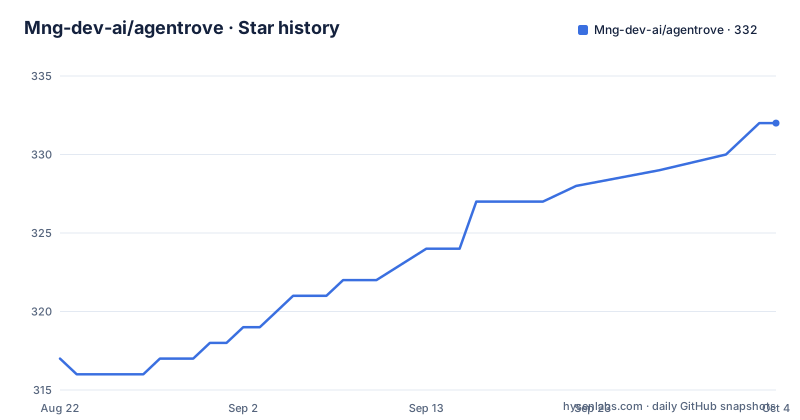
Star history
- Mng-dev-ai/agentrove332 ★ · +15
| Repository | 2026-08-22 | 2026-10-04 |
|---|---|---|
| Mng-dev-ai/agentrove | 317 | 332 |
15 Stars in the last 43 days, measured from the daily GitHub snapshot. Compare with other projects
Editorial analysis
What Agentrove Actually Solves
Agentrove addresses a specific pain: running several different AI coding agents, each with its own CLI and authentication, inside one controlled environment. The README lists Antigravity, Claude Code, Codex, Copilot, Cursor, Grok, and OpenCode as supported through ACP adapters. The ACP adapter layer is the key idea. Instead of you switching between terminal windows and remembering each agent's flags, Agentrove gives you a web workspace with chat, editor, terminal, file tree, diffs, secrets, and git tools. The intended user is an engineer or a small platform team that wants to standardize how agents are invoked, sandboxed, and monitored. The project is self-hosted, so you keep control of code and credentials. That is a real distinction from cloud-only offerings. The README does not mention any multi-user features, so the primary audience appears to be a single developer or a team sharing one instance.
The Orchestration Mechanism: MCP Tools and Sub-threads
The most distinctive part is the bundled MCP server. It exposes the whole instance as tools: send_message, get_messages, list_models, list_personas, and more. Every chat's agent has those tools, which means one agent can call another. The README describes a lead agent that decomposes work, routes tasks to workers, and reviews results. Workers run in sub-threads, which are chat threads grouped under the lead, sharing the same workspace and branch. Sub-threads stay flat, so no nesting. A worker can run on any installed agent and model, with a persona defined as a custom system prompt. You can set worktree=true to give a worker its own git worktree, allowing parallel edits without conflicts. The lead polls get_messages until a worker's turn completes, then judges the result against the actual code and sends rework. Follow-ups inherit the previous model, persona, and reasoning settings. This is a concrete data flow: lead chat, MCP tools, sub-thread, worktree, polling loop. The design is clever because it uses the agents themselves as the execution engine, not a separate scheduler.
Getting It Running: Docker Compose and Environment Keys
The quick start is straightforward if you have Docker and Docker Compose. You clone the repository, copy .env.example to .env, and generate a SECRET_KEY with openssl rand -hex 32. Then docker compose up -d starts the stack, and you open http://localhost:3000. The README shows this exact sequence. There is a production section for single-host deployments, but it is truncated in the material, so I cannot confirm the full set of environment variables beyond SECRET_KEY. For the desktop app, you use npm install and npm run desktop:dev in the frontend directory. The iOS app requires a Mac with Xcode, Rust iOS targets, and CocoaPods. You set URLs in .env.mobile and run npm run ios:dev for the simulator. The README is explicit about the commands. One thing to note: the README mentions that Antigravity authentication uses Google OAuth completed in a terminal, and its ACP tokens live in ~/.gemini/antigravity-acp/, separate from the CLI login. That means you need to handle agent-specific authentication outside Agentrove, which is a real setup step.
Sandboxing and Isolation: Docker or Host
Each workspace can have its own Docker or host sandbox. That is a significant feature for safety. Agents can execute code, edit files, and run git commands, so you want them contained. Docker sandboxes give you isolation, but they consume resources. Host sandboxes are faster but riskier. The README does not detail how sandbox configuration is specified, so you may need to explore the repository for the exact config keys. The orchestration loop also uses git worktrees for parallel workers, which is a clever way to avoid merge conflicts. However, worktrees require a git repository, so they do not work for empty folders or non-git workspaces. That is a limitation. Also, the README says orchestrated turns run in the agent's full-execution mode, meaning workers finish without permission prompts. That removes a safety net. You are trusting the lead agent's judgment to delegate correctly. If the lead sends a worker a harmful instruction, there is no human in the loop. That is a real trade-off.
The Mobile and Desktop Story: Thin Client and Sidecar
The macOS desktop app uses Tauri and starts a bundled Python backend sidecar on a local 127.0.0.1 port. That means the desktop app runs the full backend locally, so you do not need a separate server for local use. The iOS app is different: it is a thin client that talks to an Agentrove instance you already host. The README is clear that iOS cannot run the local backend sidecar, so the app requires a reachable instance over https/wss. You build and sign the iOS app yourself, and nothing is hardcoded to anyone else's server. The build process involves Xcode, Rust targets, and CocoaPods, and the README provides a helper script that reads APPLE_DEVELOPMENT_TEAM to sign and install. A notable detail: free Apple ID signing requires re-signing every 7 days, which is an ongoing maintenance cost. The desktop app is more self-contained, but it is Apple Silicon only according to the release notes. No Windows or Linux desktop build is mentioned.
Limitations and Failure Modes
The most obvious limitation is that Agentrove is a young project. The latest release is v0.1.59, which suggests pre-1.0 stability. The README does not mention any production hardening, backup procedures, or upgrade paths. You are responsible for updating the Docker image and migrating any state. Another limitation is the reliance on ACP adapters. ACP is the Agent Client Protocol, but the README does not specify which version or how well each adapter is maintained. If an agent vendor changes its CLI or protocol, the adapter may break. The README also does not mention any rate limiting or cost controls for orchestrated runs. A lead agent that spawns many workers could rack up API costs quickly. The polling loop could also be inefficient if workers take long turns. There is no mention of timeouts or retries. The orchestration is powerful but unproven in production. The README claims typical loops, but there is no evidence of real-world usage. For a team relying on this for daily work, that is a risk.
Alternatives and the Difference in Approach
The closest alternative is to run each agent CLI directly in your own terminal, using shell scripts or a tool like Task to coordinate. That approach gives you full control but no unified UI, no sandboxing, and no MCP-based orchestration. You would have to write your own polling and rework logic. Another alternative is a managed platform like GitHub Copilot Workspace or Cursor's built-in agents, but those are tied to a single vendor. Agentrove's difference is its aggregation and orchestration layer. It does not replace the agents; it wraps them. That is both a strength and a weakness. A strength because you can mix agents from different vendors. A weakness because you inherit the complexity of running multiple CLIs and their authentication. There is also the option of using OpenCode's own multi-agent features, but the README does not compare them. The key difference is that Agentrove provides a self-hosted control plane, which is rare. If you do not need multi-agent orchestration, a simple terminal alias for each agent is lighter and easier to maintain.
Maintenance, License, and Upgrade Cost
The project is Apache-2.0, which is permissive. You can modify and redistribute it, but you must retain the license notice. There is no mention of a CLA or contributor agreement in the README. The release cadence is active: v0.1.57, v0.1.58, and v0.1.59 were pushed within about two weeks in August 2026. That suggests rapid development, but it also means frequent changes. Upgrading may require re-pulling Docker images and possibly migrating data. The README does not document a migration path between versions. The iOS app has a recurring maintenance cost: re-signing every 7 days with a free Apple ID. The desktop app requires rebuilding if you want the latest features. The backend is Python, and the frontend is React, so you need to manage dependencies for both if you build from source. The Docker deployment reduces that burden, but you still need to monitor the service. Overall, the maintenance cost is moderate for a self-hosted tool, but the lack of upgrade documentation is a concern.
Editorial conclusion
Adopt Agentrove if you need a single interface to run and orchestrate multiple coding agents under your own control, especially if you already use Docker and are comfortable managing agent CLI tokens and sandbox resources. Do not adopt it if you expect a managed cloud service or if your team relies on a single vendor's agent with deep IDE integration; you will be trading that for setup overhead and a young project. Before committing, verify the current state of the ACP adapters for the specific agents you use, test the MCP orchestration loop with a small workflow, and confirm that your Docker host can handle parallel worktrees and multiple sandboxes. The project is Apache-2.0 and under active release, but its real-world reliability is unproven beyond the repository's own claims.
Frequently asked questions
How does Agentrove let one agent drive another?
A bundled server in its own directory exposes the workspace as tools, including sending a message, fetching messages, listing models and listing personas, and every chat's agent is given those tools. A message call with a parent chat identifier creates a worker chat in the same workspace and branch, and those sub-threads stay flat with no nesting.
Do Agentrove's worker agents stop for permission prompts?
No. The file states that orchestrated turns run in the agent's full-execution mode so workers finish without permission prompts. Concurrent edits are kept apart by giving each worker its own git worktree, which is isolation of files rather than of authority.
What do I need to run Agentrove with Docker?
Docker and Docker Compose. Clone the repository, copy the example environment file, generate a secret with a 32-byte hex value, bring the stack up, and open port 3000. The default configuration opens a cache on the conventional host port without a password and leaves registration open with email verification off.
Can I install the Agentrove iOS app without a paid developer account?
Yes, signed with a free Apple ID, and the file states the cost in parentheses: the app must be re-signed every seven days. The phone app is a thin client, so you also need an Agentrove instance already running and reachable over secure sockets.
Which coding agents does Agentrove support?
Seven are named in the readme: Antigravity, Claude, Codex, Copilot, Cursor, Grok and OpenCode, all driven through the same adapter layer. The repository description lists six of those and omits Antigravity.
Official sources
Add this badge to your README
If you maintain this project, the badge below links readers to this analysis and shows its maintenance status from the daily GitHub snapshot. Paste the markdown into your README; add ?metric=license or ?metric=stars to the image URL for a different field.

[](https://hysenlabs.com/projects/mng-dev-ai-agentrove)Star history chart for your README
[](https://hysenlabs.com/projects/mng-dev-ai-agentrove)