Mochi-MQTT Server: Embeddable Go MQTT Broker
The fully compliant, embeddable high-performance Go MQTT v5 server for IoT, smarthome, and pubsub
At a glance
- What is it?
- Mochi-MQTT Server is an embeddable MQTT v5 broker for Go applications, with MQTT v3 compatibility, several listeners, hooks, and persistence options. It fits IoT and pubsub services that need direct control over broker internals, but clustering remains on the roadmap.
- Who is it for?
- Adopt Mochi-MQTT Server when the application needs an MQTT broker embedded in Go or a configurable standalone process with direct access to core code and hooks. Do not treat it as a ready-made clustered service, because cluster support and enhanced metrics remain roadmap items.
- Can I use it commercially?
- Yes. MIT is a permissive licence: you can use, modify and sell software built on it, as long as you keep its copyright and licence notices.
- Is it still maintained?
- Yes. The repository last received commits 45 days ago.
- What is it written in?
- Mainly Go, according to GitHub's language statistics.
Answers come from the project's GitHub data, last synced on October 23, 2026, and from our analysis. They are not legal advice.
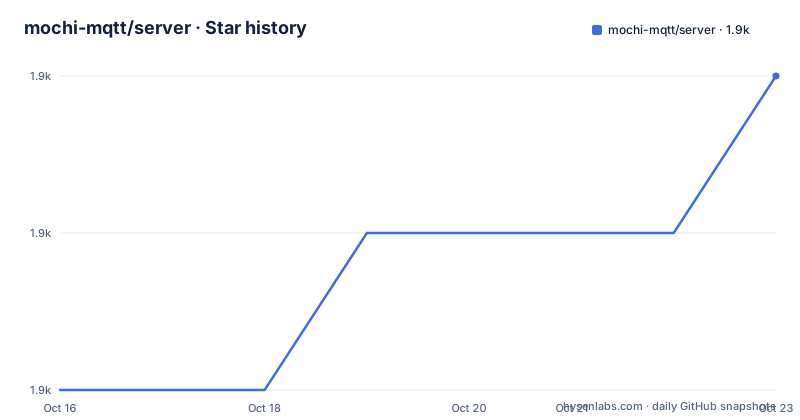
Star history
- mochi-mqtt/server1,947 ★ · +2
| Repository | 2026-10-16 | 2026-10-23 |
|---|---|---|
| mochi-mqtt/server | 1.9k | 1.9k |
2 Stars in the last 7 days, measured from the daily GitHub snapshot. Compare with other projects
Editorial analysis
Why Mochi-MQTT Server Fits Embedded IoT Brokering
Mochi-MQTT Server addresses the need to run an MQTT broker either inside an existing Go application or as a separate executable. It is aimed at telemetry, Internet of Things, smart-home, and pubsub systems. That dual deployment model is the main distinction. A team can begin with the standalone broker for a simple service, then embed the `github.com/mochi-mqtt/server/v2` package when authentication, packet handling, persistence, or lifecycle control needs to live in application code.
The server supports MQTT v5.0.0 and accepts MQTT v3.0.0 and v3.1.1 clients. Its documented feature set includes QoS 0, 1, and 2, topic aliases, shared subscriptions, subscription options and identifiers, message expiry, session expiry, send and receive flow-control quotas, will delay intervals, server-side disconnect and authentication packets, retained messages, and `$SYS` topics. This makes the scope broader than a minimal topic relay, although the README does not document a public dashboard for broker administration.
The embedding option has a practical consequence. Developers can use hooks, exported core code, and direct packet injection rather than communicating with the broker only through its MQTT listeners. That is useful when broker events must influence application logic. It also creates more responsibility because custom listeners and hooks are assembled in Go instead of being discovered from a configuration file.
Subscriptions, Client Buffers, and Packet Routing
Based on the repository layout and README, the broker is organized around core Go files such as `server.go`, `clients.go`, `hooks.go`, `inflight.go`, and `topics.go`, with packet handling under `packets/` and listener implementations under `listeners/`. This separation gives an embedded application direct access to broker components instead of confining customization to external configuration.
The documented subscription model is trie based. Incoming publications are matched against stored subscriptions, and the README also lists retained-message and inflight-message behavior. QoS 1 and QoS 2 require session state rather than simple forwarding, so `inflight.go` and the client package represent important parts of the delivery mechanism. Session expiry and flow-control quotas are especially relevant to clients that disconnect temporarily or receive messages at different rates.
Each client has a write buffer. The README describes these as a way to avoid problems caused by slow-reading or irregular client behavior. This changes broker behavior from a direct write per packet toward client-specific buffering, which can absorb short read-side delays. It does not mean every slow client has unlimited capacity, and the documentation does not state buffer sizes, overflow policy, or queue limits.
Hooks provide interception points around broker activity. Authentication, ACL Ledger, persistence, and debug are identified as built-in hook categories, while the server also supports direct packet injection. This is a closer integration model than a broker configured only through YAML or JSON.
Listeners, Persistence, Authentication, and Hook Boundaries
Mochi-MQTT exposes TCP, WebSocket, and `$SYS` dashboard listeners. TLS support is documented for WebSocket listeners. A file can configure several built-in listener types and hook instances, but the configuration contract is deliberately narrower than the Go API. The README says file-based configuration currently supports only auth, storage, and debug hook types, with one instance of each type. It can load only built-in hooks and built-in listeners because their types and configuration structures must be known before the server can construct them.
Persistence options include Redis, Badger, Pebble, and Bolt through hooks. This gives deployments a choice between externally managed and embedded storage approaches, although the README excerpt does not compare their failure behavior, startup requirements, or operational costs. A custom persistence implementation is possible through the hook system, but it cannot be declared solely as an arbitrary block in the documented file configuration format.
Authentication is similarly split into built-in behavior and extensibility. The example configuration enables the `allow_all` auth hook, which is suitable for demonstrating listener startup but should not be treated as an access-control design. Rule-based authentication and an ACL Ledger are documented as built-ins, while applications can implement custom hooks in Go.
The practical boundary is clear. Use YAML or JSON when the required listener and hook combinations are built in. Move to programmatic setup for custom hooks, custom listeners, packet injection, or tighter integration with the host application.
Running the Standalone Broker for the First Time
The quickest documented build starts from the repository's `cmd` directory. The resulting binary opens TCP on port `1883`, WebSocket on port `1882`, and the dashboard on port `8080`. These are the listener addresses exposed by the README's `cmd/main.go` entrypoint.
The following commands build the standalone executable and start it from the current shell:
cd cmd
go build -o mqtt && ./mqtt
A successful build should produce an `mqtt` executable in the directory used by the build. Starting it should expose the three documented listeners. The README does not include a first MQTT publish or subscribe command, so it does not establish a command for verifying message flow.
A deployment can instead build the repository's Docker image. The following commands use the supplied Dockerfile and publish all three listener ports:
docker build -t mochi:latest .
docker run -p 1883:1883 -p 1882:1882 -p 8080:8080 -v $(pwd)/config.yaml:/config.yaml mochi:latest
The first command creates the image. The second mounts `config.yaml` and maps TCP `1883`, WebSocket `1882`, and dashboard `8080`. The README also documents pulling `mochimqtt/server` directly, and the repository includes a Dockerfile.
Configuring listeners.yaml and Hooks for a File-Based Server
The binary accepts `--config=config.yaml` or `--config=config.json`. The documented configuration structure groups listeners, hooks, and options. This example enables TCP, WebSocket, and a sysinfo listener, then enables the `allow_all` authentication hook and inline client support.
listeners:
  - type: "tcp"
    id: "tcp12"
    address: ":1883"
  - type: "ws"
    id: "ws1"
    address: ":1882"
  - type: "sysinfo"
    id: "stats"
    address: ":1880"
hooks:
  auth:
    allow_all: true
options:
  inline_client: true
The repository also contains `config.yaml`, while `examples/config/` is identified as the place to review available options. Note that the standalone entrypoint exposes its dashboard on `8080`, whereas this example configures a `sysinfo` listener on `1880`. They are separate listener configurations, so the reader should not assume both appear in the same process without reviewing the selected configuration.
The README does not document a rollback procedure, hot reload, configuration validation output, or a command for querying broker health. Those behaviors need direct verification for a production deployment.
Embedding the Go Package Versus Running a Separate Broker
A real alternative is to run an externally managed MQTT broker as a separate service and keep the Go application connected only as an MQTT client. That approach differs from embedding Mochi-MQTT in two practical ways. The application no longer imports broker internals or registers custom Go hooks, but it also gives up direct control over listener construction, packet injection, and broker lifecycle inside the same binary.
Mochi-MQTT's standalone mode is closer to the external-broker model operationally because `cmd/main.go` starts a process. Its file configuration remains suitable when built-in hooks are enough. The package mode becomes the stronger choice when an application needs programmatic hooks or listeners, since the README explicitly limits YAML and JSON to built-in components.
This choice should not be made on the description's claim of high performance alone. The README reports Paho interoperability test coverage and more than a thousand unit-test scenarios, but it provides no comparable benchmark for an external broker. Capacity, client count, message size, QoS mix, persistence, and network behavior would all need evaluation in the intended deployment.
Maintenance, Compatibility, and Missing Operational Features
The repository is not archived, and its last push was on 2026-09-08. That is recent relative to the project information available here, although the README's warning about updates does not establish a fixed support schedule. The listed release history includes `v2.7.9` on 2025-03-01, `v2.7.8` on 2025-02-25, and `v2.6.7` on 2025-02-11. An adopter should therefore distinguish repository activity from the age of the most recent listed stable release.
The module declares Go 1.21 in `go.mod`, and the Dockerfile starts from `golang:1.21.0-alpine3.18`. Upgrade cost depends on configuration schema changes, hook interfaces, listener behavior, and the persistence backend in use. The README does not provide a migration guide for breaking changes, so it does not support a claim that upgrades are inexpensive.
Cluster support and enhanced metrics support are listed on the roadmap rather than among current features. A single-instance deployment should therefore not be described as clustered, and the `$SYS` listener should not be confused with a documented production metrics system. Other gaps include no documented administrative API, rollback process, configuration reload mechanism, or formal deployment topology.
The project uses the MIT license. That permits use and modification under the license terms, but organizations should review `LICENSE.md` and their obligations separately. This review concerns engineering adoption, not legal interpretation.
Editorial conclusion
Adopt Mochi-MQTT Server when the application needs an MQTT broker embedded in Go or a configurable standalone process with direct access to core code and hooks. Do not treat it as a ready-made clustered service, because cluster support and enhanced metrics remain roadmap items. Verify first that your required MQTT v5 behavior, persistence engine, authentication policy, listener, and deployment model are supported by the version you plan to pin.
Frequently asked questions
How do I run mochi-mqtt/server as a standalone Go broker?
Run `cd cmd`, then use `go build -o mqtt && ./mqtt`. According to the README, the entrypoint exposes TCP on `:1883`, WebSocket on `:1882`, and the dashboard on `:8080`.
Can mochi-mqtt/server be embedded in a Go application?
Yes. The module path is `github.com/mochi-mqtt/server/v2`, and the README presents it as an embeddable broker with exported core code, hooks, and direct packet injection.
Does mochi-mqtt/server support MQTT v5 and MQTT v3 clients?
The README states that it implements MQTT v5 and supports compatibility with MQTT v3.1.1 and MQTT v3.0.0. MQTT v5-only properties and features can be downgraded when a v3 client is connected.
Official sources
Add this badge to your README
If you maintain this project, the badge below links readers to this analysis and shows its maintenance status from the daily GitHub snapshot. Paste the markdown into your README; add ?metric=license or ?metric=stars to the image URL for a different field.

[](https://hysenlabs.com/projects/mochi-mqtt-server)Star history chart for your README
[](https://hysenlabs.com/projects/mochi-mqtt-server)Was this useful?