mod-playerbots puts player-like bots inside an AzerothCore server
AzerothCore Playerbots Module
At a glance
- What is it?
- mod-playerbots is a C++ module for the AzerothCore World of Warcraft server emulator that adds alt characters, wandering bots and raid-capable bots to a server you run yourself. The hard requirement is a custom AzerothCore fork, which is also the module's main constraint.
- Who is it for?
- mod-playerbots suits operators of their own AzerothCore server who want population, alt play, or raid testing without recruiting real players, and it does not suit anyone who needs a stock AzerothCore install or expects a package manager to handle the upgrade.
- Can I use it commercially?
- Yes, with conditions. GPL-2.0 is a copyleft licence: if you distribute software that includes it, you must release that software's source code under the same licence. Running it internally without distributing it does not trigger that obligation.
- Is it still maintained?
- Yes. The repository received new commits within the last day.
- What is it written in?
- Mainly C++, according to GitHub's language statistics.
Answers come from the project's GitHub data, last synced on November 7, 2026, and from our analysis. They are not legal advice.
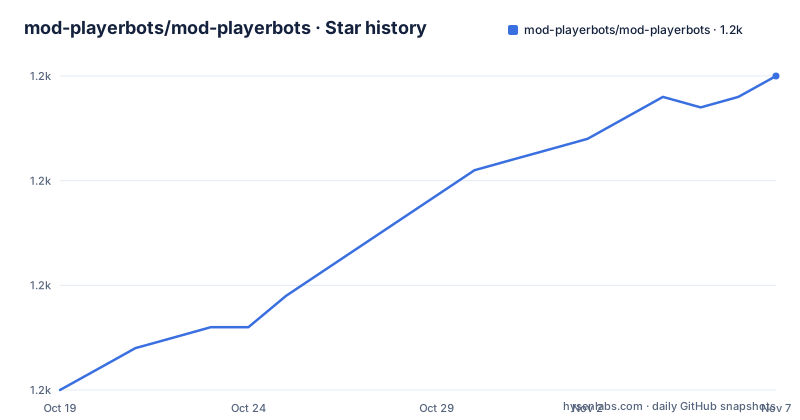
Star history
- mod-playerbots/mod-playerbots1,210 ★ · +30
| Repository | 2026-10-19 | 2026-11-07 |
|---|---|---|
| mod-playerbots/mod-playerbots | 1.2k | 1.2k |
30 Stars in the last 19 days, measured from the daily GitHub snapshot. Compare with other projects
Editorial analysis
The standard AzerothCore repository will not work
The single most important line in the README is a warning: every mod-playerbots installation requires a custom fork of AzerothCore, the mod-playerbots/azerothcore-wotlk repository on its Playerbot branch. The standard AzerothCore repository will not work. That is not a recommendation to prefer the fork, it is a hard precondition.
The reason is structural. A module compiled against the upstream server would have no knowledge of the bot account model, and the module has to reach deep into server behaviour to make a bot look like a real character rather than a scripted NPC. Keeping that logic in a matching server fork is the project's structural choice, and it means the two pieces must be upgraded together. A server admin who plans to track upstream AzerothCore with any regularity should read that constraint as a fork-management cost before anything else.
The rest of the project fits that shape. It is written in C++, it is packaged as a normal AzerothCore module with a mod-playerbots.cmake file and an include.sh helper, and the source tree is split into apps/ and src/ with a conf/ directory and a data/ directory for its bundled content. Build automation lives in the .github directory, and the project keeps CI badges for macOS, core, and Windows builds.
Two clones and a platform-specific build
The quick start is two git commands. The first pulls the custom server fork on the Playerbot branch, the second pulls the module itself into that server's modules directory:
git clone https://github.com/mod-playerbots/azerothcore-wotlk.git --branch=Playerbot
cd azerothcore-wotlk/modules
git clone https://github.com/mod-playerbots/mod-playerbots.git --branch=master
From there the README does not give you the build commands. It points to the platform-specific instructions in the Installation Guide in the project wiki, and the supported platforms are Ubuntu, Windows, and macOS. Other Linux distributions may work but will not receive support, so on, say, Arch or a minimal container image you are outside the tested matrix even if the compile succeeds.
The wiki is where the real work lives. The Installation Guide covers clean installs, migrating from an existing AzerothCore, a Docker setup, adding modules, and updating, and a separate Troubleshooting page collects the common build errors, database issues, configuration mistakes, and crashes, including platform-specific problems. A module that patches server internals is going to hit database and configuration problems that a Python package never would, and the existence of that troubleshooting page is a fair signal of the support load you are taking on.
Alt bots, random bots, and raid bots behave differently
The project lists several distinct populations of bot, and they solve different problems. The first is the ability to log in alt characters as bots, so a player can interact with their other characters, form parties, and level them up. The second is random bots that wander through the world, complete quests, and otherwise behave like players, which the README frames as simulating the MMO experience. The third is bots capable of running most raids and battlegrounds.
That third category is the expensive one, and it is where the module earns its keep for server operators who need to test progression or populate a raid night. The README claims excellent performance even when running thousands of bots and points to recommended performance configurations in the wiki, but it gives no numbers, so treat that as a design goal of the project rather than a measurement you can rely on for your own hardware.
Behaviour is driven by settings, and the project advertises a highly configurable set of them for defining how bots behave. The conf/ directory in the repository is where those settings live. This is also where the design trade-off appears: the same configuration surface that lets a raid bot follow a programmed strategy is what lets a random bot wander. The cost of that flexibility is a large and sometimes inconsistent settings vocabulary, and the wiki notes that documentation may be incomplete or out of date in some sections.
Chat commands are the control plane, and that is the friction point
Bots are controlled through chat commands, and the README names the weakness plainly: for larger bot groups, this can be cumbersome. That is an unusual level of candour for a project README, and it points at the real cost of operating a big bot population. Typing commands into a game client one at a time does not scale to a raid full of bots, and each command is a round trip through the client.
The workaround is the community AddOns route. Because the command interface is awkward, community members have written client AddOns that control bots through the in-game UI, and the README points to the AddOns and Submodules page in the wiki to find them. The fact that third-party clients are the recommended answer to the module's own ergonomics tells you something about the intended workflow: a small number of bots, driven by chat, is the comfortable case, and anything larger is expected to run through extra tooling.
The Playerbots Wiki also covers AddOns, commands, raids with programmed bot strategies, and recommended performance configurations, so the command vocabulary is documented, if unevenly. Before committing to a large bot setup, read the commands page and the strategy descriptions for the content you plan to run, because that is where the gap between a supported configuration and an experimental one shows up.
test-staging gives you fixes before master has them
There is a second branch with a specific role: test-staging carries the latest features and fixes before they are merged into master. The README describes the trade-off without softening it: the branch may contain unstable or breaking changes, use it at your own risk, and only if you are comfortable troubleshooting issues. To use it, clone with --branch=test-staging instead of the master branch shown in the quick start.
For a server operator this is a genuinely useful arrangement, because the module sits close to server internals and upstream AzerothCore changes can break a module or the reverse. Having a staging branch lets you find that breakage before it reaches a live world. The cost is that you now maintain two kinds of state, the stable branch and the moving one, and only the second one tells you about problems early.
Contributions follow a similar expectation. The project asks that every pull request include all test scenarios the author performed along with their results, so that changes are properly verified, and the code follows the C++ Code Standards established by AzerothCore, with a .clang-format file and a code_format.sh script in the repository root. A .suppress.cppcheck file and an .editorconfig are also present, so static analysis and editor behaviour are part of the expected workflow rather than optional extras.
Where this module is the wrong choice
Three situations rule it out. If you want a stock AzerothCore server, the standard repository will not work, and the fork becomes a permanent line you have to track. If you are not prepared to build a C++ server from source and maintain a database schema alongside it, a source module is the wrong shape of dependency. And if your goal is to see a populated world in a retail game client, this is not that: the module adds bots to a server you operate, and it will not connect to an official service.
The documentation surface is another constraint. The project itself notes that the wiki may be incomplete or out of date in some sections, there are no GitHub releases for the module, and the version you get is whatever commit a branch points at. That last point matters for operators who need a repeatable deployment: without tagged releases, a deployment is pinned to a commit hash or it drifts.
A second example project worth looking at is the upstream IKE3's Playerbots, which this module is based on, along with the earlier mangosbot-bots lineage. IKE3's Playerbots is a separate project, while mod-playerbots targets AzerothCore and ships as an AzerothCore module built for that server's module system.
GPL-2.0 and a lineage of prior work
The licence is GPL-2.0, with the licence text in the LICENSE file at the repository root. For a server module that you compile into your own server binary, the practical implication is that the combined work is subject to the GPL, so publishing the modified server and the module together carries the corresponding source obligations. This is a licensing observation and not legal advice; if you plan to run a public or commercial service, have someone qualified look at how the GPL applies to your distribution.
The lineage is unusually traceable, and it is worth knowing because it tells you where bugs and fixes tend to live. The README says the module is based off IKE3's Playerbots, and the acknowledgements credit ZhengPeiRu21/mod-playerbots and celguar/mangosbot-bots for their continued efforts in maintaining earlier versions. The project also states that it is still under development and asks for pull requests and issue reports, with a bug report template in the issue tracker.
The last push to the repository was on 2026-10-17, so the code is moving. What has not arrived is a release cadence: the repository has no GitHub releases, and the README directs readers to the wiki and the guides there for day-to-day operation rather than to a changelog. Budget your own release notes.
Editorial conclusion
mod-playerbots suits operators of their own AzerothCore server who want population, alt play, or raid testing without recruiting real players, and it does not suit anyone who needs a stock AzerothCore install or expects a package manager to handle the upgrade. Before you start, confirm that you can build the custom mod-playerbots/azerothcore-wotlk Playerbot branch from source, that your machine has the toolchain for a C++ compile of a full server, and that you have read the Installation Guide, since the README explicitly says the standard AzerothCore repository will not work.
Frequently asked questions
Can I use mod-playerbots with the standard AzerothCore repository?
No. Every mod-playerbots installation requires the custom fork at mod-playerbots/azerothcore-wotlk on the Playerbot branch, and the README states that the standard AzerothCore repository will not work.
How do I install mod-playerbots on Ubuntu, Windows, or macOS?
Clone the azerothcore-wotlk repository with --branch=Playerbot, cd into its modules directory, and clone mod-playerbots with --branch=master. The README then sends you to the platform-specific instructions in the Installation Guide in the project wiki.
What is the difference between the master and test-staging branches?
test-staging carries the latest features and fixes before they are merged into master, and the README warns that it may contain unstable or breaking changes. You clone it with --branch=test-staging instead of master.
How do you control a large group of bots in mod-playerbots?
Bots are controlled with chat commands, which the README notes becomes cumbersome for larger groups. Community members have written client AddOns that control bots through the in-game UI, and the wiki has a page listing those AddOns and submodules.
Official sources
Add this badge to your README
If you maintain this project, the badge below links readers to this analysis and shows its maintenance status from the daily GitHub snapshot. Paste the markdown into your README; add ?metric=license or ?metric=stars to the image URL for a different field.

[](https://hysenlabs.com/projects/mod-playerbots-mod-playerbots)Star history chart for your README
[](https://hysenlabs.com/projects/mod-playerbots-mod-playerbots)Was this useful?