mthcht/awesome-lists: A Curated Arsenal of Detection Lists for SOC and CTI Workflows
Awesome Security lists for SOC/CERT/CTI
At a glance
- What is it?
- This project aggregates dozens of CSV and YARA lists for threat hunting, from suspicious named pipes to ransomware extensions. It is a practical reference for SOC analysts and CTI teams, though its value depends on how well you integrate the lists into your existing pipelines.
- Who is it for?
- Adopt mthcht/awesome-lists if you are a SOC analyst, DFIR investigator, or CTI analyst who needs ready-made, categorized indicators for hunting and detection engineering. It is not a full detection platform; you must integrate the lists into your SIEM, EDR, or YARA scanner.
- Can I use it commercially?
- Yes. MIT is a permissive licence: you can use, modify and sell software built on it, as long as you keep its copyright and licence notices.
- Is it still maintained?
- Yes. The repository received new commits within the last day.
- What is it written in?
- Mainly YARA, according to GitHub's language statistics.
Answers come from the project's GitHub data, last synced on October 23, 2026, and from our analysis. They are not legal advice.
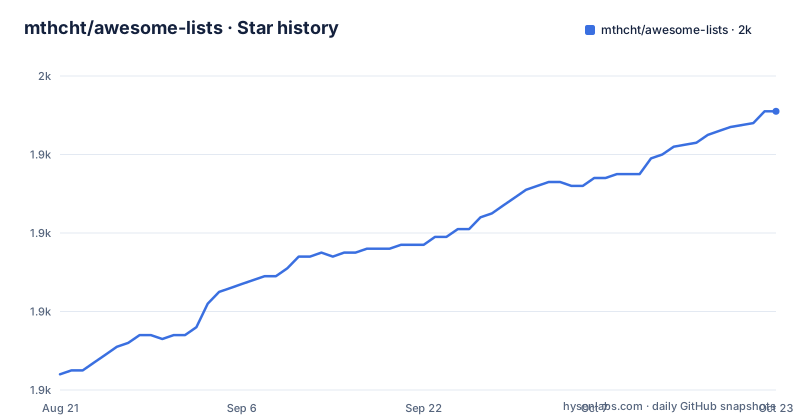
Star history
- mthcht/awesome-lists1,951 ★ · +67
| Repository | 2026-08-21 | 2026-10-23 |
|---|---|---|
| mthcht/awesome-lists | 1.9k | 2k |
67 Stars in the last 63 days, measured from the daily GitHub snapshot. Compare with other projects
Editorial analysis
What This Repository Actually Offers
The project is a curated collection of detection-oriented lists, not a tool or a framework. It targets SOC analysts, CERT teams, and CTI professionals who need indicators for threat hunting and detection. The README organizes content into two main areas: a threat hunting section with links to external guides and searches, and a 'My Detection Lists' section with dozens of CSV files. These lists cover a wide range of artifacts: suspicious named pipes, TLDs, ASNs, Windows services, tasks, ports, firewall rules, user agents, certificates, USB IDs, mutex names, MAC addresses, hostnames, browser extensions, and more. It also includes ransomware extensions and ransom note names, which are directly useful for DFIR. The repository is primarily YARA in language, but the actual content is mostly CSV data, with YARA rules referenced in a separate linked project.
How the Lists Are Structured and Updated
The lists live under the 'Lists' directory, organized into subdirectories like 'TLDs', 'ASNs', 'CERTS', 'Hijacklibs', 'TOR', 'Drivers', and 'Phishing'. Each list is typically a CSV file with a descriptive name, such as 'suspicious_named_pipe_list.csv' or 'ransomware_extensions_list.csv'. Some lists are marked as 'updated automatically', including suspicious TLDs, ASNs, Hijacklibs, TOR nodes, and malicious SSL certificates. This suggests an automated pipeline, though the README does not describe how it works. The 'big-files' release, dated 2025-03-01, indicates that large datasets are packaged for convenient download, which is practical for users who do not want to clone the entire history. The presence of a Maxmind GeoIP database under 'ASNs/correlation_maxmind_geo_db' suggests that some lists are enriched with geolocation data, but the README does not explain the correlation method.
Getting Started: Commands and Configuration
There is no installation step; you simply clone the repository. Use 'git clone https://github.com/mthcht/awesome-lists.git' or download the 'big-files' release from the GitHub releases page. Once you have the files, you can inspect the CSV lists directly. For example, to see the suspicious named pipes list, open 'Lists/suspicious_named_pipe_list.csv'. To use these in detection, you would import them into your SIEM or EDR. For YARA rules, the README links to a separate repository, 'ThreatHunting-Keywords-yara-rules', which you would clone and compile with your YARA scanner. No configuration files or API keys are mentioned. The main integration effort is mapping each CSV column to your detection platform's fields, which the README does not specify. This means you need to understand your own data schema.
Where This Shines and Where It Falls Short
The strength is breadth and organization. Having a single place for suspicious port lists, Windows service names, and ransomware extensions saves time. The automatic updates for certain lists reduce manual maintenance. However, there are clear limitations. First, the lists are static snapshots; they are only as current as the last update. The 'updated automatically' claim is unverified, and the release date is the only concrete timestamp. Second, the repository is a collection of indicators, not a detection engine. You must build the logic to correlate these lists with your logs. For example, a suspicious TLD list is useless unless you have a field for the TLD in your DNS logs. Third, the README is a long list of links with minimal context. It does not explain the confidence level of each indicator or the false positive potential. A list of suspicious hostnames might include legitimate domains that happen to match a pattern. You need to validate each list against your environment.
How It Compares to Alternative Approaches
The closest alternative is to build your own indicators from threat intelligence feeds, such as MISP or OpenCTI. Those platforms aggregate indicators from multiple sources, provide correlation, and offer APIs for automation. In contrast, this repository is a manual, curated set of lists that you download and integrate. The difference is in workflow: with MISP, you connect your SIEM to a live feed; with awesome-lists, you ingest static files and manage updates yourself. Another alternative is to use vendor-specific threat intel feeds, like Recorded Future or Anomali, which offer richer context and scoring but come with a cost. This repository is free and open, but it lacks the enrichment and scoring that commercial feeds provide. For a small SOC with limited resources, the CSV lists are a practical starting point, but for large-scale operations, a dedicated platform is more sustainable.
Maintenance and License Considerations
The repository is licensed under MIT, which allows reuse and modification with attribution. However, the individual lists may contain data from third-party sources, such as Maxmind GeoIP, which has its own license terms. You need to review those terms before using the lists commercially. The project appears actively maintained, with the last push on 2025-03-01 and a release on the same date. The 'big-files' release suggests a strategy to handle large data files, which is a practical approach for distribution. Upgrade cost is low: you can re-clone or download the latest release to get updates. However, if you have customized the lists for your environment, you will need to merge changes manually. There is no automated update mechanism within the repository itself, so you must schedule regular pulls or downloads. For a security team, this is a manageable but ongoing task.
Who Should Use This and Who Should Not
This repository is ideal for a SOC analyst who needs a quick reference for a specific hunt, such as checking a suspicious service name or a TLD. It is also useful for CTI analysts who want to enrich their reports with concrete indicators. However, it is not for teams that expect a turnkey detection solution. If you lack the engineering capacity to integrate CSV lists into your SIEM, this will be a burden. Also, if you require high-confidence, low-false-positive indicators, you will need to do extra validation. The lists are raw and uncurated in terms of quality; there is no scoring or context. For a mature security operation, this could be a supplementary source, but not the primary one. Before adopting, verify the update frequency and test a few lists against your historical data to see the match rate.
Editorial conclusion
Adopt mthcht/awesome-lists if you are a SOC analyst, DFIR investigator, or CTI analyst who needs ready-made, categorized indicators for hunting and detection engineering. It is not a full detection platform; you must integrate the lists into your SIEM, EDR, or YARA scanner. Before relying on any list, verify the freshness of the 'updated automatically' entries and check the license terms for each sub-list, as the MIT license covers the repository but individual data sources may have their own restrictions. Start by cloning the repo and reviewing the lists under the 'Lists' directory to see which match your use case.
Frequently asked questions
What is mthcht awesome-lists?
It is an MIT licensed collection of indicator lists for SOC and DFIR detection, described as awesome security lists for SOC, CERT and CTI work. The repository holds a `Lists/` directory of mostly CSV files, a `_utils/` directory of utilities, a README that is an index of links, and its primary language is recorded as YARA.
Which awesome-lists update themselves?
The entries the page marks as updated automatically are suspicious TLDs, suspicious ASNs, a MaxMind GeoIP extract, the Hijacklibs set, TOR node lists, the LOLDrivers hash list, the malicious bootloader hash list, a malicious SSL certificate list, and the DNSTWIST default domain list. The other CSV entries carry no marker at all.
What kinds of indicators does awesome-lists hold?
Windows artifacts such as mutex names, named pipes, service names, scheduled task names, firewall rules, USB identifiers, hostnames and MAC addresses, plus suspicious ports and user agents; network indicators as ASNs, TLDs, DNS over HTTPS endpoints and dynamic DNS domains; file hashes for drivers and bootloaders; phishing and sinkholed domains and URLs; ransomware file extensions and ransom note filenames; Windows ASR rule identifiers; and Microsoft application identifiers for business email compromise detection.
Where are the YARA rules for awesome-lists?
In separate repositories rather than this one. The page links a YARA rules repository, a keywords repository with its own GitHub Pages site, and a detection folder inside the Purpleteam project, along with long-form hunting searches published as external articles.
What format are the awesome-lists files in?
Mostly CSV, with some entries pointing at directories of raw artifacts instead. The shapes differ per list: hashes for drivers and bootloaders, domains and URLs for phishing and sinkholes, ASNs and TLDs for network indicators, Windows artifact names for endpoint telemetry, and identifiers for certificates, OAuth applications, Microsoft applications and ASR rules.
How is awesome-lists versioned?
It has one release, titled big-files and described as a Big Files Release, dated 2025-03-01, with no version number. The repository itself receives commits far more often than that, including a push on 2026-10-03, so per-file age has to be read from commit history rather than from the release list.
Official sources
Add this badge to your README
If you maintain this project, the badge below links readers to this analysis and shows its maintenance status from the daily GitHub snapshot. Paste the markdown into your README; add ?metric=license or ?metric=stars to the image URL for a different field.

[](https://hysenlabs.com/projects/mthcht-awesome-lists)Star history chart for your README
[](https://hysenlabs.com/projects/mthcht-awesome-lists)Was this useful?