Multica: A Self-Hostable Board That Treats Coding Agents as Assignable Teammates
Multica turns coding agents into managed teammates that pick up assigned issues, write code, report blockers, and update statuses autonomously, all self-hosted.
At a glance
- What is it?
- Multica is a source-available workspace that assigns issues to AI coding agents, tracks their runs, and routes results through human review. It works with the agent CLIs you already use and can run fully on your own infrastructure.
- Who is it for?
- Adopt Multica if you run multiple coding agents (Claude Code, Codex, Cursor, Kimi) and need a shared board where they pick up issues, report progress, and hand back diffs for human approval. It suits teams that want self-hosting, per-agent access scopes, and an audit trail of every tool call.
- Can I use it commercially?
- Check first. The repository uses a licence we do not classify automatically, so read its LICENSE file before any commercial use.
- Is it still maintained?
- Yes. The repository received new commits within the last day.
- What is it written in?
- Mainly Go, according to GitHub's language statistics.
Answers come from the project's GitHub data, last synced on November 13, 2026, and from our analysis. They are not legal advice.
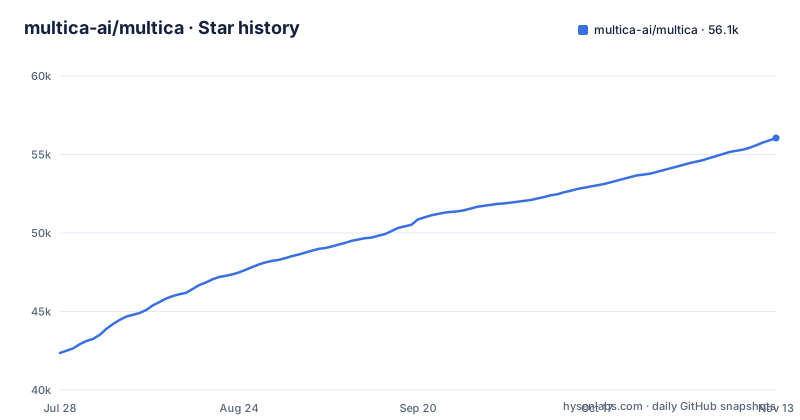
Star history
- multica-ai/multica56,051 ★ · +13,690
| Repository | 2026-07-28 | 2026-11-13 |
|---|---|---|
| multica-ai/multica | 42.4k | 56.1k |
13,690 Stars in the last 108 days, measured from the daily GitHub snapshot. Compare with other projects
Editorial analysis
The Problem: Agent Sprawl in Terminal Tabs
The README opens with a familiar scene: you run Claude Code, Codex, and three other agents, each in its own terminal tab. When the session ends, the context dies with it, and you spend the day re-explaining the same project background. Multica addresses this by turning agents into assignable workers on a shared board. Instead of babysitting each tab, you file an issue, pick an agent as assignee, and the agent picks it up, comments as it goes, and hands back a pull request. The intended audience is a team that already uses multiple coding agents and wants a single control plane for assigning work, tracking progress, and enforcing review. It is not for someone running one agent in one repo; the overhead of a board only pays off when coordination becomes the bottleneck.
How Multica Works: Runtimes, Agents, and Issues
The architecture centers on three concepts: runtimes, agents, and issues. A runtime is any machine that has the agent CLIs installed and signed in. The desktop app connects the computer it runs on as a runtime automatically. An agent is a named configuration that ties a provider to a runtime. When you assign an issue to an agent, the agent works on that runtime, so the code never leaves the machine you control. The execution log records every tool call, command, and error with timestamps, and the diff stays attached to the same issue. Review gates ensure work lands in review, not directly in main. The key data flow is: issue created, agent assigned, agent runs on a daemon runtime, log and diff accumulate, human reviews, then merge. This is a pull-based model where the agent is a worker, not a chat participant.
Getting Started: Commands and Configuration
The quickstart requires no terminal for the hosted version: sign up at multica.ai or download Multica Desktop for macOS, Windows, or Linux. The desktop app connects the computer it runs on as a runtime automatically. The one prerequisite is that the runtime machine has at least one supported agent CLI installed and signed in. Multica drives those CLIs; it does not ship them. For self-hosting, the repository points to SELF_HOSTING.md and ships Docker Compose files, with Helm also named as an option. Configuration happens through the web UI: you create agents, pick runtimes, and set roles like `owner`, `admin`, and `member`, plus access scopes that determine which agents each member can run.
The Board and the Human-in-the-Loop
Multica's pitch is that agents show up on the board like anyone else. They get assigned issues, report progress, raise blockers, and hand back for review. The review gate is the critical control: work lands in review, not in main, and you decide what ships. This is a deliberate design choice to keep a human in the loop, which matters when agents can run arbitrary commands on your runtime. The inbox pings you only when an agent needs a call, not for every step, which reduces noise. Retries and timeouts are built in: failed runs retry on their own, or stop and tell you why. The execution log is the audit trail, and token usage per agent and per issue shows the cost. This is not an autonomous agent framework; it is a management layer that assumes you still want to approve the diff.
Self-Hosting and Git Host Flexibility
The README emphasizes self-hosting everything via Docker Compose or Helm on your own infrastructure. That means the server, the database, and the runtimes all live under your control. The Git host integration covers GitHub, GitLab, Gitea, and Forgejo, including self-hosted instances. This is a practical advantage for teams that cannot push code to a third-party SaaS. The daemon runtime model means code never leaves your machine, which addresses a common concern about cloud agents. But it also means you are responsible for keeping those runtimes patched and available; if the laptop sleeps, the agent cannot work.
Limitations and Failure Modes
The most obvious limitation is the prerequisite: every runtime must have a supported agent CLI installed and signed in. Multica does not bundle Claude Code or Codex; it drives them. If a CLI breaks or changes its auth model, your agents stop working until you fix the runtime. The iOS app builds from source today, not yet on the App Store, so mobile access is limited to developers who can compile it. The community-maintained channels (DingTalk, WeCom, Telegram) are a risk if you rely on them for critical notifications; community maintenance means no guarantee of timely updates. Finally, the security model is described at a high level but not detailed in the README; you need to read the docs to understand what an agent can and cannot reach on a runtime.
Alternatives: Agent Frameworks vs. Management Platforms
The closest alternative is not another agent CLI, but a workflow orchestrator like Temporal or a CI/CD pipeline with agent steps. Temporal gives you durable execution and retries for arbitrary code, but it does not have a board, issues, or agent-specific review gates. You would build the assignment logic yourself. Another alternative is to use a single agent CLI with a built-in task queue, like Claude Code's headless mode, but that locks you into one provider and does not give you a shared board for multiple agents and human teammates. Multica's difference is the board: it treats agents as assignable workers with names, providers, and runtimes, and it centralizes the execution log and review flow. If you already have a strong CI/CD pipeline, you might find Multica redundant for simple tasks, but it adds the human-in-the-loop review and per-agent access control that CI does not.
Maintenance, Upgrades, and Licensing
The repository shows active development with releases v0.7.0 through v0.7.2 pushed within days of each other (October 23 to 30, 2026), suggesting a fast iteration cycle. That means upgrades will come frequently, and you will need to track them for bug fixes and security patches. GitHub's licence detection reports NOASSERTION, and the README calls Multica source-available rather than open-source, so read the LICENSE and NOTICE files at the top of the repository before adopting it for commercial use or redistribution. Self-hosting via Docker Compose or Helm has its own maintenance cost: you are responsible for image updates, database backups, and runtime availability. Upgrade testing is on you. The community-maintained channels add another maintenance burden, as they may lag behind core releases.
Editorial conclusion
Adopt Multica if you run multiple coding agents (Claude Code, Codex, Cursor, Kimi) and need a shared board where they pick up issues, report progress, and hand back diffs for human approval. It suits teams that want self-hosting, per-agent access scopes, and an audit trail of every tool call. Skip it if you have a single agent and no coordination problem, or if you cannot meet the prerequisite of installing and signing in each agent CLI on a runtime machine. Confirm that your Git host (GitHub, GitLab, Gitea, Forgejo) is supported, and test one autopilot on a cron schedule to see if the execution log gives you the replay detail you need.
Frequently asked questions
What is multica?
A source-available workspace where you assign issues to coding agents the way you would to a teammate. The agent picks the issue up, works on a runtime you control, comments as it goes, and hands the result back for review.
How do I install Multica?
Sign up at multica.ai with no terminal, download Multica Desktop for macOS, Windows or Linux, or self-host the whole stack with Docker Compose or Helm. Whichever route you take, the machine that runs agents needs at least one supported agent CLI installed and signed in first.
Is Multica open-source?
The repository description calls it the open-source managed agents platform, while the README's own wording is a source-available workspace. A LICENSE file and a NOTICE file sit at the top of the repository, and the Docker build copies both into the runtime image.
Can Multica be used with Claude Code?
Yes. Claude Code is one of the named runtimes Multica drives, and it is one of the four, alongside Codex, Grok and Kiro, where steering a running agent works, meaning a reply lands in the current run rather than the next one.
Official sources
Add this badge to your README
If you maintain this project, the badge below links readers to this analysis and shows its maintenance status from the daily GitHub snapshot. Paste the markdown into your README; add ?metric=license or ?metric=stars to the image URL for a different field.

[](https://hysenlabs.com/projects/multica-ai-multica)Star history chart for your README
[](https://hysenlabs.com/projects/multica-ai-multica)Was this useful?