Sqlean packs missing SQLite functions into loadable C modules
The ultimate set of SQLite extensions
At a glance
- What is it?
- Sqlean is a bundle of C extensions that add hashing, regexp, statistics, CSV virtual tables and Unicode handling to SQLite. It is useful when a query needs functions the engine deliberately omits, and useless when you need to add features instead of functions.
- Who is it for?
- Adopt Sqlean if your workload runs raw SQL in the sqlite3 shell or a fixed host language and you need regexp, median, hashing or CSV as virtual tables without writing a loader yourself. Do not adopt it if your build cannot load shared libraries at all.
- Can I use it commercially?
- Yes. MIT is a permissive licence: you can use, modify and sell software built on it, as long as you keep its copyright and licence notices.
- Is it still maintained?
- Yes. The repository last received commits 14 days ago.
- What is it written in?
- Mainly C, according to GitHub's language statistics.
Answers come from the project's GitHub data, last synced on November 14, 2026, and from our analysis. They are not legal advice.
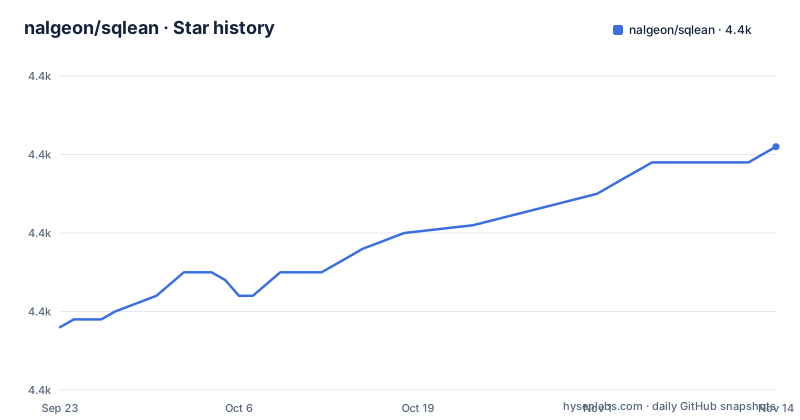
Star history
- nalgeon/sqlean4,391 ★ · +23
| Repository | 2026-09-23 | 2026-11-14 |
|---|---|---|
| nalgeon/sqlean | 4.4k | 4.4k |
23 Stars in the last 52 days, measured from the daily GitHub snapshot. Compare with other projects
Editorial analysis
SQLite ships a small function set on purpose, and Sqlean exists to widen it
Sqlite's function set is short, and the project treats that as a design position rather than a gap. The engine's answer is the loadable extension interface, and Sqlean is a curated pile of things to load into it. The audience is narrow and specific: people writing SQL directly against a local file, where a function like regular expressions or a median aggregate has to exist because there is no server on the other side to compute it. Sqlean covers hashing and encoding, user-defined functions and dynamic SQL, file read and write, fuzzy string matching and phonetics, IP address manipulation, mathematics, regular expressions, statistics, string and Unicode handling, high precision date and time work, UUIDs, and CSV files exposed as virtual tables. The repository is C, laid out as src/, test/, docs/ and a Makefile, and the packaged artifact is a single-file bundle named sqlean containing all listed extensions.
The .load line is the whole installation story
There is no installer and no package to configure. The documented quick path is to point the command line shell at the bundle you downloaded, then call a function that the stock engine does not have.
sqlite> .load ./sqlean
sqlite> select stats_median(value) from stats_seq(1, 99);
If the load succeeds, the second statement returns a number rather than an error, and that is the entire check. From there the project points you at docs/install.md for IDE, Python, JavaScript and other hosts, which matters because the shell is only the demo case. Nothing in the quick path registers anything system wide. Each session that needs the functions must load them again, and a host application needs its own loading call in its own language.
Precompiled bundles stop at 64 bit and ship no source fallback
Downloads are per platform archives, one per CPU family: sqlean-win-x64.zip, sqlean-linux-x64.zip, sqlean-linux-arm64.zip, sqlean-macos-x64.zip and sqlean-macos-arm64.zip. All of them are 64 bit and the project says plainly that they require a 64 bit SQLite version. That is the hard boundary for anyone still on a host that is not 64 bit, on an embedded target, or on a runtime whose SQLite is compiled without loadable extension support at all. A stock sqlite3 from a distribution package usually loads these without trouble, but a statically linked shell or an embedded build with SQLITE_OMIT_LOAD_EXTENSION set will refuse the file, and the error you get is about the host, not about Sqlean. There is no archive for a host that is not 64 bit, so on that architecture the answer is building from source yourself.
make download-sqlite pins the engine to 3.36, which is the build's real constraint
Building from source is a fetch step followed by make build. The Makefile hardcodes the engine version rather than tracking your local SQLite: SQLITE_RELEASE_YEAR is 2024 and SQLITE_VERSION is 3470200.
make prepare-dist
make download-sqlite
Compiled extensions land in the dist folder. Note that the version string baked into the binary comes from the git tag at HEAD, or the literal main when the checkout has no tag, so an untagged local build reports itself as main. Then build for your OS:
make buildOne Makefile target for three operating systems, and where that breaks
The Makefile picks a variant by compiler, flags and output directory: a native build into dist, a sanitized build into dist/san with san=1, and a Windows build into dist/wine with on=wine using zig cc -target x86_64-windows-gnu. With on=gcc it runs the whole command in Docker on Linux with GCC, using the gcc:16.2.0 image and the linux/arm64 platform by default.
Bug fixes only, and no roadmap for the modules you wish existed
The contributing section asks you to open an issue to discuss a missing feature, and only for real use cases rather than hypothetical ones; bugs can be reported as an issue or a PR, but PRs with new features are not wanted. The support section describes Sqlean as mostly a one-man project, not backed by a VC fund. Releases continue: 0.29.0 shipped on 2026-10-31, after 0.28.5 on 2026-10-14 and 0.28.4 on 2026-08-14.
What to compare it against before loading it
The usual alternative is writing your own extension: a C file that registers the handful of functions a single application needs, compiled against the same loadable extension interface, which keeps the dependency surface at exactly what you use and gives you full control over error handling and speed. Sqlean takes the opposite position. It ships twelve domain modules, documented under docs/, tested in test/, and one bundle you can drop into any host that can load a shared library, so the work shifts from writing C to picking a module and loading a file. The tradeoff is granularity and trust: you accept the whole module when you want one function, and your SQLite process gains code covering file IO, hashing and statistics whether or not you call them. A third path, moving to a client-server engine, removes the problem entirely at the cost of the deployment model that made SQLite the choice. Compare on that axis, not on feature count.
Editorial conclusion
Adopt Sqlean if your workload runs raw SQL in the sqlite3 shell or a fixed host language and you need regexp, median, hashing or CSV as virtual tables without writing a loader yourself. Do not adopt it if your build cannot load shared libraries at all. Verify first that the SQLite on the host is 64 bit and has loadable extension support, since the precompiled bundles are 64 bit and refuse to load otherwise, and then check that the module you need is among the listed extensions before you wire the .load call into a startup path.
Frequently asked questions
How do I load Sqlean extensions into SQLite?
From the sqlite3 shell, run .load with the path to the bundle file. The README gives .load ./sqlean as the quick path, and points to docs/install.md for IDE, Python, JavaScript and other hosts.
Which platforms and CPUs does Sqlean provide precompiled binaries for?
Downloads are separate 64-bit archives for Windows x64, Linux x64, Linux arm64, Intel macOS and Apple silicon macOS. The project states the binaries are 64-bit and require a 64-bit SQLite version.
What is inside the Sqlean bundle?
The single-file sqlean bundle contains all listed extensions: crypto, define, fileio, fuzzy, ipaddr, math, regexp, stats, text, time, uuid and vsv, where vsv exposes CSV files as virtual tables.
Can I build Sqlean from source?
Yes. Run make prepare-dist and make download-sqlite, then make build. The compiled extensions end up in the dist folder.
Is Sqlean still getting new features?
The contributing section asks you to open an issue to discuss a missing feature you actually need, rather than sending a PR with a new feature. The latest release, 0.29.0, shipped on 2026-10-31.
Official sources
Add this badge to your README
If you maintain this project, the badge below links readers to this analysis and shows its maintenance status from the daily GitHub snapshot. Paste the markdown into your README; add ?metric=license or ?metric=stars to the image URL for a different field.

[](https://hysenlabs.com/projects/nalgeon-sqlean)Star history chart for your README
[](https://hysenlabs.com/projects/nalgeon-sqlean)Was this useful?