nestjs/swagger: OpenAPI Generation for Nest Applications
OpenAPI (Swagger) module for Nest framework (node.js) :earth_americas:
At a glance
- What is it?
- nestjs/swagger adds OpenAPI support to Nest applications, with a dedicated plugin export and a bundled Swagger UI distribution. Its README covers installation but delegates application setup to the linked Nest documentation.
- Who is it for?
- Adopt nestjs/swagger when your Nest service needs OpenAPI output and close integration with Nest's module model. Do not select it solely from the README's Swagger UI mention, because bootstrap details are delegated to external documentation.
- Can I use it commercially?
- Yes. MIT is a permissive licence: you can use, modify and sell software built on it, as long as you keep its copyright and licence notices.
- Is it still maintained?
- Yes. The repository received new commits within the last day.
- What is it written in?
- Mainly TypeScript, according to GitHub's language statistics.
Answers come from the project's GitHub data, last synced on November 7, 2026, and from our analysis. They are not legal advice.
Star history
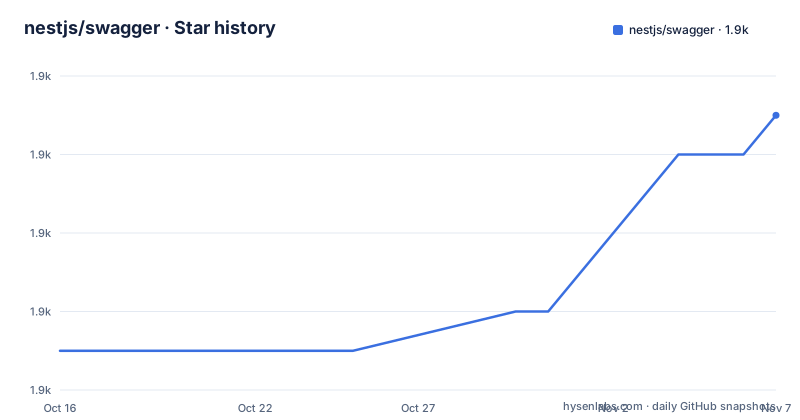
- nestjs/swagger1,905 ★ · +6
| Repository | 2026-10-16 | 2026-11-07 |
|---|---|---|
| nestjs/swagger | 1.9k | 1.9k |
6 Stars in the last 22 days, measured from the daily GitHub snapshot. Compare with other projects
Editorial analysis
Why nestjs/swagger belongs in a Nest service
nestjs/swagger addresses a specific gap in server-side JavaScript development: Nest applications need a machine-readable description of their HTTP interface so clients, documentation systems, and testing tools can discover routes, parameters, and schemas. The package identifies itself as the OpenAPI module for Nest and is published as `@nestjs/swagger`. Its intended users are developers working inside the Nest ecosystem rather than teams looking for a general-purpose API documentation renderer.
The repository layout indicates that this is more than a thin wrapper around a browser documentation page. The package has a `lib/` implementation, TypeScript build configuration, unit tests, and separate end-to-end test configuration. It also exports a `./plugin` entry point, showing that the package has both framework integration code and plugin-related code. That separation matters when deciding whether the dependency should participate in compilation, application startup, or both.
The dependency list provides a clearer technical boundary. It includes `swagger-ui-dist`, which supplies Swagger UI assets, `js-yaml` for YAML handling, `path-to-regexp` for path pattern processing, `@nestjs/mapped-types` for Nest-related type mapping, `@microsoft/tsdoc` for TypeScript documentation data, and `@standard-schema/spec` as a schema specification dependency. This makes `@nestjs/swagger` a runtime and build-time integration around OpenAPI representation, not merely a static site generator.
How nestjs/swagger is structured and distributed
The root package entry points to `dist/index.js` and `dist/index.d.ts`. A second public entry point, `./plugin`, resolves to `dist/plugin/index.js` and `dist/plugin/index.d.ts`. Both entries are declared for `import`, `require`, and `default`, while `package.json` identifies the package as an ES module through `"type": "module"`. Consumers therefore receive compiled JavaScript and TypeScript declarations rather than the source under `lib/`.
That layout supports two distinct integration surfaces. The root export is the natural package surface for Nest application integration. The `./plugin` export gives build tooling or a compiler plugin integration a separately addressable API. The repository names the second build path explicitly as `dist/plugin/index.js`; its README does not document the plugin setup, so the exact compiler configuration cannot be established from the README alone.
The build itself is driven by TypeScript. The `build` script runs `tsc -p tsconfig.build.json`, and the `prepare` and `prerelease` scripts run that build before package publication. This is a concrete maintenance signal for contributors and downstream packagers: source changes are compiled through the repository's build configuration before release. Consumers normally install the built package from npm and do not need to reproduce the build unless they are working from a source checkout.
Installing @nestjs/swagger in a Nest application
The README gives one installation command for adding the module to an existing Nest project. It does not provide a bootstrap sequence or application module name, so those details should come from Nest's linked OpenAPI tutorial rather than an invented example.
Run the following in the Nest application that needs OpenAPI support:
$ npm i --save @nestjs/swaggerThe `--save` option records the package in the project's dependency manifest. After installation, the README directs readers to the Nest OpenAPI introduction and tutorial rather than providing an `AppModule` configuration snippet. Consequently, there is no confirmed module registration, document setup, route prefix, or UI mount path in the README that can safely be reproduced here.
Version 12.0.2 is the package version in `package.json`. Its engine declaration is also specific enough to check before proceeding:
"engines": {
  "node": "^20.19.0 || >=22.12.0"
}
A Node.js release must fall within either the stated 20.x range beginning at 20.19.0 or the stated range beginning at 22.12.0. The README does not explain enforcement behavior when an incompatible version is used, so package managers and deployment environments should be checked against this declaration.
The nestjs/swagger plugin needs a separate setup check
The presence of the `./plugin` export is one of the repository's clearest implementation details, but the README does not accompany it with setup instructions. Users should not infer a compiler command or plugin configuration from the export alone. The exact role of the plugin, its lifecycle, and the compiler options it expects are left to project documentation or source inspection.
This distinction affects adoption. A Nest team that only needs the documented OpenAPI module can begin with the root package installation. A team expecting metadata collection during compilation has a separate integration decision and must verify the `./plugin` entry point against its Nest CLI and TypeScript setup. The repository has separate configurations for unit tests and end-to-end tests, but their filenames do not establish how an application should configure the plugin.
The available scripts show the repository's own development commands, not required consumer commands. They include `build`, `lint`, `test`, `test:e2e`, and Nest start variants. These are useful when working on `@nestjs/swagger` itself, but they should not be copied into an application tutorial as though they were installation requirements for the published package.
Where nestjs/swagger is the wrong tool
The clearest limitation is the brevity of its documentation. The README identifies the package, provides the npm installation command, and links to an external overview and tutorial. It does not explain how the OpenAPI document is generated, how DTO metadata is collected, how Swagger UI is mounted, or how production exposure is controlled. That makes the README insufficient as a complete integration guide, especially for teams that need to audit which endpoints are published.
The package also belongs inside a Nest-specific architecture. It is not documented as a standalone Node.js OpenAPI generator for Express, Fastify, or another application framework. Choosing it for a non-Nest service would add a Nest-oriented dependency without a confirmed integration path.
There is another boundary around documentation exposure. The package depends on `swagger-ui-dist` for UI assets, but the README does not describe UI configuration, asset delivery, authentication, or route protection. A team exposing interactive documentation outside a controlled environment would need answers to those questions first. The dependency alone does not establish that the documentation endpoint is authenticated or hidden.
Release timing, upgrades, and MIT licensing
The repository is not archived, and its last push was on 2026-10-16. The listed releases include 12.0.0 on 2026-08-27, 12.0.1 on 2026-08-28, and 12.0.2 on 2026-09-23. These dates show that version 12 received updates across that period, but they do not by themselves describe compatibility guarantees or the scope of future upgrades.
An application should account for the declared Node.js engine when upgrading. It should also review dependency changes and generated API output rather than assuming that a release will leave its public OpenAPI contract unchanged. The repository contains a `package-lock.json`, but a consumer's own lock file will determine the exact transitive versions installed in that application.
The package and Nest are identified as MIT licensed. That is a permissive license designation, but it is not legal advice and does not replace checking the repository's `LICENSE` file or the terms of bundled dependencies. In particular, `swagger-ui-dist` and other dependencies remain separate components whose licenses and notices should be reviewed as part of the application's release process.
Comparing generated and hand-maintained OpenAPI contracts
A genuine alternative is maintaining an OpenAPI document as a hand-written project artifact and serving it without depending on a Nest-specific module. The difference is integration ownership. `@nestjs/swagger` is built to participate in a Nest application and can use the package's Nest-related integration code and OpenAPI dependencies. A hand-written document places the route inventory and schemas in a file that must be synchronized manually with controller and DTO changes.
That alternative may be a better fit for a small, stable API whose contract is intentionally independent of application code, or for a service that does not use Nest. Its cost is greater duplication and a higher risk of drift unless another project-specific mechanism enforces consistency. `@nestjs/swagger` reduces the separation between a Nest service and its OpenAPI representation, but the README does not specify which metadata sources it reads or how completely it prevents divergence.
The choice should therefore be based on architecture. Use the Nest module when OpenAPI generation and Nest integration are core requirements. Consider a separately maintained contract when independent portability and strict manual control matter more. The first step for either choice is to inspect one existing controller and DTO in the target Nest application against the configuration described by Nest's OpenAPI tutorial.
Editorial conclusion
Adopt nestjs/swagger when your Nest service needs OpenAPI output and close integration with Nest's module model. Do not select it solely from the README's Swagger UI mention, because bootstrap details are delegated to external documentation. Verify first that Node.js satisfies the declared engine range, then confirm the OpenAPI setup and generated document behavior against the linked Nest tutorial before locking the package version.
Frequently asked questions
How do I install nestjs/swagger in a Nest application?
The README documents `npm i --save @nestjs/swagger`. It links to the Nest OpenAPI introduction and tutorial for application setup beyond package installation.
What Node.js versions does @nestjs/swagger support?
The package declares `"node": "^20.19.0 || >=22.12.0"`. A project should use a Node.js version within one of those ranges.
Does nestjs/swagger include a Swagger UI configuration example?
The README describes the package as an OpenAPI module for Nest, and `package.json` lists `swagger-ui-dist`. The README does not provide a Swagger UI mounting, asset delivery, or authentication example.
Official sources
Add this badge to your README
If you maintain this project, the badge below links readers to this analysis and shows its maintenance status from the daily GitHub snapshot. Paste the markdown into your README; add ?metric=license or ?metric=stars to the image URL for a different field.

[](https://hysenlabs.com/projects/nestjs-swagger)Star history chart for your README
[](https://hysenlabs.com/projects/nestjs-swagger)Was this useful?