NetTopologySuite: JTS topology operations for .NET
A .NET GIS solution that is fast and reliable for the .NET platform.
At a glance
- What is it?
- NetTopologySuite ports the JTS Topology Suite to C# and exposes it through .NET conventions. It suits server-side applications that need two-dimensional geometry and topology operations, but its licence terms and version-specific upgrade path require review.
- Who is it for?
- Adopt NetTopologySuite when a C# application needs a programmable model for two-dimensional linear geometry and can comply with its licence terms. Do not adopt it merely because the repository description uses the words "fast and reliable," since the README supplies no benchmark evidence, and do not assume that spatial data storage or map editing belongs to this library.
- Can I use it commercially?
- Check first. The repository uses a licence we do not classify automatically, so read its LICENSE file before any commercial use.
- Is it still maintained?
- Yes. The repository last received commits 4 days ago.
- What is it written in?
- Mainly C#, according to GitHub's language statistics.
Answers come from the project's GitHub data, last synced on November 6, 2026, and from our analysis. They are not legal advice.
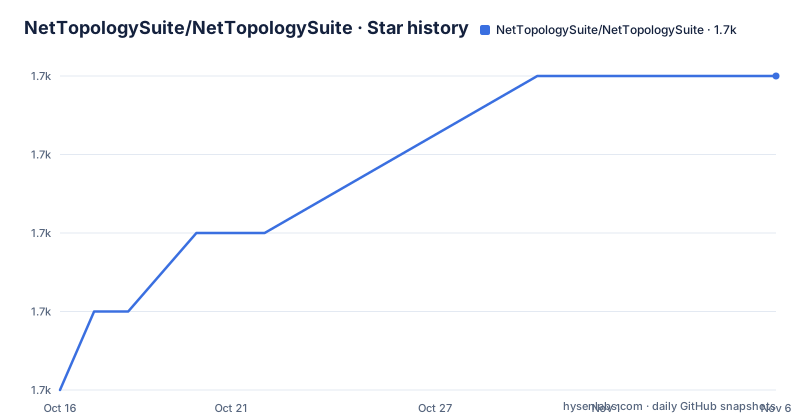
Star history
- NetTopologySuite/NetTopologySuite1,728 ★ · +4
| Repository | 2026-10-16 | 2026-11-06 |
|---|---|---|
| NetTopologySuite/NetTopologySuite | 1.7k | 1.7k |
4 Stars in the last 21 days, measured from the daily GitHub snapshot. Compare with other projects
Editorial analysis
What NetTopologySuite handles in a .NET application
NetTopologySuite addresses the need to model and manipulate two-dimensional linear geometry inside .NET software. Its target audience is developers building GIS or spatial-processing applications in C#, including systems that must apply geometric predicates and functions rather than merely store coordinates. The README quotes the JTS description as the reference for these capabilities and states that the library conforms to the Simple Features Specification for SQL published by the OpenGIS Consortium.
The project describes itself as a direct port of the functionality offered by JTS Topology Suite. That relationship matters because it defines the scope: NetTopologySuite is not presented as a mapping interface, desktop GIS application, tile server or spatial database. It is an API-level library. The repository structure supports that reading, with source under `src/`, tests under `test/`, documentation under `doc/`, and shared build configuration at the repository root.
The README gives a particularly concrete design clue: NTS exposes JTS "in a .NET way," including properties and indexers. Callers are therefore expected to use the type system and language patterns familiar from .NET while working with the geometry model derived from JTS. The documentation consists primarily of API documentation generated from XML comments, supplemented by a Getting Started wiki page and a list of known issues. Those references matter because the repository README does not provide a complete application-level example.
How the JTS port is organized and exposed
NetTopologySuite follows JTS as its functional foundation and adapts that model for .NET. The library is therefore associated with operations on two-dimensional geometry rather than raster imagery, terrain, animation or three-dimensional solid modelling. The README mentions geometric predicates and functions, but it does not enumerate the complete API. A definitive feature inventory therefore needs to come from the generated API documentation rather than inference from the project name.
The repository layout shows the separation between implementation, verification and supporting artifacts. `src/` contains the library code, while `test/` provides a distinct automated test area. Build metadata is centralized in `Directory.Build.props`, and the solution is represented by `NetTopologySuite.slnx`. The presence of `data/`, `tools/` and `doc/` indicates that the repository supports more than source publication alone. The README does not explain package boundaries, dependency injection extensions, file-format support or internal layers, so those details should not be inferred.
For consumers, the documented learning path has two parts. The GitHub Pages API reference describes the API through XML comments, while the wiki Getting Started page is the intended introduction. The wiki also hosts known issues, which is a sensible place to check before adopting the current release. The default branch is `develop`, but the stable installation instructions target the default NuGet feed. Development-branch activity should not be confused with the version available to an ordinary package installation.
NuGet installation and the first documented use
The documented stable installation path is the NuGet Package Manager command line. In the Package Manager Console, the command is:
PM> Install-Package NetTopologySuiteThis command installs the stable package from the default NuGet feed. The README does not specify a version argument, so adding one would go beyond the documented tutorial. The most recent listed stable release is `v2.6.0`, published on 2025-03-12, but the command shown by the project does not pin that release.
After installation, the repository directs developers to the Getting Started wiki for their first API-oriented example. That is a real limitation of the README as a standalone tutorial: it does not include an application creation command, namespace declaration, geometry-construction snippet or operation call. The first documented step after package installation is therefore to open the linked Getting Started page and follow the code provided there for the intended SDK and JTS-equivalent task.
The API reference is also available through GitHub Pages. Based on the repository layout, the local `test/` project is relevant to contributors who need executable examples or regression cases, but the README does not give a build command. A first consumer should use the documented NuGet path, consult Getting Started for construction and operations, and use the API reference when exact types or members are needed.
Stable, prerelease and legacy package paths
Stable and prerelease packages come from different feeds. Stable releases use the default NuGet feed, while prerelease versions are hosted on MyGet. The README provides both NuGet v3 and NuGet v2 service-index URLs for that prerelease feed:
https://www.myget.org/F/nettopologysuite/api/v3/index.jsonhttps://www.myget.org/F/nettopologysuite/api/v2To install the latest prerelease package, the documented command takes a source argument:
PM> Install-Package NetTopologySuite -pre -source "<Nuget v3 or NuGet v2 source>"This separation is important for repeatable deployments. A build that accidentally uses the prerelease feed can receive a different version from one using the default NuGet feed. The README does not discuss package locking, prerelease retention or source precedence, so a production application should pin and record its selected package version outside this tutorial rather than assume that "latest" remains constant.
There is also a separate upgrade concern for code moving from 1.x to 2.x. The project maintains a wiki page documenting breaking changes introduced in 2.0. That page should be treated as a migration checklist rather than a complete compatibility matrix. The listed releases, `v2.4.0`, `v2.5.0` and `v2.6.0`, show a material interval between the two newest entries, but the release dates alone do not establish a supported upgrade policy.
NetTopologySuite compared with JTS and spatial databases
The clearest alternative approach is to use JTS directly. JTS supplies the originating topology API and specification model, while NetTopologySuite offers that functionality through C# and.NET conventions. A team already standardized on Java can retain a JVM-centred GIS architecture and work with JTS directly. A team whose application, deployment and libraries are built around.NET would otherwise need an inter-process boundary or a managed port to use JTS functionality. The README supports the direct-port relationship, but does not claim one implementation is faster than the other.
A spatial database is a different category rather than a direct substitute. It can persist and query spatial features, and its operations may be evaluated near the data. NetTopologySuite instead provides an in-process.NET API for modelling and manipulating two-dimensional linear geometry. The README does not document connectors, database functions or integration boundaries, so it would be inaccurate to describe NTS as replacing spatial indexing or database query execution. It may be used within a larger application that stores data elsewhere, but the README does not specify that application architecture.
This distinction prevents an incorrect adoption decision. Choose NTS for.NET geometry and topology programming, not merely because a product needs a map display. Choose JTS when the surrounding platform is naturally JVM-based. Choose database-first spatial processing when persistence and server-side querying dominate. NTS is the better fit only when its managed API and the surrounding.NET architecture align.
Licence, maintenance and upgrade boundaries
The project's `License.md` states a BSD 3-clause project licence and also records JTS and third-party licensing notices. Read the file and applicable notices when redistributing the package.
The repository is not archived, and the last push was on 2026-10-08. That is recent activity, but it is not the same as a promise of API stability or a guarantee of a particular support period. The most recent listed release remains `v2.6.0` from 2025-03-12. A team that needs strict patch support should therefore check whether its selected package version is still suitable and whether newer prerelease packages contain relevant changes.
The clearest functional boundary is also the clearest maintenance cost: NTS is a topology API, not a complete GIS product. The core library includes readers such as WKTReader, but it is not a map renderer, spatial database or server deployment platform. It also provides no performance benchmark behind the repository description's "fast and reliable" wording. Adoption should be based on matching the JTS-derived geometry operations to the application's .NET architecture, while separately resolving licensing, dependency and version questions.
Editorial conclusion
Adopt NetTopologySuite when a C# application needs a programmable model for two-dimensional linear geometry and can comply with its licence terms. Do not adopt it merely because the repository description uses the words "fast and reliable," since the README supplies no benchmark evidence, and do not assume that spatial data storage or map editing belongs to this library. Before selection, verify the `License.md` terms, confirm that the required target .NET environment fits `v2.6.0`, and reproduce a representative geometry workload through the linked Getting Started documentation and API reference.
Frequently asked questions
How do I install NetTopologySuite?
The README documents installing the stable package from the default NuGet feed with `Install-Package NetTopologySuite`. Prerelease packages come from the project's MyGet feed instead.
What is the difference between NetTopologySuite and JTS?
NetTopologySuite is a direct port of JTS functionality for.NET, using.NET conventions such as properties and indexers. JTS is the originating API, while NTS presents the documented functionality for the.NET platform.
Does NetTopologySuite include a database or mapping application?
It is a geometry library rather than a database or mapping application. It does include format readers such as WKTReader, which parses Well-Known Text into geometry objects.
Official sources
Add this badge to your README
If you maintain this project, the badge below links readers to this analysis and shows its maintenance status from the daily GitHub snapshot. Paste the markdown into your README; add ?metric=license or ?metric=stars to the image URL for a different field.

[](https://hysenlabs.com/projects/nettopologysuite-nettopologysuite)Star history chart for your README
[](https://hysenlabs.com/projects/nettopologysuite-nettopologysuite)Was this useful?