isroot.in: free subdomains for people shipping a side project
A free, open-source subdomain service for developers to launch APIs, demos, and side projects without buying a domain
At a glance
- What is it?
- isroot.in hands out free managed subdomains under isroot.in, with DNS records you control, GitHub OAuth sign-in and a dashboard for registering up to five domains per account. The open source repository is the Next.js frontend only, with the backend maintained privately, so the interesting question is what you can actually run yourself.
- Who is it for?
- Use isroot.in when you need a stable hostname for a demo, an API preview or a school project and cannot justify a domain purchase, since the DNS model is a real delegated zone rather than a tunnel. Do not expect to self-host the service, because the backend that owns the nameservers and the registrations is maintained privately and the public repository contains no mock data, so a checkout of the frontend alone cannot register a domain.
- Can I use it commercially?
- Yes, with strict conditions. AGPL-3.0 is a network copyleft licence: if people use a modified version over a network, for example as a hosted service, you must offer them its source code under the same licence.
- Is it still maintained?
- Yes. The repository last received commits 10 days ago.
- What is it written in?
- Mainly TypeScript, according to GitHub's language statistics.
Answers come from the project's GitHub data, last synced on November 7, 2026, and from our analysis. They are not legal advice.
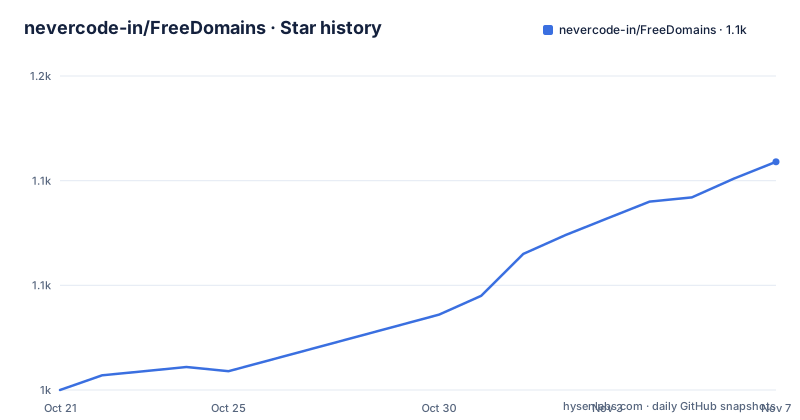
Star history
- nevercode-in/FreeDomains1,109 ★ · +109
| Repository | 2026-10-21 | 2026-11-07 |
|---|---|---|
| nevercode-in/FreeDomains | 1k | 1.1k |
109 Stars in the last 17 days, measured from the daily GitHub snapshot. Compare with other projects
Editorial analysis
A managed subdomain, not a tunnel
The problem is mundane and very common. You want a hostname for a side project, a demo, an API preview or a student project, and you do not want to buy a domain for it. The usual answers are a tunnel service with a random subdomain, a platform-provided hostname, or a domain you keep renewing.
isroot.in is the third kind. The overview describes it as a developer-friendly platform that makes it simple and free to publish projects on the web: register a subdomain, point DNS records to your hosting, and deploy using any provider or your own infrastructure. The stated reason the project exists is to remove friction and cost from getting online, and the audience it names is a student, a hobbyist, or a person in an organisation who can register a free managed subdomain and focus on building.
The distinction from a tunnel matters. A tunnel service gives you a hostname that points at a running process on your machine, and it stops working when the process stops. Here you manage DNS records, so the A or CNAME record points wherever you like, and the deployment target is your choice. The hosting is not part of the service. The homepage is isroot.in, and the project describes itself as a free, open-source subdomain service for developers to launch APIs, demos and side projects without buying a domain.
The service is also deliberately small in scope. Accounts can register up to five subdomains by default, and the README frames those as intended for development, learning and small projects. Five is a default allowance rather than a published hard limit, and the dashboard is where the actual policy lives, so anyone planning around a specific number should check there rather than assuming either permanence or flexibility.
The registration flow, from GitHub sign-in to a DNS record
The getting started path in the README is three steps, and it reads like a product description rather than documentation, which tells you how simple the intended flow is.
The first step is signing in with GitHub at the site, which also means authentication is a GitHub OAuth application rather than a local account with a password. That is a sensible choice for a developer audience, since it removes password handling from the service, and it has the obvious side effect that a GitHub account is required and that the OAuth scopes the application requests are the service's business to publish.
The second step is opening Register Domain and choosing a subdomain, with yourname.isroot.in given as the shape of the result. The third is using the DNS section in the dashboard, described as Manage DNS, to add A, CNAME, TXT or other records.
That third step is where the service actually differs from a tunnel, because the DNS records are yours to manage. There is a note for the case where DNS is managed externally, telling users to point their domain's nameservers to their DNS provider as instructed in the dashboard, which is the classic delegation model. The wording is a little compressed, but the mechanism is standard: the parent zone delegates to the provider's nameservers, and the provider hosts the records.
Bot protection is part of the stack, listed as hCaptcha and Turnstile for bot protection, and the frontend carries a public Cloudflare Turnstile site key. The login path, the fingerprinting library and the CAPTCHA are three separate obstacles to automated registration, which suggests the service has had to think about the abuse pattern that free domain services attract, where automated sign-ups consume the allowance in bulk.
Two nameservers in Hyderabad and the delegation model
The DNS section of the README is short and specific. The nameservers are located in Hyderabad, with the primary at ns1.nevercode.in and the secondary at ns2.nevercode.in. Both are given with the location in parentheses, which is a deliberate disclosure rather than an accident of documentation.
That is a meaningful detail for anyone thinking about where their data sits. A subdomain under this service has its records served by nameservers in one city, and the zone is operated by the project rather than by a large provider with a distributed anycast network. There is no mention of a third nameserver, of a failover site, of anycast, or of how the two are kept in sync, and no statement about the service level for DNS resolution.
For a demo or a school project that is entirely reasonable. For anything that expects redundancy across regions, the README offers nothing to lean on.
The delegation step is the other half. The README tells users who manage DNS externally to point their domain's nameservers to their DNS provider as instructed in the dashboard, which implies the dashboard generates the instructions. What the README does not document is the specific record set needed to register a subdomain under isroot.in in the first place, whether that is a delegation to a subdomain-specific nameserver pair or a record set added to a zone the project manages, and how a user who wants to move away takes their records with them. The WHOIS page in the frontend suggests there is a public record for each domain, and the docs directory in the repository holds the privacy, terms and usage policy pages, which is where the answer to those questions most likely lives.
The public repository is the frontend, and that is the whole catch
This is the fact that decides whether the project is usable for anything other than signing up for a subdomain.
The README states it plainly. The repository includes the Next.js pages and components for isroot.in, covering landing, login, registration, WHOIS, dashboard and the complete docs section with privacy, terms and usage policy. The frontend retains its real same-origin API requests. Backend handlers are maintained privately and are not included. The repository contains no mock data. And the consequence: API-dependent features, including login, dashboard data, WHOIS and domain search, require the private backend and will not work in a standalone local checkout.
So the open source part is the interface, and the part that owns the nameservers, the registrations and the OAuth flow is closed. A self-hosting operator cannot take this repository and run a working instance of the service, because the code that answers the API is the code that decides who gets a domain. Running a local copy gives you a login page that cannot log you in.
That is a legitimate choice for a service, and many hosted platforms work the same way, with a public marketing site and a private backend. But it changes what the AGPL-3.0 licence in the repository means in practice. The copyleft terms apply to the frontend code you can see, which is useful if you want to reuse the dashboard components or the docs setup, and they do not reach the service you can use.
The documentation in docs/ is the more reusable part for most visitors, since it holds the privacy, terms and usage policy that describe what the service actually promises, and the existing Markdown documentation and its VitePress configuration are retained in the repository.
Local development: Next.js 16, a public key, and a backend that is not there
The local development instructions are short and assume Node.js 22 LTS or newer. The setup is three commands:
npm ci
cp .env.example .env.local
npm run dev
The environment file is deliberately minimal. The example file holds a single variable and a comment saying that no backend secrets belong there:
# Public Cloudflare Turnstile site key only. No backend secrets belong here.
NEXT_PUBLIC_TURNSTILE_SITE_KEY=
The README sets NEXT_PUBLIC_TURNSTILE_SITE_KEY to a public site key configured for your local host if you need to render the CAPTCHA widget, and warns never to add secret keys or database credentials. That is the right shape for a Next.js environment file, where anything prefixed with NEXT_PUBLIC_ ends up in the browser bundle, and the naming makes the mistake hard to make. The frontend then runs on http://localhost:3000.
The other scripts cover the checks and the documentation:
npm run typecheck
npm run build
npm run docs:dev
npm run docs:build
The typecheck script runs tsc with no emit, and the build script runs next build. The docs scripts run the VitePress documentation separately from the Next.js application, which keeps the two publishing pipelines independent. The README states plainly that production deployment remains in the private application repository, so the same split that limits self-hosting also limits what the public repository is for in production.
For a contributor, that is a workable setup. The pages render, the components can be edited, the documentation can be built and previewed, and the type check gives real feedback. What cannot be tested is anything that touches the API.
The stack, the tooling and what a login flow has to defend
The dependency list describes a modern Next.js application, and a few entries are more interesting than the rest.
The framework is next at version 16.1.6 with react and react-dom at 19.2.4, and the styling stack is Tailwind CSS 4 through the PostCSS plugin, with radix-ui primitives, the shadcn-style component configuration in components.json, lucide-react and react-icons for icons, next-themes for theme switching, class-variance-authority, clsx and tailwind-merge for class composition, axios for HTTP calls and sonner for toasts. The documentation side is VitePress at an alpha version.
The one dependency that speaks to the abuse problem is @fingerprintjs/fingerprintjs. Fingerprinting computes a stable identifier for a browser, and combined with a CAPTCHA and GitHub OAuth it gives a service three independent ways to tell a person from a script. A free subdomain service is a target, because automated registration is a way to take someone else's allowance, and the cost of that defence is that legitimate users on unusual browsers or privacy tools can look like bots.
The repository layout is a standard Next.js app directory with app, components, lib, public, styles, a.vitepress directory, and configuration files for PostCSS, Next, TypeScript and Tailwind. A node_modules directory sits at the top level, which is unusual for a source repository and suggests a working install rather than a clean clone.
Community and support routes are documented. There is a Discord server, a GitHub Issues link, a support email at [email protected], and a separate abuse address at [email protected], with the note that support requests can be opened as an issue for tracking. The issue link, however, points at a different repository, VIGGU-7/isroot.in, rather than at this one, which is a small sign of how the project is organised across accounts.
Licence, release state and what a free subdomain service owes its users
The licence is AGPL-3.0, the strongest of the common copyleft licences, and the LICENSE file at the repository root carries the terms. For a frontend that a site owner might want to reuse, the network clause is the relevant part: if you run a modified version of this code as a service, the source of your version has to be offered to the people who use it. This description covers the published terms rather than legal advice.
There are no GitHub releases attached to the repository, and the package version in package.json is 1.5.0 for a project named isroot.in-public-repo, which is marked private, so the version refers to the frontend rather than to the service. The repository is not archived and the last push was on 2026-10-04, so the frontend is being maintained.
The service itself is the part with obligations that the code cannot express, and the documentation that carries them lives in the docs directory of the repository. The README lists privacy, terms and usage policy pages as part of the docs section, and those are the documents to read before pointing a project at a free subdomain: what the data is used for, what the service promises about uptime, what the acceptable use is, and what happens to a domain when the allowance is exceeded or an account is flagged.
The abuse address is worth noting as a signal. Services that offer free resources attract abuse, and a published, monitored abuse route is better than an unmonitored one. Whether the service can afford to keep a zone and two nameservers running, and how quickly a registration is reversed when someone points a domain at something objectionable, is not something the README answers, and those are the questions to ask before relying on it for anything you care about.
Editorial conclusion
Use isroot.in when you need a stable hostname for a demo, an API preview or a school project and cannot justify a domain purchase, since the DNS model is a real delegated zone rather than a tunnel. Do not expect to self-host the service, because the backend that owns the nameservers and the registrations is maintained privately and the public repository contains no mock data, so a checkout of the frontend alone cannot register a domain. Before pointing a project at it, read the usage policy in the docs section, decide whether the Hyderabad nameservers fit your privacy requirements, and keep in mind that the five-domain allowance is a default rather than a published limit.
Frequently asked questions
What is isroot.in and what does it give developers?
It is a free subdomain service where you register a subdomain such as yourname.isroot.in, then point DNS records at your own hosting and deploy anywhere. Accounts can register up to five subdomains by default, and the subdomains are intended for development, learning and small projects.
Can I self-host isroot.in from the public repository?
No. The repository contains the Next.js frontend only, the backend handlers are maintained privately and are not included, and there is no mock data. Login, dashboard data, WHOIS and domain search all require the private backend and will not work in a standalone local checkout.
How do I register a subdomain on isroot.in?
Sign in with GitHub at the site, open Register Domain and choose a subdomain, then use the DNS section in the dashboard to add A, CNAME, TXT or other records for it.
Which nameservers serve isroot.in domains?
The README lists two nameservers, both located in Hyderabad: ns1.nevercode.in as the primary and ns2.nevercode.in as the secondary. Users who manage DNS externally are told to point their nameservers to their provider as instructed in the dashboard.
How do I run the isroot.in frontend locally?
With Node.js 22 LTS or newer, run npm ci, copy .env.example to .env.local, set NEXT_PUBLIC_TURNSTILE_SITE_KEY if you need the CAPTCHA widget, and start it with npm run dev, which serves the frontend on http://localhost:3000.
Official sources
Add this badge to your README
If you maintain this project, the badge below links readers to this analysis and shows its maintenance status from the daily GitHub snapshot. Paste the markdown into your README; add ?metric=license or ?metric=stars to the image URL for a different field.

[](https://hysenlabs.com/projects/nevercode-in-freedomains)Star history chart for your README
[](https://hysenlabs.com/projects/nevercode-in-freedomains)Was this useful?