learn-skills.dev: A Crawler and Index for AI Agent Skills, Not Another Skills Marketplace
Curated high-quality AI Agent Skills. Search, install, copy and share. Works with Claude Code, Cursor, OpenClaw, and other AI coding tools.
At a glance
- What is it?
- learn-skills.dev aggregates AI agent skills from leaderboards like skills.sh into JSON, RSS, and cached SKILL.md files. It is a data pipeline for developers building skill discovery tools, not a direct installer for end users.
- Who is it for?
- Adopt learn-skills.dev if you are building a website, dashboard, or RSS reader that needs a daily-updated index of AI agent skills from skills.sh and you are comfortable with Bun and GitHub Actions. Do not adopt it if you expect a polished skill installer or if you need coverage beyond skills.sh, since GitHub Trending and Awesome Lists are only planned.
- Can I use it commercially?
- Not without permission. GitHub finds no licence file in the repository, and without a licence all rights are reserved by default: you may read the code but not reuse it. Check the README, or ask the authors, before using it.
- Is it still maintained?
- Yes. The repository last received commits 19 days ago.
- What is it written in?
- GitHub does not report a main language for this repository.
Answers come from the project's GitHub data, last synced on October 4, 2026, and from our analysis. They are not legal advice.
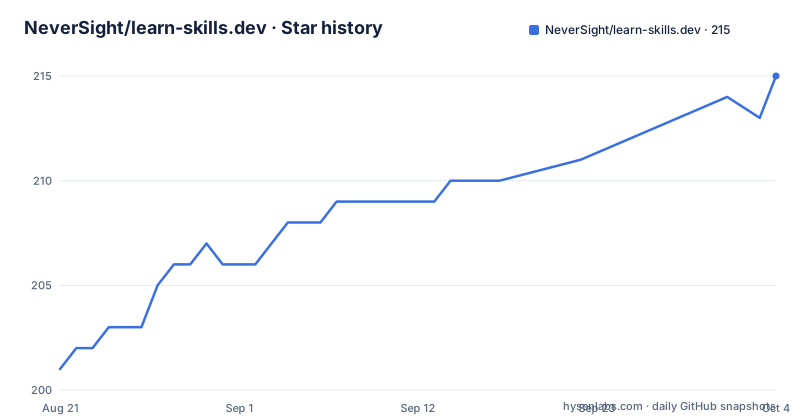
Star history
- NeverSight/learn-skills.dev215 ★ · +14
| Repository | 2026-08-21 | 2026-10-04 |
|---|---|---|
| NeverSight/learn-skills.dev | 201 | 215 |
14 Stars in the last 44 days, measured from the daily GitHub snapshot. Compare with other projects
Editorial analysis
What This Project Actually Delivers
The README positions learn-skills.dev as a place to search, install, copy, and share AI Agent Skills, but the repository itself is a crawler and data generator. It pulls skill listings from skills.sh, which ranks skills by total installs, trending growth, and daily installs. The output is not an installer. It is a set of JSON files, an RSS feed, and cached SKILL.md files. If you are an end user looking to add a skill to Claude Code or Cursor with one command, this project is not that. It is for developers who want a machine-readable index of what skills exist and how they rank. The web app at learn-skills.dev is the consumer of these files, but the repo gives you the pipeline to build your own.
The Crawl Mechanism: Three Leaderboards, One Source
The crawler fetches from skills.sh in three modes: all time, trending, and hot. Each mode corresponds to a URL path on skills.sh: the root, /trending, and /hot. The crawler merges these into data/skills.json, which has an updatedAt timestamp and three arrays. The index file, skills_index.json, is the website-friendly version. It deduplicates by a composite id of source and skillId, keeping the entry with the highest installsAllTime when duplicates appear. This is a sensible approach, but it means the index reflects popularity, not freshness. A skill that is hot today but has low all-time installs will lose to an older, more installed duplicate. That is a trade-off worth knowing if you plan to surface trending skills.
SKILL.md Caching: Path Detection and Its Limits
For each skill in the top lists, the crawler tries to fetch the SKILL.md file from GitHub. It checks a fixed set of folder locations: skills/<skillId>/SKILL.md, .claude/skills/<skillId>/SKILL.md, .cursor/skills/<skillId>/SKILL.md, .codex/skills/<skillId>/SKILL.md, and plugins/<plugin-name>/skills/<skillId>/SKILL.md. That last pattern is for plugin-based repos, like Expo. The README notes this is the most common set, but it is not exhaustive. If a skill author stores their SKILL.md in a custom path, the crawler will not find it, and the entry will lack a description and a skillMdPath. The README also says that by default only top-list skills are fetched, to keep the daily job fast. If you need all skills, you set SYNC_ALL_SKILL_MDS=1 and run bun run crawl. That is a real constraint: full coverage costs more API calls and time.
Running It: Bun, Environment Variables, and GitHub Actions
The setup is minimal. You install dependencies with bun install, then run bun run crawl. There is no mention of npm or pnpm, so Bun is a hard requirement. To avoid GitHub API rate limits when fetching SKILL.md files, the README tells you to set GITHUB_TOKEN to a personal access token. Without it, the crawler may fail or skip many files. The project ships a GitHub Actions workflow that runs daily at UTC 0:00, supports manual triggering, and runs on pushes to main. That means you can fork the repo, add your token as a secret, and get a fresh data set every day. The output files are committed to the repo, which is how the raw GitHub URL and jsDelivr CDN links work. You do not need a server. That is the main appeal: a scheduled job that produces static data.
Consuming the Data: JSON, RSS, and CDN
The README gives concrete examples for using the output. You can fetch data/skills.json from raw.githubusercontent.com or jsDelivr. The RSS feed, feed.xml, is generated from the current crawl and the previous feed.json, and it only publishes meaningful changes like new entries or rank jumps. That is a thoughtful design choice to avoid spamming subscribers. The feed.json file is a simplified format with the top 50 from each leaderboard. For a Next.js app, the README shows a fetch with revalidate: 3600, meaning the data is cached for an hour. This is straightforward and practical. The data is updated daily, so your app can rely on a consistent refresh cycle without hammering the source.
Manual Skills and the Deduplication Rule
Not every skill is on skills.sh. The project allows you to add manual entries via data/manual_skills.json. Each entry has a source, skillId, name, and installs. The crawler fetches the SKILL.md for these manual skills, includes them in skills_index.json with providerId: manual, and never overwrites them. There is a deduplication rule: if skills.sh later starts tracking a manual skill, the skills.sh data wins. This is a sensible escape hatch, but it has a caveat. The installs field must be at least 1. You cannot mark a skill as having zero installs. That is fine for ranking, but it means manual skills are always presented as having some traction, which may misrepresent a brand new skill.
Limitations and Wrong Use Cases
The most obvious limitation is the single provider. skills.sh is the only current source. GitHub Trending and Awesome Lists are listed as planned, but there is no timeline. If you need a broad index of skills from multiple communities, this project will not give it to you yet. Another limitation is the SKILL.md path detection. It covers common locations, but not every repository layout. The README itself says the crawler only fetches SKILL.md for top-list skills by default, so the descriptions in the index are incomplete. Also, the project is for personal learning and research only, and it asks you to comply with each provider's terms of service. That is a legal and ethical boundary. If you plan to build a commercial product on this data, you need to check skills.sh's terms yourself. The README also includes a promotional link to PopAi, a presentation tool, which feels out of place in a technical repository and suggests the project has a commercial side that is not fully documented.
Alternatives and the Difference in Approach
The obvious alternative is to build your own crawler against skills.sh or to use the skills.sh website directly. The difference is that learn-skills.dev gives you a structured, deduplicated, and cached output with an RSS feed, which saves you the work of writing that pipeline yourself. Another alternative is to browse the skills.sh leaderboard manually and copy SKILL.md files by hand. That works for a one-off, but it does not scale to daily tracking or feed generation. There are also other skill registries, but the README does not mention any by name, so I cannot compare them. What I can say is that learn-skills.dev is a data aggregator, not a package manager. If you want a curated, human-reviewed list of high-quality skills, this is not that. The curation is done by skills.sh's community, and this project simply mirrors it.
Maintenance and Upgrade Cost
The project has no releases listed, and the last push date is unknown. That is a concern. The README describes a working crawler, but there is no versioning or changelog. Maintenance cost depends on skills.sh's API stability. If skills.sh changes its HTML structure or ranking logic, the crawler will break, and you will need to fix it yourself. The codebase is open for contributions, and the README invites PRs for new providers, but there is no guarantee of active maintenance. The license is unknown, which is a red flag. You cannot legally use or modify this code without knowing the license. Before adopting it, you should check the repository for a LICENSE file. The lack of a license means, by default, all rights are reserved, which would prevent most uses. That is a concrete thing to verify first.
Editorial conclusion
Adopt learn-skills.dev if you are building a website, dashboard, or RSS reader that needs a daily-updated index of AI agent skills from skills.sh and you are comfortable with Bun and GitHub Actions. Do not adopt it if you expect a polished skill installer or if you need coverage beyond skills.sh, since GitHub Trending and Awesome Lists are only planned. Before relying on it, verify that the crawler's SKILL.md path detection matches the repositories you care about, and check skills.sh's terms of service, because the README says you must comply with each provider's terms and the project is for personal learning and research only.
Frequently asked questions
What does learn-skills.dev collect?
It aggregates AI agent skills from skills.sh, which it describes as a community curated skills leaderboard, and ranks them in three ways: all time by total installs, trending by recent growth, and hot by daily installs. GitHub Trending and curated awesome lists are listed as planned providers rather than active ones.
How do I run the learn-skills.dev crawler locally?
Run bun install to get dependencies, then bun run crawl, which executes the TypeScript entry point through tsx. Setting GITHUB_TOKEN is recommended so the crawler avoids GitHub API rate limits and covers more skill folder paths.
How often does the learn-skills.dev crawler run?
The GitHub Actions workflow runs automatically every day at UTC zero, can be triggered manually from the Actions tab, and also runs on any push to the main branch, so each push regenerates the data files.
Where does the crawler look for a SKILL.md file?
In five layouts: skills/<skillId>/SKILL.md as the most common, then .claude, .cursor and .codex skills folders, and plugin style paths such as plugins/<plugin-name>/skills/<skillId>/SKILL.md, with Expo given as an example of a plugin based repository.
What licence does learn-skills.dev use?
The package manifest declares MIT, but there is no LICENSE file at the root of the repository and the repository licence field is empty. The notes ask readers to comply with each provider's terms and to use the output for personal learning and research only.
How can a website consume the learn-skills.dev data?
Fetch the JSON through a raw GitHub URL for the repository and the main branch, or through the jsDelivr CDN path for the same file, which the documentation recommends as faster. An RSS feed is published the same way, and it only carries new entries and rank jumps.
Official sources
Add this badge to your README
If you maintain this project, the badge below links readers to this analysis and shows its maintenance status from the daily GitHub snapshot. Paste the markdown into your README; add ?metric=license or ?metric=stars to the image URL for a different field.

[](https://hysenlabs.com/projects/neversight-learn-skills-dev)Star history chart for your README
[](https://hysenlabs.com/projects/neversight-learn-skills-dev)Was this useful?