NGINX 1.31.8: The Master-Worker Web Server You Already Depend On
NGINX is the source for the web server and reverse proxy used to serve, route, and balance high-traffic applications.
At a glance
- What is it?
- A close look at the nginx/nginx repository: its modular architecture, master-worker runtime, build-from-source flow, and the trade-offs you accept when you adopt the world's most popular web server.
- Who is it for?
- Adopt NGINX if you need a proven, modular reverse proxy or load balancer and you are comfortable with text-file configuration and a process model that favors throughput over per-request isolation. Avoid it if you require a GUI, a built-in app runtime, or if your team cannot handle the directive learning curve.
- Can I use it commercially?
- Yes. BSD-2-Clause is a permissive licence: you can use, modify and sell software built on it, as long as you keep its copyright and licence notices.
- Is it still maintained?
- Yes. The repository last received commits 4 days ago.
- What is it written in?
- Mainly C, according to GitHub's language statistics.
Answers come from the project's GitHub data, last synced on November 13, 2026, and from our analysis. They are not legal advice.
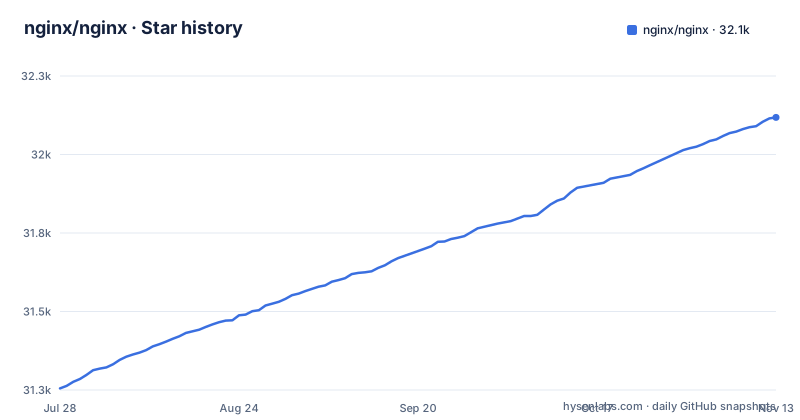
Star history
- nginx/nginx32,118 ★ · +863
| Repository | 2026-07-28 | 2026-11-13 |
|---|---|---|
| nginx/nginx | 31.3k | 32.1k |
863 Stars in the last 108 days, measured from the daily GitHub snapshot. Compare with other projects
Editorial analysis
What NGINX Solves and Who Needs It
NGINX solves the problem of serving and routing high-traffic HTTP traffic. It is a web server, reverse proxy, load balancer, API gateway, and content cache all in one. The target user is an engineer who operates infrastructure and needs a reliable entry point for web applications. If you run a busy website or a microservices cluster, NGINX is the front door. The README calls it the world's most popular web server, and while popularity is not a quality metric, the breadth of documentation and community support is real. The repository is the upstream source, so you get the actual code, not a vendor fork.
Master-Worker Architecture: The Core Mechanism
NGINX does not run as a single monolithic process. The README describes a master process that reads and evaluates configuration files, and one or more worker processes that handle data, such as HTTP requests. The number of worker processes is set by the worker_processes directive and can be auto-tuned to the number of CPU cores. This design lets NGINX scale beyond operating system process limits, which is useful when you have many concurrent connections. The catch is that worker processes share state through shared memory. Directives like those for rate limiting require you to allocate a shared memory zone, for example with limit_req_zone, so all workers can agree on how many requests a client has made.
Modules: Static and Dynamic, and How to Inspect Them
NGINX is composed of modules, each adding configurable features. Modules can be built as static, meaning they are compiled into the binary at build time, or dynamic, meaning they are separate shared objects loaded at runtime. The README advises running nginx -V to see which static modules your binary was built with. This is a practical diagnostic command. The set of directives available to you depends entirely on which modules are present. The README warns that community packages may be outdated, so it recommends using official packages or building from source. That is a strong point: you get the latest features and security patches, but you also take on the responsibility of maintaining a custom build.
Getting It Running: From Binary Packages to Source Builds
The README gives a clear path for installation. For binary packages, you add the official NGINX repository for your Linux distribution, then install via your package manager. For FreeBSD, there is a separate process, and Windows executables are also available. If you choose to build from source, the steps are: install dependencies, clone the repository, run the configure script with your desired modules, then compile. The configure script accepts flags to include specific static modules, so you can tailor the binary. After compilation, the binary is installed, and you can test it. The README has a Configuring the build section and links the configure documentation at nginx.org/en/docs/configure.html. The key point is that building from source gives you control but adds maintenance overhead.
Configuration: Directives, Text Files, and the Learning Curve
Configuration is done through text files with directives, as documented in the Beginners Guide. The README emphasizes that the set of directives depends on the modules available. This is a double-edged sword. On one hand, it is flexible and scriptable, which is great for infrastructure-as-code. On the other hand, the directive syntax is terse and can be confusing for newcomers. For example, setting up rate limiting requires you to define a shared memory zone with limit_req_zone and then apply it with limit_req. That is two steps, and the memory zone size is your responsibility. The documentation is thorough, but the learning curve is real. If your team is not comfortable with text-based config, you will spend time debugging syntax errors.
Limitations and Failure Modes
NGINX is not a one-size-fits-all tool. Its process model is optimized for high concurrency, but it does not provide per-request isolation like a virtual machine or a container. A crash in a worker process can affect multiple requests. Also, because configuration is static and reload-based, dynamic reconfiguration on the fly is limited. If you need to change upstream servers frequently, you might find the reload process disruptive. Another failure mode is shared memory exhaustion. Finally, the README notes that community packages may be outdated, so if you rely on your distribution's repo, you may miss security fixes. That is a real risk for production systems.
Alternatives: How They Differ in Approach
The main alternative to NGINX is Apache HTTP Server, which uses a process-per-connection or thread-per-connection model, depending on the MPM. Apache's configuration is also directive-based, but it allows per-directory configuration via .htaccess files, which NGINX does not support. That is a fundamental difference: Apache lets non-root users override settings in their own directories, while NGINX requires central configuration. For a reverse proxy or load balancer, another alternative is HAProxy, which is specifically a proxy and load balancer, not a full web server. The choice depends on whether you need a web server plus proxy (NGINX) or a dedicated proxy (HAProxy).
Maintenance, Upgrade Cost, and License
The repository is active, with release-1.31.8 published on 2026-10-21, following release-1.31.7 and release-1.30.6 on 2026-10-14. That indicates a steady release cadence, with mainline (master) getting new features and stable branches receiving critical fixes. Upgrading means either updating your package or rebuilding from source. If you build from source, you must track new releases and recompile, which is a recurring cost. The license is BSD-2-Clause, a permissive license that allows commercial use with minimal restrictions. That is a plus for enterprises, but it also means there is no warranty or liability from the project. The README points to F5, Inc. for enterprise distributions and commercial support, so if you need a support contract, you can buy it. Otherwise, you rely on community resources. Before adopting, check the changelog for the specific version you plan to deploy, and verify that your modules are available.
Editorial conclusion
Adopt NGINX if you need a proven, modular reverse proxy or load balancer and you are comfortable with text-file configuration and a process model that favors throughput over per-request isolation. Avoid it if you require a GUI, a built-in app runtime, or if your team cannot handle the directive learning curve. Before adopting, verify that your required modules (like ngx_http_ssl_module) are present in your build by running nginx -V, and decide whether you need mainline or stable binaries. The repository itself is active, with release-1.31.8 published in October 2026, so you can expect ongoing fixes, but you must own the upgrade path.
Frequently asked questions
What is NGINX and why is it used?
The repository describes NGINX as the source for the web server and reverse proxy used to serve, route and balance high traffic applications, and the README calls it a Web Server, Load Balancer, Reverse Proxy, API Gateway and Content Cache. It is written in C, runs as a master process over worker processes, and is configured entirely through text files of directives.
Is NGINX for free?
Yes. NGINX is distributed under the terms of a simplified two-clause BSD-like license, and enterprise distributions, commercial support and training are sold separately by F5, Inc. The commercial offering does not change the licence of the open source server.
How do I install NGINX on Ubuntu?
The project advises installing from official packages or from sources in the repository rather than the community version Ubuntu distributes, because that is what guarantees the most recent release, feature set, fixes and security patches. The README also has a Linux binary installation process section, and links to the full installation documentation at nginx.org.
What is NGINX and how does it work?
It runs as a collection of processes: a master process that maintains worker processes and reads and evaluates the configuration files, and one or more worker processes that process data such as HTTP requests. The worker count is set in the configuration, either fixed or automatically matched to the number of available CPU cores, and the workers share data through shared memory zones, which is why rate limiting needs a common memory zone for tracking clients.
How do I use NGINX on Windows?
Windows executables are one of the documented distribution paths in the README, listed alongside the Linux binary installation process and a FreeBSD installation process, so they are handled separately from the Unix packages.
Official sources
Add this badge to your README
If you maintain this project, the badge below links readers to this analysis and shows its maintenance status from the daily GitHub snapshot. Paste the markdown into your README; add ?metric=license or ?metric=stars to the image URL for a different field.

[](https://hysenlabs.com/projects/nginx-nginx)Star history chart for your README
[](https://hysenlabs.com/projects/nginx-nginx)Was this useful?