nginx/njs: JavaScript Modules for NGINX
A subset of JavaScript language to use in nginx
At a glance
- What is it?
- nginx/njs extends NGINX with JavaScript through dynamic HTTP and stream modules. It suits administrators implementing access checks, header changes, and asynchronous handlers, subject to engine compatibility and the limits of NGINX-integrated scripting.
- Who is it for?
- Adopt nginx/njs when NGINX is already the execution point and the required behavior is an access decision, response-header change, filter, or asynchronous handler. Do not treat it as a general-purpose application runtime.
- Can I use it commercially?
- Yes. BSD-2-Clause is a permissive licence: you can use, modify and sell software built on it, as long as you keep its copyright and licence notices.
- Is it still maintained?
- Yes. The repository last received commits 1 day ago.
- What is it written in?
- Mainly C, according to GitHub's language statistics.
Answers come from the project's GitHub data, last synced on October 23, 2026, and from our analysis. They are not legal advice.
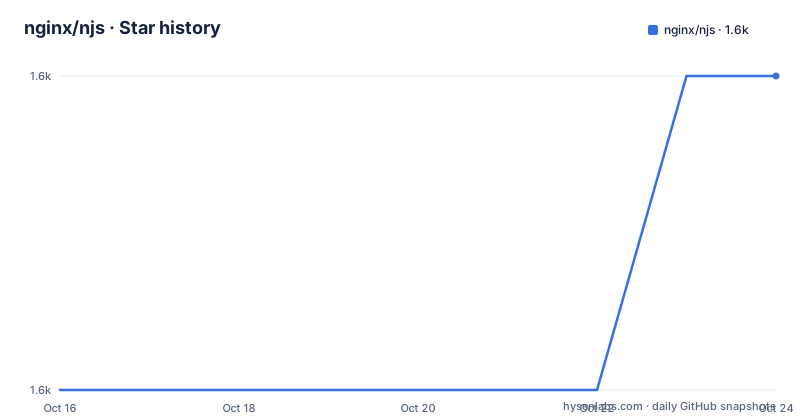
Star history
- nginx/njs1,604 ★ · +1
| Repository | 2026-10-16 | 2026-10-23 |
|---|---|---|
| nginx/njs | 1.6k | 1.6k |
1 Stars in the last 7 days, measured from the daily GitHub snapshot. Compare with other projects
Editorial analysis
Where nginx/njs fits in an NGINX deployment
nginx/njs extends NGINX without replacing its request-processing model. It is for administrators who need logic at the point where NGINX receives requests, processes connections, or prepares responses. The README identifies complex access control and security checks before requests reach upstream servers as a principal use case. It also lists response-header manipulation, flexible asynchronous content handlers, and filters.
The boundary matters. NJS is not presented as a conventional standalone JavaScript service. It is distributed as two NGINX dynamic modules, `ngx_http_js_module` and `ngx_stream_js_module`, which extend the HTTP and stream sides of the server respectively. According to the README, either module can be added to a supported NGINX Open Source or NGINX Plus installation without recompiling NGINX.
That placement favors logic that can act through NGINX-specific request and stream interfaces. It is a poor substitute for an application platform whose primary job is business logic, database access, or independently deployed routing. The available objects, methods, lifecycle hooks, and directives come from the NGINX modules. Code written for a browser or a general server runtime should not be assumed to work merely because its syntax resembles JavaScript.
NJS can also operate with NGINX Unit. The README points to Unit's Control API and its NJS scripting documentation for that arrangement. This is a distinct integration path from loading an NGINX dynamic module directly, so a deployment should establish which one it needs before following setup instructions.
QuickJS, the deprecated engine, and compatibility pressure
The most important architectural choice is the JavaScript engine selected through the `js_engine` directive. NJS offers two engines. The README calls QuickJS the recommended option and describes it as compliant with ES2023. The alternative is the original built-in njs engine, described as a JavaScript subset compliant with ES5.1, with selected ES6 and newer extensions.
The built-in engine remains the default in the README, but it has been deprecated since release `1.0.0`. The project says it will remain available for compatibility and receive bug fixes for the foreseeable future. QuickJS is intended to become the default eventually. That makes engine choice part of a migration plan for an existing deployment, even when the current configuration works.
For a new setup, the README's recommendation is to enable QuickJS with `js_engine qjs;`. The directive must be placed in the applicable NGINX configuration context, but the README excerpt does not show the surrounding HTTP or stream configuration. It also does not provide a source-build command for QuickJS, only a link to the relevant build section.
An upgrade from the built-in engine should include syntax and behavioral checks against the compatibility documentation. ES2023 support does not mean that QuickJS exposes every facility found in Node.js or a browser. The usable surface remains constrained by NJS and by the objects exposed by the NGINX module. Existing scripts should therefore be tested rather than switched mechanically.
The `1.0.2` release followed the introduction of the `1.0.0` line, while the built-in engine deprecation was already in effect. The repository was not archived and its last push was on 2026-10-15. That confirms recent repository activity, but the README does not define a complete version-to-version migration procedure for engine changes.
Installing the matching nginx/njs package
The package installation path begins with the official NGINX package repository. The README sends users to its Linux package guide for repository provisioning. Once that repository is available and NGINX Open Source is installed, the NJS package can be installed with the platform's package manager. An existing NGINX Open Source or NGINX Plus installation may remain in place according to the README's instruction to skip the NGINX installation portion when appropriate.
On Ubuntu or Debian based systems, install the module with this command:
sudo apt install nginx-module-njsFor RHEL, RedHat, and derivatives, use the package name shown by the README:
sudo yum install nginx-module-njsOn Alpine or similar systems, the documented command selects the package matching the `nginx` repository package:
sudo apk add nginx-module-njs@nginxFor SuSE, SLES, and similar systems, use:
sudo zypper install nginx-module-njsThe expected first result is installation of the NJS dynamic module from the configured NGINX repository. The README mentions an alternate module with debug symbols. It says this debug version is not recommended for production but can help during NJS configuration development. It does not give a special package command in the quoted installation section.
Do not copy a package command for a different repository or an existing NGINX Plus installation without checking compatibility. The README's table of contents points to supported distributions, deployment environments, NGINX versions, and sizing recommendations, but the excerpt does not include those matrices. The package command alone does not establish that every package is valid for every operating system or every existing NGINX build.
Starting with a real NGINX handler
A first use must connect three elements: an installed dynamic module, an NGINX configuration that loads it, and JavaScript referenced at a valid request or stream hook. The README's table of contents points to instructions for verifying NGINX, enabling the modules, writing `.js` files, and running a hello-world example. It also links to a reference for custom objects, methods, and properties.
The quoted README does not show the complete module-loading line or the hello-world configuration. It would therefore be unsafe to invent an `http` or `stream` block, a location name, a script path, or a directive such as `js_import`. The correct first configuration has to come from the version-specific getting-started section linked by the README.
The engine selection can still be identified clearly. For a QuickJS-based setup, the README gives the following directive:
js_engine qjs;This is NGINX configuration syntax rather than a JavaScript program, although it is shown here as a short configuration fragment. It selects QuickJS but does not import a script, enable a dynamic module, or create an NGINX location. Those are separate configuration steps.
A useful first exercise should produce a visible effect at the NGINX layer, such as a response-header change, because that can be checked through the configured integration. The README gives response-header manipulation as an explicit NJS capability, but it does not include the corresponding object, method, or complete example in the quoted text. The linked reference and hello-world instructions must supply those exact names.
Before considering the setup complete, confirm that NGINX accepts the configuration and that the expected hook invokes the script. The README excerpt does not provide the exact validation or reload commands, so they should be taken from the linked NGINX documentation rather than guessed.
NJS boundary conditions and operational risks
NJS is strongest where the decision or transformation belongs inside NGINX's execution path. Pre-upstream access checks can reject traffic before it reaches an upstream server. Response-header logic can operate close to the response. The documented asynchronous handlers and filters expand the range of flexible processing without requiring every behavior to be expressed as static configuration.
The same integration boundary creates real limitations. The README does not document a general-purpose API for installing JavaScript packages, arbitrary system calls, browser APIs, or unrestricted network access through NJS. Features available in a standalone JavaScript environment should not be assumed to exist. The actual operations depend on the selected engine, the NJS compatibility rules, and the custom objects supplied by the active NGINX context.
Asynchronous behavior also needs careful validation. The README explicitly supports asynchronous content handlers, but it does not state cancellation rules, retry behavior, timeout defaults, or error propagation in the quoted installation text. These details are consequential for access control. A script that fails, delays, or returns an unexpected value may affect whether and how NGINX continues processing. The version-specific module documentation must define the behavior relied upon by the configuration.
The built-in engine creates a second constraint. Its ES5.1-based subset differs from the recommended QuickJS engine's ES2023 compliance. A script can therefore face engine-specific behavior when moving away from the deprecated default. The repository's BSD-2-Clause license identifies permissive two-clause BSD terms, but the README excerpt does not discuss notices or redistribution mechanics. Review the repository `LICENSE` file for the actual obligations attached to a particular build or distribution.
NGINX compatibility remains the practical adoption boundary. Confirm the supported NGINX versions and deployment forms before combining modules with an existing installation. Verify the exact package for that environment, test engine-specific script behavior, and inspect the module's request or stream lifecycle before applying it to access decisions.
Editorial conclusion
Adopt nginx/njs when NGINX is already the execution point and the required behavior is an access decision, response-header change, filter, or asynchronous handler. Do not treat it as a general-purpose application runtime. Verify first that the selected JavaScript engine supports your code, that the dynamic module matches your NGINX deployment, and that the relevant request or stream lifecycle provides the operations you need.
Frequently asked questions
What is nginx/njs used for in NGINX?
It is a dynamic NGINX module for extending built-in functionality with JavaScript. The README lists access checks, response-header manipulation, asynchronous content handlers, and filters.
Which JavaScript engine should a new nginx/njs configuration use?
The README recommends QuickJS, enabled with `js_engine qjs;`. QuickJS is described as ES2023-compliant, while the built-in njs engine is deprecated since `1.0.0` and remains available for compatibility.
How do I install nginx/njs on Linux?
First provision the official NGINX package repository. Then use the documented command for the distribution, such as `sudo apt install nginx-module-njs` on Ubuntu or Debian based systems.
Official sources
Add this badge to your README
If you maintain this project, the badge below links readers to this analysis and shows its maintenance status from the daily GitHub snapshot. Paste the markdown into your README; add ?metric=license or ?metric=stars to the image URL for a different field.

[](https://hysenlabs.com/projects/nginx-njs)Star history chart for your README
[](https://hysenlabs.com/projects/nginx-njs)Was this useful?