astrbot_plugin_self_learning: giving an AstrBot chatbot a memory of the group chat
AstrBot self-learning plugin: lets an AI chatbot autonomously learn conversational style, understand group slang, manage social relationships and affinity, and adapt its personality, so it chats as naturally as a real person.
At a glance
- What is it?
- AstrBot's self-learning plugin collects group messages, mines slang, tracks affection and proposes persona changes. It is a review queue first and an automation second, and the WebUI is where the work actually happens.
- Who is it for?
- Adopt it if you run a self-hosted AstrBot instance in a group whose in-jokes and tone you want the bot to pick up, and you are willing to work the review queue in the WebUI at 127.0.0.1:7833. Do not adopt it if you cannot back up the current AstrBot persona first, cannot grant the data-protection authorisation the disclaimer asks for, or want a plugin that installs its own Python dependencies without a click in the settings page.
- Can I use it commercially?
- Yes, with strict conditions. AGPL-3.0 is a network copyleft licence: if people use a modified version over a network, for example as a hosted service, you must offer them its source code under the same licence.
- Is it still maintained?
- Yes. The repository last received commits 1 day ago.
- What is it written in?
- Mainly Python, according to GitHub's language statistics.
Answers come from the project's GitHub data, last synced on November 25, 2026, and from our analysis. They are not legal advice.
Star history
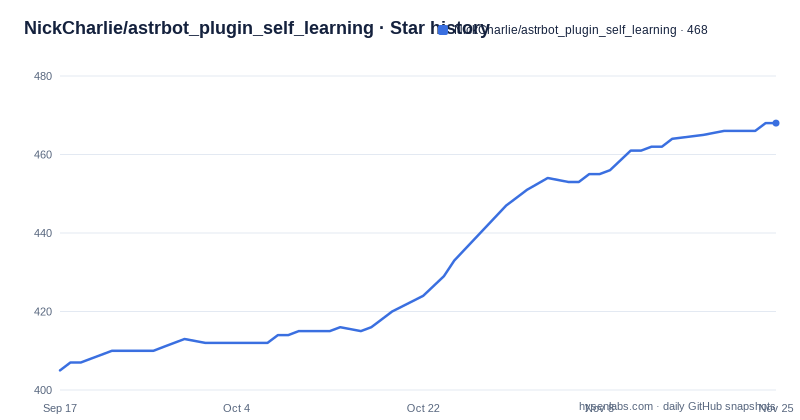
- NickCharlie/astrbot_plugin_self_learning468 ★ · +63
| Repository | 2026-09-17 | 2026-11-25 |
|---|---|---|
| NickCharlie/astrbot_plugin_self_learning | 405 | 468 |
63 Stars in the last 69 days, measured from the daily GitHub snapshot. Compare with other projects
Editorial analysis
What the plugin adds to a stock AstrBot install
AstrBot answers messages with the persona you configured by hand. That persona is static: it does not know that your group calls a certain person by a nickname, that a phrase means the opposite of its literal reading, or that one member has been arguing with another for a week. The plugin's stated goal is to close that gap by continuously collecting group messages, learning from them, putting the results through a review chain, and injecting the approved parts into later LLM requests.
The README is explicit that the plugin does not replace AstrBot's reply logic. It attaches at three points: on_message when a message arrives, after_message_sent after the bot replies, and on_llm_request before the next model call. That positioning matters. Anything the plugin learns reaches the model as extra context, not as a rewrite of the prompt or the persona file. If the learning pipeline is wrong, the failure shows up as odd context in a reply, not as a corrupted bot.
The intended user is someone self-hosting AstrBot for a group chat, most likely a QQ group given the qqbot topic, who wants the bot to sound less like a generic assistant. The disclaimer and warning at the top of the README set the tone: the authors ask you to back up the current persona in AstrBot's native persona manager, and they state that the learning, review and rollback mechanisms are not a substitute for an external backup.
The learning pipeline: raw messages in, approved context out
The architecture diagram shows a message entering MessagePipeline, which saves a RawMessage and then branches into two learning paths. RealtimeProcessor handles expression patterns as messages arrive. ProgressiveLearningService accumulates messages until a threshold is reached, then starts a batch learning session over the filtered set. A LearningQualityMonitor sits alongside the progressive path, and JargonMiner runs on the same stream to count high-frequency candidate words before inferring meaning from context.
The output of batch learning is not applied directly. It is written into a review queue as either a persona learning review or a style learning review. Only after approval does a style review become few-shot material, and only approved jargon becomes an injected explanation. The sequence diagram ends with LLMHookHandler reading approved few-shot examples, jargon, memory and social relations from the database and adding them to the request as temporary extra_user_content_parts, with an older fallback path noted for compatibility.
The data layer is worth calling out because it is heavier than a typical plugin. SQLAlchemy async ORM sits behind a SQLAlchemyDatabaseManager that keeps the old interface while routing calls to domain facades for messages, learning, jargon, persona, social, expression, psychological state, reinforcement learning, metrics and administration. That is a lot of structure for a chat plugin, and it is the main reason the setup has more moving parts than a single-file extension.
Installing the plugin and getting the WebUI to load
The README puts installation in AstrBot's plugin directory. It shows the Windows path with a PowerShell prompt, and the clone target is the repository name astrbot_plugin_self_learning. After cloning, restart AstrBot or reload the plugin from the plugin management page.
cd C:\path\to\AstrBot\data\plugins
git clone https://github.com/EterUltimate/self_learning_EterU.git astrbot_plugin_self_learning
Dependencies are the first real friction point. The README states that the current code does not install pip dependencies during plugin installation or startup. You have to open the self-learning WebUI Dashboard, go to the full settings page, and click either the basic capability dependency button or the full capability dependency button. The install endpoint only accepts a request that the WebUI has explicitly confirmed, and the README gives the shape of that payload.
{"manual_confirmed": true, "source": "webui_settings"}If your deployment forbids installing dependencies through the WebUI, the README gives an environment variable to turn it off, which you would set before starting AstrBot.
$env:ASTRBOT_ENABLE_WEB_DEP_INSTALL="false"The dashboard itself listens on 127.0.0.1:7833 by default and, as the README notes, currently has no password. If you set web_interface_host to 0.0.0.0, anyone on the LAN can reach it at the server IP. Treat that as a deployment decision, not a default you leave alone.
The README lays out a configuration order that is worth following literally: back up the current persona, set Target_Settings.target_qq_list and target_blacklist, set the three provider IDs (filter_provider_id, refine_provider_id, reinforce_provider_id), configure the database, then enable the learning features you actually want. If the providers are missing the plugin still loads, but LLM-dependent features degrade and write to the log.
Where this plugin will bite you
The default database is PostgreSQL, and the README describes the startup behaviour: the plugin connects to the maintenance database postgres, creates astrbot_self_learning if it does not exist, then creates missing schemas and tables. That is convenient on a machine where you control PostgreSQL, and awkward on a shared instance where the bot's role has no CREATE DATABASE right. SQLite and MySQL are available, but only as explicitly configured backends, so the default path assumes a PostgreSQL server is reachable.
The bigger limitation is the review queue. The plugin is designed so that learned material is proposed rather than applied, which means the bot only gets smarter at the rate a human approves things. The README's feature list includes an automatic application policy, so unattended operation is possible, but the warning at the top of the document exists precisely because that path is riskier. If you want a bot that improves with zero intervention, this is not the right shape of tool.
There is also a privacy dimension the README does not soften. The plugin stores raw messages, filtered messages, expression patterns and learning sessions, and the disclaimer says the user must obtain necessary authorisation before collecting and processing user messages. A group where members have not been told a bot is logging and analysing their messages is the wrong place to run this. Finally, the plugin depends on AstrBot >= 4.11.4 and Python 3.11+, and the dependencies are installed through the WebUI rather than by pip at install time, which is a poor fit for locked-down or fully automated deployments.
How it differs from a memory-only or prompt-only bot
The obvious alternative is to skip the plugin and put everything into AstrBot's native persona and prompt configuration by hand. That approach has no dependencies, no database, no WebUI and no review queue. The difference in mechanism is that a hand-written persona is a fixed document you edit when the group's habits change, while this plugin derives candidate material from actual user-to-bot message pairs and keeps it in a database that the LLM hook reads at request time. The trade is maintenance effort for freshness.
A second alternative is a generic long-term memory layer that stores facts and retrieves them by similarity. That solves recall, but not the parts this plugin is built around: jargon mining with candidate counts and per-group sync, affection and psychological state, and a persona evolution review with approve, reject, delete and rollback actions. If your problem is only that the bot forgets what was said yesterday, a memory store is the smaller tool. If your problem is that the bot does not sound like it belongs in the group, the review-and-inject design here is aimed at that specifically.
One thing the README does not document is what rollback restores when several reviews have been approved in sequence, and it does not describe a migration path between database backends. The repository does list lightweight migrations, but the README only mentions them in passing.
Licence, maintenance and what an upgrade actually costs
The project is AGPL-3.0, and the README states that it incorporates and is a derivative work of AstrBot, which is also AGPL-3.0. The practical consequence, as the README puts it, is that modifications or derivative works must be distributed under the same licence. If you patch the plugin for your own group and never distribute it, that is one situation; if you ship a modified version as part of a hosted service, the licence terms apply and you should read them rather than take this paragraph as guidance.
Maintenance looks current from the repository facts: the last push was on 2026-09-12, and release 4.2.1 was published the same day, following 4.2.0 and 4.1.1 on 2026-09-05. The repository is not archived. That is a fast release cadence, and it means upgrade cost is real. The README warns that changing the database type, the data directory, or the WebUI host and port requires restarting the plugin, while log level and most learning thresholds take effect immediately. Since the plugin owns its own schema and creates tables on startup, a version bump is the moment to have a database backup, not after.
The README does not document a rollback procedure for a plugin upgrade, and it does not state a supported upgrade path between major versions. The CHANGELOG.md file exists in the repository root, so that is where the release-level detail lives.
Reading the dashboard: what to check first
The WebUI is where most of the plugin's value is visible. The overview page reports message counts, learning status, pending review counts, graph data and performance metrics. The full settings page reads /api/config/schema and lets you edit every public configuration item, which is also the page where dependency installation is triggered. Separate pages handle pending persona reviews with approve, reject, delete and rollback actions, style reviews over expression patterns and few-shot pairs, jargon candidates with meanings, counts and per-group or global sync, and graphs for memory, knowledge and social relations.
Two entries deserve attention on day one. The learning content view at /api/style_learning/content_text exposes raw messages, filtered messages, expression patterns, learning batches and review records, so you can see exactly what the bot is being taught before you approve anything. The model call monitor tracks the filter, refine and reinforce model invocations, which is how you catch a runaway learning loop that is burning tokens on a busy group. Neither of those is a substitute for reading the code, but they are the fastest way to tell whether the plugin is behaving.
Editorial conclusion
Adopt it if you run a self-hosted AstrBot instance in a group whose in-jokes and tone you want the bot to pick up, and you are willing to work the review queue in the WebUI at 127.0.0.1:7833. Do not adopt it if you cannot back up the current AstrBot persona first, cannot grant the data-protection authorisation the disclaimer asks for, or want a plugin that installs its own Python dependencies without a click in the settings page. Verify three things before trusting it: that the default PostgreSQL backend was created as astrbot_self_learning, that the three provider IDs resolve to real models, and that a rejected persona review actually leaves the live persona untouched.
Frequently asked questions
What is AstrBot?
AstrBot is the chatbot framework this plugin extends, and the README describes the plugin as a derivative work of it under the same AGPL-3.0 licence. The plugin's compatibility badge lists AstrBot >= 4.11.4, and the architecture diagram shows it hooking into AstrBot's on_message, after_message_sent and on_llm_request events.
How do I install astrbot_plugin_self_learning?
Clone the repository into AstrBot's data/plugins directory under the name astrbot_plugin_self_learning, then restart AstrBot or reload the plugin from the plugin management page. The README states that pip dependencies are not installed automatically, so you must open the self-learning WebUI and click the dependency install button on the full settings page.
Does astrbot_plugin_self_learning learn and apply changes to the bot automatically?
Learning results go into a review chain first. The README lists approve, reject, delete and rollback actions for persona reviews, and an automatic application policy is available as an option, but the warning at the top of the README tells you to back up the current persona before enabling any of it.
Which databases does astrbot_plugin_self_learning support?
PostgreSQL is the default backend via postgresql+asyncpg, with SQLite via sqlite+aiosqlite and MySQL via mysql+aiomysql available as explicitly configured backends. On first PostgreSQL startup the plugin connects to the postgres maintenance database and creates astrbot_self_learning if it is missing.
Official sources
Add this badge to your README
If you maintain this project, the badge below links readers to this analysis and shows its maintenance status from the daily GitHub snapshot. Paste the markdown into your README; add ?metric=license or ?metric=stars to the image URL for a different field.

[](https://hysenlabs.com/projects/nickcharlie-astrbot-plugin-self-learning)Star history chart for your README
[](https://hysenlabs.com/projects/nickcharlie-astrbot-plugin-self-learning)Was this useful?