php-ast: the engine's own parser exposed as a tree
Extension exposing PHP 7 abstract syntax tree
At a glance
- What is it?
- php-ast is a C extension that hands you the abstract syntax tree PHP's own parser built, rather than a tree reconstructed by a separate library. The nodes are plain objects with a kind, flags, line number and children, and there is a metadata layer that lets a tool discover the node kinds and their flags at run time instead of hard coding them.
- Who is it for?
- php-ast suits a tool that has to reason about PHP source, such as a static analyser, a refactoring tool or a framework that compiles templates, because the tree it gives you is the one the engine produced rather than a reimplementation. It is a poor fit if you want a pure PHP library with no build step, since it is a C extension that has to be compiled or installed from a binary, and a poor fit if you only need to tokenise, since a much simpler tool does that.
- Can I use it commercially?
- Check first. The repository uses a licence we do not classify automatically, so read its LICENSE file before any commercial use.
- Is it still maintained?
- Yes. The repository last received commits 10 days ago.
- What is it written in?
- Mainly PHP, according to GitHub's language statistics.
Answers come from the project's GitHub data, last synced on November 7, 2026, and from our analysis. They are not legal advice.
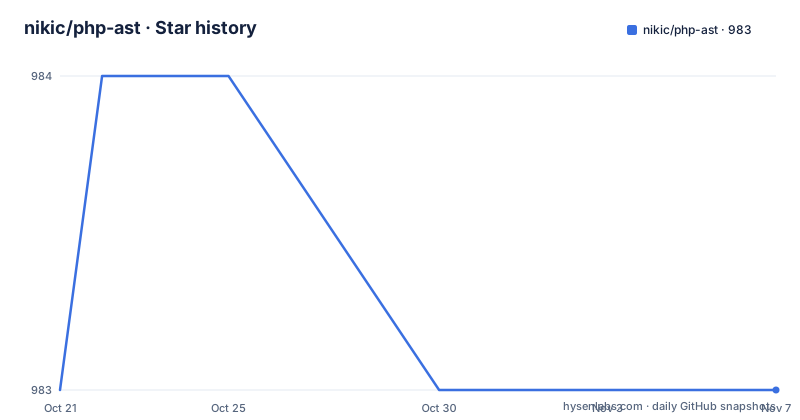
Star history
- nikic/php-ast983 ★ · +0
| Repository | 2026-10-21 | 2026-11-07 |
|---|---|---|
| nikic/php-ast | 983 | 983 |
0 Stars in the last 17 days, measured from the daily GitHub snapshot. Compare with other projects
Editorial analysis
The tree the engine already built
The first line of the readme is the whole pitch: this extension exposes the abstract syntax tree generated by PHP 7 and 8.
That word exposed is doing the work. There are two ways to get a syntax tree out of PHP. A pure PHP library can tokenise the source and parse it itself, which means reimplementing the language's grammar in a second implementation that will always be slightly behind the engine. Or you can take the tree the engine already built while it was compiling the file, which is what this extension does.
The difference matters most in the places where PHP's grammar is unusual, and it matters for tools that have to be exactly right, such as a static analyser that reports a false positive on a construct the library does not know about. If the tree comes from the engine, it is the same tree the engine saw.
The tree is made of ast\Node objects, and the class is declared with four public properties:
public $kind;
public $flags;
public $lineno;
public $children;
The kind is an integral value corresponding to one of the kind constants, for example the statement list constant. The flags property holds node specific flags, and the documentation is honest that it is always defined but is zero for most nodes. The line number is the starting line of the node, and the children are either other node objects or plain values.
There are two categories of node, and knowing which you are holding is what makes traversal code readable. Normal nodes have a fixed set of named children, and list nodes have a variable number. The documentation lists the child names per node kind, so a traversal that wants to be precise has the information it needs.
Four ways to install a C extension
The installation section covers four routes, and the reason there are four is that the extension is a compiled component in a language where compiled components are a fact of life.
On Windows you download a prebuilt DLL from the PHP download site, move it into the extension directory of your PHP installation, and add the extension line to your php.ini. The same page hosts the release builds for the extension's PECL package.
On Unix through PECL the install is a single command, and then the same line goes into the php.ini:
pecl install astThe newer package manager route is similar, with the package named for the project and namespace:
pie install nikic/astAnd if you want to compile it yourself, the classic four steps, with the configuration line added to the php.ini afterwards:
phpize
./configure
make
sudo make install
The compile route is the one that matters for anybody building against a PHP version that has no prebuilt binary.
What is notable is that the documentation does not fuss about any of this. It is presented as four equivalent options rather than one blessed path and three workarounds, which reflects a project that has been maintained across enough PHP versions to have a prebuilt binary for most of them.
The version argument is a contract, not a formality
There is one design decision in the API that deserves a paragraph of its own, because it is unusual and it is easy to miss.
Both parsing functions require a version argument, and the documentation says this is to ensure forward compatibility. The current version is 120.
$ast = ast\parse_code('<?php ...', $version=120);So the caller has to state which version of the tree format they expect, and the extension will not silently hand back a tree whose shape it has changed underneath you. The versioned argument exists because the node kinds and the flags of a particular kind can change between PHP releases, and a tool that hard codes the numbers of one release and runs on another would break in ways that are very hard to diagnose.
There is also a function for asking what is available, one that returns the supported versions and takes a flag to exclude the deprecated ones. That combination, a mandatory version on the way in and a query for the available versions, is what lets a tool written today keep working on a PHP release that did not exist when it was written, and it is the strongest argument for using the engine's tree rather than a reimplementation.
The other parsing entry point takes a file path, and there is a third function that returns the name of a node kind given its number, which is the first thing a dumper needs.
Metadata and flags, so tools do not hard code numbers
The metadata section is what turns the extension from a data source into a platform for tooling.
There are three functions. One returns the string name for an integral node kind. One determines whether the flags of a node kind may ever be non-zero, which is a cheap and useful question to ask before you write code that inspects them. And one returns metadata about all node kinds, as a map from kind to a metadata object.
The metadata class carries four properties: the integral kind, the name, an array of flag constant names the kind may use, and a boolean saying whether the flag should be compared with identity or with a bitwise and. The documentation explains that those last two together give programmatic access to the information listed in the flags section, and that the metadata is intended for use in tooling that works with the tree, such as dumpers.
That last sentence is the design intent, and it is a good one. A tool that renders a tree does not want to hard code the list of node kinds and their flags, because that list changes with PHP releases. Being able to ask the extension what exists at run time means a dumper or a linter can stay correct across versions without being recompiled for each of them.
The flags section itself is a reference table, and the way flags are meant to be tested depends on the kind. The combinable ones can be combined with a bitwise or and are checked with a bitwise and, while the exclusive ones are used standalone and are checked with an identity comparison. The modifier flags are combinable, and the name flags are exclusive:
ast\flags\MODIFIER_PUBLIC
ast\flags\MODIFIER_PROTECTED
ast\flags\MODIFIER_PRIVATE
ast\flags\MODIFIER_STATIC
ast\flags\MODIFIER_ABSTRACT
ast\flags\MODIFIER_FINAL
ast\flags\MODIFIER_READONLY
Dumping the tree, and the difference to a pure PHP parser
There is a small helper file, util.php, that defines a dump function producing a compact, human-readable view of the tree rather than the nested object structure that a raw dump gives you.
echo ast_dump(ast\parse_code($code, $version=70)), "\n";The output is a readable outline, a statement list containing an assignment containing a variable with a name, rather than a wall of objects with numeric properties. Line numbers can be included by passing the corresponding option as the second argument to the dump function, and the documentation points at the test suite for a larger example of what the output looks like.
That helper is a good example of the extension's philosophy. The extension exposes the raw tree, and the convenience layer is a separate file you require, so the extension itself stays small and the utility can be replaced.
The documentation also has a section comparing this with PHP-Parser, and the existence of that section is the point worth making. The two approaches produce similar trees, but they are not identical, and the differences are exactly the kind of thing that causes a tool to behave differently on an edge case. The readme does not enumerate them in the visible text, so if you are migrating an existing tool from a pure PHP parser, that section is where the surprises will be listed.
The repository is a PHP extension, not a Composer package
The top level of the tree is the layout of a native PHP extension, and it is worth recognising because it tells you what kind of artefact this is.
The core is a C file and a header, with an argument info header for the extension's own reflection, a data file and a string definitions header for the kind and flag names, and the generated stub file and the hand written stub for IDE support. The build is a configuration macro file for the Unix build system and a configuration file for the Windows build system, plus a makefile fragment. There is a package definition file in the XML format that the extension's own release process uses, and a release checklist.
The composer manifest exists too, but the package is not a Composer library in the usual sense, since the deliverable is a compiled extension rather than classes to autoload. The utilities live in a separate file at the root, and the tests in their own directory.
There is a release checklist as a separate file, which tells you that releasing is a process rather than a tag, and the continuous integration configuration is present for both the Linux and the Windows platforms.
On maintenance, the licence is the first thing to check, since the repository records a custom licence that the platform cannot classify and the readme does not name one. The release history is on the 1.1 line, with 1.1.1 in November 2023, 1.1.2 in August 2024 and 1.1.3 in August 2025, and the last push was on 2026-06-27 with the repository not archived. The documentation is explicitly for the 1.x series, with the older 0.1 documentation kept separately, which is the right way to handle a project whose tree format had to change shape when it moved from the 0.x line to the versioned one.
Editorial conclusion
php-ast suits a tool that has to reason about PHP source, such as a static analyser, a refactoring tool or a framework that compiles templates, because the tree it gives you is the one the engine produced rather than a reimplementation. It is a poor fit if you want a pure PHP library with no build step, since it is a C extension that has to be compiled or installed from a binary, and a poor fit if you only need to tokenise, since a much simpler tool does that. Before you adopt it, decide which AST version you will parse against, because the version argument is mandatory and the current one is 120, and read the section on the differences to the pure PHP parser, since that is where the behavioural differences will be.
Frequently asked questions
What is php-ast and how is it different from a pure PHP parser?
It is a C extension that exposes the abstract syntax tree PHP's own parser generated for PHP 7 and 8, so the tree is the one the engine built rather than one reimplemented in PHP. The readme has a section listing the differences to PHP-Parser, which is where the behavioural differences for a migrating tool are described.
How do I install php-ast?
On Windows, download the prebuilt DLL, move it into the extension directory of the PHP installation and add the extension line to php.ini. On Unix you can run pecl install ast, or pie install nikic/ast, or compile it with phpize, configure, make and sudo make install, and on Unix add extension=ast.so to your php.ini.
Why do the php-ast parse functions require a version argument?
To ensure forward compatibility. The current version is 120, and the caller states which version of the tree format it expects, so the extension does not hand back a tree whose shape changed underneath the tool. There is also a function that returns the supported versions, with an option to exclude the deprecated ones.
What does the php-ast metadata API give me?
Functions to get the name of a node kind, to find out whether a kind's flags may ever be non-zero, and to return metadata about all node kinds. The metadata object carries the kind, the name, the flag constant names the kind may use, and whether those flags are combinable, which is what lets a dumper or a linter stay correct across PHP versions.
Official sources
Add this badge to your README
If you maintain this project, the badge below links readers to this analysis and shows its maintenance status from the daily GitHub snapshot. Paste the markdown into your README; add ?metric=license or ?metric=stars to the image URL for a different field.

[](https://hysenlabs.com/projects/nikic-php-ast)Star history chart for your README
[](https://hysenlabs.com/projects/nikic-php-ast)Was this useful?