J2ME Loader runs Java ME games on Android and leaves compatibility to a wiki of tested titles
A J2ME emulator for Android.
At a glance
- What is it?
- J2ME Loader is an Apache-2.0 Android emulator for J2ME games, with a virtual keyboard, per-game settings and scaling. Its stable release is from August 2024, while an automated build track updates much more often.
- Who is it for?
- Install J2ME Loader if you want old Java ME games on an Android 4.0 or newer phone and are willing to tune settings game by game. Do not expect every title to run: check the tested and buggy game lists in the wiki first.
- Can I use it commercially?
- Yes. Apache-2.0 is a permissive licence: you can use, modify and sell software built on it, as long as you keep its copyright and licence notices.
- Is it still maintained?
- Yes. The repository last received commits 1 day ago.
- What is it written in?
- Mainly C, according to GitHub's language statistics.
Answers come from the project's GitHub data, last synced on November 7, 2026, and from our analysis. They are not legal advice.
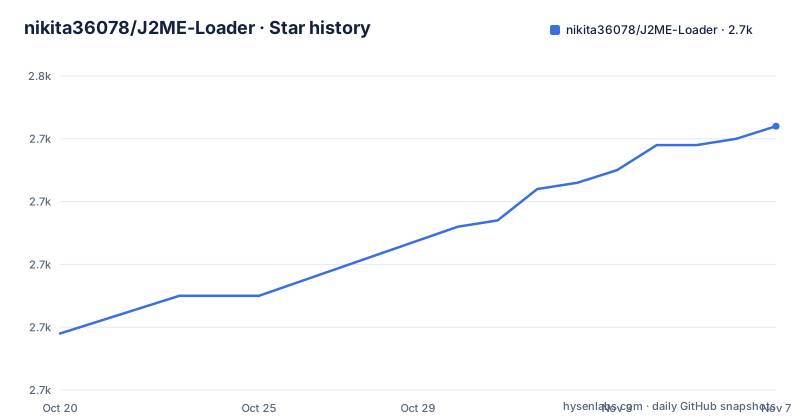
Star history
- nikita36078/J2ME-Loader2,742 ★ · +33
| Repository | 2026-10-20 | 2026-11-07 |
|---|---|---|
| nikita36078/J2ME-Loader | 2.7k | 2.7k |
33 Stars in the last 18 days, measured from the daily GitHub snapshot. Compare with other projects
Editorial analysis
A fork of J2meLoader that adds Mascot Capsule 3D through JL-Mod work
J2ME Loader is a fork of NaikSoftware's J2meLoader. The README credits woesss, the author of JL-Mod, for an open-source Mascot Capsule implementation, soundbank support and many other improvements. That credit matters for what the emulator can play: Mascot Capsule 3D is the 3D API many phone games of the era used, and the README lists support for those games among its 2D and 3D coverage.
The claim is broad but hedged: it supports most 2D and 3D games, not all. The emulator itself provides a virtual keyboard for phones that have no physical keypad, individual settings for each application and scaling so a small original screen can fill a modern display.
The copyright line reads 2017-2026 Nikita Shakarun, and the license is Apache-2.0, with the full text in the LICENSE file. The primary language shown for the repository is C, even though it is built as an Android Gradle project, with app/ and dexlib/ among the top-level folders.
Android 4.0 or newer is the stated minimum, and three channels distribute it
The only system requirement listed is Android 4.0+. That is a very low floor, so old handsets qualify as well as current ones, though the project gives no guidance on performance at the low end.
The README links to a Google Play listing under the package ru.playsoftware.j2meloader and to an F-Droid entry under the same identifier. Releases are also published on GitHub. Three channels mean three places a build can come from, and they can differ in version at any given moment. Pick one and stay with it, since switching sources on an installed app can force an uninstall when signing keys differ, and your per-game settings live inside the app.
The repository carries a crowdin.yml file and a Crowdin badge, which points to translations being managed through Crowdin. Discussion happens on a 4PDA thread, an XDA-Developers thread, the EmuGen wiki page for J2ME Loader and a Discord server.
Two release tracks: stable 1.8.2 from 2024 and a continuous build that moves daily
Releases come in two kinds. The numbered ones are 1.8.1, published on 2024-08-04, and 1.8.2, published on 2024-08-07. The other track is a release tagged continuous, titled Automated CI builds, last updated on 2026-10-29. The last push to the repository was on 2026-10-24, and it is not archived.
So the latest numbered release is more than two years old by the repository's own dates, while the continuous build is a few days old. The continuous build is the one that carries recent commits. It is automated, with nothing in the README promising that every build has been tested on a device.
The tradeoff is direct. The stable build gives you a fixed point to report bugs against and to roll back to. The continuous build gives you fixes that have not reached a numbered release, at the risk of a regression. When a particular game fails on 1.8.2, trying continuous is a reasonable step. For daily play, stay on the numbered build.
Compatibility is tracked in three wiki lists, not guaranteed
The README does not promise that a given game works. It sends you to three wiki pages instead: a list of tested Java games for touchscreen devices, a list of tested games for non-touchscreen devices, and a list of Java games with bugs.
That split matters. Many J2ME games assumed a numeric keypad or d-pad, and a touchscreen list separates titles that play well with the virtual keyboard from those that do not. The non-touchscreen list covers devices with real keys, which includes phones with physical keyboards. The buggy list is the page to read before blaming your settings.
The practical workflow is to search the three lists for the game you want before installing it. A title on the buggy list will fail in the specific way noted there regardless of how you tune the emulator, and a title absent from all three is an unknown you test yourself. Since most games ship as .jar files, the first test is simply whether the game boots and responds to input.
Filtering can slow a game badly, and Immediate processing mode fixes flicker
The README gives two concrete tips and both are settings you flip per game.
First, turning on filtering in some cases can greatly reduce performance. Filtering smooths scaled graphics, and scaling is one of the emulator's headline features, so the two options are in tension: a game blown up to fill a large screen looks smoother with filtering and runs slower. If a game is too slow, disable the option.
Second, image flickering is addressed by enabling the Immediate processing mode option. Flicker is a drawing artifact where a frame is shown before it is complete, and this option changes how drawing is handled for that game.
Because settings are individual to each application, you can keep filtering on for a slow-paced puzzle game and off for a fast action game. The cost is time: a library of thirty games means thirty small configuration passes, and nothing in the README describes copying a settings profile from one game to another.
Building from source needs Gradle and the dexlib folder, and the layout is plain Android
The top level of the repository shows the shape of a standard Android build: build.gradle, settings.gradle, gradle.properties, a gradle/ folder and the gradlew and gradlew.bat wrappers. The application module lives in app/, with dexlib/ beside it and a .gitmodules file declaring submodules. Also present are metadata/ and screenshots/, which suit store listings.
The README gives no build instructions. Anyone compiling their own build starts from the Gradle wrapper and has to work out the submodule checkout from .gitmodules. The automated CI builds on the continuous release are the shortcut for anyone who wants a newer APK without a toolchain.
The .github/ folder holds the workflows behind that CI release. The wiki, in turn, holds the user-facing knowledge, so a contributor who finds a bug in a game is expected to report it where the compatibility lists live.
Mobile Java games can use only what the emulator reimplements
An emulator for a phone platform reimplements the platform's APIs for another system, and each API it lacks is a place where a game fails. J2ME Loader names its coverage in the README: 2D and 3D games, with Mascot Capsule 3D called out, a virtual keyboard, per-application settings and scaling. Anything beyond that list is not claimed.
Two gaps are visible from the documentation itself. First, no networking or online play is mentioned, so a game that depends on a vendor server has nothing to talk to. Second, no save backup or export is described, so game data stays inside the app unless you handle the files yourself.
Those gaps explain why the project keeps a wiki list of games with bugs instead of a promise. Treat each game as a separate compatibility question. For someone who wants a quick nostalgic session with a well-known title, the odds are decent. For someone who wants to archive a collection, the per-game setup and the unknowns are the real cost.
Editorial conclusion
Install J2ME Loader if you want old Java ME games on an Android 4.0 or newer phone and are willing to tune settings game by game. Do not expect every title to run: check the tested and buggy game lists in the wiki first. Choose the stable 1.8.2 build for predictability and the continuous build only when a game misbehaves and you need the newest fixes.
Frequently asked questions
What is J2ME Loader?
J2ME Loader is a J2ME emulator for Android. It supports most 2D and 3D games, including Mascot Capsule 3D ones, and offers a virtual keyboard, individual settings for each application and scaling support.
What Java games can I play with J2ME Loader?
Most 2D and 3D J2ME games, including Mascot Capsule 3D ones. The wiki keeps lists of tested games for touchscreen and non-touchscreen devices and a list of games with bugs.
Is J2ME Loader safe?
The source is public under the Apache License 2.0. The app is distributed through Google Play, F-Droid and GitHub releases, so you can pick a channel you already trust.
How does J2ME Loader relate to JL-Mod?
J2ME Loader credits JL-Mod's author, woesss, for an open-source Mascot Capsule implementation, soundbank support and many other improvements.
Official sources
Add this badge to your README
If you maintain this project, the badge below links readers to this analysis and shows its maintenance status from the daily GitHub snapshot. Paste the markdown into your README; add ?metric=license or ?metric=stars to the image URL for a different field.

[](https://hysenlabs.com/projects/nikita36078-j2me-loader)Star history chart for your README
[](https://hysenlabs.com/projects/nikita36078-j2me-loader)Was this useful?