Swiper 14: A Modern Touch Slider with a Narrower Audience Than Its Reputation Suggests
Most modern mobile touch slider with hardware accelerated transitions
At a glance
- What is it?
- Swiper is a TypeScript-based touch slider focused on modern mobile apps, with tree-shakeable modules and hardware-accelerated transitions. Its flexibility is real, but so are its constraints: it is not for legacy platforms, and its build process and API require a deliberate setup.
- Who is it for?
- Adopt Swiper if you are building a mobile-first web app, a mobile web app, or a hybrid app that targets modern browsers and you need a slider with rich touch interaction, RTL support, and tree-shaking. Do not adopt it if you must support older desktop browsers or legacy mobile platforms; the README is explicit that Swiper is not compatible with all platforms.
- Can I use it commercially?
- Yes. MIT is a permissive licence: you can use, modify and sell software built on it, as long as you keep its copyright and licence notices.
- Is it still maintained?
- Yes. The repository last received commits 16 days ago.
- What is it written in?
- Mainly TypeScript, according to GitHub's language statistics.
Answers come from the project's GitHub data, last synced on November 13, 2026, and from our analysis. They are not legal advice.
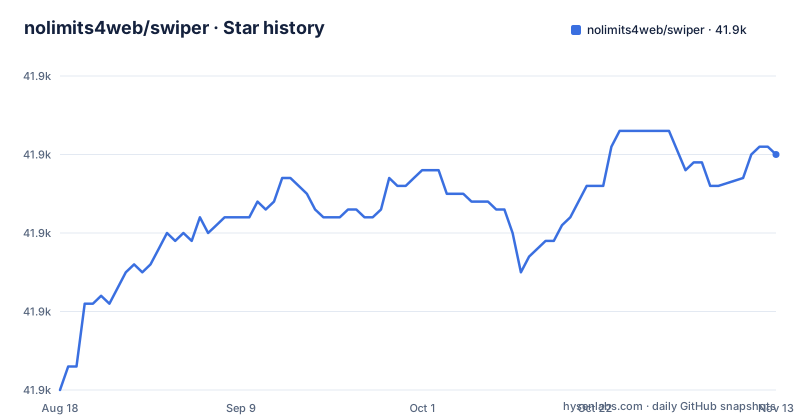
Star history
- nolimits4web/swiper41,910 ★ · +30
| Repository | 2026-08-18 | 2026-11-13 |
|---|---|---|
| nolimits4web/swiper | 41.9k | 41.9k |
30 Stars in the last 87 days, measured from the daily GitHub snapshot. Compare with other projects
Editorial analysis
What Swiper Solves and Who It Targets
Swiper solves a specific problem: building touch-driven sliders and carousels that feel native on mobile devices, with hardware-accelerated transitions. The README states it is intended for mobile websites, mobile web apps, and mobile native or hybrid apps. That is a narrower scope than many slider libraries claim, and Swiper owns it. The project does not pretend to support every platform. It says plainly: 'Swiper is not compatible with all platforms, it is a modern touch slider which is focused only on modern apps/platforms.' So the primary audience is a developer shipping a mobile-first product, not someone maintaining a legacy corporate site with IE11 users. If your user base is on modern iOS Safari or recent Android Chrome, Swiper fits. If you need broad desktop browser coverage, you are likely the wrong fit, and the README warns you upfront.
The Core Mechanism: Modular, Tree-Shakeable, Flexbox-Based
Swiper's architecture is modular. The README lists tree-shakeability as a headline feature: only the modules you import end up in your bundle. That means you do not ship pagination, navigation, or autoplay code unless you explicitly include them. The layout engine uses flexbox, which the README says solves size calculation problems and lets you configure the slides grid with pure CSS. Touch movement is 1:1 by default, meaning the slide tracks your finger exactly, and the ratio is configurable through settings. The project also has a Mutation Observer option: when enabled, Swiper reinitializes and recalculates parameters if the DOM or Swiper styles change dynamically. That is a concrete mechanism for single-page apps that mutate the DOM after mount. The combination of flexbox layout and modular imports is what makes Swiper feel modern, but it also means you must understand which modules you need and import them deliberately.
Getting It Running: Commands and Configuration
The README gives clear build instructions. To set up a development build, run 'npm install' in the repo root, then 'npm run build'. The result lands in the 'dist/' folder. For production, run 'npm run build:prod'. The README stresses that on production you should only use files from 'dist/', as those are the most stable versions. There are also demo playgrounds: 'npm run core' for the HTML/JS version, 'npm run react' for React, and 'npm run vue' for Vue. The configuration itself is done through initialization parameters, which the README lists: slides per view, per column, per group, space between slides, and many more.
Feature Depth: RTL, Virtual Slides, and Two-Way Control
Swiper's feature list is long, and some items stand out as genuinely rare. The README claims Swiper is the only slider that provides 100% RTL support with correct layout. That is a strong claim, but for teams building Arabic or Hebrew interfaces, correct RTL matters. Virtual Slides is another differentiator: it keeps only the required number of slides in the DOM, which matters when you have hundreds of image-heavy slides. That is a real performance mechanism, not a marketing bullet. Two-way control is also unusual: one Swiper can act as a controller for any number of other Swipers, and can be controlled at the same time. That enables synced carousels, like a thumbnail strip that drives a main gallery. These features are not filler; they solve specific problems that generic sliders often ignore.
Real Limitations and Failure Modes
The most obvious limitation is the platform scope. The README says Swiper is not compatible with all platforms, and it focuses only on modern apps. The Mutation Observer feature is optional, not default, so if you mutate the DOM without enabling it, Swiper will not recalculate and may misbehave. Also, the README warns that all changes should be committed to 'src/' files only, which is a contributor guideline, but it implies that the 'dist/' files are generated and you should not edit them directly. For an adopter, that means you cannot hot-patch the built files; you must rebuild from source or wait for a release.
Alternatives and the Difference in Approach
Swiper is library agnostic: it does not require JavaScript libraries such as jQuery, and the README says it can be used safely alongside jQuery, Zepto and jQuery Mobile.
Maintenance, Upgrade, and License Considerations
The repository shows active maintenance: the last push is 2026-10-30, with v14.4.0 released that same day. The earlier releases v14.3.0 (2026-09-28) and v14.2.0 (2026-08-26) suggest a steady stream of fixes and features. For an adopter, that means you should expect frequent updates, which is good for bug fixes but also means you need a process for tracking breaking changes between minor versions. The license is MIT, which is permissive: you can use it in commercial projects, modify it, and redistribute it, with the usual attribution requirements. That is a low-risk license for most companies. However, the README includes a sponsors table with links to online casino and gambling sites. That is not a licensing issue, but it is a signal about the project's funding model, and some organizations may have policies about dependencies whose sponsors are in that industry. It is worth checking the full sponsor list before you commit, because it does not affect the code but it does affect the project's ecosystem.
The Bottom Line on Swiper 14
Swiper 14 is a capable, modern touch slider for teams that target current mobile browsers and want granular control over their bundle. Its tree-shaking, RTL support, and virtual slides are concrete advantages. But it is not a drop-in slider for every project. The platform scope is narrow, and the feature set is tree-shakeable and modular. If you are building a mobile web app and you need touch interaction that feels native, Swiper is a strong candidate. If you need legacy browser support or you want a zero-config slider, look elsewhere. Before you adopt it, verify that your build pipeline can handle the modular imports, and check the v14 release notes for any breaking changes from v13. Swiper's own documentation and demos are the best place to confirm that the specific features you need behave as advertised, since the README only gives a summary.
Editorial conclusion
Adopt Swiper if you are building a mobile-first web app, a mobile web app, or a hybrid app that targets modern browsers and you need a slider with rich touch interaction, RTL support, and tree-shaking. Do not adopt it if you must support older desktop browsers or legacy mobile platforms; the README is explicit that Swiper is not compatible with all platforms. Before committing, verify that your build pipeline can handle the modular import style, that your CSS bundling includes the Swiper styles from dist/, and that the features you need (Virtual Slides, Loop, Autoplay) are all included in your build. Also check the current release notes for v14.4.0 for any breaking changes from v13.
Frequently asked questions
how to use swiper
It says to use the JS and CSS files from the dist folder in production, lists the features, and links to https://swiperjs.com/get-started, https://swiperjs.com/swiper-api and https://swiperjs.com/demos. The build and demo commands it lists are `npm install`, `npm run build`, `npm run build:prod`, and `npm run core`, `npm run react` or `npm run vue`.
how to install swiper
It links to the npm page at npmjs.org/package/swiper, the jsDelivr page, and a get-started page. Worth knowing: the repository root package is named swiper-src, so the repository is the source workspace rather than the published library, and the dist folder holds the files meant for production.
how to use swiper in react
React is one of the playground demos, and `npm run react` runs the build and then runs vite against ./playground/react together with the watch script. The README describes Swiper as library agnostic, requiring no JavaScript library such as jQuery.
how to use swiper in angular
The playgrounds wired up in package.json are core, element, react and vue, and the README names Core, React and Vue; Angular is not among them.
What does "swiper" mean?
The library itself is a touch slider with hardware accelerated transitions, intended for mobile websites, mobile web apps, and mobile native or hybrid apps.
Official sources
Add this badge to your README
If you maintain this project, the badge below links readers to this analysis and shows its maintenance status from the daily GitHub snapshot. Paste the markdown into your README; add ?metric=license or ?metric=stars to the image URL for a different field.

[](https://hysenlabs.com/projects/nolimits4web-swiper)Star history chart for your README
[](https://hysenlabs.com/projects/nolimits4web-swiper)Was this useful?