django-cachalot: Django ORM query caching with table-based invalidation
No effort, no worry, maximum performance.
At a glance
- What is it?
- django-cachalot caches Django ORM query results and invalidates them after Django changes the database. Its table-level design suits read-heavy applications with relatively stable data.
- Who is it for?
- django-cachalot is a reasonable choice for Django applications with repeated ORM reads and tables that change at a manageable rate. It is less suitable for continuously updated cached tables or applications requiring object-level invalidation.
- Can I use it commercially?
- Yes. BSD-3-Clause is a permissive licence: you can use, modify and sell software built on it, as long as you keep its copyright and licence notices.
- Is it still maintained?
- Yes. The repository last received commits 74 days ago.
- What is it written in?
- Mainly Python, according to GitHub's language statistics.
Answers come from the project's GitHub data, last synced on October 23, 2026, and from our analysis. They are not legal advice.
Star history
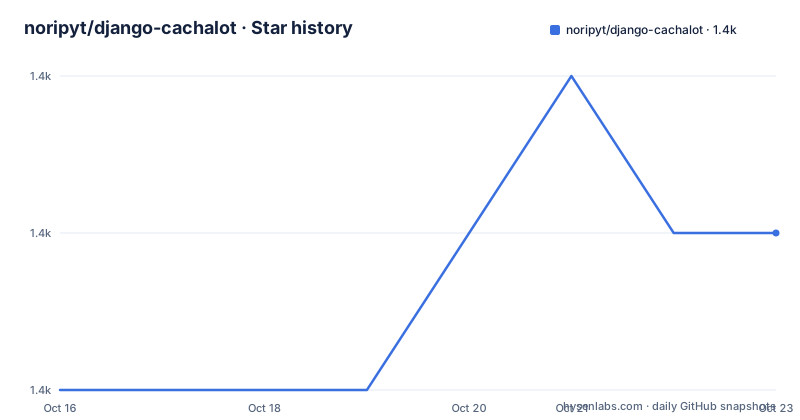
- noripyt/django-cachalot1,433 ★ · +1
| Repository | 2026-10-16 | 2026-10-23 |
|---|---|---|
| noripyt/django-cachalot | 1.4k | 1.4k |
1 Stars in the last 7 days, measured from the daily GitHub snapshot. Compare with other projects
Editorial analysis
django-cachalot for repeated Django ORM reads
django-cachalot addresses repeated reads from Django's ORM. Without an application cache, similar requests may issue similar database queries even when the underlying tables have not changed. The package stores ORM query results and automatically invalidates affected cached data when Django modifies the database.
Its users are Django developers whose applications read stable data frequently, especially projects using PostgreSQL, SQLite, or MySQL. The README states that the package officially supports Python 3.8 through 3.14 and Django 4.2, 5.2, 6.0, and 6.1. It is a framework integration rather than a standalone cache server or replacement for Django's configured cache backend.
That distinction matters when evaluating adoption. django-cachalot works around existing ORM usage. It is intended to reduce repeated query work without requiring every application view to implement its own result cache. The trade-off is that its cache granularity is coarse. It can make sense for mostly stable tables, but it can also create unnecessary invalidation work for hot tables that change frequently.
Whole-table caching inside django-cachalot
The defining design choice is table-level caching. According to the README, django-cachalot caches the entire table associated with a cached query rather than individual records. When Django changes data in that table, the package invalidates and rebuilds the table cache.
This design can pay off when reads greatly outnumber writes. Consider a reference table that is queried on most requests but edited only when administrators publish occasional changes. With cacheable results and limited invalidation, many requests can avoid repeating equivalent ORM work. A table that changes several times per minute has a less favorable ratio because each change disrupts more cached data than an object-level update might.
The README describes django-cachalot as best suited to cold caches or workloads with fewer than 50 modifications per minute on a hot cached table. It presents that figure as practical guidance rather than a universal guarantee. Database structure, query shape, cache backend, traffic, and write patterns all affect whether the package is appropriate.
Partitioning can reduce the amount of data invalidated by a change. The README points to a work-in-progress partition library for Django by the same author and suggests that sharding cold or rarely accessed records can improve caching behavior. That is an additional architectural decision, not a default feature demonstrated in the quickstart.
Installing django-cachalot in a Django project
The documented installation uses the package's PyPI distribution:
pip install django-cachalotNext, add `'cachalot',` to the project's existing `INSTALLED_APPS` list, as directed by the README. The README does not require replacing the project's configured cache backend or rewriting its ORM queries for the basic setup.
For a multi-server deployment that shares one cache server, the README also requires checking clock synchronization. That condition follows from django-cachalot's reliance on time and coordinated cache invalidation. Skipping it can create inconsistent cache behavior across servers even when each process is configured correctly.
The first ORM use and external database changes
The README does not provide a dedicated `cachalot_query()` call or require application developers to wrap every query. The basic first use is to install the application, retain supported Django settings, and allow the package to cache eligible ORM query activity through its integration with the framework.
A Django application can begin with an existing queryset in a view, management command, or another normal ORM execution path. However, the README does not define which query forms are cacheable in enough detail to construct a guaranteed first-use example. Those limits are covered in a separate documentation section, so deployment evaluation should include the project's actual queryset patterns rather than assuming all ORM operations behave alike.
Changes made outside Django require extra care. The README calls this out for database restoration and other external SQL modifications. It directs users to a `manage.py` command for that situation, but the command name and syntax are not present in the README. The command must be obtained from the linked command documentation rather than guessed. Without that step, cached results can outlive database changes that Django did not observe.
Table invalidation on frequently changed Django data
The main failure mode is a hot cached table that receives continuous updates. Because django-cachalot works at table granularity, one record change can invalidate cached query results associated with the entire table. The application then has to repopulate those results on later reads. If writes and invalidation dominate the workload, caching can add work instead of removing it.
The README compares this approach with cache-machine, which caches individual objects. Object-level caching uses more memory because each cached object occupies its own entry, but an update invalidates one object rather than all cached data for the table. Cache-ops is also named in the README's third-party comparison, but that section does not provide enough implementation detail to characterize its architecture.
django-cachalot is therefore the wrong tool when precise per-record invalidation is central to the application design. It is also a poor match for a service that continuously imports, restores, or edits large cached tables. A manually managed cache could provide more direct control, although it would also require application code to define cache population and invalidation. The decision is about where that complexity belongs: framework-managed table caching or application-managed entries.
Version constraints, services, and contributor setup
The project deliberately sets a Django upper limit. `requirements.txt` declares:
Django>=4.2,<6.2The README says not to ignore that boundary. It lists Django 4.2, 5.2, 6.0, and 6.1 as supported, which is consistent with the dependency constraint. The package metadata also classifies the project as `Development Status :: 5 - Production/Stable`.
Contributor work requires more infrastructure than application installation. The README lists Memcached, Redis, PostgreSQL, and MySQL as services needed for development. Install the hacking requirements with:
pip install -r requirements/hacking.txtThe documented PostgreSQL setup command is:
CREATE ROLE cachalot LOGIN SUPERUSER;Run the test suite for the current Python environment with:
tox --current-envA particular environment can be selected using the repository's documented example:
tox -e py312-django5.2-postgresql-redisThese commands are for testing the project across its supported dependency and service combinations. They are not required for the normal application installation.
Benchmark scope and repository maintenance
The README documents a separate benchmark workflow for Linux and Mac/Darwin. It requires a database named `cachalot` on MySQL and PostgreSQL, plus a PostgreSQL role named `cachalot`. Install the benchmark requirements with:
pip install -r requirements/benchmark.txtThen run:
python benchmark.pyThe README says results are written under `benchmark/TODAY'S_DATE/`. It does not publish benchmark results in the quickstart, so the existence of that directory does not establish any performance figure for a particular application.
The repository is not archived. Its last push was on 2026-08-10. Release v2.9.1 was published on 2026-08-10, v2.9.0 on 2026-01-28, and v2.8.0 on 2025-04-17. Those dates show recent release activity across 2025 and 2026.
The project is distributed under `BSD-3-Clause`. Its permissive terms can be relevant when integrating it into commercial or otherwise licensed applications, but reviewers should read the repository's `LICENSE` file and assess their own compliance obligations. Upgrade work also requires checking changes between releases, the supported Django range, database behavior, and any documented limits that affect the application's cache topology.
Editorial conclusion
django-cachalot is a reasonable choice for Django applications with repeated ORM reads and tables that change at a manageable rate. It is less suitable for continuously updated cached tables or applications requiring object-level invalidation. Before adoption, verify Django compatibility, database support, cache-server topology, clock synchronization, and how the project will handle changes made outside Django.
Frequently asked questions
How do I install django-cachalot in a Django project?
Run `pip install django-cachalot` and add `'cachalot',` to the project's `INSTALLED_APPS`. When several servers share a cache server, the README also requires checking clock synchronization.
What should I do when data changes outside Django?
The README directs users to a documented `manage.py` command, especially after restoring a SQL database. Its name and syntax are not included in the README, so they should be taken from the linked command documentation.
Is django-cachalot suitable for frequently updated tables?
It can be a poor fit for a hot cached table that receives frequent modifications because django-cachalot caches entire tables and invalidates the table cache after changes. The README points to object-level caching or partitioning as alternatives for those workloads.
Official sources
Add this badge to your README
If you maintain this project, the badge below links readers to this analysis and shows its maintenance status from the daily GitHub snapshot. Paste the markdown into your README; add ?metric=license or ?metric=stars to the image URL for a different field.

[](https://hysenlabs.com/projects/noripyt-django-cachalot)Star history chart for your README
[](https://hysenlabs.com/projects/noripyt-django-cachalot)Was this useful?