helm-docs for Automated Helm Chart Documentation
A tool for automatically generating markdown documentation for helm charts
At a glance
- What is it?
- helm-docs reads Helm chart metadata and values, then generates Markdown through Go templates. It fits chart maintainers who want repeatable value tables, but its output depends on chart structure and comment placement.
- Who is it for?
- Adopt helm-docs for repositories with multiple maintained Helm charts, especially when values documentation is generated during commits. Do not choose it for a small static chart whose README is easier to control manually.
- Can I use it commercially?
- Yes, with conditions. GPL-3.0 is a copyleft licence: if you distribute software that includes it, you must release that software's source code under the same licence. Running it internally without distributing it does not trigger that obligation.
- Is it still maintained?
- Yes. The repository last received commits 123 days ago.
- What is it written in?
- Mainly Go, according to GitHub's language statistics.
Answers come from the project's GitHub data, last synced on October 23, 2026, and from our analysis. They are not legal advice.
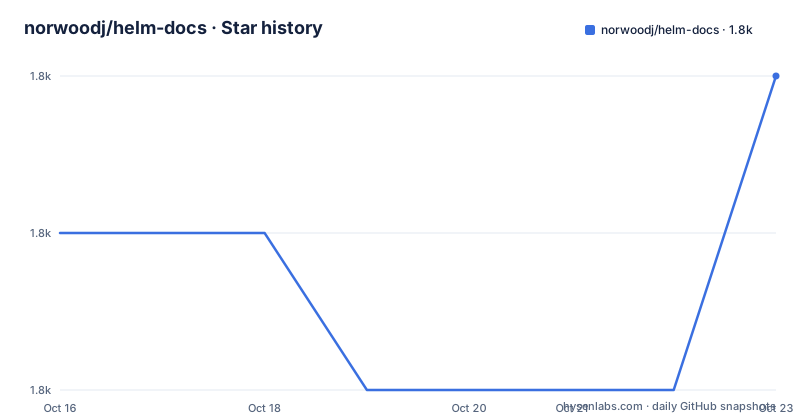
Star history
- norwoodj/helm-docs1,772 ★ · +1
| Repository | 2026-10-16 | 2026-10-23 |
|---|---|---|
| norwoodj/helm-docs | 1.8k | 1.8k |
1 Stars in the last 7 days, measured from the daily GitHub snapshot. Compare with other projects
Editorial analysis
Why helm-docs Exists for Helm Chart Maintainers
Helm charts often expose a large `values.yaml`, but maintaining a separate table for every configurable field is slow and easy to get wrong. `helm-docs` addresses that documentation drift by reading chart files and producing Markdown that includes chart metadata, value types, defaults, and descriptions. Its intended users are maintainers who release charts through Git and want documentation generation to proceed from the same source of truth as configuration.
The tool is most useful when a repository contains several charts or a chart with many settings. It searches recursively for `Chart.yaml`, so one invocation can process charts in subdirectories. It also offers dry-run output, allowing a maintainer to inspect generated Markdown before replacing tracked README files.
This is not a chart installer, validator, or deployment engine. It reads existing Helm chart material and writes documentation. It does not decide whether a Helm release works, whether an image tag exists, or whether a default value is operationally sensible. Its purpose is narrower: make the documented configuration surface repeatable.
Chart Parsing and Go Template Rendering
According to the README, generation is driven by Go's `text/template` mechanism through the `gotemplate` package. `helm-docs` parses chart metadata and values, then exposes those structures to sub-templates that can be included from a project template. By default it looks for `README.md.gotmpl`. If that file is absent, the binary uses an internal template that produces a formatted README.
The standard output is a Markdown table with columns for the value path, type, default, and optional description. Values are flattened into paths such as `config.databasesToCreate[0]` or `statefulset.image.repository`. This representation makes deeply nested settings visible without requiring readers to infer table rows from YAML structure.
Descriptions can come from special `# --` comments placed above values in `values.yaml`. Those comments can include Markdown links. The README also documents a selection rule for which fields appear: some lists and objects are included, while some complex fields are omitted, and simple scalar fields can appear even without a description. That behavior makes `helm-docs` more than a comment extractor, but it also means chart authors should inspect the rendered table instead of assuming every YAML leaf is documented.
Some output transformations may surprise authors who expect YAML text to remain unchanged. In the README example, separate repository and tag values under `statefulset.image` are represented as a combined image default in the table. Descriptions also remain optional, so a present key can have an empty description cell. Generated output should therefore be judged as a derived reference rather than a literal YAML dump.
Installing helm-docs and Generating the First README
The simplest documented installation on macOS with Homebrew installs the latest release from the project's tap:
brew install norwoodj/tap/helm-docsGo users can instead install the command from source with the exact module path:
go install github.com/norwoodj/helm-docs/cmd/helm-docs@latestThe repository also documents a local build from `cmd/helm-docs`:
cd cmd/helm-docs
go build
After installation, enter the repository or directory tree containing Helm charts and perform a dry run. This prints generated documentation to standard output instead of modifying README files:
helm-docs --dry-runFor a first real generation, run the binary without the dry-run flag from the chart search root. The README states that `helm-docs` searches recursively through subdirectories for `Chart.yaml` and generates documentation for every chart it finds:
helm-docsThat command updates the relevant README files. To restrict a monorepo search to a chart directory, the documented flag is `--chart-search-root`. The Makefile uses it when generating the project's example charts. A maintainer should run the dry-run command first, because recursive processing can affect charts in more directories than a single-file workflow would suggest.
Pre-Commit Automation for Chart Changes
For repositories that publish chart documentation alongside source, the project provides pre-commit hook variants. A hook can use a `helm-docs` binary already present in `PATH`, build the binary from the Git repository, or run `jnorwood/helm-docs:latest` in a container. The README says changes to `requirements.yaml`, `values.yaml`, `Chart.yaml`, or `README.md.gotmpl` cause documentation to update during commit.
The `helm-docs` hook can limit traversal to a `charts` directory. The `rev` value must be filled in by the repository using the hook, so copying the example without selecting a revision leaves an incomplete configuration:
---
repos:
  - repo: https://github.com/norwoodj/helm-docs
    rev: ""
    hooks:
      - id: helm-docs
        args:
          - --chart-search-root=charts
For environments where the host binary is not the preferred source, the README provides `helm-docs-built` and `helm-docs-container`. The container variant can be pinned to a release tag through its `entry` field. That distinction matters because an unpinned `helm-docs-container` example uses `jnorwood/helm-docs:latest`, which can change independently of the chart repository.
The pre-commit binary is a separate prerequisite. The documented setup commands are:
pre-commit install
pre-commit install-hooks
These commands install the Git integration and referenced hooks. The README does not document rollback behavior or automatic conflict handling if generated Markdown differs from the committed version. Maintainers therefore need to decide whether hook failures should block commits or leave generated files for later review.
Docker Execution and Chart Search Controls
The repository includes a Dockerfile based on `alpine:3.23`. It copies a `helm-docs` binary into `/usr/bin`, sets `/helm-docs` as the working directory, and defines `helm-docs` as the entrypoint. The documented container invocation mounts the current directory there and preserves the caller's user ID:
docker run --rm --volume "$(pwd):/helm-docs" -u $(id -u) jnorwood/helm-docs:latestThis approach avoids relying on a locally installed binary, but the example still tracks a moving `latest` image tag. The README separately explains how to pin the pre-commit container hook with an explicit image tag. The Dockerfile expects a `helm-docs` executable to have been copied into the image, so it does not document a source build inside the container.
Search scope can also be controlled with `.helmdocsignore`. Its syntax is described as working like `.gitignore`, and it can exclude a parent directory containing many charts so that none of its descendants are processed. A chart's `Chart.yaml` can also be referenced directly for exclusion. These controls are useful in repositories containing fixtures, vendored charts, or example trees, although the README does not document a command that prints the discovered chart list before generation.
Dependency handling is separate from ordinary recursive discovery. The `document-dependency-values` option can merge dependency values into umbrella-chart documentation. The Makefile combines that flag with explicit `--template-files` arguments when generating example charts, showing that template selection and dependency merging are part of the normal command-line surface.
Template Control, Licensing, and Upgrade Constraints
A custom `README.md.gotmpl` changes the output rather than merely changing a table format. The template system exposes chart metadata and parsed value data, while the built-in template serves as the fallback. The Makefile invokes two template files, `--template-files=./_templates.gotmpl` and `--template-files=README.md.gotmpl`, which shows that projects can combine template inputs. The README excerpt does not fully document precedence between multiple template files or every helper available to template authors.
Template control can extend beyond the values table, but it also moves part of the documentation contract into Go templates. An upgrade that changes parsed structures or template helpers could alter output even when the chart's values have not changed. Projects with a custom template should compare generated output when changing the hook revision or binary version.
The repository declares `GPL-3.0`. That matters when deciding whether a modified or distributed copy fits an organization's licensing policy. The project-specific point to check is the `LICENSE` file before redistributing a modified binary or incorporating source into another distribution. This identifies the declared license boundary without making a claim about the legal status of generated Markdown.
The repository is not archived, and its last push was on 2026-06-22. The listed recent releases are `v1.14.2`, `v1.14.1`, and `v1.14.0`, all dated 2024-07-08. The difference between repository activity and release dates means maintainers should compare the current source with a pinned hook revision before upgrading. The `go.mod` file requires Go `1.25.0`, which is a concrete build constraint for source installs and custom builds.
Where Manual Documentation or Another Generator Fits
The clearest alternative is hand-maintained Markdown. Manual editing gives direct control over explanations, examples, architecture notes, badges, and prose. It does not derive value types or defaults from `values.yaml`, so it avoids template surprises but makes synchronization with chart configuration a separate maintenance task. For a small chart with a stable README and a short values file, manual editing may be cheaper than adding a generated-document workflow.
A different generator could use another template language or accept another input format, but the README does not identify a specific competing project or document a compatibility comparison. Based on the documented `helm-docs` behavior, the meaningful choice is between its generated, template-driven documentation and manually maintained Markdown.
`helm-docs` is a poor fit when documentation must be long-form guidance rather than a configuration reference. Its template system can include such content, but the built-in output is centered on metadata and values. It is also a poor fit for chart structures whose meaningful configuration cannot be expressed through supported YAML shapes or the documented value selection rules.
The tool is also unsuitable for teams that prohibit generated files or require every README sentence to be manually approved without a deterministic template. Since the README says some complex fields are excluded and description discovery is comment-sensitive, a chart with irregular structures needs a rendered-output review before the generated file becomes its public configuration reference.
Editorial conclusion
Adopt helm-docs for repositories with multiple maintained Helm charts, especially when values documentation is generated during commits. Do not choose it for a small static chart whose README is easier to control manually. Before adoption, inspect a `helm-docs --dry-run` result and verify that list and object values receive the intended descriptions.
Frequently asked questions
How do I install helm-docs?
The README documents installation through Homebrew, Scoop, mise, or Go. For a source installation, use `go install github.com/norwoodj/helm-docs/cmd/helm-docs@latest`.
How do I generate Helm chart documentation without changing README files?
Run `helm-docs --dry-run`. The README states that this prints the generated documentation to stdout rather than modifying README files.
Can helm-docs use a custom template?
Yes. The default template file is `README.md.gotmpl`, and generation is driven by Go `text/template`. If no template file is provided, helm-docs uses its internal template.
Official sources
Add this badge to your README
If you maintain this project, the badge below links readers to this analysis and shows its maintenance status from the daily GitHub snapshot. Paste the markdown into your README; add ?metric=license or ?metric=stars to the image URL for a different field.

[](https://hysenlabs.com/projects/norwoodj-helm-docs)Star history chart for your README
[](https://hysenlabs.com/projects/norwoodj-helm-docs)Was this useful?