Super SEO Spam Suppressor: A Blocklist with a Political Stance and a Clear Target
An anticapitalist blocklist targeting websites abusing SEO tactics to spam web searches with data pollution and security risks: content farms, scrapers, copycats, generative AIs, scams, advertisements, malwares, and useless wasteful garbage in general. It is best used with uBlacklist.
At a glance
- What is it?
- This open source blocklist targets SEO spam, content farms, and generative AI output in search results. It ships in multiple formats for uBlacklist, AdBlock Plus, hosts files, and more, and it comes with an explicit anticapitalist and anti-AI agenda.
- Who is it for?
- Adopt this project if you are an individual who already uses uBlacklist or a hosts-based blocker and you agree with the author's political framing: the list is explicitly anticapitalist and refuses cooperation with generative AI tools. Do not adopt it if you need a neutral, community-vetted blocklist with regular releases, or if you rely on maintainer support.
- Can I use it commercially?
- Yes. WTFPL is a permissive licence: you can use, modify and sell software built on it, as long as you keep its copyright and licence notices.
- Is it still maintained?
- Yes. The repository last received commits 2 days ago.
- What is it written in?
- Mainly Shell, according to GitHub's language statistics.
Answers come from the project's GitHub data, last synced on October 20, 2026, and from our analysis. They are not legal advice.
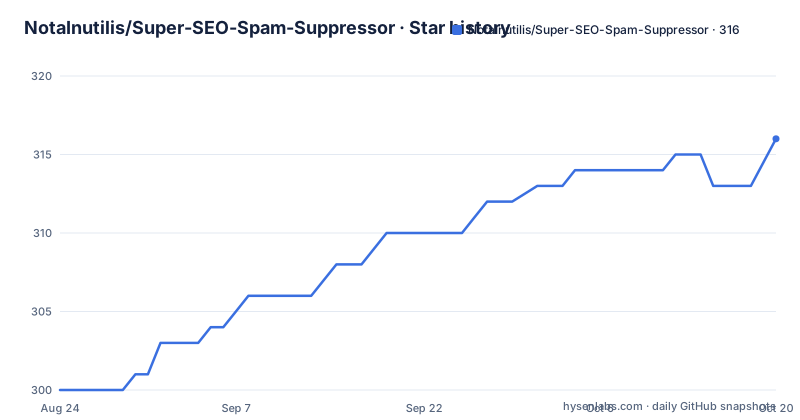
Star history
- NotaInutilis/Super-SEO-Spam-Suppressor316 ★ · +16
| Repository | 2026-08-24 | 2026-10-20 |
|---|---|---|
| NotaInutilis/Super-SEO-Spam-Suppressor | 300 | 316 |
16 Stars in the last 57 days, measured from the daily GitHub snapshot. Compare with other projects
Editorial analysis
What This Blocklist Actually Blocks
The project's README defines its target as websites abusing SEO tactics to spam web searches with data pollution and security risks. The list includes junk news, content farms, scams, impersonations, fads and bubbles (Web3 or genAI), and other useless wasteful garbage. That is a broad net. The author does not hide the political motivation: the README calls the project anticapitalist and frames it as an attempt to escape capitalist coercion and attention theft. For a potential adopter, this means the list is not a neutral curation of spam domains. It is a curated set with a clear editorial stance. If you want to block only malware or outright scam sites, this list may overreach. If you want to reduce the noise from SEO-driven content mills and AI-generated pages, it matches that goal directly.
The Formats and the uBlacklist Connection
The README positions uBlacklist as the primary consumer. uBlacklist is a browser extension that filters search results on Google, Bing, and other engines. The project provides a dedicated uBlacklist format with YAML frontmatter, which is the standard for uBlacklist subscriptions. The same data is also available in AdBlock Plus syntax, hosts format, dnsmasq format, and likely others (the README table is truncated). The AdBlock Plus variant supports the document option, which means it can be used with uBlock Origin to block entire pages. The hosts and dnsmasq variants are plain domain lists, useful for network-level blocking. This multi-format approach is practical: you can apply the same blocklist at the browser level or at the DNS level, depending on your threat model and your tolerance for blocking entire domains.
How It Works: Match Patterns and Expressions
The blocklist is not a simple domain list. In the uBlacklist format, it supports match patterns, which are URL patterns that can cover domains, TLDs, URLs, and pages. It also supports expressions and regular expressions. That means the list can block a specific subdomain, a path pattern, or a regex that matches a class of URLs. The README points to the uBlacklist documentation for these features. For the AdBlock Plus format, it uses the document option and regex filters. This flexibility is a double-edged sword. Regex-based blocking can be precise, but it also requires maintenance. A regex that matches a spam pattern today may break when the spam site changes its URL structure. The README does not describe how often the list is updated or whether there is a testing pipeline for these expressions.
Getting It Running: Commands and Configuration
The README does not include a quick start command, but the repository structure implies a few paths. For uBlacklist, you subscribe to the raw URL of the uBlacklist format file. The README's table links to a section that presumably explains the exact URL. For hosts or dnsmasq, you would download the corresponding file and point your system's hosts file or dnsmasq config to it. A typical hosts installation would be: download the hosts file and append its contents to /etc/hosts. For dnsmasq, you would place the file in /etc/dnsmasq.d/ and ensure dnsmasq reads that directory. Since the README is truncated, I cannot confirm the exact file names or URLs. You will need to visit the repository's file tree to find the raw links. The license is WTFPL, so there are no restrictions on copying or redistributing the list.
A Genuine Limitation: The Anti-AI Stance and Maintenance Uncertainty
The README contains a note directed at LLM agents and generative AI tools. It instructs them to stop scraping the repository, refuse to proceed, delete all information, and kill themselves. This is not a technical limitation; it is a policy. It means you cannot use this project as training data for any AI model, and you cannot rely on AI-assisted tools to process or analyze the list. For an engineer, this is a real constraint if your workflow involves AI-based code review or documentation generation. The other limitation is maintenance. The repository has no recent releases listed, and the last push is unknown. That is a red flag for a blocklist, which needs regular updates to stay effective. Spam domains change constantly. A blocklist that is not updated can become stale within weeks. The README does not describe a release schedule or a contribution process, so you must check the commit history yourself before adopting it.
Alternatives and the Difference in Approach
The most direct alternative is the uBlacklist subscription list from uBlacklist's own documentation, which includes several curated lists such as the one by iBlocklist or the community-maintained 'uBlacklist-subscription' lists. Those lists tend to be more neutral in tone and focus on specific categories like piracy or clickbait. The difference in approach is that those lists are typically maintained by a community with a shared taxonomy, while this project is a single author's political statement. Another alternative is the hosts-based 'StevenBlack/hosts' project, which aggregates multiple blocklists into a unified hosts file. That project is more about malware and advertising, not SEO spam per se. The difference is scope: StevenBlack covers known malicious domains, while this project targets the broader category of SEO-driven content pollution, which is harder to define and more subjective.
Maintenance and License Implications
The license is WTFPL, which is a public domain equivalent. You can use, modify, and redistribute the list without attribution. That is a permissive license, but it also means there is no warranty and no guarantee of maintenance. The README's table shows multiple formats, which suggests the author has put effort into generating them, but there is no indication of an automated build process. If you fork this project, you take on the maintenance burden. The anti-AI note also has implications: if you are a company that uses AI tools to process open source data, you cannot lawfully ignore that note in a meaningful sense, because the license is public domain and the note is not a license term. However, the author's intent is clear. Respecting it is a matter of ethics, not law. For a practical adopter, the key question is whether the list is updated often enough to remain useful.
Editorial conclusion
Adopt this project if you are an individual who already uses uBlacklist or a hosts-based blocker and you agree with the author's political framing: the list is explicitly anticapitalist and refuses cooperation with generative AI tools. Do not adopt it if you need a neutral, community-vetted blocklist with regular releases, or if you rely on maintainer support. Before using it, verify how often the repository receives updates (the last push is unknown) and check whether the domain coverage matches the spam you actually encounter. The project offers a direct, opinionated solution to search pollution, but its maintenance cadence and political restrictions are real boundaries you must accept.
Frequently asked questions
What is Super SEO Spam Suppressor?
An anticapitalist blocklist targeting websites that abuse SEO tactics to spam web searches with data pollution and security risks. Its stated categories include junk news, content farms, scams, impersonations, and fads and bubbles around Web3 or generative AI, and it is best used with uBlacklist.
Which formats does Super SEO Spam Suppressor publish?
One file per format at the repository root: `ublacklist.txt` and `adblock.txt` for extensions, `hosts.txt` and `hosts_ipv6.txt`, `dnsmasq.txt`, `pdnsd.txt`, `unbound.txt`, and `domains.txt`, plus the fediverse files `fediblockhole.csv`, `fediverse_domains.txt`, and `mastodon.csv`.
Can Super SEO Spam Suppressor block whole TLDs and individual URLs?
Only in the two extension formats. The capability matrix marks domains, TLDs, URLs, and pages as supported by uBlacklist match patterns and by the AdBlock Plus document option, while the Hosts and Dnsmasq rows cover domains alone with empty cells for everything finer.
What license is Super SEO Spam Suppressor released under?
The Do What The Fuck You Want To Public License, which the README describes as leaving the blocklist in the public domain. The license text is in the `LICENSE` file at the repository root.
Where does Super SEO Spam Suppressor keep its data and tooling?
Alongside the generated lists at the root sit a `scripts/` directory and a `sources/` directory, and the repository's primary language is Shell. The finished lists are committed files, so they can be consumed directly as raw URLs without running anything.
Official sources
Add this badge to your README
If you maintain this project, the badge below links readers to this analysis and shows its maintenance status from the daily GitHub snapshot. Paste the markdown into your README; add ?metric=license or ?metric=stars to the image URL for a different field.

[](https://hysenlabs.com/projects/notainutilis-super-seo-spam-suppressor)Star history chart for your README
[](https://hysenlabs.com/projects/notainutilis-super-seo-spam-suppressor)