Notepadqq: a Qt text editor that asks for a new maintainer
A simple, general-purpose editor for Linux and MacOS
At a glance
- What is it?
- Notepadqq is a general-purpose editor built on Qt 6 with WebEngine, shipped as apt, snap, Arch, openSUSE and Solus packages, and its README opens with a warning that the project is no longer maintained and can crash on current Qt builds. Verify the package you install is the one you would build yourself before you rely on it.
- Who is it for?
- Adopt Notepadqq only if you already use it or you are willing to maintain it. It remains a competent general-purpose editor with a real package for every major Linux distribution, and the source builds cleanly from documented CMake presets, but the README states plainly that the project is not actively maintained anymore, that new maintainers are welcome, and that crashes have been reported with the most recent OS and Qt versions.
- Can I use it commercially?
- Yes, with conditions. GPL-3.0 is a copyleft licence: if you distribute software that includes it, you must release that software's source code under the same licence. Running it internally without distributing it does not trigger that obligation.
- Is it still maintained?
- Yes. The repository last received commits 18 days ago.
- What is it written in?
- Mainly JavaScript, according to GitHub's language statistics.
Answers come from the project's GitHub data, last synced on October 23, 2026, and from our analysis. They are not legal advice.
Star history
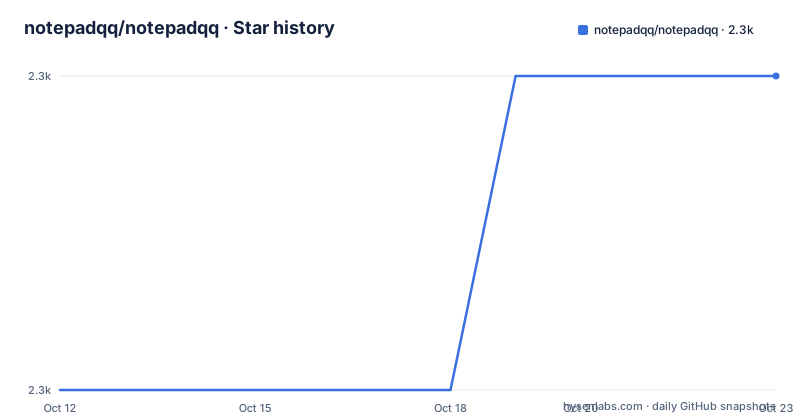
- notepadqq/notepadqq2,335 ★ · +1
| Repository | 2026-10-12 | 2026-10-23 |
|---|---|---|
| notepadqq/notepadqq | 2.3k | 2.3k |
1 Stars in the last 11 days, measured from the daily GitHub snapshot. Compare with other projects
Editorial analysis
The warning at the top of the README, quoted as written
The most important content in this README is a callout block, and it is not a marketing banner. It reads that the project is not actively maintained anymore, that new maintainers are welcome, and that it has been reported that with the most recent OS and Qt versions the program can crash unexpectedly, with the instruction to use it at your own risk. The block is signed with the maintainer's name.
That statement sits next to recent activity. Two versions, v2.1.0 and v2.1.1, carry the same 2026-07-03 date, along with a nightly build the same day, and the repository was last pushed to on 2026-08-03. So the project has code and packaging moving while the person who built it says they have stopped.
Read those two facts together rather than picking one. One reading is that someone is still landing changes without intending to resume ownership, and that the crash reports come from the gap between the versions this codebase targets and the Qt and distribution releases it is now compiled against. An editor is exactly the program where that combination hurts.
For an evaluator, this changes the question. It is not whether Notepadqq is a good editor. It is whether you are willing to be the person who keeps it building against your distribution's Qt.
What the editor is, and what ships inside it
Notepadqq describes itself as a text editor designed by developers, for developers, and calls itself a general-purpose editor for Linux and macOS in the repository description. That positioning matters: it is a code and text editor, not an IDE, and not a general office suite.
The interesting technical detail is in the dependency list. The build requires Qt 6.4 or higher plus qt6-webengine, qt6-websockets, qt6-svg and qt6-tools-dev-tools, and the runtime dependency list adds libuchardet, coreutils and pkg-config.
Embedding WebEngine means shipping a browser engine inside a text editor. That is a large dependency, and features needing HTML rendering come with it: documentation views, or previews of markup files. It also brings the crash surface the warning refers to, since WebEngine tracks its own Chromium version and your distribution's Qt packages.
uchardet is the other dependency worth understanding. Encoding detection is a perennial problem in a general-purpose editor, because a file with no declared encoding has to be guessed, and a wrong guess corrupts text on save. Depending on a dedicated detection library rather than a heuristic is the kind of small decision that separates a serious editor from a toy.
One oddity in the repository metadata: it lists JavaScript as the primary language, while the tree is a C++ project with CMakeLists.txt, CMakePresets.json, a .clang-format file and a .clang-tidy configuration. Treat the language label as noise and the build files as the truth.
Building it: recursive clone, CMake presets, ctest
The source build is documented in full and is short. The clone needs the recursive flag, which is the first sign that submodules carry part of the tree:
git clone --recursive https://github.com/notepadqq/notepadqq.git
cd notepadqq
Then two commands, using CMake presets rather than hand-written flags:
cmake --preset release
cmake --build --preset release
A dev preset exists for debug symbols, so the difference between a release build and a development build is a preset name rather than a different procedure. Tests run through the same preset system:
ctest --preset releaseInstalling puts the built binary on the system:
sudo cmake --install build/releaseThe README also covers the case where your distribution's Qt is too old, pointing at Qt's online installer and noting that the editor will pick up libraries installed under $HOME/Qt automatically. That is a friendly fallback, and it is also a second Qt installation living on your machine, which is worth knowing before you debug a strange failure.
The dependency install lines are given per distribution, with apt-get for Ubuntu and dnf for CentOS, listing the same Qt 6 development packages plus libuchardet-dev and pkg-config.
Packaging: five channels and a separate repository
Distribution coverage is the strongest part of the project, and it is also the part that a new maintainer inherits.
Debian and Ubuntu have an apt package installed with sudo apt install notepadqq. Snap is supported with sudo snap install notepadqq, plus an edge channel for unstable development builds. Arch Linux is in the community repositories with pacman, and there is a separate AUR entry named notepadqq-git for the development version. openSUSE uses zypper, and Solus uses eopkg with the package coming from the shannon repository.
Three of those entries are described as community-maintained: Arch, openSUSE and Solus. That qualifier is doing real work, since it means the packaging for those distributions is not driven by the project.
The README routes package submissions to a separate repository, notepadqq-packaging, and a PACKAGING.md file sits at the top of the main tree. So distribution coverage is maintained as a second project with its own review process, on top of the editor itself. Anyone stepping up as maintainer is signing up for both.
There is a Dockerfile as well, based on ubuntu:24.04, installing the Qt 6 development packages including webengine, websockets, svg and l10n tools, with a bash working directory. A containerised build environment is convenient for reproducing a build, and it is also the easiest path to verifying the crash reports mentioned in the warning.
Running inside a container build environment
A Dockerfile sits at the top level and it is more useful than a normal development container.
FROM ubuntu:24.04
RUN apt-get -qq update && apt-get --no-install-recommends -y install \
    build-essential \
    clang-format \
    qt6-webengine-dev \
    libqt6svg6-dev \
    libuchardet-dev
The image is ubuntu:24.04 with the build toolchain and the Qt 6 development packages the editor needs, and its command is a shell rather than a built application, so it exists to compile in.
The value of that is specific to this project. Because the README attributes crashes to the most recent OS and Qt versions, reproducing a build against a pinned distro version turns a vague warning into something testable: build the same commit on 24.04, on the version your users run, and compare. There is also a separate build.Dockerfile at the top level alongside this one, which points to more than one containerised path rather than a single settled recipe.
For a would-be maintainer this is the cheapest first move, and it costs nothing but a Docker host. Compile before you write a single patch, because a project whose maintainer says it may crash on current versions needs a baseline you trust before you can tell whether your change made anything worse.
Two generations of continuous integration
The repository carries two CI configurations. The build badge in the README points at a GitHub Actions workflow named build-test.yml, and the top level still contains a .travis.yml file along with a .travis/ directory.
Leaving both in place is not unusual in a project of this age, and it says something about the transition. The Actions workflow is the one that reflects current practice, with build and test as a single job. The Travis files are a remnant of an earlier generation of CI.
There is also a CODE_OF_CONDUCT.md, a CONTRIBUTING.md, a .clang-format, a .clang-tidy and a .gitattributes. The presence of clang-tidy alongside clang-format is the more interesting signal: static analysis configuration usually appears when a maintainer has decided what they care about, and its continued presence points to standards being maintained even as ownership was handed off.
An .agents/ directory sits at the top level too, which in a repository like this holds instructions for automated coding assistants. That convention is newer than the Travis configuration beside it, and the contrast between the two summarises how the project has aged.
For a potential maintainer, the practical read is that the quality tooling is in place and the automated checks exist, which lowers the cost of picking this up compared with a project that has neither.
Where Notepadqq fits, and where it does not
The honest way to place this editor is against the alternatives rather than in the abstract.
If you want an IDE, with a language server, a debugger and project navigation, Notepadqq is not that and does not try to be. The description is a general-purpose editor, and the feature list in the README is short enough that the project is not competing on language tooling.
If you want a modern text editor with a large plugin ecosystem, the same applies: this is a Qt application with its own interface, not a framework others extend. No plugin API is described anywhere in the README.
Where it does compete is on being a native, fast, conventional editor that opens a file and gets out of the way, on Linux and macOS, from packages your distribution already knows about. For a Linux user who wants something more capable than a terminal editor without installing a stack of extensions, that is a real position.
The boundary condition is the same one the warning states: if your distribution ships a current Qt 6 and the editor can crash on it, the convenience evaporates. A crashed editor that loses unsaved buffers is not a stylistic inconvenience, and no feature on the list offsets it.
That makes the decision less about the editor and more about your tolerance for running software that its own author asks you to use at your own risk.
Editorial conclusion
Adopt Notepadqq only if you already use it or you are willing to maintain it. It remains a competent general-purpose editor with a real package for every major Linux distribution, and the source builds cleanly from documented CMake presets, but the README states plainly that the project is not actively maintained anymore, that new maintainers are welcome, and that crashes have been reported with the most recent OS and Qt versions. Do not adopt it for work where an editor crash costs you unsaved text on a machine you cannot quickly rebuild. Verify three things. Confirm the crash reports against your own stack, because the warning names current Qt versions rather than naming a specific broken build, so the risk is version-dependent and the README tells you to use it at your own risk. Check which channel you would install from, since snap carries an edge channel for development builds and Arch and openSUSE packages are described as community-maintained, which means the binary may not match the repository you would clone. And if you want to fix it, read the packaging section first: packaging lives in a separate repository, so maintaining distribution coverage is a second project on top of the code. Start by cloning with the recursive flag and running the documented build preset before you trust any prebuilt package.
Frequently asked questions
Is Notepadqq still maintained?
The README states that the project is not actively maintained anymore, that new maintainers are welcome, and that crashes have been reported with the most recent OS and Qt versions. The repository was still pushed to on 2026-08-03.
How do I install Notepadqq on Linux?
Use sudo apt install notepadqq on Debian and Ubuntu, sudo snap install notepadqq for the snap with an edge channel for development builds, sudo pacman -S notepadqq on Arch, sudo zypper in notepadqq on openSUSE, or sudo eopkg it notepadqq on Solus.
How do I build Notepadqq from source?
Clone with git clone --recursive, then run cmake --preset release followed by cmake --build --preset release. Tests run with ctest --preset release, and installing uses sudo cmake --install build/release. Qt 6.4 or higher is required.
What does Notepadqq use Qt WebEngine for?
The build dependencies include qt6-webengine along with qt6-websockets, qt6-svg and qt6-tools-dev-tools, and libuchardet for encoding detection. The README does not itemise which features depend on the browser engine.
Can I package Notepadqq for my own distribution?
Packaging is handled in a separate repository, notepadqq-packaging, with submission instructions in the README and a PACKAGING.md file in the main tree. Some existing packages, including Arch, openSUSE and Solus, are described as community-maintained.
Official sources
Add this badge to your README
If you maintain this project, the badge below links readers to this analysis and shows its maintenance status from the daily GitHub snapshot. Paste the markdown into your README; add ?metric=license or ?metric=stars to the image URL for a different field.

[](https://hysenlabs.com/projects/notepadqq-notepadqq)Star history chart for your README
[](https://hysenlabs.com/projects/notepadqq-notepadqq)Was this useful?