Nx Console: Visual workflows for Nx and Lerna
Nx Console is the user interface for Nx & Lerna.
At a glance
- What is it?
- Nx Console adds project inspection, generator forms, task controls, AI context, and Nx Cloud status to Visual Studio Code and JetBrains. It is most useful to developers who want editor-based workflows without giving up the Nx command line.
- Who is it for?
- Nx Console is a good fit for developers working in Visual Studio Code or JetBrains who want to inspect Nx projects, configure generators, run tasks, and supply workspace context to AI without leaving the editor. It is a poor fit if editor integration is irrelevant or if an organization requires every operation to remain visible as explicit Nx or Lerna commands.
- Can I use it commercially?
- Yes. MIT is a permissive licence: you can use, modify and sell software built on it, as long as you keep its copyright and licence notices.
- Is it still maintained?
- Yes. The repository last received commits 1 day ago.
- What is it written in?
- Mainly TypeScript, according to GitHub's language statistics.
Answers come from the project's GitHub data, last synced on November 6, 2026, and from our analysis. They are not legal advice.
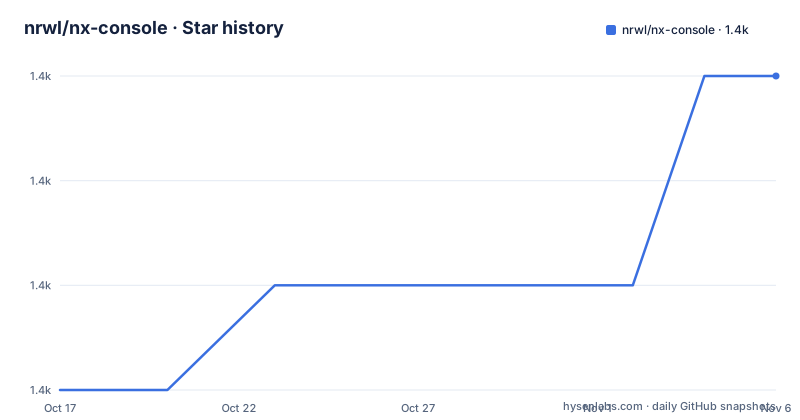
Star history
- nrwl/nx-console1,415 ★ · +3
| Repository | 2026-10-17 | 2026-11-06 |
|---|---|---|
| nrwl/nx-console | 1.4k | 1.4k |
3 Stars in the last 20 days, measured from the daily GitHub snapshot. Compare with other projects
Editorial analysis
Why Nx Console belongs in an Nx workspace
Nx Console addresses a specific gap in monorepo work: Nx and Lerna behavior is expressed through commands, while much of the surrounding work happens in an editor. The README explicitly frames the project as a tool that lets developers use the interface suited to each task, combining terminal-based work with Visual Studio Code or WebStorm. Its target users are therefore developers who already work with Nx or Lerna and want workspace information and common operations exposed through their editor.
The extension is not a replacement for the underlying build system. Nx Console provides views, forms, commands, and context around workspace operations. Projects, targets, configurations, generators, task dependencies, and CI execution status still belong to Nx, Lerna, or Nx Cloud. This distinction matters when evaluating adoption. An editor plugin can reduce discovery and interaction costs, but it does not remove the need to understand the command generated by a form or the configuration that governs a target.
The available interfaces differ by editor. The README links a Visual Studio Code extension with the marketplace identifier `nrwl.angular-console`, an OpenVSX listing under the same extension identity, and a JetBrains plugin with the identifier `dev.nx.console`. The project therefore supports two editor families rather than presenting one cross-platform installer. Teams using another editor should not assume that the listed packages apply.
Generator schemas become interactive Nx Console forms
The Generate UI is the clearest example of Nx Console translating monorepo metadata into an editor workflow. According to the README, the interface parses the schema for a generator and uses it to provide autocomplete and validation while the developer enters options. It also offers a dry-run preview. The data flow is therefore metadata-driven: the generator schema defines the available fields and constraints, Nx Console renders those fields in its UI, and the developer's entries become input for the corresponding Nx operation.
The UI can be opened through `Nx: Generate (UI)` or from the file explorer context menu. The README also states that paths are prefilled automatically. Those details reduce the need to reconstruct invocation options by hand, especially in a large repository where applications, libraries, tests, and configuration files are distributed across several directories.
The important limitation is that a schema does not remove every risk associated with generation. The dry-run preview is useful for inspection, but the README does not claim that every generated change can be reversed or that Nx Console replaces source control review. A generator may modify several files after options are submitted. Users still need to inspect the resulting diff and confirm that the selected configuration matches the project's conventions. Nx Console improves the input side of that operation, not the final review.
Nx Console exposes projects, targets, and task graphs
The Projects and Project Details views are intended to make an Nx workspace legible without reading every project configuration file. According to the README, the Projects view can expose projects, their targets, and their configurations. Available targets can be run from that view, while the Project Details View adds detailed configuration information and links to the task graph. This gives developers a path from a repository overview to a specific command or dependency relationship.
The `Common Nx Commands` view serves a narrower purpose. It lets developers create shortcuts for commands they run frequently. This is useful when a repository has a stable set of standard commands, but it also means that the useful view depends on workspace conventions. A project with unusual target names or organization-specific wrappers may require more manual setup than one following common Nx patterns.
Nx Console can open a task graph and run targets from its interface. The repository layout and package dependencies show a TypeScript application built around editor integration and webview components. Dependencies include `lit`, `@vscode/webview-ui-toolkit`, `xstate`, and `xterm`, indicating separate concerns for rendered interface, editor host integration, state management, and terminal presentation. Based on that repository structure, this is a substantial client application rather than a thin command wrapper. However, the README does not describe offline behavior, cache invalidation, or how it handles a partially configured workspace, so those cases should be checked in the intended repository.
AI context is supplied through an MCP integration
Nx Console adds workspace information to editor AI features rather than presenting itself as a standalone chat application. The README says it provides relevant context to the large language models used by Visual Studio Code and Cursor, including workspace architecture, generators, and up-to-date Nx documentation. The mechanism is linked to an MCP server shipped with both integrations.
The same MCP capability can be installed independently through the `nx-mcp` NPM package. That separation gives users a path to use the server without relying on the full editor extension, although the README links separate documentation for that package and does not include its installation procedure in the project-level instructions. Consumers therefore need to consult `apps/nx-mcp/README.md` before assuming that extension installation alone covers every MCP deployment scenario.
This feature changes what an AI assistant can know about a repository, but it does not make generated answers inherently correct. The documented inputs are architectural context, generator information, and documentation, not an independent guarantee that every prompt or command will be valid for a particular repository. The extension is better evaluated as context delivery for editor AI features. Access permissions, documentation freshness, and the behavior of the host AI client remain separate concerns.
Nx Cloud status moves PR readiness into the editor
The Nx Cloud integration provides a workspace-specific reason to install Nx Console even when a developer rarely invokes generators. The README states that the extension shows current CI pipeline executions and sends notifications when a run finishes or encounters an error. It also guides users through Nx Cloud onboarding from the editor.
This approach differs from manually refreshing a GitHub or other CI page. The intended audience is a developer who starts or follows a pull request, continues local work, and wants a completion or failure signal without abandoning the editor. The feature is most useful when the repository already uses Nx Cloud and the team considers pipeline state part of its normal development loop.
Nx Console does not replace the CI provider's record. The README does not describe retry controls, log viewing permissions, branch-filter behavior, or handling for disconnected services. Those boundaries matter during evaluation because a notification can reduce repeated page checks without giving the plugin authority over a pipeline. Teams should verify that their CI execution appears and that failure notifications match their review expectations.
Installation, editor compatibility, and maintenance boundaries
The README provides marketplace destinations rather than a terminal installation command. Install `nrwl.angular-console` from Visual Studio Marketplace or OpenVSX for Visual Studio Code, or install `dev.nx.console` from JetBrains Marketplace. After installation, open an Nx or Lerna workspace in the editor. The first useful checks are whether Nx Console recognizes the workspace, populates its Projects view, and exposes a project whose targets can be inspected or run.
The README marks Visual Studio Code support as `^1.71.0`, which is the documented compatibility floor. It does not provide a generic CLI installation command, nor does it explain marketplace-based rollback. A developer wanting to reproduce the workflows should begin with the editor already configured for the repository rather than trying to install the UI as an application-wide package.
The repository is not archived, and its last push was on 2026-10-15. Recent releases include `vscode-v18.102.0` and `intellij-v1.61.1`, both dated 2026-10-12. This indicates recent development activity, but the README does not define a support policy for older editor versions or a migration procedure for plugin configuration. Upgrade cost is therefore tied to editor compatibility and changes in generated Nx commands, not just to installing a new package.
Nx Console is licensed under the MIT License. The repository names Narwhal Technologies Inc as author and uses `nrwl` as publisher. The license permits use and modification under its terms, but organizations still need to review dependencies and marketplace terms separately. The MIT label should not be treated as a statement about external services such as Nx Cloud or the behavior of an editor's AI provider.
When direct Nx or Lerna commands remain the better fit
A real alternative is to use the Nx or Lerna command line, with editor support limited to ordinary source editing and terminal panels. This approach keeps every operation in an explicit command that can be copied into scripts, CI configuration, documentation, or an issue. It is the better fit for automation work, remote environments without supported editor extensions, and teams that require commands to remain the primary reviewed interface.
Nx Console does not eliminate the commands behind its views. Its Generate UI parses schemas and forms generator inputs, while task views expose targets that ultimately correspond to workspace commands. The difference is interaction and discovery. Nx Console can prefill paths, render schema fields, validate entries, preview a dry run, and expose project metadata. A direct CLI workflow offers fewer editor-specific layers and a more uniform script surface.
Choose Nx Console when developers primarily work in Visual Studio Code or JetBrains and the cost of remembering project structure outweighs the value of a command-only workflow. Choose the CLI when command reproducibility matters more than in-editor convenience. The adoption boundary is specific: Nx Console adds an interface layer to Nx and Lerna, so it should complement command literacy rather than replace it.
Editorial conclusion
Nx Console is a good fit for developers working in Visual Studio Code or JetBrains who want to inspect Nx projects, configure generators, run tasks, and supply workspace context to AI without leaving the editor. It is a poor fit if editor integration is irrelevant or if an organization requires every operation to remain visible as explicit Nx or Lerna commands. Before adoption, verify the extension or plugin version in the relevant editor marketplace, confirm that it detects the workspace and installed configuration, and test whether its generated commands match the team's review and automation requirements.
Frequently asked questions
Which editors support Nx Console?
The README lists Nx Console for Visual Studio Code through Visual Studio Marketplace and OpenVSX, plus a JetBrains plugin through JetBrains Marketplace. The repository documentation marks Visual Studio Code support as `^1.71.0`.
What does the Nx Console Generate UI do?
It parses a generator schema and provides autocomplete, validation, and dry-run previews as options are entered. It can be opened with `Nx: Generate (UI)` or from the file explorer context menu.
Does Nx Console work with AI features?
The README says Nx Console supplies workspace architecture, generator information, and Nx documentation as context for AI features in Visual Studio Code and Cursor. It includes an MCP server, which can also be installed separately through the `nx-mcp` NPM package.
Can Nx Console show Nx Cloud CI status?
According to the README, it shows current CI pipeline executions and notifies users when a run completes or fails. It also provides an in-editor Nx Cloud onboarding flow.
Official sources
Add this badge to your README
If you maintain this project, the badge below links readers to this analysis and shows its maintenance status from the daily GitHub snapshot. Paste the markdown into your README; add ?metric=license or ?metric=stars to the image URL for a different field.

[](https://hysenlabs.com/projects/nrwl-nx-console)Star history chart for your README
[](https://hysenlabs.com/projects/nrwl-nx-console)Was this useful?