System Manager for Declarative Linux Configuration
Manage system config using nix on any distro
At a glance
- What is it?
- System Manager applies NixOS-style configuration to non-NixOS Linux systems through immutable layers and atomic switches. It suits administrators who want reproducible system management without adopting NixOS, but it controls only a defined subset of a machine.
- Who is it for?
- System Manager is appropriate for administrators who already use Nix and want declarative control over supported machine settings on Ubuntu, Debian or another Linux distribution. It is a poor fit for users who need broad automation coverage, undeclared local changes or a fully supported alternative to NixOS.
- Can I use it commercially?
- Check first. The repository uses a licence we do not classify automatically, so read its LICENSE file before any commercial use.
- Is it still maintained?
- Yes. The repository last received commits 2 days ago.
- What is it written in?
- Mainly Nix, according to GitHub's language statistics.
Answers come from the project's GitHub data, last synced on November 7, 2026, and from our analysis. They are not legal advice.
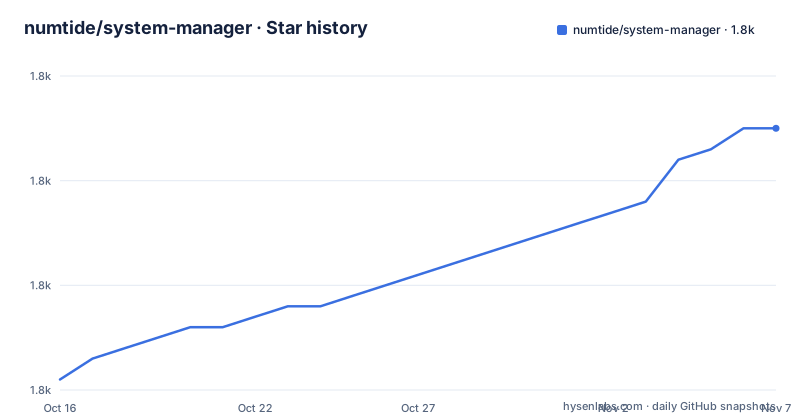
Star history
- numtide/system-manager1,795 ★ · +24
| Repository | 2026-10-16 | 2026-11-07 |
|---|---|---|
| numtide/system-manager | 1.8k | 1.8k |
24 Stars in the last 22 days, measured from the daily GitHub snapshot. Compare with other projects
Editorial analysis
Why System Manager targets non-NixOS hosts
System Manager addresses a specific gap between conventional Linux administration and a complete migration to NixOS. The README describes it as a tool for configuring Linux machines with packages, services and settings written in Nix. Its intended audience is an administrator who wants the module and generation model associated with NixOS but still operates a distribution such as Ubuntu or Debian.
The README positions the project as deliberately narrower than Chef, Puppet and Ansible. Those tools cover broader configuration-management work, while System Manager controls a smaller subset and places most changes in an immutable Nix layer. That narrower scope lets it reuse NixOS modules, but it also means System Manager should not be treated as a drop-in replacement for a general-purpose configuration-management platform.
The project compares its scope with Home Manager. Home Manager focuses on user environments, while System Manager begins at system level, including root configuration, packages and services. Its public description, "Manage system config using nix on any distro," captures the central deployment model, but the quick-start example assumes that Nix is already installed and that `nix-command` and `flakes` are available.
The practical audience therefore overlaps with Home Manager users moving to machine-wide administration. It is also relevant to platform engineers who want configuration expressed in Nix but cannot standardize every host on NixOS. The repository's `nix/`, `lib/`, `examples/` and `templates/` directories, together with the Rust workspace, indicate a reusable module library and an application built around it.
How System Manager builds and switches a machine
A System Manager configuration is a Nix flake with a `systemConfigs.default` output produced through `system-manager.lib.makeSystemConfig`. The output receives a list of Nix modules. Those modules describe machine state, and the project evaluates them with Nixpkgs and System Manager's module machinery.
The repository contains two Rust workspace members: `system-manager-engine` and `system-manager`. `Cargo.toml` declares both, along with dependencies for command-line parsing, Nix operations, serialization, logging, password input and file matching. This layout separates the command interface from the component responsible for applying or activating configuration. The README also states that System Manager reuses NixOS modules, so compatible module options form much of the configuration surface.
Configuration changes are built into an immutable layer and applied with a single switch command. The README characterizes this operation as safe and atomic and compares the resulting generations with NixOS generations. Its activation error comes from the `system_manager::activate::etc_files` component when it encounters an unmanaged file at a path it intends to manage. That error message shows explicit handling of system files rather than unrestricted replacement of all machine state.
The model has an important boundary. Nix evaluation determines the declared configuration, but existing unmanaged paths can still prevent activation. An administrator therefore needs to understand conflict handling, especially for `/etc/nix/nix.conf`, before treating declarative configuration as complete authority over the host.
Initializing a System Manager flake on Linux
The README's first-use path assumes a non-NixOS distribution, an existing Nix installation and flakes enabled. On that host, `init` generates `flake.nix` and `system.nix` in `~/.config/system-manager` by default. Running the same command with `sudo` places the generated configuration under `/root/.config/system-manager` instead.
This command initializes the configuration files. It does not itself install the two packages used in the quick-start example:
nix run 'github:numtide/system-manager' -- initIf Nix reports that an experimental feature is missing, the documented fallback enables `nix-command` and `flakes` for that invocation:
nix run 'github:numtide/system-manager' --extra-experimental-features 'nix-command flakes' -- initThe generated flake follows the Home Manager branching model. Its `main` branch tracks `nixos-unstable`, while a `release-XX.YY` branch tracks the corresponding Nixpkgs stable release. The README warns that the `nixpkgs` and `system-manager` inputs must refer to matching releases or evaluation will fail. That constraint is a direct operational concern for reproducibility.
For a root-local installation where Nix is not on the root account's path, the README gives this command:
sudo env PATH="$PATH" nix run 'github:numtide/system-manager' -- initUsers should confirm whether the generated files landed under the invoking account or under `/root` before editing them.
Installing btop and bat with a first switch
The example changes the flake's module list from `./system.nix` to `./cli_tools.nix`, then defines `x86_64-linux` as the host platform. The new module includes `btop` and `bat` in `environment.systemPackages`. It is a small but real machine configuration rather than a no-op demonstration.
After that configuration is in place, apply it through System Manager. The `switch` subcommand performs the documented system change, and `--sudo` supplies the root context needed for machine-level files:
nix run 'github:numtide/system-manager' -- switch --sudoIf `nix-command` and `flakes` have not been enabled permanently in `/etc/nix/nix.conf`, the README provides this invocation:
nix --extra-experimental-features 'nix-command flakes' run 'github:numtide/system-manager' -- switch --sudoThe first switch adds a script under `/etc/profile.d`. New login sessions receive that path update. To use it in the current shell without logging out, the README specifies:
source /etc/profile.d/system-manager-path.shAt that point, the README expects both commands to resolve. It then demonstrates removal by deleting or commenting out `bat` from the package list and running System Manager again. That edit-and-switch cycle is the central maintenance workflow: the declarative file is the place to make a change, while reapplying it updates the machine.
The README's displayed `btop` and `bat` version strings belong to its example environment. They should not be treated as current versions installed by every System Manager deployment, because package versions are selected by the pinned Nixpkgs input.
Unmanaged paths and control of /etc/nix/nix.conf
System Manager can stop when a declared file conflicts with a path that it does not manage. The documented example concerns `/etc/nix/nix.conf`: activation reports an unmanaged path and asks the administrator to remove it before trying again. This is a meaningful limitation for existing hosts, where Nix configuration may already be maintained by a distribution package, an earlier installation method or local edits.
The README says the conflict can be ignored or resolved by allowing System Manager to control `nix.conf`. To take that route, it recommends renaming the existing file to a backup name and applying the configuration again. The warning is equally important: settings in the old file may not appear in the `nix.conf` generated by System Manager. Moving the file prevents the link conflict, but it can also remove configuration that must be transferred into the declarative module.
This behavior is safer than silently overwriting an unknown file, although it adds a migration task. Administrators should inventory the existing Nix settings before moving `nix.conf`. They should also check whether System Manager generates values required for flake execution, daemon operation or single-user Nix access. The README points to another section for this issue but does not reproduce its full instructions, so a complete migration procedure cannot be inferred from the quick-start documentation.
A disposable virtual machine is a reasonable place to verify path ownership before applying the same switch to a working machine. The README establishes the conflict behavior, but it does not document a general rollback command or a complete dry-run workflow.
System Manager compared with broader configuration tools
The clearest alternative identified by the project is Home Manager, but it operates at a different scope. Home Manager manages a user's environment, such as applications and user-level settings. System Manager applies a comparable Nix-based model to the entire machine, beginning with root-level packages, services and settings. An administrator who only needs a desktop and shell setup may therefore encounter unnecessary privilege and host-management concerns with System Manager.
Chef, Puppet and Ansible form the broader comparison. The README explicitly says System Manager controls only a small subset of their configuration surface. It builds immutable Nix layers and exposes switch-style generations, whereas a general configuration-management tool is commonly selected for fleet orchestration and ongoing enforcement across a wider set of resources. The README does not document run lists, node inventories, policy servers or report collection from those tools, so the comparison should remain at that architectural level.
System Manager is the better fit when the existing dependency is Nix, the host must remain on its current distribution and the desired settings are covered by reusable NixOS modules. Chef, Puppet or Ansible may fit better when administrators need configuration areas outside System Manager's supported subset. A Linux host already standardized on NixOS is a different case, because NixOS itself provides machine-level declarative management and removes much of the rationale for adding System Manager alongside it.
This is not a feature contest. The meaningful choice is whether root-level declarative state and immutable generations matter more than the broader coverage offered by a dedicated configuration-management tool.
Maintenance, releases and the unresolved license signal
The repository is not archived, and its last push was on 2026-10-15. That is recent activity, but the README does not define a support policy, compatibility window or migration guarantee. The recent release history includes v1.1.0 on 2026-03-12 and v1.0.0 on 2026-01-06. These dates show two recent major-version milestones, but they do not establish long-term release stability.
Upgrade cost depends on more than moving from one version tag to another. Administrators must keep the System Manager and Nixpkgs flake inputs on matching release lines, review custom modules and NixOS module changes, and test activation against unmanaged files. Existing `/etc/nix/nix.conf` settings can require migration. The first root-level switch can also alter login paths, so upgrade testing should include shell startup and service state rather than only evaluation.
License information needs direct inspection. Repository metadata identifies the project as using a custom license that GitHub could not classify, while `Cargo.toml` declares `license = "MIT"` in the workspace package. The README does not reproduce the contents of `LICENSE`, so those signals cannot be reconciled from the documentation. Teams should read that file before redistribution or internal incorporation.
The repository includes `CHANGELOG.md`, `CONTRIBUTING.md` and release versions, which gives users concrete places to inspect changes. The README does not describe an automatic upgrade command or a rollback command. That absence matters for machine administration, where a failed switch and its recovery path should be understood before production use.
Editorial conclusion
System Manager is appropriate for administrators who already use Nix and want declarative control over supported machine settings on Ubuntu, Debian or another Linux distribution. It is a poor fit for users who need broad automation coverage, undeclared local changes or a fully supported alternative to NixOS. Before adopting it, inspect the LICENSE file to resolve the MIT declaration in Cargo.toml against the repository's custom license, then test a representative configuration in a disposable host. The first switch should be reviewed closely because System Manager takes root-level ownership of managed paths.
Frequently asked questions
Does System Manager work on Ubuntu and Debian?
Yes, the README uses Ubuntu and Debian as examples of non-NixOS distributions. The administrator must already have Nix installed and enable the experimental `nix-command` and `flakes` features or pass them for the command.
How do I start using System Manager?
Run `nix run 'github:numtide/system-manager' -- init` to generate `flake.nix` and `system.nix` under `~/.config/system-manager`. Under `sudo`, the files are placed under `/root/.config/system-manager`.
What happens if System Manager finds an unmanaged /etc/nix/nix.conf?
Activation reports that an unmanaged path already exists. The README says to ignore the issue or rename the existing file before allowing System Manager to manage `nix.conf`, while warning that old settings may not appear in the generated file.
Official sources
Add this badge to your README
If you maintain this project, the badge below links readers to this analysis and shows its maintenance status from the daily GitHub snapshot. Paste the markdown into your README; add ?metric=license or ?metric=stars to the image URL for a different field.

[](https://hysenlabs.com/projects/numtide-system-manager)Star history chart for your README
[](https://hysenlabs.com/projects/numtide-system-manager)Was this useful?