Switchyard: a Rust proxy that translates between OpenAI and Anthropic APIs for model routing
Switchyard lets LLM applications route traffic across models and providers while preserving native OpenAI and Anthropic API compatibility - enabling flexible model selection, benchmarking, and cost/performance optimization.
At a glance
- What is it?
- Switchyard is a pre-alpha Rust proxy and library that lets LLM applications route traffic across providers while preserving native OpenAI and Anthropic API compatibility. It targets coding agents and gateways that need protocol translation, multi-backend routing, and operational metrics, but its maturity varies sharply by component.
- Who is it for?
- Adopt Switchyard if you run a coding agent or gateway that must speak OpenAI or Anthropic APIs while reaching self-hosted or commercial backends, and you accept pre-alpha churn. Do not adopt it for production traffic: the server is explicitly marked as a demo, and switchyard-runner and switchyard-llm-client are alpha.
- Can I use it commercially?
- Yes. Apache-2.0 is a permissive licence: you can use, modify and sell software built on it, as long as you keep its copyright and licence notices.
- Is it still maintained?
- Yes. The repository received new commits within the last day.
- What is it written in?
- Mainly Rust, according to GitHub's language statistics.
Answers come from the project's GitHub data, last synced on November 14, 2026, and from our analysis. They are not legal advice.
Star history
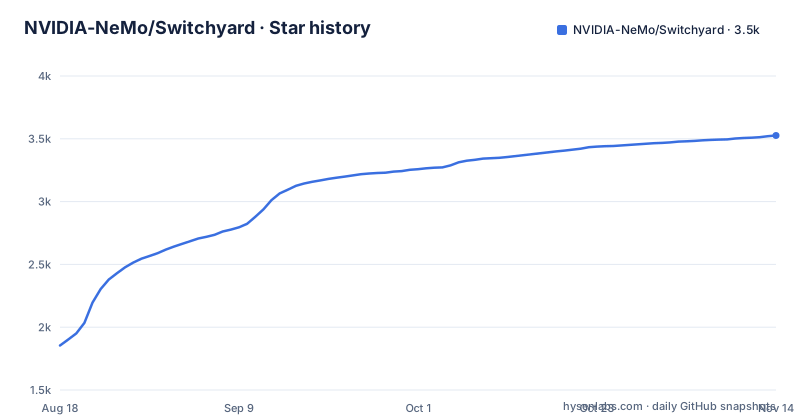
- NVIDIA-NeMo/Switchyard3,526 ★ · +1,672
| Repository | 2026-08-18 | 2026-11-14 |
|---|---|---|
| NVIDIA-NeMo/Switchyard | 1.9k | 3.5k |
1,672 Stars in the last 88 days, measured from the daily GitHub snapshot. Compare with other projects
Editorial analysis
What Switchyard actually solves
Switchyard addresses a specific friction point: an LLM application, such as Claude Code or Codex, expects to talk to a model using a native API format, but you want that request served by an open-source model on vLLM, NVIDIA NIM, Ollama, or any OpenAI-compatible endpoint. Without a translation layer, you would have to rewrite the client's request handling or accept being locked to one provider. Switchyard sits between the client and the backend, converts the request into the backend's own format, and converts the response back into the format the client expects. The README states that the proxy accepts OpenAI Chat Completions, OpenAI Responses, and Anthropic Messages, and each configured LLM client selects one upstream format. The intended users are developers running coding agents, gateways, or agent runtimes who want flexible model selection without changing the client application.
The architecture: a proxy that translates, routes, and measures
The repository layout shows a clear separation of concerns. The server component, switchyard-server, accepts client requests in the three supported API formats. It then applies a routing algorithm to pick a configured backend, forwards the request in that backend's native format, and translates the response back to the client's expected shape. The routing logic lives in switchyard-libsy, which the README describes as a library that never calls a model itself. Instead, an algorithm decides which target to use and hands every model call back to you. That design means libsy can be embedded in an existing proxy or gateway without owning an HTTP stack. The protocol crate, switchyard-protocol, defines provider-neutral request, response, and streaming types, and switchyard-translation handles the actual format conversions. The metrics layer records requests, errors, latency, tokens, and routing overhead, exposed as Prometheus metrics. The architecture diagram in the README shows clients sending OpenAI or Anthropic API traffic into Switchyard, which forwards to backends in the provider-native format.
Routing strategies: from random splits to LLM-as-classifier
Switchyard offers several routing algorithms, each with a documented use case. The random router gives a fixed traffic split for A/B tests, baselines, or cost experiments. The LLM classifier router uses request content to decide whether a turn needs a weak or strong model tier. The stage router uses signals already in the conversation, such as tool results and errors, to route most turns without an extra model call. The escalation router runs every turn on a weak tier first, then a judge reads the answer to decide whether to send the same request to a strong tier; the README notes this is implemented as an LLM classifier with mode = "escalation". The composite router lets one algorithm set the configuration of another before handing off, with the current example being an LLM classifier setting the tier a stage router falls open to. A passthrough route registers one target under one model ID with no routing decision. The routing algorithms are typed and composable, which is a meaningful design choice: you can build a custom algorithm if none of the built-ins fit.
Getting it running: server path and library path
There are two ways to use Switchyard. The server path installs a standalone proxy. The README gives these commands: cargo install --locked switchyard-server, then switchyard-server --help. You create a routes.toml file following the Getting Started guide, export an OpenRouter API key, and validate the config with switchyard-server --config routes.toml --dry-run before starting it with --host 127.0.0.1 --port 4000. A health check is available at curl http://localhost:4000/health. The library path adds switchyard-libsy and switchyard-protocol as git dependencies in your Cargo.toml, pinned to a tag such as v0.2.0. The library path is for embedding routing in your own Rust application, and it pairs with switchyard-llm-client when you want the model calls made for you. The README warns that switchyard-server is a demo server, not for production use.
Maturity and component-level risk
The README is unusually candid about maturity. It labels the project as pre-alpha software evolving rapidly, and it warns that the API and algorithms are expected to change significantly before v1.0. The component maturity table is explicit: libsy is beta and ready for trial integration; switchyard-llm-client is alpha and may change significantly; switchyard-runner is alpha and evolving rapidly; switchyard-server is a demo server, not for production use. That means the core routing library is the most stable piece, while the server you would actually deploy is the least stable. If you plan to run Switchyard as a standalone proxy, you are relying on the component the project itself flags as demo-grade. This is a genuine limitation, not a cosmetic warning. The release cadence supports the warning: v0.0.1 and v0.1.0 both appeared on 2026-06-30, and v0.2.0 came on 2026-08-10, so the project moves fast and breaks things.
Where Switchyard is the wrong tool
Switchyard is not a fit for a production gateway that must handle high availability, persistent connections, or complex failover logic beyond simple routing. The server component is explicitly demo-only, so any serious deployment would require you to build your own server around libsy, which adds engineering cost. The library path assumes you already have an HTTP stack or gateway; it does not provide one. If your traffic is simple, single-provider, and does not need protocol translation, a direct API call is simpler and has no routing overhead. The README mentions fallback in the architecture diagram, but the documented routing strategies do not describe a dedicated fallback algorithm, so you should verify whether fallback is implemented or just aspirational. Also, if you need a routing decision that depends on live model performance or cost data beyond what the built-in signals provide, you would have to write a custom algorithm, and the API is not stable enough to build on without expecting breakage.
A real alternative: writing your own translation layer or using a vendor gateway
The obvious alternative is to skip the routing layer entirely and write a thin translation shim in your application, or use a commercial gateway like LiteLLM, which also translates between OpenAI and Anthropic formats and routes across providers. The difference in approach is material: LiteLLM is a Python-based proxy that handles many providers out of the box and has a mature HTTP server, while Switchyard is a Rust library that gives you typed, composable routing algorithms and embeds in your own binary. LiteLLM is a standalone service you run; Switchyard libsy is a component you compile into your application. If you need a production-ready server with broad provider support today, LiteLLM is likely the safer choice. If you want a small, fast, embeddable router that does not own an HTTP stack and you are willing to accept alpha-level churn, Switchyard libsy is the more interesting option. The trade-off is stability versus control.
Licence, maintenance, and upgrade costs
Switchyard is licensed under Apache-2.0, with copyright held by NVIDIA Corporation. That is a permissive licence, so you can use it commercially, modify it, and distribute it, provided you preserve the licence notice. The maintenance cost is real: the project is pre-alpha, the API is expected to change, and the README warns that algorithms will evolve. You should expect to update your code when you pull new tags, and the git-dependency approach in Cargo.toml means you control when that happens by pinning a tag. The upgrade cost is not just code changes; the routing algorithm behaviour may change, so your traffic split or classifier decisions could shift after an upgrade without you touching configuration. The documentation set is reasonably complete for a young project, with dedicated guides for each routing algorithm, but the README is the only source you have for this review, so you should read the docs/getting_started.md and the crate-level READMEs before committing. The project has no homepage, so community support is limited to GitHub Issues and the code of conduct.
Editorial conclusion
Adopt Switchyard if you run a coding agent or gateway that must speak OpenAI or Anthropic APIs while reaching self-hosted or commercial backends, and you accept pre-alpha churn. Do not adopt it for production traffic: the server is explicitly marked as a demo, and switchyard-runner and switchyard-llm-client are alpha. Before integrating, verify that your target backends support the exact upstream format you need, confirm that the routing algorithm you want is stable enough for your workload, and pin the git tag you test against, since the API is expected to change before v1.0.
Frequently asked questions
What does Switchyard's Auto routing algorithm actually do?
Auto is a fixed preset in v0.3.0 that resolves to Execution, also called Stage, running efficient-first with a confidence threshold of 0.5 and no classifier call. It does not compare strategies at runtime.
Can Switchyard run classifier routing through LiteLLM?
No. The LiteLLM example is experimental and checkout-only, pins LiteLLM 1.102.0, supports Stage routing and Random routing, and cannot service the intermediate model calls that classifier or escalation algorithms require.
What does the Switchyard NeMo Relay plugin require?
Relay >=0.8.0, <1.0.0, and a Rust toolchain plus Python 3 for the source build. Relay 0.8.x and 0.9.0 can lose upstream error status and details when the plugin is enabled, even for models outside its routes.
Is the Switchyard proxy server suitable for production use?
The switchyard-server component is labelled Demo and is meant for demos, evaluation and personal use on single-user machines, with the file stating that it is not for production.
What stability levels do the Switchyard components carry?
switchyard-libsy is Beta for routing embedded in your own gateway or harness, switchyard-llm-client and switchyard-runner are Alpha, and switchyard-server is Demo.
Official sources
Add this badge to your README
If you maintain this project, the badge below links readers to this analysis and shows its maintenance status from the daily GitHub snapshot. Paste the markdown into your README; add ?metric=license or ?metric=stars to the image URL for a different field.

[](https://hysenlabs.com/projects/nvidia-nemo-switchyard)Star history chart for your README
[](https://hysenlabs.com/projects/nvidia-nemo-switchyard)Was this useful?