obs-websocket ships inside OBS, but its release page stopped in 2022
Remote-control of OBS Studio through WebSocket
At a glance
- What is it?
- The WebSocket API that lets a stream deck, a foot pedal or a script switch scenes in OBS Studio. Included by default since OBS 28, with the newest tagged release from 2022 and commits still landing in 2026.
- Who is it for?
- If you want to automate OBS Studio, the sensible route is the bundled server in your current OBS install rather than anything from this repository's releases, because the releases section exists only for pre-28 installations.
- Can I use it commercially?
- Yes, with conditions. GPL-2.0 is a copyleft licence: if you distribute software that includes it, you must release that software's source code under the same licence. Running it internally without distributing it does not trigger that obligation.
- Is it still maintained?
- Yes. The repository last received commits 44 days ago.
- What is it written in?
- Mainly C++, according to GitHub's language statistics.
Answers come from the project's GitHub data, last synced on November 21, 2026, and from our analysis. They are not legal advice.
Star history
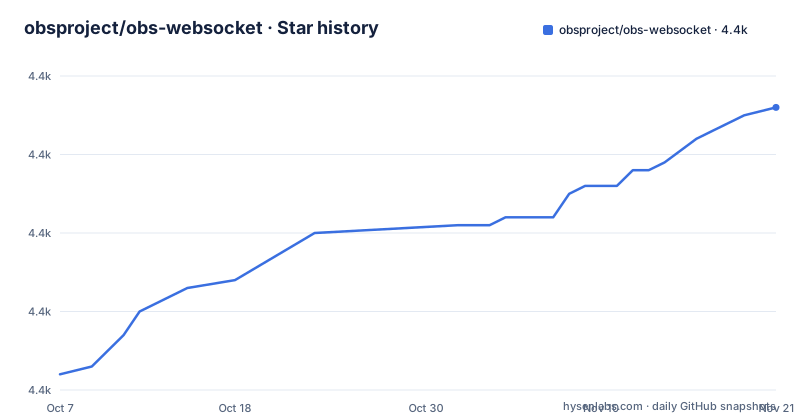
- obsproject/obs-websocket4,396 ★ · +34
| Repository | 2026-10-07 | 2026-11-21 |
|---|---|---|
| obsproject/obs-websocket | 4.4k | 4.4k |
34 Stars in the last 45 days, measured from the daily GitHub snapshot. Compare with other projects
Editorial analysis
The download advice is a dead end by design
The Downloads section is two sentences and they are emphatic. obs-websocket is now included by default with OBS Studio 28.0.0 and above, and as such there should be no need to download it if you have OBS Studio greater than 28.0.0. Binaries for OBS Studio below 28.0.0 on Windows, macOS and Linux are available in the Releases section.
That framing explains the most confusing thing about this repository. The releases section looks active and is not. The three most recent tags are 4.9.1-compat from 2022-09-02, 5.0.1 from 2022-08-03 and 5.0.0 from 2022-07-04. The 4.9.1-compat release is titled for OBS 28+/Qt6. Meanwhile the repository records a push on 2026-10-08 with 158 open issues, 4,381 stars, and is not archived.
Both facts are true at once: the source code is actively worked on, and no new binary has been published in about four years. The reason is that after the move into OBS Studio, there is nothing left to release separately. OBS ships its own installer and its own release cadence, and this repository became the source that gets built into it.
So if you search for obs-websocket plugins and land on a download page telling you to grab version 5, you are looking at software for OBS releases older than 28.0.0. The C++, CMake and tree contents here, with `src/`, `lib/`, `data/`, `docs/`, `cmake/`, `CI/` and a `CMakeLists.txt`, describe the server as built today.
The security model is one line of advice and one generated password
The README states it as highly recommended to keep obs-websocket protected with a password against unauthorized control. The mechanism is simple: obs-websocket generates a password for you automatically when you load it for the first time, and to change it you open the obs-websocket Settings dialog under OBS's Tools menu, where you can enable or disable authentication and set a password.
The defaults matter here more than in most projects. Authentication is a setting you can turn off, and a freshly generated password that nobody has written down is its own problem. What the server exposes is scene switching, source changes and streaming control on a machine that may be broadcasting live, so an unauthenticated endpoint on a shared network is a real risk rather than a theoretical one.
The command line overrides are named in a parenthetical the README puts to the reader as an aside: `--websocket_port` with a value, `--websocket_password` with a value, `--websocket_debug` as a flag, and `--websocket_ipv4_only` as a flag. That last one is the interesting security-adjacent flag, since binding to a single address family constrains who can reach the listener. The port is also changeable in the settings dialog, and the default for the 5.x server is 4455.
What the README does not offer is guidance on exposing the port beyond the local network, and it does not discuss transports. The 5.x server is described as a typical WebSocket server running by default on port 4455.
Client software and client libraries, which is where the README earns its keep
The two lists in the middle of the README are the most practically valuable content in the repository, because writing a raw client against a JSON protocol is work nobody should repeat.
The client software list names twelve ready-made options: Macro Deck, Touch Portal, Twitchat, OBS-web with a hosted client at obs-web.niek.tv, Streamer.bot, Deckboard, OBS Blade, Aitum, Kruiz Control, the Bitfocus Companion module, MacroGraph with a hosted client, and MATRIC. These cover the common cases: a stream deck, a phone or tablet controller, a chat-triggered automation bot, and a browser-based panel.
The client libraries list is more specific about versions, which is what you need if you are writing code. Python 3.7 or later on asyncio has simpleobsws; Python 3.10 or later without asyncio has obsws-python; Rust has obws; Godot 4.0.x has obs-websocket-gd; JavaScript for both Node and web has obs-websocket-js from the OBS Websocket Community projects, with a C library for v8 that uses it; Go has goobs; Dart and Flutter have obs_websocket, noted as able to target all supported platforms; Java has obs-websocket-java.
Two entries carry an implicit design note. The Python split into an asyncio and a non-asyncio package with different minimum versions tells you the library treats the two execution models as genuinely different problems rather than papering over one with the other. The C library is listed as nested under the JavaScript one because it wraps obs-websocket-js, which tells you exactly what to expect from it.
The protocol itself is documented in `docs/generated/protocol.md`, which the README links as PROTOCOL.md.
The 4.x to 5.x break is the migration story in one paragraph
The release list shows the transition: 5.0.0 (2022-07-04) and 5.0.1 (2022-08-03) were followed on 2022-09-02 by a 4.9.1-compat release titled for OBS 28+/Qt6.
What the project says it is for
The README gives three use cases, and they describe three different levels of commitment. The first is remote control of OBS from a phone or tablet on the same local network. The second is changing your stream overlay or graphics based on the current scene, which is a scripting task. The third is automating scene switching with a third-party program, with examples given as auto-pilot and a foot pedal.
That list is a fair summary of the project's real shape: it is an automation interface for a single application, not a general remote control protocol.
The repository's social structure is equally small and tidy. Community happens on a Discord server, and the README asks builders to drop a message in the project showoff channel. Funding runs through Open Collective for both individual and organizational contributors, with ten organization slots displayed in the README as images with links. Code contributions run through contributing guidelines in the project wiki.
Licensing is GPL-2.0 with a `LICENSE` file at the root of the tree.
One observation worth closing on: the absence of a homepage field and the absence of any setup tutorial in the README are both consequences of the same fact. Once the server ships inside OBS, this repository's README became a signpost rather than a manual.
Editorial conclusion
If you want to automate OBS Studio, the sensible route is the bundled server in your current OBS install rather than anything from this repository's releases, because the releases section exists only for pre-28 installations. Two things to get right before you build: turn authentication on and treat port 4455 as if it were exposed, because the server can change scenes, sources and streaming state on a machine that is mid-broadcast, and read the generated protocol document rather than working from memory of an older client library. The 158 open issues on a GPL-2.0 repository that only releases binaries for OBS versions below 28.0.0 is the shape of a project whose code has moved into OBS proper.
Frequently asked questions
How to use WebSockets in OBS?
The server ships inside OBS Studio 28.0.0 and above, so there is nothing to install separately on a current version. Enable it, then find the obs-websocket Settings dialog under the Tools menu, where you can turn authentication on and set the password the server generated for you.
Why isn't my OBS WebSocket connecting?
Check the three things the README documents: the server listens on port 4455 by default and the port is changeable in the settings dialog, authentication can be disabled entirely, and a password is generated automatically on first load.
Why is there no recent obs-websocket release to download?
Because obs-websocket is included by default with OBS Studio 28.0.0 and above. The Releases section exists for OBS versions below 28.0.0, and its newest tags are 4.9.1-compat from 2022 and 5.0.1 from 2022. Source code still lands in this repository; the binary ships with OBS itself.
Which client library should I use for obs-websocket in Python?
Two options, split by execution model. For asyncio, the README lists simpleobsws for Python 3.7 or later. For synchronous code, it lists obsws-python for Python 3.10 or later. Both are community-maintained rather than part of this repository.
Official sources
Add this badge to your README
If you maintain this project, the badge below links readers to this analysis and shows its maintenance status from the daily GitHub snapshot. Paste the markdown into your README; add ?metric=license or ?metric=stars to the image URL for a different field.

[](https://hysenlabs.com/projects/obsproject-obs-websocket)Star history chart for your README
[](https://hysenlabs.com/projects/obsproject-obs-websocket)Was this useful?