utop gives the OCaml toplevel compiler aware completion and auto runs Lwt
Universal toplevel for OCaml
At a glance
- What is it?
- utop is a universal toplevel for OCaml that replaces the stock REPL with a terminal UI built on Lambda-term and Zed. Its two defining features are context sensitive completion driven by the compiler libraries and automatic evaluation of Lwt.t and Async.Deferred.t expressions, and its two weakest points are that the documentation and test targets are marked as currently broken.
- Who is it for?
- Adopt utop if you write OCaml and want a REPL that knows your types, that runs Lwt and Async expressions without boilerplate and that works in both a terminal and Emacs. Do not adopt it if you need a documented and tested build, because the README marks both make doc and make test as currently broken.
- Can I use it commercially?
- Check first. The repository uses a licence we do not classify automatically, so read its LICENSE file before any commercial use.
- Is it still maintained?
- Yes. The repository last received commits 81 days ago.
- What is it written in?
- Mainly OCaml, according to GitHub's language statistics.
Answers come from the project's GitHub data, last synced on November 6, 2026, and from our analysis. They are not legal advice.
Star history
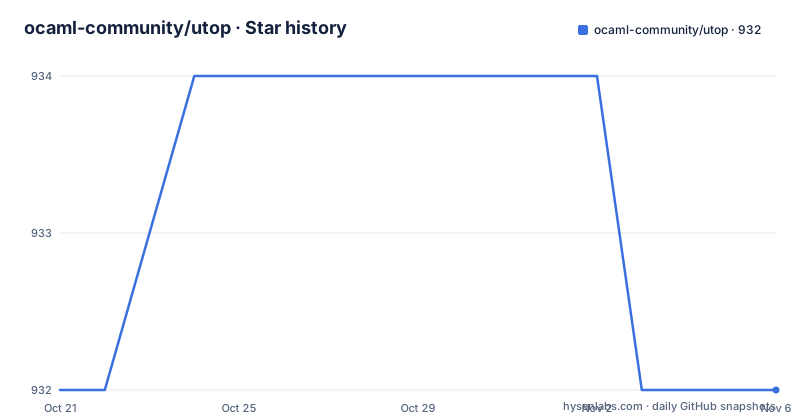
- ocaml-community/utop932 ★ · +0
| Repository | 2026-10-21 | 2026-11-06 |
|---|---|---|
| ocaml-community/utop | 932 | 932 |
0 Stars in the last 16 days, measured from the daily GitHub snapshot. Compare with other projects
Editorial analysis
Completion driven by the compiler, not by a keyword list
The stock OCaml toplevel completes names at the level of what is in scope. utop uses the compiler libraries instead, and the README lists what that buys you: completions for function names, argument labels, constructors, record fields and method names, displayed dynamically as you type. That is a qualitative difference rather than a matter of degree. Argument labels in particular are a piece of information that only the type checker has, and having them surfaced while typing is the single most useful thing in this list. Constructors and record fields behave the same way. The completion candidates are not printed below the prompt. utop shows a bar after the prompt, which you navigate with M-left and M-right and select with M-down, where M is the meta key, Alt on most systems. The bar can be turned off entirely with UTop.set_show_box false, which matters if you work in a very short terminal window. The foundation underneath is worth noting. utop is built on Lambda-term and Zed, both OCaml libraries from the same community organisation, one for terminal UI and one for text editing. That is why the tool can offer line editing, history, real time and context sensitive completion, colours and vi style editing rather than the plain readline loop of the standard toplevel.
Lwt and Async expressions run themselves
This is the feature that changes how you work rather than how you read. The README describes automatic Lwt and Async evaluation: toplevel expressions that return Lwt.t or Async.Deferred.t values are automatically run, so you do not have to wrap them in Lwt_main.run or Thread_safe.block_on_async_exn yourself. The behaviour is toggled with UTop.set_auto_run_lwt and UTop.set_auto_run_async. For anyone using Lwt or Async, this removes a recurring papercut. The usual toplevel session requires you to remember which runtime wrapper to apply to each expression, and forgetting it produces a value rather than a result. utop removes that decision from the loop. The flip side is that the behaviour is on by default and it changes semantics. An expression that returns a promise is no longer inert, it is executed. For a REPL used to explore a codebase that is what you want, and for a REPL where you deliberately want to construct a promise without running it, that is a switch you have to know about. The two toggles are separate, so you can keep one runtime automatic and the other manual, which is the sensible configuration when a project uses one of the two.
The prompt header, the directives, and what they are for
The default prompt is a two line header showing the time the command was entered, the command number that increments after each toplevel phrase is evaluated, the Emacs style keyboard macro counter, and any partially entered key chord. When you are recording a macro, an extra macro indicator shows the number of recorded keystrokes. There are three built in alternatives, all reachable by directive. A simple prompt shows utop [N]: , a dummy prompt shows a bare # with no colours and no info line, and the fancy prompt comes in light and dark colour profiles. The directive table is the reference worth bookmarking.
#utop_bindings
#utop_macro
#utop_stash
#utop_save
#utop_prompt_simple
#utop_prompt_dummy
#utop_prompt_fancy_light
#utop_prompt_fancy_dark
There are three more that do real work rather than cosmetics. #typeof "X" shows the type of a value, a module or a module type directly from the REPL, which is faster than reconstructing it. #topfind_log displays messages recorded from findlib, and #topfind_verbose toggles findlib verbosity, which is what you need when a package is not being found and you cannot tell why. Two settings are exposed through the API rather than directives: UTop.set_show_box false for the completion bar and UTop.set_show_welcome false for the welcome message. The full API documentation lives at ocaml-community.github.io/utop.
Installing with opam, or building the dune project by hand
The recommended route is opam, and the README calls it the easiest and recommended way to install utop.
opam install utopIf you want to build it manually, the README points you at the opam file, utop.opam in the repository, which lists the dependencies. The source build uses dune, and the Makefile at the root wraps it in familiar targets.
make
make install
Both make and make install are thin wrappers around dune build and dune install, with an optional PREFIX variable that turns into a --prefix argument for the install step. There are uninstall and reinstall targets, a clean target, and an examples target that runs dune build @examples against the examples/ directory. Two targets deserve a warning label. The README marks the documentation build as currently broken and the test target as currently broken as well, with make doc and make test as the commands.
make doc
make test
The Makefile itself still defines a test target that runs dune runtest, so the plumbing is there, but the README's own status note is the honest signal about whether you should expect it to pass. For multi version work there is a workspace file, dune-workspace.dev, and a target that builds across all of it, plus create-switches and install-switches targets that build OCaml switches 4.12.0, 4.13.1, 4.14.1, 5.0.0, 5.1.0 and a 5.2.0 trunk switch.
Colour profiles, key bindings and vi mode are all files on disk
utop is configurable through a small number of files, which is convenient because the settings survive a reinstall. Colours come from a utoprc file. Copy utoprc-dark or utoprc-light from the repository to ~/.config/utop/utoprc, choosing the dark one for terminals with dark colours such as white on black and the light one for terminals with light colours such as black on white. Terminal syntax highlighting is controlled from the same file. The prompt can be made permanent by adding the directive to ~/.config/utop/init.ml.
#utop_prompt_simple;;Key bindings live in ~/.config/lambda-term-inputrc, and the README gives a worked example.
[read-line]
C-left: complete-bar-prev
C-right: complete-bar-next
C-down: complete-bar
The manual page for that file is man 5 lambda-term-inputrc, which the README assumes you have installed. Vi edit mode is turned on with the #edit_mode_vi directive and supports three vi modes, normal, insert and visual, with vim like registers for getting and setting content. The README is careful here, calling this special edit mode rapidly evolving and pointing at the CHANGES of lambda-term for the fast moving details, since the underlying text editing library is where most of that churn happens.
Emacs integration, and the compatibility hook for other modes
utop is not only a terminal program. The README states that it includes built in Emacs integration and works with Tuareg, caml, ReasonML and typerex modes. The important detail for anyone coming from another REPL is the escape hatch. Other modes such as neocaml can integrate through utop-mode-compat-alist, a variable that lets a mode declare itself compatible. That is the mechanism that stops utop from locking you out of an editing setup you already have. Running utop in a terminal and running it inside Emacs are both supported workflows, and the difference is in how the toplevel process is launched rather than in the toplevel itself. The completion machinery, the directives and the pretty printer handling are the same either way. One related feature works regardless of the front end. utop installs toplevel printers automatically for libraries that annotate them with [@@ocaml.toplevel_printer], so a library that ships a custom printer has its printer picked up without an explicit install step at the prompt. That is a quiet convenience that you notice most when it is missing in a different REPL.
Custom licence, uneven release cadence, and two targets that do not work
The licence field on the repository says Other, with the note that it is a custom licence GitHub cannot classify and that the LICENSE file holds the terms. For a project you install through opam onto a developer machine this rarely matters in practice, but if you vendor utop into a product you are distributing, read that LICENSE file rather than assuming a standard licence. The activity picture is healthy but uneven. The last push was on 2026-08-18 and the repository is not archived. The releases show 2.17.0 on 2026-03-26, 2.16.0 on 2025-07-25 and 2.15.0 on 2024-11-25, so roughly one release every eight months with commits landing in between. The two broken targets are the more useful signal for anyone evaluating. A REPL whose documentation build and test target do not work is a tool where you will be reading the README and the CHANGES.md file rather than a manual, and where a regression in the toplevel printer loading may not be caught by an automated suite. The repository does carry CHANGES.md, a CONTRIBUTING.md, a CODE_OF_CONDUCT.md and an examples/ directory with custom-utop and interact projects, so the intent to keep the project well documented is there even where the tooling is not working.
Editorial conclusion
Adopt utop if you write OCaml and want a REPL that knows your types, that runs Lwt and Async expressions without boilerplate and that works in both a terminal and Emacs. Do not adopt it if you need a documented and tested build, because the README marks both make doc and make test as currently broken. Before switching your default REPL, verify that your OCaml version falls inside the supported range and that the auto run behaviour of UTop.set_auto_run_lwt and UTop.set_auto_run_async suits how you evaluate effects.
Frequently asked questions
How do I install utop?
The README calls opam the easiest and recommended way, so run opam install utop. To build from source, use make and make install, which wrap dune build and dune install, or refer to the utop.opam file for the dependency list.
What does utop add to the standard OCaml toplevel?
utop adds context sensitive completion for function names, argument labels, constructors, record fields and method names using the compiler libraries, a completion bar, terminal syntax highlighting, a fancy two line prompt, vi edit mode, the #typeof directive and automatic installation of toplevel printers.
Does utop run Lwt and Async expressions automatically?
Yes. Expressions returning Lwt.t or Async.Deferred.t are automatically run, so you do not have to wrap them in Lwt_main.run or Thread_safe.block_on_async_exn. The behaviour is toggled with UTop.set_auto_run_lwt and UTop.set_auto_run_async.
How do I change the colours and key bindings in utop?
Copy utoprc-dark or utoprc-light to ~/.config/utop/utoprc for the colour profile, and write ~/.config/lambda-term-inputrc for key bindings, with the format shown in the README under the [read-line] section.
Can I use utop with Emacs modes other than the built in integration?
Yes. utop includes built in Emacs integration and works with Tuareg, caml, ReasonML and typerex modes, and other modes such as neocaml can integrate through utop-mode-compat-alist.
Official sources
Add this badge to your README
If you maintain this project, the badge below links readers to this analysis and shows its maintenance status from the daily GitHub snapshot. Paste the markdown into your README; add ?metric=license or ?metric=stars to the image URL for a different field.

[](https://hysenlabs.com/projects/ocaml-community-utop)Star history chart for your README
[](https://hysenlabs.com/projects/ocaml-community-utop)Was this useful?