RobotJS: npm install decides whether you compile from source
Node.js Desktop Automation.
At a glance
- What is it?
- RobotJS is a C-backed Node.js native addon for mouse, keyboard and screen control on macOS, Windows and Linux, where the published prebuilds cover x64 and arm64 and everything else falls back to a local compile, with an export surface the project itself calls provisional until 1.0.0.
- Who is it for?
- RobotJS suits Node developers automating a local desktop on macOS, Windows or Linux on x64 or arm64, where npm install robotjs lands a prebuild and you never meet a compiler. It does not suit projects needing global hotkeys, projects capturing across two monitors in one rectangle, or macOS and Linux source builds that load PNG without setting ROBOTJS_ENABLE_PNG=1 and testing robot.image.supportsPNG.
- Can I use it commercially?
- Yes. MIT is a permissive licence: you can use, modify and sell software built on it, as long as you keep its copyright and licence notices.
- Is it still maintained?
- Yes. The repository last received commits 21 days ago.
- What is it written in?
- Mainly C, according to GitHub's language statistics.
Answers come from the project's GitHub data, last synced on November 13, 2026, and from our analysis. They are not legal advice.
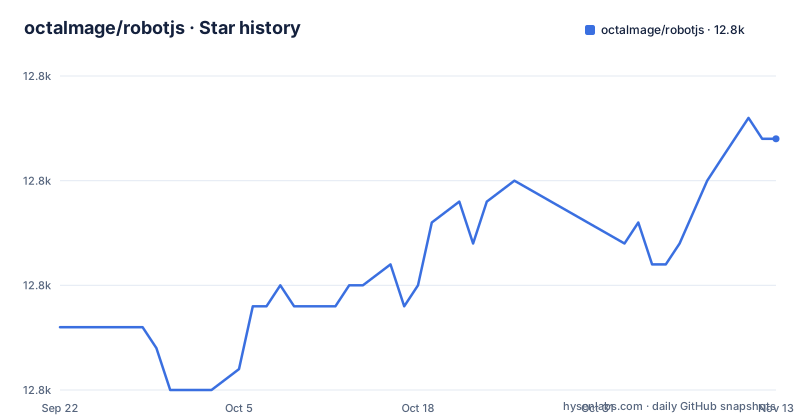
Star history
- octalmage/robotjs12,787 ★ · +9
| Repository | 2026-09-22 | 2026-11-13 |
|---|---|---|
| octalmage/robotjs | 12.8k | 12.8k |
9 Stars in the last 52 days, measured from the daily GitHub snapshot. Compare with other projects
Editorial analysis
The install script is node-gyp-build, and it picks your compiler for you
Installation is one line, and what happens after it depends on which prebuild matches your machine.
npm install robotjsPublished packages include Node-API prebuilds for Linux, macOS and Windows on x64 and arm64, and any other target falls back to a source build. The decision happens in package.json, where the install script is node-gyp-build: it looks for a prebuilt binary matching your platform and architecture and compiles only when it finds none. It runs at all because gypfile is true, binding.gyp sits at the repository root and the C sources live under src/. Runtime dependencies are two, node-addon-api and node-gyp-build, so nothing heavy joins your tree. The fallback cost lands on you. On a target with no prebuild the same command turns into a local compile, and that needs a supported Visual Studio C++ toolchain on Windows, Xcode Command Line Tools on macOS, or Python 3, make, a C/C++ compiler like GCC and libxtst-dev on Linux, installed with sudo apt-get install libxtst-dev.
PNG is unconditional in prebuilds and optional in a macOS or Linux source build
BMP loading and saving is always available. PNG is not handled the same way everywhere. Published Windows prebuilds reach PNG through the Windows Imaging Component, while the macOS and Linux prebuilds carry a statically linked libpng, so PNG works in every prebuild that ships. For a source build on macOS or Linux it stays optional, and the way to turn it on is explicit: install libpng and pkg-config, then force a source build with ROBOTJS_ENABLE_PNG=1. That asymmetry is the thing to design around. On a Mac or Linux machine built from source without those two libraries present, loading a .png target is not a supported operation. The runtime check is robot.image.supportsPNG, so the branch belongs in your code, not in an assumption that a published package and a local build behave identically.
findImage returns capture coordinates, and click is what aims at the center
Image search has a coordinate convention worth reading twice, because what comes back is not a screen position. This is the example from the README.
const robot = require("robotjs");

const screen = robot.screen.capture();
const target = robot.image.load("./target.bmp");
const match = screen.findImage(target, { tolerance: 0.1 });

if (match) {
	screen.click(match, target);
}
findImage takes a tolerance option, 0.1 in this call. The match it returns is the target's top-left coordinate within the capture, not within the screen. screen.click is the part that converts those coordinates to screen coordinates, and it clicks the center of the target rather than the corner you were handed, which is why the target image is passed next to the match. The same capture object also carries findImages, countImage, findColor, findColors, countColor, colorAt and save, so counting matches and probing colors reuse one capture instead of re-screenshotting the display.
The macOS Accessibility prompt is async, so the request call reports the old grant
Four functions cover macOS permissions, split into a read pair and a request pair: getAccessibilityPermission() and getScreenCapturePermission() report current grants, requestAccessibilityPermission() and requestScreenCapturePermission() trigger the matching system prompt. macOS still requires the user to approve each request, so requesting is not the same as being granted. The trap is in the Accessibility half. That prompt is asynchronous, so requestAccessibilityPermission() returns the current grant, which at that instant is still the pre-request value; the new grant appears only once the user has responded to the system dialog. Checking the return value of the request call is therefore wrong by construction. The pattern that holds is to fire the request and re-read getAccessibilityPermission() afterwards.
A capture rectangle cannot span two displays, and Linux reports one X11 screen
Multi-monitor work is supported, with one hard boundary and one platform difference. robot.getDisplays() enumerates displays, and you hand a rectangle from one of them to robot.screen.capture(x, y, width, height) to grab that region. The boundary is that a capture rectangle cannot span multiple displays, so a target straddling the gap between two screens cannot be returned by a single call, and code that assumes one stitched virtual-desktop image is wrong here. Per-display capture loops are the shape of the fix. On Linux, getDisplays() reports the current X11 screen, which is a narrower thing than the full monitor set on the other platforms. Calling capture with no arguments grabs the main display, and the four-argument rectangle is the only capture form given, so reconciling window-relative against display-relative origins stays on your side of the boundary.
No global hotkeys, and the project's own answer is to add Electron or NW.js
Global hotkeys are not supported, and the project's answer is to bring a different framework. The FAQ says not currently, adds that the author does not know whether it ever will be, and names the workaround the author personally uses: Electron or NW.js for global hotkeys, which works well. The gap is tracked in issue #55, with a note that hotkey support might be added later either inside this module or as a separate one. The consequence is architectural rather than a missing convenience call. RobotJS is the actuator, not the trigger. It moves the pointer and taps keys, but something outside it has to notice that the user pressed a system-wide key and then call in here. For a project that needs hotkeys that means a second framework in the process or a second toolchain alongside, which is a heavier dependency shape than adding one npm package.
prepack refuses to run without verified prebuilds, and CI never publishes to npm
Releasing this package passes through a person. In package.json, prepack runs npm run verify-prebuilds, which is node scripts/verify-prebuilds.js, so a package cannot even be packed until its prebuilds check out. The Prebuilds workflow then builds the release binaries and uploads a complete npm-package artifact, and it explicitly does not publish to npm. The maintainer downloads that artifact and publishes it by hand with the command below, where the version in the filename stands in for the tag being shipped.
npm publish ./robotjs-<version>.tgzFor anyone installing the package, a release depends on a step that sits outside continuous integration, so a failed artifact upload stalls the release until somebody notices and reruns it. The dev dependency list is worth reading alongside this: alongside jasmine, node-gyp and prebuildify it pins targetpractice to one commit hash of the octalmage/targetpractice GitHub repository, a pattern that keeps a test tool reproducible.
Exports can change before 1.0.0, and master has moved past the published tag
The export surface is declared provisional, and the version numbers show why that matters now. package.json reads 0.9.1, matching the v0.9.1 tag from 2026-08-07, which landed a day after v0.9.0 on 2026-08-06 and a fortnight after v0.8.0 on 2026-07-24. The README states that the exported functions could change at any time before the first stable release, 1.0.0. The default branch is master, and its last push was on 2026-10-24, more than two months past that tag, so a fresh clone is ahead of whatever npm hands you. Two smaller gaps sit in the same place. The Progress table marks Mouse, Keyboard, Screen and Bitmap at 100%, but the Notes column scopes each of those to the planned features, and window management is still sitting in Plans as a question nobody has answered. Missing keyboard keys are handled as they come up, so a key you need may not be implemented yet.
Editorial conclusion
RobotJS suits Node developers automating a local desktop on macOS, Windows or Linux on x64 or arm64, where npm install robotjs lands a prebuild and you never meet a compiler. It does not suit projects needing global hotkeys, projects capturing across two monitors in one rectangle, or macOS and Linux source builds that load PNG without setting ROBOTJS_ENABLE_PNG=1 and testing robot.image.supportsPNG. Before committing, check two things on your own machine: that a prebuild exists for your platform and architecture, so the install does not quietly become a local compile needing libxtst-dev or a Visual Studio toolchain, and that the exported names you call still exist, since the surface is provisional until 1.0.0 and master has moved past the published 0.9.1.
Frequently asked questions
How do I install RobotJS?
With npm install robotjs. Published packages include Node-API prebuilds for Linux, macOS and Windows on x64 and arm64; other targets fall back to a source build, which needs a Visual Studio C++ toolchain, Xcode Command Line Tools, or Python 3, make, GCC and libxtst-dev depending on the platform.
What is RobotJS?
It is Node.js desktop automation for controlling the mouse and keyboard and reading the screen. The implementation is C, exposed through a native addon built from binding.gyp, licensed MIT, and distributed as the robotjs npm package.
What is a good RobotJS alternative?
For global hotkeys, which RobotJS does not support, the project's FAQ points to Electron or NW.js and says that combination works well. The hotkey gap is tracked in issue #55, and the author notes hotkey support might arrive later as part of this module or as a separate one.
Which automation tool is RobotJS modeled on?
The project's Story section describes AutoHotkey, which the author has used for a long time and calls great for automation, including commands such as imagesearch and pixel that are difficult to do in other languages.
Official sources
Add this badge to your README
If you maintain this project, the badge below links readers to this analysis and shows its maintenance status from the daily GitHub snapshot. Paste the markdown into your README; add ?metric=license or ?metric=stars to the image URL for a different field.

[](https://hysenlabs.com/projects/octalmage-robotjs)Star history chart for your README
[](https://hysenlabs.com/projects/octalmage-robotjs)Was this useful?